CoderFunda
  • Home
  • About us
    • Contact Us
    • Disclaimer
    • Privacy Policy
    • About us
  • Home
  • Php
  • HTML
  • CSS
  • JavaScript
    • JavaScript
    • Jquery
    • JqueryUI
    • Stock
  • SQL
  • Vue.Js
  • Python
  • Wordpress
  • C++
    • C++
    • C
  • Laravel
    • Laravel
      • Overview
      • Namespaces
      • Middleware
      • Routing
      • Configuration
      • Application Structure
      • Installation
    • Overview
  • DBMS
    • DBMS
      • PL/SQL
      • SQLite
      • MongoDB
      • Cassandra
      • MySQL
      • Oracle
      • CouchDB
      • Neo4j
      • DB2
      • Quiz
    • Overview
  • Entertainment
    • TV Series Update
    • Movie Review
    • Movie Review
  • More
    • Vue. Js
    • Php Question
    • Php Interview Question
    • Laravel Interview Question
    • SQL Interview Question
    • IAS Interview Question
    • PCS Interview Question
    • Technology
    • Other

28 December, 2020

Vue.js Template

 Programing Coderfunda     December 28, 2020     Vue.js Tutorial     No comments    Image

Vue.js Template

In the previous Vue.js Instance chapter, we have learned how to get an output in the form of text content on the screen. In this chapter, we will learn how to get an output in the form of an HTML template on the screen. Vue.js uses an HTML-based template syntax that facilitates Vue.js developers to declaratively bind the rendered DOM to the underlying Vue instance's data. All Vue.js templates are valid HTML that can be parsed by spec-compliant browsers and HTML parsers.

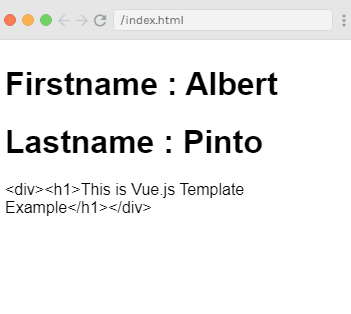
If you choose the simple interpolation method i.e., with double curly brackets to display the HTML content on the web browser, it will show the wrong result.

Let's take a simple example and see the output to understand this concept well.

Index.html file:

  1. <html>  
  2.    <head>  
  3.       <title>Vue.js Template</title>  
  4.       <link rel="stylesheet" href="index.css">  
  5.         <script src="https://cdn.jsdelivr.net/npm/vue/dist/vue.js"></script>  
  6.     </head>  
  7.     <body>      
  8.       <div id = "app">  
  9.          <h1>Firstname : {{firstname}}</h1>  
  10.          <h1>Lastname : {{lastname}}</h1>  
  11.          <div>{{htmlcontent}}</div>  
  12.       </div>  
  13.       <script src="index.js"></script>  
  14.    </body>  
  15. </html>  

Index.js file:

  1. var vm = new Vue({  
  2.    el: '#app',  
  3.    data: {  
  4.       firstname : "Albert",  
  5.       lastname : "Pinto",  
  6.       htmlcontent : "<div><h1>This is Vue.js Template Example</h1></div>"  
  7.    }  
  8. })  

Let's use a simple CSS file to make the output more attractive.

Index.css file:

  1. html, body {  
  2.     margin: 5px;  
  3.     padding: 0;  
  4. }  

After the execution of the program, you will see the following output:

Output:

Firstname : Albert
Lastname : Pinto
<div><h1>This is Vue.js Template Example</h1></div>
Vue.js Template

In the above example, you can see that the html content is not shown on the browser as you want to show it. The html content is displayed in the same way you have specified in the variable htmlcontent. This is not what you want. We want to display it in a proper HTML content on the browser.

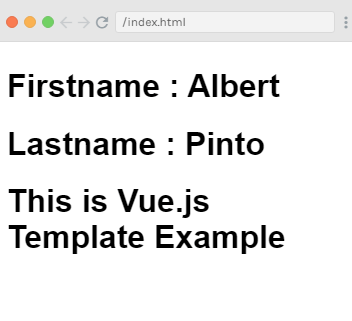
To resolve this issue, we will have to use v-html directive. When we assign v-html directive to the html element, Vue.js knows that it has to output it as HTML content.

Now, add the v-html directive in the .html file and see the difference in the following example.

Syntax:

  1. <div v-html = "htmlcontent"></div>   

Example2:

Index.html file:

  1. <html>  
  2.    <head>  
  3.       <title>Vue.js Template</title>  
  4.       <link rel="stylesheet" href="index.css">  
  5.         <script src="https://cdn.jsdelivr.net/npm/vue/dist/vue.js"></script>  
  6.     </head>  
  7.     <body>      
  8.       <div id = "app">  
  9.          <h1>Firstname : {{firstname}}</h1>  
  10.          <h1>Lastname : {{lastname}}</h1>  
  11.          <div v-html = "htmlcontent"></div>  
  12.       </div>  
  13.       <script src="index.js"></script>  
  14.    </body>  
  15. </html>  

Index.js file:

  1. var vm = new Vue({  
  2.    el: '#app',  
  3.    data: {  
  4.       firstname : "Albert",  
  5.       lastname : "Pinto",  
  6.       htmlcontent : "<div><h1>This is Vue.js Template Example</h1></div>"  
  7.    }  
  8. })  

After the execution of the program, you will see the following output:

Output:

Firstname : Albert
Lastname : Pinto
This is Vue.js Template Example
Vue.js Template

In the above example, you can see that after using the v-html directive, you can successfully add HTML template to the DOM. Now, let's see how to add attributes to the exiting HTML elements.

Add attributes to HTML element

Suppose, we have an image tag in the HTML file and we want to assign src, which is a part of Vue.js. See the following example:

Index.html file:

  1. <html>  
  2.    <head>  
  3.       <title>Vue.js Template</title>  
  4.       <link rel="stylesheet" href="index.css">  
  5.         <script src="https://cdn.jsdelivr.net/npm/vue/dist/vue.js"></script>  
  6.     </head>  
  7.     <body>      
  8.       <div id = "app">  
  9.          <h1>Firstname : {{firstname}}</h1>  
  10.          <h1>Lastname : {{lastname}}</h1>  
  11.          <div v-html = "htmlcontent"></div>  
  12.           <img src = "" width = "300" height = "250" />  
  13.       </div>  
  14.       <script src="index.js"></script>  
  15.    </body>  
  16. </html>  

Index.js file:

  1. var vm = new Vue({  
  2.    el: '#app',  
  3.    data: {  
  4.       firstname : "Albert",  
  5.       lastname : "Pinto",  
  6.       htmlcontent : "<div><h1>This is Vue.js Template Example</h1></div>",  
  7.       imgsrc : "https://www.fiordalisa.ch/wp-content/uploads/2017/12/IMG_4610.jpg"  
  8.    }  
  9. })  

After the execution of the program, you will see the following output:

Output:
Vue.js Template

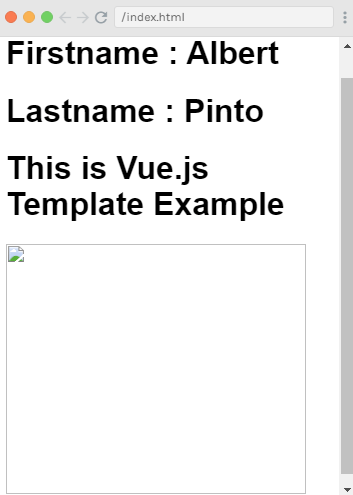
In the above example, you can see that the image is broken. So, we have to use v-bind directive to assign any attribute to the HMTL tag.

Let's add the src to the image with v-bind directive. See the following example:

Example3:

Index.html:

  1. <html>  
  2.    <head>  
  3.       <title>Vue.js Template</title>  
  4.       <link rel="stylesheet" href="index.css">  
  5.         <script src="https://cdn.jsdelivr.net/npm/vue/dist/vue.js"></script>  
  6.     </head>  
  7.     <body>      
  8.       <div id = "app">  
  9.          <h1>Firstname : {{firstname}}</h1>  
  10.          <h1>Lastname : {{lastname}}</h1>  
  11.          <div v-html = "htmlcontent"></div>  
  12.           <img v-bind:src = "imgsrc" width = "300" height = "250" />  
  13.       </div>  
  14.       <script src="index.js"></script>  
  15.    </body>  
  16. </html>  

Index.js:

  1. var vm = new Vue({  
  2.    el: '#app',  
  3.    data: {  
  4.       firstname : "Albert",  
  5.       lastname : "Pinto",  
  6.       htmlcontent : "<div><h1>This is Vue.js Template Example</h1></div>",  
  7.       imgsrc : "https://www.fiordalisa.ch/wp-content/uploads/2017/12/IMG_4610.jpg"  
  8.    }  
  9. })  

After the execution of the program, you will see the following output:

Output:
Vue.js Template

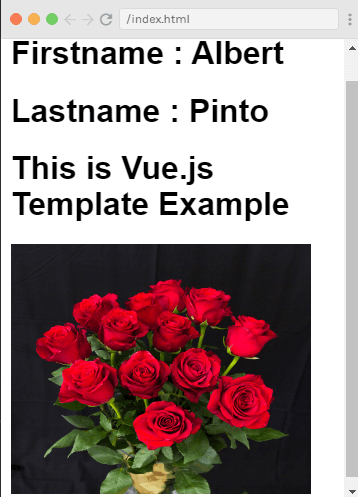
You see that after adding the v-bind directive to the img src, the image is loaded completely.


Source By : Javatpoint

  • Share This:  
  •  Facebook
  •  Twitter
  •  Google+
  •  Stumble
  •  Digg
Image
Email ThisBlogThis!Share to XShare to Facebook
Newer Post Older Post Home

0 comments:

Post a Comment

Thanks

Meta

Popular Posts

  • Vue.js Events
      In Vue.js, Events are used to respond to an action. Suppose, you have to build a dynamic website using Vue.js then you'll most likely ...
  • Is there a way to use awk to count the number of rows between 2 flags and input that number into a specific field?
    I have a set of data that consists of seismic wave travel times and their corresponding information (i.e. source that produced the wave and ...
  • Use Leaflet.js and Google Maps Blade Components in Laravel
      Laravel Maps   is a package to easily create maps using   Leaflet.js   or Google Maps and Blade components. The main features that work wi...
  • How to use Filament 3 with Laravel 11 | Beginner Course
    How to install filament 3 from scratch with Laravel 11. submitted by /u/Tilly-w-e [link] [comments]
  • How to Run a Python File on a Specific Virtual Desktop Only?
    I want to run a Python script on a specific virtual desktop without affecting other desktops. Currently, when I execute my Python file us...

Categories

  • Ajax (26)
  • Bootstrap (30)
  • DBMS (42)
  • HTML (12)
  • HTML5 (45)
  • JavaScript (10)
  • Jquery (34)
  • Jquery UI (2)
  • JqueryUI (32)
  • Laravel (1017)
  • Laravel Tutorials (23)
  • Laravel-Question (6)
  • Magento (9)
  • Magento 2 (95)
  • MariaDB (1)
  • MySql Tutorial (2)
  • PHP-Interview-Questions (3)
  • Php Question (13)
  • Python (36)
  • RDBMS (13)
  • SQL Tutorial (79)
  • Vue.js Tutorial (69)
  • Wordpress (150)
  • Wordpress Theme (3)
  • codeigniter (108)
  • oops (4)
  • php (853)

Social Media Links

  • Follow on Twitter
  • Like on Facebook
  • Subscribe on Youtube
  • Follow on Instagram

Pages

  • Home
  • Contact Us
  • Privacy Policy
  • About us

Blog Archive

  • July (4)
  • September (100)
  • August (50)
  • July (56)
  • June (46)
  • May (59)
  • April (50)
  • March (60)
  • February (42)
  • January (53)
  • December (58)
  • November (61)
  • October (39)
  • September (36)
  • August (36)
  • July (34)
  • June (34)
  • May (36)
  • April (29)
  • March (82)
  • February (1)
  • January (8)
  • December (14)
  • November (41)
  • October (13)
  • September (5)
  • August (48)
  • July (9)
  • June (6)
  • May (119)
  • April (259)
  • March (122)
  • February (368)
  • January (33)
  • October (2)
  • July (11)
  • June (29)
  • May (25)
  • April (168)
  • March (93)
  • February (60)
  • January (28)
  • December (195)
  • November (24)
  • October (40)
  • September (55)
  • August (6)
  • July (48)
  • May (2)
  • January (2)
  • July (6)
  • June (6)
  • February (17)
  • January (69)
  • December (122)
  • November (56)
  • October (92)
  • September (76)
  • August (6)

Loading...

Laravel News

Loading...

Copyright © CoderFunda | Powered by Blogger
Design by Coderfunda | Blogger Theme by Coderfunda | Distributed By Coderfunda

Advertisement