Posts

Showing posts with the label CSS

CSS Sprites | What are They?

Image
CSS Sprites most web developers should have heard this term, so what is it ?. CSS Sprite bunch of other images transformed into one Big Image. The origin of the term "sprites" comes from old school computer graphics and the video game industry. A dding Sprites to our websites helps with webpage performance, since the webpage has to make only one request to the server, which will fetch the Sprite (the Big image) which includes all the other images that you want to use in your webpage. since the server makes only one request your page will load a lot faster compared to conventional way of linking each images separately. H ere is a demo on how to use CSS Sprites. further more there a many Sprite generators online to create CSS Sprites all you have to do is upload a bunch of images to these Online tools and they will generate the Sprite for you. Signup image Signup confirmation image Two images made into one image As you see above the are two images ca...

How CSS3 Works

CSS works with HTML, but it’s not HTML. It’s a different language altogether. While HTML provides structure to a document by organizing information into headers, paragraphs, bulleted lists, and so on, CSS works hand-in-hand with the web browser to make HTML  look  good. For example, you might use HTML to turn a phrase into a top-level heading, indicating that it introduces the content on the rest of the page. However, you’d use CSS to format that heading with, say, big and bold red type and position it 50 pixels from the left edge of the window. In CSS, that text formatting comprises a style—a rule describing the appearance of a particular portion of a web page. A style  sheet  is a set of these styles. You can also create styles specifically for working with images. For instance, a style can align an image along the right edge of a web page, surround the image with a colorful border, and place a 50-pixel margin between the image and the surrounding text....

Login form | Using CSS3

Image
Here is an awesome demo of a login form , which makes good use of CSS3 and HTML5. In this demo, i have made extensive use of gradients, text-shadows and box-shadows to achieve a beautiful and modern looking login form. The design of this login form was originally taken for codrops.com, hope you'll like and use this login form in your projects. ViewDemo |   Download Source login form login form Onfocus

Adding a button in HTML | styling a button

Image
To add a button in a HTML page use <input> tags and specify the type as button like so <input type=”button” value=”submit” action=”submit.php”> this code will be rendered in browser like in Figure 1.1 Add caption Further more if you wish to style this button we can apply a set of CSS rules to make the buttons look pretty here are a few examples: Download code for these buttons here

15 Simple HTML buttons | Download

Image
Here is a few simple looking html buttons styled using CSS3 . See Demo | Download HTML buttons

How to remove the space between cells in tables | CSS tutorial

Image
Cell’s margin and padding property will have a default value, so by setting the margin and padding to 0 wont remove the gap between cells, to remove these gaps we have use the border-collapse property and set the value to collapse.   An example use of border-collapse property:

How to add Border to a table | CSS Tutorial

Image
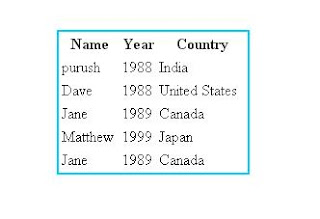
Adding border to tables is fairly simple here is an Example HTML <table width="200" border="0">   <tr>     <th scope="col">Name</th>     <th scope="col">Year</th>     <th scope="col">Country</th>   </tr>   <tr>     <td>purush</td>     <td>1988</td>     <td>India</td>   </tr>   <tr>     <td>Dave</td>     <td>1988</td>     <td>United States</td>   </tr>   <tr>     <td>Jane</td>     <td>1989</td>     <td>Canada</td>   </tr>   <tr>     <td>Matthew</td>     <td>1999...

How to create a Navigational menu using a list | CSS tutorial

Image
Transforming a list into a Navigational menu is one of the most popular technique used these days, by just using CSS we can easily transform a list in to visually attractive navigation menu. Here is an Example: HTML Code:

How to rotate images on web pages | Using CSS

Image
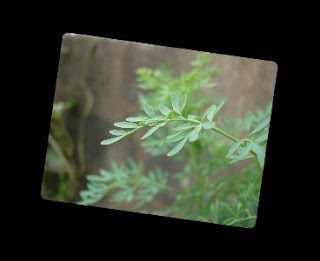
To rotate images using CSS provides something called CSS Transforms which can be used to rotate images gently. result after gently rotating the image using CSS transforms

How to create rounded corners to an Element | How to create border-radius using CSS

Image
To create rounded corners to an element like an image for example or a <div> we have to use the border-radius property. Here is an example:    Result after adding border radius

How to add Drop shadow to Elements | Using CSS

Image
CSS provides the box-shadow property which allows us to add drop shadows effects to any elements ,

How to add shadow to text | Using CSS

Image
We can use the text-shadow property to add drop shadow to text,Aadditionally CSS also provides the box-shadow property which can de used set drop shadows to any element. Text Shadow using CSS

How to make an element transparent so that the background shows through | Using CSS

Image
To make elements transparent we need use the Opacity property and give it value less than 1, why less than 1 because one is the default value and the elements will appear as they are without any transparency, giving the elements a value less than 1 will make it transparent. without opacity

How to add a Background Image that scales with the Browser Window |Using CSS

To make the background image scale with the browser window we need to use the Background size property with value of cover like so, CSS Code: <style>

Gradient background | Using CSS

Image
To create a gradient background we have to use the background-image property and set the gradient in CSS like this: Gradient background using CSS

How to Fix a background Image while the page is being Scrolled | Using CSS

To make a background image static while the content scrolls over it, we have to use the background-attachment property like so, CSS Code: <style> img { background-image: url(background.png);background-attachment:fixed;} </style>

How to add borders to Images | Using CSS

Image
Often adding borders to images makes it look pretty and professional, but it is a time consuming process to open and edit images in photo editors. CSS makes it easier to add borders, Here is an example: HTML Code: <body> <img src="mypic.jpeg" id="myImageWithoutBorder"/> <img src="mypic.jpeg" id="myImageWithBorder"/> </body> CSS Code: #myImageWithBorder { border-width: 2px; border-style: solid; border-color: #000000; } You can also write compact version of CSS like this img{border:2px solid #000000;}

How to highlight text on the page | Using CSS

Image
To highlight important text on the page just wrap that important text with the a <span> class and add CSS rules to that span class .

How to remove the default gap between H1 and other HTML elements | Using CSS

  Often it is required to remove the default gap between h1 and other HTML elements for this we have to set the values of margin and padding properties to 0. Here is an Example: <html>  <h1>My heading</h1> </html> CSS  code to remove the gap  h1{ margin:0; padding:0;}

Adding Background color to Headings | using CSS

  To add a background color to any element including heading use the background-color property. <html>  <h1>My heading</h1> </html> CSS will look like this <style>   h1{ background-color:blue;} </style>