Image

Chip Swap Fixes A Dead Amiga 600

The Amiga 600 was in its day the machine nobody really wanted — a final attempt to flog the almost original spec 68000 platform from 1985, in 1992. Sure it had a PCMCIA slot nobody used, and an IDE interface for a laptop hard drive, but it served only to really annoy anyone who’d bought one when a few months later the higher-spec 1200 appeared. It’s had a rehabilitation in recent years though as a retrocomputer, and [LinuxJedi] has a 600 motherboard in need of some attention.

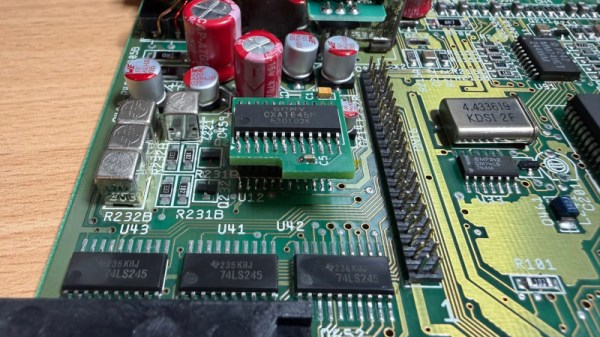
As expected for a machine of its age it can use replacement electrolytic capacitors, and its reset capacitor had bitten the dust. But there’s more to that with one of these machines, as capacitor leakage can damage the filter circuitry surrounding its video encoder chip. Since both video and audio flow through this circuit, there was no composite video to be seen.

The hack comes in removing the original chip rather than attempt the difficult task of replacing the filter, and replacing it with a different Sony chip in the same series. It’s nicely done with a connector in the original footprint, and a small daughterboard. The A600 lives again, but this time it won’t be a disappointment to anyone.

If you want to wallow in some Amiga history as well as read a rant about what went wrong, we have you covered.

A blue screen is visible, with an ASCII image of the text "Hello World" is displayed.

Designing A CPU For Native BASIC

Over the years there have been a few CPUs designed to directly run a high-level programming language, the most common approach being to build a physical manifestation of a portable code virtual machine. An example might be the experimental Java processors which implemented the JVM. Similarly, in 1976 Itty Bitty Computers released an implementation of Tiny BASIC which used a simple virtual machine, and to celebrate 50 years of Tiny BASIC, [Zoltan Pekic] designed a CPU that mirrors that VM.

The CPU was created within a Digilent Anvyl board, and the VHDL file is freely available. The microcode mapping ROM was generated by a microcode compiler, also written by [Zoltan]. The original design could execute all of the 40 instructions included in the reference implementation of Tiny BASIC; later iterations extended it a bit more. To benchmark its performance, [Zoltan] set the clock rate on the development board equal to those of various other retrocomputers, then compared the times each took to calculate the prime numbers under 1000 using the same Tiny BASIC program. The BASIC CPU outperformed all of them except for Digital Microsystems’ HEX29. Continue reading “Designing A CPU For Native BASIC”

Image

Catching Those Old Busses

The PC has had its fair share of bus slots. What started with the ISA bus has culminated, so far, in PCI Express slots, M.2 slots, and a few other mechanisms to connect devices to your computer internally. But if the 8-bit ISA card is the first bus you can remember, you are missing out. There were practically as many bus slots in computers as there were computers. Perhaps the most famous bus in early home computers was the Altair 8800’s bus, retroactively termed the S-100 bus, but that wasn’t the oldest standard.

There are more buses than we can cover in a single post, but to narrow it down, we’ll assume a bus is a standard that allows uniform cards to plug into the system in some meaningful way. A typical bus will provide power and access to the computer’s data bus, or at least to its I/O system. Some bus connectors also allow access to the computer’s memory. In a way, the term is overloaded. Not all buses are created equal. Since we are talking about old bus connectors, we’ll exclude new-fangled high speed serial buses, for the most part.

Tradeoffs

There are several trade-offs to consider when designing a bus. For example, it is tempting to provide regulated power via the bus connector. However, that also may limit the amount of power-hungry electronics you can put on a card and — even worse — on all the cards at one time. That’s why the S-100 bus, for example, provided unregulated power and expected each card to regulate it.

On the other hand, later buses, such as VME, will typically have regulated power supplies available. Switching power supplies were a big driver of this. Providing, for example, 100 W of 5 V power using a linear power supply was a headache and wasteful. With a switching power supply, you can easily and efficiently deliver regulated power on demand.

Some bus standards provide access to just the CPU’s I/O space. Others allow adding memory, and, of course, some processors only allow memory-mapped I/O. Depending on the CPU and the complexity of the bus, cards may be able to interrupt the processor or engage in direct memory access independent of the CPU.

In addition to power, there are several things that tend to differentiate traditional parallel buses. Of course, power is one of them, as well as the number of bits available for data or addresses. Many bus structures are synchronous. They operate at a fixed speed, and in general, devices need to keep up. This is simple, but it can impose tight requirements on devices.

Continue reading “Catching Those Old Busses”

Image

Building A Commodore 64 Laptop

ImageWhat might a laptop version of the Commodore 64 have looked like if one had been released by the late 1980s? This is the question that [Kevin Noki] tried to recently answer with a custom C64 laptop build.

While technically you could argue that Commodore’s SX-64 could be construed as a ‘portable’ system, its bulky format ensured that it was only portable in the sense that a 1980s CRT-based oscilloscope is also portable. Sadly, this turned out to be the last real attempt by Commodore to make a portable non-PC compatible system, with the ill-fated Commodore LCD project never making it out of development. We can, however, glean from this some design hints of what Commodore’s designers had in mind.

Interestingly, [Kevin] decided to instead use the Macintosh Portable as inspiration, with adaptations to make it look more like a breadbin C64. One could have argued that the C64C’s design would have worked better. Regardless, an enclosure was 3D printed, with parts glued together and metal dowels added for support.

For the guts, a custom keyboard with a new PCB and FDM printed keycaps was used, with a Raspberry Pi Pico as keyboard controller. We would here cue the jokes about how the keyboard controller is more powerful than a C64, but the real brains of this laptop come in the form of a Raspberry Pi 5 SBC for running the Vice C64 emulator, which blows a C64 even further out of the water.

This choice also means there’s no direct compatibility with genuine C64 peripherals, but a workaround involving many adaptors and more MCUs was implemented. Sadly, cartridge compatibility was sacrificed due to these complications. The resulting innards can be glimpsed in the above screenshot to give some idea of what the end result looks like.

Of course, this isn’t the first time a Commodore 64 laptop has been created; [Ben Heck] used a C64C mainboard and an original keyboard back in 2009. This meant direct compatibility with all peripherals, including cartridges. Hopefully, now that Commodore as a company has been revived, it will pick up on ideas like these, as an FPGA-based C64 or C128 laptop would be pretty rad.

Thanks to [fluffy] for the tip.

Continue reading “Building A Commodore 64 Laptop”

Image

A Brief History Of The Spreadsheet

We noted that Excel turned 40 this year. That makes it seem old, and today, if you say “spreadsheet,” there’s a good chance you are talking about an Excel spreadsheet, and if not, at least a program that can read and produce Excel-compatible sheets. But we remember a time when there was no Excel. But there were still spreadsheets. How far back do they go? Continue reading “A Brief History Of The Spreadsheet”

Image

Weird Email Appliance Becomes AI Terminal

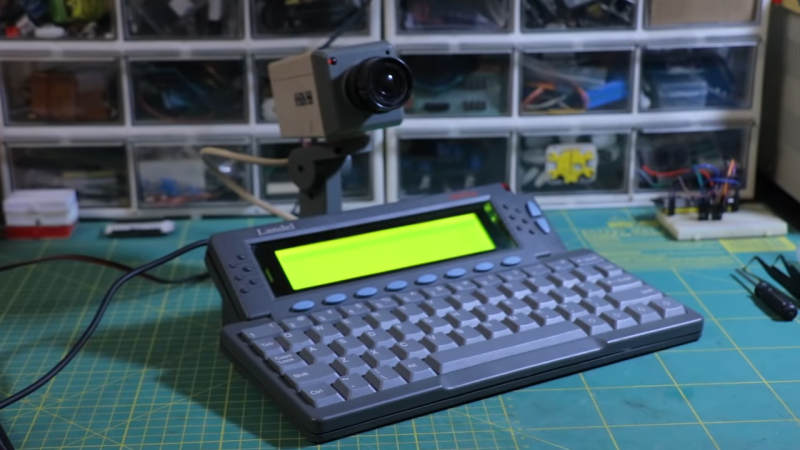
The Landel Mailbug was a weird little thing. It combined a keyboard and a simple text display, and was intended to be a low-distraction method for checking your email. [CiferTech] decided to repurpose it, though, turning it into an AI console instead.

The first job was to crack the device open and figure out how to interface with the keyboard. The design was conventional, so reading the rows and columns of the key matrix was a cinch. [CiferTech] used PCF8574 IO expanders to make it easy to read the matrix with an ESP32 microcontroller over I2C. The ESP32 is paired with a small audio output module to allow it to run a text-to-speech system, and a character display to replace the original from the Mailbug itself. It uses its WiFi connection to query the ChatGPT API. Thus, when the user enters a query, the ESP32 runs it by ChatGPT, and then displays the output on the screen while also speaking it aloud.

[CiferTech] notes the build was inspired by AI terminals in retro movies, though we’re not sure what specifically it might be referencing. In any case, it does look retro and it does let you speak to a computer being, of a sort, so the job has been done. Overall, though, the build shows that you can build something clean and functional just by reusing and interfacing a well-built commercial product.

Continue reading “Weird Email Appliance Becomes AI Terminal”

Image

Cheap And Aggressive DRAM Chip Tester

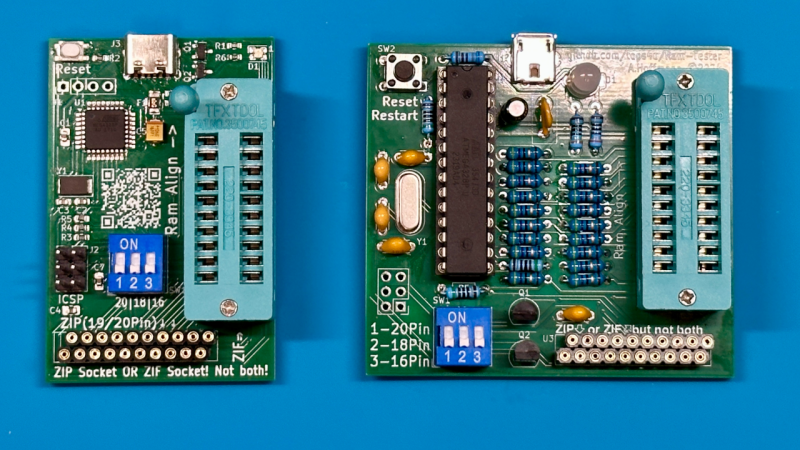
People enjoy retrocomputing for a wide variety of reasons – sometimes it’s about having a computer you could fully learn, or nostalgia for chips that played a part in your childhood. There’s definitely some credit to give for the fuzzy feeling you get booting up a computer you built out of chips. Old technology does deteriorate fast, however, and RAM chip failures are especially frustrating. What if you got a few hundred DRAM chips to go through? Here’s a DRAM chip tester by [Andreas]/[tops4u] – optimized for scanning speed, useful for computers like the ZX Spectrum or Oric, and built around an ATMega328P, which you surely still have in one of your drawers.

Continue reading “Cheap And Aggressive DRAM Chip Tester”