Showing posts with label Marketing-PR. Show all posts

Writers and the Short Pitch

Image
Have you ever asked another author what her book is about and then cringed when she rambled all over the place?

When he/she finished talking, you probably had no clear idea of what the book was about.

It's embarrassing for the author and the listener when that happens.

One of the first skills to be learned by a wannbe author is the Short Pitch.

WHAT IS A SHORT PITCH?

It's a consise, succint sentence that tells someone what the book is about. One sentence is best. Two is good. Three is fair. If you have to use more than three sentences to explain your book, you probably don't have a clear grasp of your plot, characters, conflict, and overall story.

When I was learning to fly, my instructor pilot taught me to always know 3 things when I called the tower—the air traffic controller: 

(1 ) who I was (in flying that meant my plane's tail number

(2) where I was (that's my heading or compass location)

(3) what I wanted (was I calling the tower because I wanted to land or needed information or what?).

You don't get chatty with the tower. When you call, you must quickly and succinctly tell them these things. The bottom line is you make sure you clearly communication those three things so you get what you want.

Image
15-30 SECOND PITCH

The short pitch is delivered to anyone who asks you about your book whether that's an editor, agent, or reader. It's very useful in talking with readers you meet at book events or out in public.

With a Short Pitch available, you won't be at a loss when you're at a social events and someone asks, "What do you do?" (What's your occupation?) You say, "I'm an author who just released my first (or 50th) book. It's about yada yada."

The Short Pitch can be used to pitch your book or your brand, or an idea or manuscript to an editor or agent. There are many websites and print articles that give information about this skill. Here's my 30 second version of the short pitch skill based on my pilot training.

Who You Are

In a pitch, you want to get across your identity as you introduce yourself if you're pitching to an editor or agent. In the case of writers, it might be: “I'm Joan Reeves, and I write Romance in various sub-genres. Or, "I'm Joan Reeves, and I hit the New York Times and the USA Today bestsellers list in 2015 with a novella in a box set collection.”

When I worked as a freelance writer, I used this intro: "I'm Joan Reeves, and I write effective and entertaining advertising copy for clients who appreciate articulate presentation of their businesses or products.”

Where You Are

Include this if the information enhances your pitch, for instance, you're pitching to someone in your local area. Local booksellers, libraries, businesses that sponsor events for employees, etc. I.e., I'm Joan Reeves, and I live in the Houston area which is the setting for several of my novels.

Fortunately, if you're an indie self-published author or a freelance writer, location isn't much of an issue because the entire world is your client base. In the past, I wrote for clients in Canada, Germany, England, Italy, Japan, and Australia. 

Image
What You Want

What you want is to promote yourself, your brand, your product, or your business. What you want should also be viewed as what you want to give the listener, the reader—the audience. 

Initially, you want to give the person receiving your pitch the incentive to help you promote your work.

In the book signing scenario, you want to sign your new release at a book store. The store manager or owner wants you to give him/her something that will draw customers to the store. The "What You Want" should always be a win/win for you and the person receiving the pitch.

In pitching to an agent, what you want is representation. What the agent wants is a book that has legs and will sell itself to editors. Your pitch needs to tell them why your manuscript will do that. "I'm Jane Doe, and my manuscript has won first place in ten writing competitions. Judges have likened it to The Hunger Games for a new generation." (Then rattle off your 1 sentence logline.)

In indie self-publishing a book, you want a reader to buy your book. The reader wants to know what makes your book one she wants. Your blurb and book cover are the pitch to the reader. 

I believe it was motivational speaker Brian Tracy who said people listen to radio station WII-FM,  What's In It  For Me. Everyone wants to know what's in it for me?

Image
Your pitch for whatever you're selling must be a win-win for you and the other person. Are you offering a good read or a great product?

What does the other person get? Information? Entertainment? Big sales? Lots of traffic into a bookstore? Spend some time thinking about the Win/Win Equation. 

TAKEAWAY TRUTH

Work on your Short  Pitch—whether that’s an oral pitch or a book blurb. Developing the short pitch skill will help you sell yourself, your brand, your books, or your whatchamacallit. That's a win for you. Make your book or product top notch. That's a win for the reader or the end user.


Image

Love to read? Sign up for my free newsletter, I LOVE READING. You'll receive exclusive content, giveaways, and bargains.

Quote Graphic: Louisa May Alcott

Image
I liked this Quote Graphic I made so much that I'm posting it here as a super short blog since I'm writing like a crazy woman.

I usually post these on my Facebook page, JoanReevesWrites.

TAKEAWAY TRUTH

Follow me on JoanReevesWrites to see one of these every few days.

Analysis of STONE ANGEL Video

Image

Welcome to Part 2 of a discussion of what makes a video successful.

Here you go if you missed Part 1.

5 STEPS TO VIDEO SUCCESS

1. Focus

 2. Visual representation

3. Text

4. Music

5. Length  and Attention Span

APPLYING THE 5 STEPS TO MY STONE ANGEL VIDEO

1. With the opening image, I wanted to hook the viewer to watch the rest of the video. The image I created from a photo of a beautiful woman at a massive antique door superimposed over a moonlit scene was representative of her era, and text that said, "She was the beloved wife of a Creole aristocrat." 

2. Next you see scenes that are combinations of evocative images and text. A grief-stricken woman and text: "He was murdered. She was betrayed."

Text slides on a stormy background appear: "During a storm her chains are removed." Hopefully that indicates to the viewer that she had been imprisoned for some reason.

"She is taken to the family cemetery." That should give a sense of foreboding because nothing good could happen in a cemetery during a storm."

Then a stunning statement: "To be killed."

Video of lightning, image of a woman holding a dagger, harrowing text, dark images, and a video with an opening door that suggests something out of the ordinary.

Add it all together and it represents what happens in Act 1.

3. Text is used in coordination with the visual images to emphasize the message.

4. Music is so important.  From the first, It sets the tone for the video. Know the message you want viewers to get and match the music to the message. I listened to dozens of audio clips before choosing Black Mass by Brian Bolger, a dark, brooding piece of music that was perfect.

5. Length is the hardest element to master. You can make it short if you really focus on what your book is about—not the entire book, but the essence of the book.

TAKEAWAY TRUTH

 Most of all, have fun making videos. Like any creative project, the rewards when completed are worth the work.

Videos for Readers: 5 Steps to Video Success

Image
I'm making videos again—specifically, videos for readers.

What is a Video for Readers? Simply put, it's a book blurb that's a mini movie.

Today, I have 5 Steps to Video Success to help you make a video too whether for a book or other project. 

I've done many videos over the years for myself and for others, but only a couple in the last few years due to circumstances beyond my control.

YOU TUBE PLAYLISTS

I was cleaning up my Playlists this weekend and noticed the thousands of views some of my past videos received. I watched them all on my Smart TV and remembered how much fun I had making them.

I set a goal to make more because I have a lot more books I've written plus so much more information to share about blogging, writing, and publishing.

As with any new goal, one must immediately take action. So I made a video for STONE ANGEL, my Kindle Vella that currently has 55 episodes available. Today, I'll be publishing episode 56 aka Chapter 56 of this paranormal romantic thriller.

Image
WHY VIDEOS FOR READERS?

Can a Video sell books? Not usually.

So why make them?

They can bring attention to your book and increase name recognition hat's always a good thing.

Personally, I make them because it's fun. I love presenting the emotion, tone, and premise of a book in a mini-movie.

I carefully choose the images, music, and text into the perfect package to represent my vision of a book or an idea.

I've done several videos for box sets in which I participate. I leave the video up even if the box set is no longer available because each individual book mentioned in the video is still available for sale. In the description of those videos, I encourage viewers to visit the respective authors' book pages.

Now, let me give you some tips on video production. 

Come back tomorrow, and I'll give a step by step breakdown of my new video for STONE ANGEL and how it fits my 5 step formula.

5 STEPS TO VIDEO SUCCESS

Image
1. Focus

A book blurb can't tell everything about a book just as a movie trailer can't reveal everything about a movie.

It follows that a video for readers can't tell everything either. A book video should be focused on the main points like that 1-2 sentence concise summary every author should write for his/her book.

A good video should showcase: main character, goal, conflict, genre, tone, author style, and a good ending hook that makes a reader want to know more—wants to click the book link in the description and go grab it from Amazon or wherever it's sold.

2. Visual representation

How do you show all of that—character, goal, conflict, genre, tone, author style, ending hook—in a video? Especially in a 30-60 second video which is the ideal now. You select images that portray all of that.

Images that look like your character as you imagined him/her physically. Images that show conflict in action. Images that can represent the genre and the tone. An image that creates a stunning ending hook.

3. Text

In most book videos, you'll find text either as voice over, text on the screen, or a combination. Use the fewest words possible and make them resonate with the reader. Make them memorable. Avoid the mundane. Think sound bite. This is the element that can show the author's voice, tone of the book, and genre.

Image
4. Music

The music you choose is critical and can establish the tone of the book, the genre, set the mood, and captivate the viewer.

5. Length  and Attention Span

I touched on Length in #2. My first video was for Old Enough to Know Better, produced in 2013, was over 2 minutes long yet it still had over 1,400 views. In the ensuing year, attention spans have grown shorter, and video length has had to adjust.

Call it the TikTok effect if you wish, but videos for books over a minute in length rarely get watched from beginning to end. Your video should aim at 60 seconds. Yes, it's difficult. That's why focus is so important.

TAKEAWAY TRUTH

Come back tomorrow for the breakdown, step by step, of my video for STONE ANGEL . I'll show you how it fits my 5 step formula and also give other tips to help you either create a video or know what a good visualization of your book should look like in case you decide to pay someone to make a video for you.

Joan Reeves participates in the Amazon Services LLC Associates Program, an affiliate advertising program designed to provide a way for websites to earn advertising fees by linking to products on Amazon.

Image


3 Reasons to Love BookBrush

Image
Hey! It's Thursday3Some, and I'm pleased to bring you 3 Reasons to Love BookBrush.

In case you don't know, BookBrush is the online web app that helps you create graphics like a professional graphic designer!

For authors, this is HUGE! Before I give you the 3 Reasons, let me tell you...

A Little About BookBrush

You can sign up for free on BookBrush and try them for free. After your free trial, you can upgrade. Before 30 days is up, if you decide their service is not for you, contact them and they will hellp you get a pro-rated refund.

4 Levels of Service

Annual payment is made, but the monthly breakdown of the fee is shown next to each level.
  • Free
  • Plus – $8.25/month (12 X 8.25 = $99.00 per year)
  • Gold – $12.25/month ($146.00 per year)
  • Platinum – $20.50/month ($246.00 per year)
BookBrush is totally, completely worth it. No question. I learned about BookBrush when Josh Wiley, the CEO, contacted me when they first started business as CoversSellBooks. He asked me to try the app and review it. I did and fell in love with it.

Since then, they've added countless new tools including making print book covers, video trailers, hundreds of ready-made templates, and so much more.

Kathleen Sweeney, Customer Service Manager & Marketing Lead, is one of the nicest people you'll ever meet. She conducts online workshops to help users make the most of BookBrush.
Image

3 Reasons to Love BookBrush 


This YouTube video explains how to use video background effects that enable one to make the coolest graphics for use on social media. 

When coupled with animation, filters and/or  overlay, and text, you can actually end up with a short video that can be used as a book trailer which is sheer genius. Kathleen Sweeney explains it so clearly and concisely that anyone can do this.


Forget trying to guess the sizes of each image as well as how to clip them and paste them into each image section so they look natural. BookBrush has templates that shortcut the whole process. In this video Kathleen takes you through how to do it step by step in less than 5 minutes!


This tool alone is worth the subscription plan fee. A graphic artist charges about $100.00 for an ebook cover. A print cover? More than double. This video teaches you how to make an ebook cover, a Kindle Vella cover, or a print wraparound cover. Kathleen teaches this in about 33 minutes. Unbelievable, I know, but it's true.

Takeaway Truth

I could probably give you 300 reasons to love BookBrush, but I'll let you discover that for yourself. Visit BookBrush YouTube Channel and discover all the ways they can help you. You'll become a true believer.

5 Simple Inexpensive Ways to Market Books

ImageMonday = Make Things Happen Day.

These Monday posts aren't for authors only because what I've said applies to any product if you have very little marketing money.

Of course, I want these posts to be  helpful for authors because most of us aren't marketing professonals, but I've learned a few things along the way.

If you missed the other posts this year, here's the list:

Does Marketing Sell Books

Immutable Laws of Marketing

5 Accessible Inexpensive Ways to Market a Product

With decreased sales, many authors are struggling to find ways to market their books on a non-existent budget. For many, it's a back to the beginning way of gaining exposure for a book. These ways still work, but in a small way. However, the more you do them, the more exposure.

Image
1. Blog consistently.

You have  a blog, right? If not, start one. The blog is not dead. At the very least, join a group blog so you get exposure but don't have to blog every day.

Most people don't leave comments on blogs. I guess they want to put their name out there, but statistics show that blog posts get read.

I get a report from Google every month that shows my reading audience, and I'm always amazed at the thousands of readers who read my older posts.

Choose aspects of your writing branding that you want to talk about on a consistent schedule in a way that entertains, not hammers home the message "buy my book" because that won't gain you blog readers.

Blog readers can become book readers if you go about it the right way.

2. Guest Blog

Again, the blog is not dead. Tap all the people you know who blog. Ask for a guest spot. The best way to guest blog is to find bloggers who draw a different audiences so your message gets seen by many people, not the same bunch over and over.

Also, create a different post and graphics for each guest blog spot. That way even if the same readers are in the audience, they'll look at your new graphic and read your new excerpt, ad copy, or whatever.

Image
2.  Be consistent in publishing your Newsletter.

You do have a newsletter, right? If not, start one. 

Your subscribers should become your devoted audience, and they will be the most likely readers to buy your books.

If you don't subscribe to my newsletter with news about new books, bargain books, and free books, sign up now. You'll get a free ebook when you opt-in or confirm your subscription.

3. Swap newsletter listings.

Exchange features with your friends who have newsletters. Create a different "ad" for each newsletter because most authors draw many of the same readers. Different content and graphics for the same reason as in #1 above.

4. Make a list of 2-5 things, at a minimum, to do each day to market yourself and your book. 

The list may include: tweet 3 times a day, promote your book on 2 or more FB reader groups, post to your own FB fan page, make a new graphic each day for one of your books (retire any old ones that seem outdated or over-exposed), create a new tagline or review quote for your graphics and social media posts, mine your reviews for social media content.

Image
5. Brainstorm a list of every inexpensive thing you can think of that I haven't touched upon.

My 5 suggestions may be the tip of the iceberg. You may have some wonderful ideas of your own so leave a comment about those so others can try your ideas.

Takeaway Truth

Most of all, write up a marketing plan that you work every day. Quit winging it.

Immutable Laws of Marketing

Image
Monday is Make Things Happen Day.

At least it is in my world.

Last week, I blogged about marketing with the post, "Does Marketing Sell Books."

Since it's Make Things Happen Day, let's talk a bit more about marketing with a universal truth about this thorny subject. This truth applies whether you're selling hammers or books.

Immutable Law of Marketing

It takes 9 times before something sticks in the customer's mind.

I'll be honest. In today's world where one is bombarded by email, video, TV commercials, online ads, etc., I think it takes much more than 9 times before something sticks.

I know I hear about books that sound delightful, but by the end of the day, I can't remember the title. Know what I mean?

I think ad agencies responsible for TV commercials agree because just think of all the repetitive commercials one sees on TV. They're on a loop. In a 30-minute sitcom, you may see the same product advertised at least 6 times—probably more like 12 times.

The fast-paced TV commercial world now features commercials 10 seconds in length. It's little better than viewing flash cards, but the one thing the viewer gets is the name of the product.

These commercials are repetitive for a good reason. Quantity equals lots of exposure for the product name. Comapnies want to reach every corner of the viewing audieence. If you take a bathroom break during a commercial, you will eventually end up watching the commercial at some point–at several points during the day or evening.

Of course, those advertiserss have millions to pay to flash their message and product before your eyes. Authors don’t have that. Most of us depend on less costly tactics to get book covers in front of readers.

When you blog around the internet, your cover gets seen by readers which is why authors often guest blog—to reach a different set of readers. Same thing when authors post their bookcovers on a friend's newsletter—exposure to a different audience of readers.

Takeaway Truth

Always ask yourself, how can I get more exposure?

Does Marketing Sell Books?

Image
Authors are always perplexed about what sells books.

Back in the days when most of us were published by big companies, we never really had to worry about marketing to sell books.

We thought that was the publisher's job. They knew what was best.

Then we jumped on the indie publishing band wagon. At first, it was glorious. There was such a huge demand for ebooks from readers who embraced the new form of reading.

Of course, fast forward a few years, and there are millions of ebooks out there. How can an author draw readers to her books? That's the question that befuddles thousands of very good authors.

What Does Marketing Do?

First, what it doesn't do is sell products regardless of whether the product is widgets or books. 
If that's true, why do huge companies spend so much money on marketing and promotion?

So what can marketing and promotion do?

It can call attention to a product. In other words, if you pay for advertising, you're engaging in  marketing and promotion, and that means you’re buying exposure.

Exposure brings readers’ attention to your books. That may result in sales. At least, I hope it does because just about every author I know buys ads.

Best Practice

If you can afford it, spend money on advertising, but make sure you target the audience most receptive to your particular books.

Always think of exposure as the desired end result of your marketing and promotion. Remove "sell books" as your goal.

Takeaway Truth

Changing your mindset about the marketing issue should make you feel better.

5 Crucial Website Pages

Image
I'm still trying to get my domain moved so my website is down as is my domain email.

I know what content I want to put on my website once it's live again starting with the pages that are absolutely necessary.

Unfortunately, I see websites all the time that lack a crucial page.

5 Crucial Website Pages

#1 — Home Page aka Landing Page

This is the landing page which many think is not needed. I think you do need it. It should contain a welcome message, a current news release like a sale, a new release, coming soon, etc., and links to various pages on your site. This page can be a CTA (call to action) for your readers.

#2 — Book Page or Pages

This page shows your books (covers, short blurbs, buy links). If you have just a few books, you can use only 1 page. If you have a lot of books, you may want to set up several pages. It's your choice how you want to organize it: by series names, by genre or sub-genre, etc.

#3 — Blog, Event, or News Page

If your website theme allows for an interactive page, set one up depending on your time and ability to interact with your readers. If you set up an interactive page, be sure to update it on a consistent basis.

#4 — Author Bio Page

Many readers want to know about you the Author. Give them a bio page with your social links and a photo. Make it as formal or informal and chatty as you wish. You want to be friendly and accessible.

#5 — Contact Page

Readers may want to get in touch with you so always have a contact page with an email address or contact form. Repeat your social media links here. This is the one page that most websites lack.

Takeaway Truth

If you want to learn more about the basics of website design, try How to Create a Website: A Step by Step Guide available on Amazon.

Heat Lightning Now a KU Free Read

Image
Trying to get back into the swing of things. A lot of items on my To Do list fell by the wayside while I was busy moving.

Just enrolled my romantic thriller HEAT LIGHTNING in Kindle Unlimited.

Get it today for a free read if you're a KU subscriber. If you're not a subscriber, it's only $2.99 for a thrill ride set in Outlaw Ridge, Texas that will leave you breathless.

About Heat Lightning

Secrets, lies, passion. What Tessa doesn't remember may be the death of her.

Her husband found her, claimed her, rescued her. David’s touch makes Tessa throb. Desire flashes between them like heat lightning on a summer night. Her body knows David, but when she looks at him, he is a stranger to her. Not a flicker of memory is left of him or their life together since she awakened from a coma.

Amnesia has left her with nothing but questions. Who is she? Why does David seem to hate her even as he pulls her into his arms? What is he hiding? How can she trust him when her gut says, Trust no one?

As her love for David grows, so does her feeling of foreboding—as if something awful is watching and waiting.

Image
Reviews for Heat Lightning

Lots of Heat, Lots of Tension
M. Watson Review
5 Stars

This book started from the get-go with action and amazing conflict. I enjoyed the characters very much, plus their obvious love for each other kept me turning the pages. I highly recommend this book!
***************

NetGalley Review
5 Stars

This is a keeper!
***************
Fast Short Read!
Bookzilla, Top 500 Reviewer
5 Stars

Interesting storyline with descriptive writing. Believable dialogue and characters with distinct personalities. I am always interested in works by this author!

Takeaway Truth

Grab this hot romantic suspense today—free read on KU.

Review: Design Wizard Online Graphic Design App

Image
I'm always looking for free graphic design apps to offer readers since most of us use them.

If you're looking for a user-friendly graphic design app, you can add Design Wizard to your list which should be good for personal use for invitations and celebration events as well as book/product promotion.

I tried the Basic Free version to create the 2 graphics in this post.

Details

Design Wizard contacted me and asked me to review their app which I did this morning. Like other online Graphic Design Apps, Design Wizard offers a free, or basic, version and a Pro Plan which you can try for 7 days to see if you want to pay for the $9.99/month Pro Plan.

When you first go to the website, a video pops up on the home page that gives you the basics of using their app. You can close that and scroll down to read the details too. There are 3 steps in the process of using it.

1. Select a Template from their Template Library (I've linked it so you can open a new tab and look right now.) According to the website, their "graphic design team have created thousands of pre-made templates in a wide range of styles suitable for social media and print.

2. Edit or Tailor the selected template with one of their Premium Images, Videos, and Fonts. Every element is editable, and it works on the layers system like Adobe and other graphic systems.

3. Schedule, Share on Social Media, and/or Download Your Design. What you create can be downloaded to your computer or downloaded in print quality. You can share immediately on social media, and videos can be downloaded in standard or HD to be shared immediately or scheduled using their Buffer, Hubspot, or Marketo integrations.

Image
Signing Up

After checking all that out, you can go back to the top of the home page and click the Become a Design Wizard button. 

You'll be asked to sign up for an account. 

After you've accomplished that, an ad for trying the Pro Plan pops up immediately. If you only want to try the Basic for now, as I did, you'll find below that in small text, a clickable Just Want to Try the Basic or some similar text. 

Positives for Design Wizard

1. Intuitive and easy to use without going through long tutorials.
2. Creates an attractive graphic.
3. Download fast and easy.
4. The usual fonts offered with design apps were there.

Negatives for Design Wizard

1. I didn't find many free templates or images. Most were available for the paid plan or individually priced if you weren't on the paid plan.

2. The app is geared more for the usual retail businesses/products and general social use. If you're an author, you'll probably have to upload your own images. However, I could see it might be useful for making signs like the one I made with the books graphic. I found only 2 free templates that contained books graphics, but I gave this only a cursoy examination. If you have time to explore more deeply, you might find more suitable graphics.

Takeaway Truth

Let me know if you try Design Wizard and your experience with it. Feel free to leave a comment or email me: Contact Joan.The 

All Author Cover Art Contest Has The Key To Kristina

Image

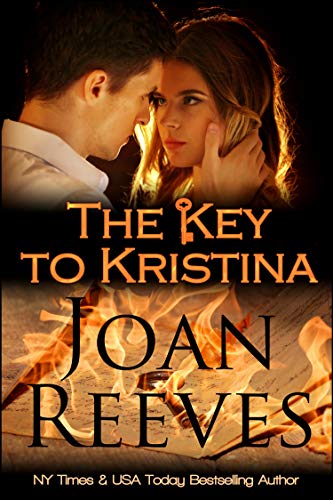
I really liked the cover for my latest release The Key To Kristina so I entered it in theOctober Cover of the Month contest sponsored by AllAuthor.com!

They say not to judge a book by its cover, but I need you to do just that.

If you like the cover of my book, The Key To Kristina, please vote for it for the Cover of the Month contest on AllAuthor.com!

I need as much support as I can get because I really think this cover nails the premise of this mystery-romance that one reviewer called: "Brilliant!!Fantastic book. Very hard to put down."

Please take a short moment to vote for my book cover.

Click to Vote!

Because I'm posting this link on Blogger, a Google product, you get a re-direct notice from Google that says:

"The previous page is sending you to https://allauthor.com/cover-of-the-month/9781/. If you do not want to visit that page, you can return to the previous page." If you get that notice, just click the first link on it, i.e., https://allauthor.com/cover-of-the-month/9781/

Takeaway Truth

Thank you for your support. Please vote and tell a friend too.

FORTUNE'S FAVOR: The Treasure—New Release


Woman splashing in the ocean next to an ereader displaying the cover of Second Chance Bride along with review quotes.
New Release

Only 99 cents for this     new Romance Box Set for those who want Adventure with their Romance!
Fortune favors the Bold, and bold women and men through the centuries have sought Fortune’s Favor in Life and Love.
A quest, hidden treasure, inheritance, Spanish Gold, and missing jewels inspire 5 riveting action adventure tales of women and men seeking redemption and rewards, searching for legacies, revealing secrets, finding romance, falling in love and winning that happily-ever-after that make all the challenges they must overcome worthwhile.
For the best Kindle Beach Read 2020, go treasure hunting with 5 NY Times, USA Today Bestselling Authors, and Award-winning authors as they seek Fortune’s Favor: The Treasure.
99 Cents for 5 Full-Length Novels
The Key to Kristina: Joan Reeves, New York Times and USA Today Bestselling Author, reveals a story of betrayal, conspiracy, and a Quest for hidden treasure in an enemies-to-lovers story. “Kristina’s father never gave her anything but a hard time—until he died and left her a key. But what does the key unlock?”
The Missing Statue: Mona Risk, New York Times and USA Today Bestselling Author, weaves a story of hidden treasure, and romantic suspense set in France. “Are his statue and chateau worth endangering the life of the impetuous young woman who’s turned his life upside down?”
That Devious Kiss: Tamara Ferguson, USA Today Bestselling Author, delights with a small town romance where opposites attract, underscored by romantic suspense and an inheritance. “When a century-old family feud brings a librarian and historian together, a devious kiss of seduction reveals that fate might have other plans in store for them. Have they already discovered the missing treasure?
The Richest Man in Texas: Nancy Radke, USA Today bestselling author, thrills with a western romance set in post-Civil War Texas, starring a larger than life hero and fiery heroine, and the search for a fortune in Spanish gold. “In 1866, Cole Trahern is crossing Texas when he encounters a sandstorm, a dying man, a Spanish girl with a Kentucky rifle, a jealous suitor, a controlling grandfather, and a huge amount of Spanish gold. Can he get the woman and the gold?
The Blue Dragon: Susanne Matthews, Award-winning author, inspires us with the story of lovers reunited and embarking on a search for missing jewels and perhaps a second chance at love. “Broken, alone, her dreams shattered, Samantha looks to a dismal future until Phil steps back into her life.”

Takeaway Truth

Grab hold of excitement—grab your copy of Fortune’s Favor: The Treasure today! 

Guest Starring the Fabulous Nancy Fraser

Image
I'm back! Bet you think I was kidnappped by alients and taken to another world—never to be seen again.

Nope. I've been busy putting together a box set I'll tell you about tomorrow. It's fabulous if I say so myself.

I'm pleased to pop back into the blogverse with a guest star, the fabulous Nancy Fraser who is a wonderful author in many different genres.

Nancy has a new short story out, and it's a doozy! So grab a coffee and get ready to meet one of my favorite people.

About Nancy Fraser

Jumping Across Romance Genres with Gleeful Abandon

Nancy is an Amazon Top 100 and Award-Winning author who can’t seem to decide which romance genre suits her best. So, she writes them all.
Image

Like most authors, Nancy began writing at an early age, usually on the walls and with crayons or, heaven forbid, permanent markers. 

Her love of writing often made her the English teacher’s pet which, of course, resulted in a whole lot of teasing. Still, it was worth it.

Published in multiple genres, Nancy currently writes for three publishers and has recently dipped her toe into the self-publishing market. 

She has published over thirty books in full-length, novella, and short format.

When not writing (which is almost never), Nancy dotes on her five energetic grandchildren and looks forward to traveling and reading when time permits. Nancy lives in Atlantic Canada where she enjoys the relaxed pace and colorful people.

Visit Nancy Fraser Online

Image
Touch Me by Nancy Fraser

Tax consultant Katherine Weller isn't ready for a relationship after a divorce that left her empty.

When her best friend suggests she set up a "date" through Lusty Liaisons, a unique and exclusive dating service, she's uncertain but intrigued.

Maybe a hot romp with a sexy, younger man is exactly what she needs to take that confident first step into her new life as a single woman.

Touch Me, is a short story in the erotica series, Lusty Liaisons.

Nancy's story is vailable for the very enticing price of a mere 99 cents!

Want some sizzle in your summer? Touch Me is the story for you!

Want to know more about Touch Me? Watch the Video

Excerpt from Touch Me

Monday came and went. Tuesday...nothing. By Wednesday, Katherine wanted nothing more than to bury herself beneath a mound of blankets and stay there until her death. Or her eightieth birthday, whichever came first. 

Lillie’s daily request for a progress report wasn’t helping matters.

Katherine’s cell dinged—a sure sign Lillie was sending her another message of encouragement. After pouring herself a second glass of Cakebread Chardonnay, Katherine picked up her phone, ran her fingertips across the lock screen, and stabbed the blinking icon.
Image
You have a request.

Katherine double checked the sender’s name. Lusty Liaisons.

Damn! Hands shaking, she opened the email.

You’ve made a sexy match!

A request for contact was received from Aaron Blake. Mr. Blake is offering a fun-filled night at the Hudson Inn, Somerville, for this coming Saturday beginning at eight in the evening. If you decide to accept, please respond to this email. We will make the arrangements and confirm within twenty-four hours.

Click the link below to read Aaron’s profile.

She re-read the email twice before finally clicking on the profile link.

Aaron Blake, age thirty-two. Six-foot-two, two-hundred ten pounds. Occupation: government contractor. Sexual preferences:  Well, I guess you'll have to buy the book to discover what happens!

Takeaway Truth

You can find Touch Me at these online booksellers:

Amazon Kindle | B&N/Nook | Apple/iBooks

Happy Reading!


Review: Free Website App, QuotesCover

Image
I made this image using QuotesCover & a photo of Freddie.
Like to make pretty graphics with a quote? I've used Quozio for this in the past. (Read my Quozio Review.)

I like having more than one tool in the old design toolbox.So today's Magic Trick is QuotesCover.

This free website app turns any text you write into beautiful graphics for social, web, and printouts by combining worry-free licensed fonts and breathtaking backgrounds.

What You Need to Know

No design skill or sign-up required. You can use QuotesCover to create anything from small resolution graphics for social media and website to higher resolution images for your desktop and mobile wallpaper to graphics suitable for printouts or merchandising. No matter how large the image, the download will be fast.

Any time you create images using online editors, you should always check the output image license. Make sure the fonts and graphic assets are safe for commercial use. Quo, has high-quality fonts and backgrounds that are carefully curated and or created to comply with the "safe for commercial use license" which is a must for anyone designing online. Get all the legal rights details here.

Takeaway Truth

If you really love QuotesCover, membership is only $2.90 a month. Check out all the features in a paid membership.

Cabin Fever Party: Free Books & Prizes

Image
We're having a party...a groovy, groovy par-tay!

And you're invited!!

Who
Authors of Authors Billboard

What
Facebook Party

When
April 17 (also the next 2 Fridays—April 24th and May 1st)

Where
ABB Party Place (just click the link to attend)

Why
We all need some fun in our life!!

What better way to have fun then schmooze with a bunch of friendly authors who specialize in Happily Ever After?

Come to the party for great conversation with fascinating authors, free box sets, and prizes—did I mention prizes? Amazon Gift Card and probably some surprise prizes from the authors too.

Image
From today, April 17 to April 19, we're giving away free copies of 3 of our bestselling romance collections:

A Wedding She'll Remember
Sweet and Sassy Weddings
Sweet and Sassy Brides

All 3 of these box sets will sweep you away from the COVID reality and leave you with a smile!

Go to the ABB Party Place now and join the page. This big blowout starts a 4pm Easter. Be there or be square!

Takeaway Truth

The Facebook URL for ABB Party Place? https://www.facebook.com/groups/414604506092518/

Graphic Design: What Quozio Can Do

Image
Today I have a free online app that makes attractive "Quote" Signs.

A Quote Sign is what I call text on a colorful background that can be saved as a JPG image.

You can make a Quote Sign from a sentence in a book, a promotion tagline, a web address, a quotation, your book title, or any text you choose.

Quozio calls these graphics Bookmarklets.

Use these graphics on social media or in email. You can use it as a background with your book cover if you wish.

You can see the ones I created earlier to illustrate this post. They were super easy, and I think they're attractive too.

Quozio
Image
Promotion for Cinderella Blue


Instructions for Quozio, an app that turns your words into attractive JPG images, appear on the home page when you visit the website.

The home page is also the form to use to create your Bookmarklet or Quote Sign.

Just fill in the form and click GO. In seconds, your sign is created.

Then scroll through the background images to find the one you want to go with your text. Select it.

In seconds, the Bookmarklet is completed. Share them on any social media, in email, or any place you'd use a graphic.

Image

How to Get Started

It's easy to get started, and it's free.

You can register an account if you want to, but you don't have to do so in order to use this app.

When you visit the app, you can just type in your quote and the author of the quote. If the words are yours, put your name down as author. In seconds, your Bookmarklet is created.

Next, scroll horizontally through the available background images to find the one you like. Select it, and in seconds your quote appears with the selected background.
Image
Promotion for Cinderella Blue

After it's "made" once, you can click through all the background images and see how your text looks with the others.

Choices are limited, but free is free so I'm not complaining.

When it looks just the way you want, right click on the image, select View Image then select Save Image and select the place on your computer where you wish to save it. That's all there is to it!

Even though this is free, use good online manners and thank them by liking them on Facebook and on the other social media pages they list.

Let me know if you like this app.

Why Create an Account?

If you want to create an account, you can save the quotes you create on the user dashboard and upload quotes straight to your Facebook page, etc.

ImageYou can also drag a Quozio tool called Bookmarklet to your browser toolbar.

You can use the Bookmarklet tool to create Quote Signs from any text you highlight online.

Just be careful that you don't use any copyrighted material without permission.

Visit Quozio on Facebook. Visit Quozio on Pinterest.

ImageTakeaway Truth

I scour the internet looking for apps for my blog readers—authors and "civilians"—to use.

This one was really easy, and best of all, free for business or personal use.

3 Fun Image Generators for Book Promotion

Image
There are some wonderful graphic image design websites like BookBrush, which I highly recommend.

If you're on a really tight budget, there are some free graphic image generators you should check out.

You can create some fun graphic images for book promotion with these online image generators.

They're very easy to use, and you usually don't have to create an account. Since they're free—really free, not just a trial period—no credit card is needed.

ImageYou can create some quirky images that may have a place in your marketing. I've created an image to go along with each link.

Street Party Sign

Put your book's title and your author name on a movie marquee with a street party!

Easy to do with this image generator from Atom Smasher.

Just fill in the 4 lines and click the Make My Sign button.

Image 
Newspaper Clipping Generator

Make the front page news with this Newspaper Clipping Generator from Fodey.com.

Just fill in the boxes with the information you want to appear.

Click the Generate button. In less than a minute, you have a cute graphic image like the one I made.

Make as many as you want with different headlines and news stories.

SuperStickies
Image

Make a sticky note design with SuperStickies by WigFlip.

Just type up your note, select the color of sticky note you want, select a font if you want something other than the default.

Click the Create button. In a few seconds you have a sticky note facsimile you can download.

Takeaway Truth

I have dozens of these image generator webpages saved so I'll share others with you in future posts.