

Where big layouts get their polish
Adobe InDesign CC, developed by Adobe, is a desktop publishing application built for multi-page print and digital layouts. It handles complex typesetting, linked assets, preflight checks, and exports for formats such as interactive PDFs and EPUBs. Key tools include OpenType support, master pages, paragraph and character styles, Content-Aware Fit, Creative Cloud asset links, and Liquid Layout. The software is aimed at graphic designers, layout artists, publishers, and marketing teams producing long-form or multi-format documents.

Unlock your creativity with Adobe Stock
Get 10 images or 1 video with a free trial
Type rules and page discipline
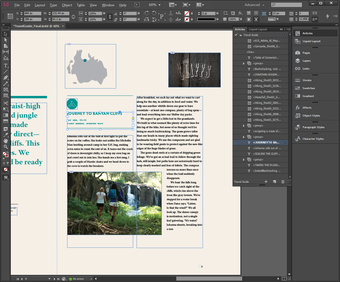
InDesign shines in fine-grained typography, with direct control over kerning, tracking, and leading, alongside OpenType features and Adobe Fonts integration. Long documents stay organized through master pages and named paragraph and character styles, which help keep layouts consistent across spreads. It also supports page numbering, table of contents generation, and preflight checks for issues like missing links or overset text. That depth is a major strength, although new users can face a real learning curve before everything clicks.
More than a static page pretty-printer
Beyond static layouts, the program supports buttons, hyperlinks, video, and audio for interactive PDFs and EPUBs, and it also includes Publish Online for browser viewing. Share for Review lets stakeholders comment through a web browser, which fits collaborative workflows well. Creative Cloud integration also keeps linked Photoshop and Illustrator assets connected to the layout, so updates carry over without constant reimporting. That connected workflow is one of its clearest advantages, though it also ties the app closely to Adobe’s subscription ecosystem.
File formats, fit tools, and a few fine-print realities
Native files use the .indd format, while IDML exports help with opening projects in older releases. Image tools include Content-Aware Fit, which can crop images based on the main subject, and Liquid Layout, which helps adapt page elements for alternate sizes and orientations. Those features are useful, even if they are not the main reason most professionals choose InDesign. The bigger practical issue is accessibility over time: backward compatibility often depends on exporting IDML rather than opening older files directly.
Built for serious publishing, not instant mastery
InDesign remains a strong choice for production-oriented layout work because of its feature depth, document control, and support for both print and digital publishing. It rewards careful setup and structured workflows, especially on long or typography-heavy projects. At the same time, it is not lightweight beginner software. The interface and publishing logic take time to learn, and the Creative Cloud subscription model can be a sticking point for users who only need occasional layout work.



















.png)