






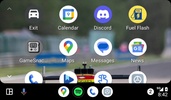
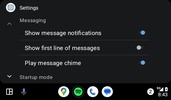
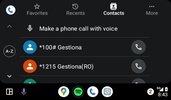
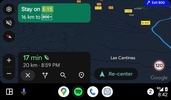

Android Auto is the system app developed by Google that allows you to connect your Android smartphone to your car's display. Android Auto generates an interface designed for driving, where you can interact with apps such as Google Maps, Spotify, Calendar, YouTube Music, Amazon Music, Phone, Discord, Waze, and many more on your vehicle's screen.
Android Auto wireless or with cable: the choice is yours
Depending on your car, you can use Android Auto with or without a USB cable. If you use Android Auto wirelessly, connect your smartphone to a USB charging port or use wireless charging. Otherwise, your device's battery will drain faster.
Each app adapts its interface to your vehicle with Android Auto
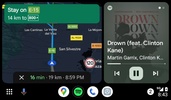
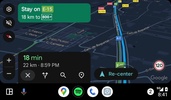
Apps compatible with Android Auto adapt their interface to make them easier to use while driving. For example, Google Maps offers information with a larger font size and an interface that is easy to interact with while moving, while Spotify has larger pause and switch song buttons. Thanks to this, you can avoid boredom while driving and stay entertained by listening to all kinds of content.
Use Google Assistant on your trip
Another advantage that Android Auto offers is that you can use Google Assistant to interact with the apps and content displayed on the screen as you drive. Thanks to this, you won't get distracted while driving or have to take your hands off the steering wheel to touch the screen. For example, you can control the playback of your music or podcasts, say where you want to go, or call a contact in your address book.
Everything is managed by your smartphone
Your smartphone will manage the content you see on the screen. The navigation feature uses the GPS chip. For maps, those downloaded to the device or downloaded from the Internet using the data tariff are used. Thanks to this, your vehicle won't need to be connected to the Internet to get real-time information, such as traffic information, or to download songs.
Read or mute notifications
If you receive a message or email while using Android Auto, you will see the notification appear on the screen. You can respond through a voice message or mute the notification so you are not disturbed while driving. You can also directly activate the "Do not disturb" mode to avoid receiving notifications.
Stay up to date
Download the Android Auto APK and stay updated with the latest Android interface for driving. Google is constantly making changes to the app, so having the newest version of Android Auto will ensure you are up to date with the latest features and functions that will make your day-to-day driving easier.
Requirements (Latest version)
- Android 12L or higher required


 1,488 reviews
  Users consistently rate this app highly, often giving it a perfect score
 This is an AI-generated summary based upon real user reviews.


















Comments
Thank you very much for this app.
It's an excellent helper!
Excellent
Very good app.
good
Excellent