Icon of program: ChemSketch

ChemSketch for Windows

Free Download for Windows

View an ad to download for free

Image

Cathy Buggs

Updated 6 months ago

Draw precise chemical structures

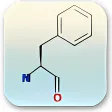
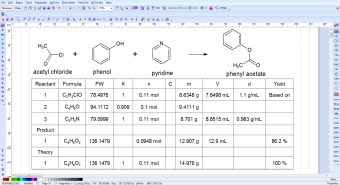
ChemSketch is a graphic and design app. It is a free chemistry drawing software designed to help students, researchers, and educators create precise representations of chemical structures. Unlike general design tools, it is specifically tailored for molecular modeling, offering enhanced accuracy and consistency.  

Top Recommended Alternative
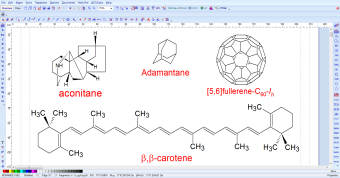
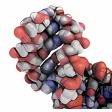
In ChemSketch, you can easily build 2D diagrams of molecules, then convert them into 3D models to better visualize their geometry and structure. This is particularly useful in classrooms, reports, and presentations, where clarity matters. The interface is straightforward, offering drag-and-drop tools for drawing atoms, bonds, rings, and other standard molecular elements.  

Take control of chemical modeling 

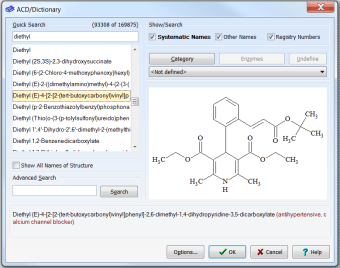
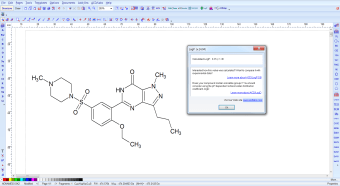
In ChemSketch, a library of templates for common structures is available, making it easy to quickly start building complex compounds. It also includes tools to calculate molecular properties like weight, density, and refractive index, which helps users do more than just draw — they can analyze. One of its biggest strengths is uniformity. It ensures that molecules are represented in a standardized way, which is essential for comparing chemical structures.  

This is especially helpful for educators and students who need their diagrams to look consistent in tests, homework, or lab reports. The symmetry tools and grid snapping features add to the visual alignment, keeping every atom and bond cleanly arranged. While it might not be as advanced as expensive commercial software like ChemDraw, it remains a powerful and accessible option, especially for anyone working with limited resources.  

It’s not just for drawing; it aids in understanding how molecules work, how atoms bond, and how changes in structure can alter chemical behavior. There are some learning curves, especially for users new to chemistry or digital drawing tools. But once you get the hang of it, it becomes an indispensable part of your workflow. However, it lacks built-in collaboration or cloud sync features. 

Ensure every atom and bond aligns perfectly  

In ChemSketch, you work in a focused design environment where accuracy matters. It allows you to build clean, uniform models of complex molecules with ease. Every bond, atom, and structure is precise, making your chemistry diagrams reliable and standardized. It’s not a game but a technical creative process. You draw, adjust, and compare structures while maintaining clarity for analysis, study, or presentation in academic and professional settings. 

Image

Cathy Buggs

With decades of experience in IT management and later as a writer and tutor, she combines technical knowledge with a passion for clear communication. His work spans editing, teaching, and writing, bringing authority and precision to content on technology and related fields.

  • Pros

    • Precise, chemistry-focused drawing tools for 2D and 3D models
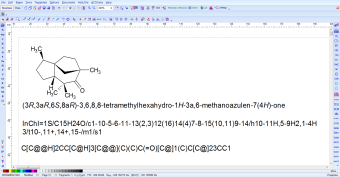
    • Automatic IUPAC naming and property calculations
    • Intuitive interface with bond-angle snapping and stereochemistry support
  • Cons

    • Lacks built-in collaboration or cloud sync features
Image
 0/5

App specs

  • License

    Free

  • Version

    2024
  • Latest update

  • Platform

    Windows

  • OS

    Windows ME

  • Language

    English

  • Downloads

    446.5K

    Last month's downloads

    • 1.5K
  • Developer

Program available in other languages


Icon of program: ChemSketch

ChemSketch for PC

Free Download for PC

View an ad to download for free


User reviews about ChemSketch

3.7

7 reviews

Add review

Main reviews for you

  • Image

    Anonymous user

    Excellent program and it is soft as a computer software for chemical drawing

  • Image

    Anonymous user

    Good app for drawing structures. its a good app for making structures and diagrams for chemistry and physics

  • Image

    Anonymous user

    In short its amazing. its amazingits wonderful and simply awesomeits very easy way to draw chemical structures

  • Image

    Anonymous user

    Easy ,fast and very usable chemical application.. The ACDChemsketch really helped me during work in lab, since I`m a chemist and a working on PhD.Sometimes you really do need something useable and easy to work with.Definently recommending this application.You won`t regret. Cons: Some additional groups on right side tab

  • Image

    Anonymous user

    Best for learning chem. cool software in universty of medicine. i like it very much! Cons: more elementscolours

  • Image

    Anonymous user

    It is very helpful.. it is veryn good.i enjoyed to use it. it is very helpful for us. Pros: ease to make structures

More

You may also like

Alternatives to ChemSketch

Explore Apps

Latest articles

Laws concerning the use of this software vary from country to country. We do not encourage or condone the use of this program if it is in violation of these laws.
Softonic

Is ChemSketch safe?

100/100

Score result: Clean

This file passed a comprehensive security scan using VirusTotal technology. It is safe to download.

  • Virus free
  • Spyware free
  • Malware free
  • Verified by Security Partners

    VirusTotal logo

Scan Info

Last scan
Thursday, July 24, 2025
Scan provider
VirusTotal

Softonic security commitment

ChemSketch has been thoroughly scanned by our advanced security systems and verified by industry-leading partners. This file comes from the official developer and has passed all our security checks, showing no signs of viruses, malware, or spyware. For more information, visit our Security and Trust Center