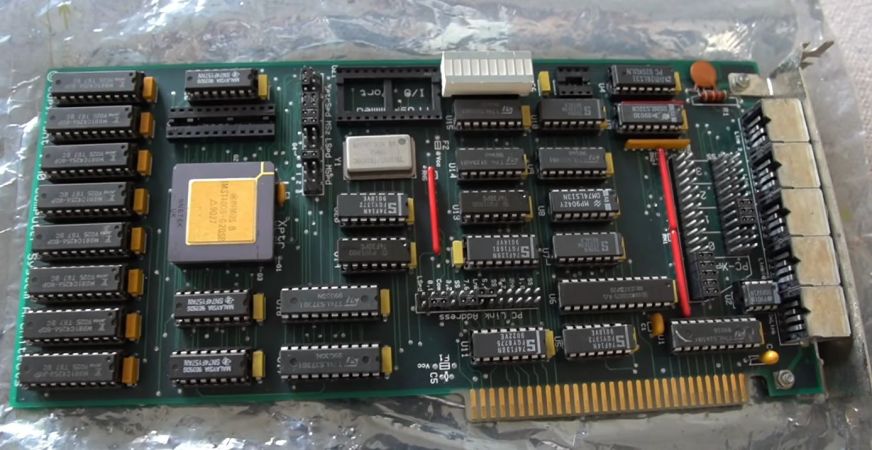
A long time before Beowulf clusters wired up with commodity Ethernet hardware became a hobbyist thing and a running joke, the transputer took a swing at a very similar architecture. This used stand-alone computers that were networked together with other transputer systems, to achieve task-level parallelism. For some people like [Lance Harvie] this is the kind of hardware that he used during his university years for a project, with him not only still having that hardware, but also recently adding to this collection with a recent eBay purchase.
The transputer story is a fascinating one, forming a major part of the UK’s semiconductor industry during the 1980s, creating a strong legacy as the computer industry awkwardly tried to figure out what types of parallelism to target. Whereas the industry largely moved to instruction-level (superscalar) parallelism alongside tightly coupled task-level parallelism along with multiple CPU cores on a single die, one could consider today’s supercomputer clusters to be one example of the transputer legacy.
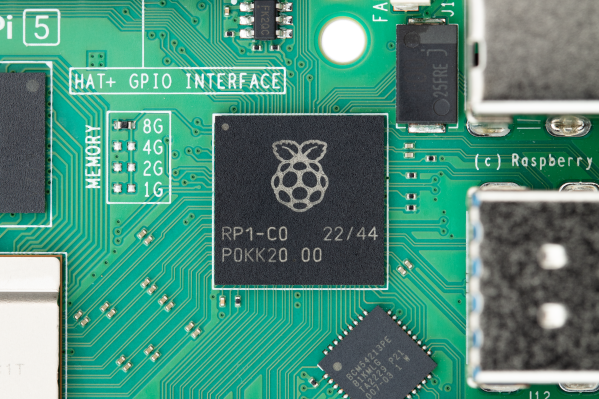
As announced by [André] on Bluesky, next month the much loved Rpilocator.com website will cease displaying the stock status and pricing of Raspberry Pi computers from various online retailers.
One of the main reasons is that the indexing bot used by the site has been blocked by most shopping sites. It’s not clear whether this blocking is on purpose or just another consequence of website owners protecting themselves from the onslaught of obnoxious ‘AI’ scraping bots. But in any event, the effort of finding workarounds that may only work for a few days or weeks was becoming too much.
According to [André] there are still about 11,000 users of the site each month, which even when accounting for the human-bot ratio is still a sizable number of visitors who’ll now have to get their fix somewhere else. He also indicates that he receives numerous emails from presumably real people about the site to point out small issues they have noticed.
Although the site may still be back in the future, it’s also important to recognize how much the single-board computer landscape and raison d’être for this tracking site have shifted since the 2020s Chip Crisis days. Currently it’s less about finding where these boards are in stock, and more about taking the hits to one’s wallet as memory prices continue to spiral out of control. Making what were once fun, cheap little hobby boards into luxury items that cut into your rent-food-and-gas budget.
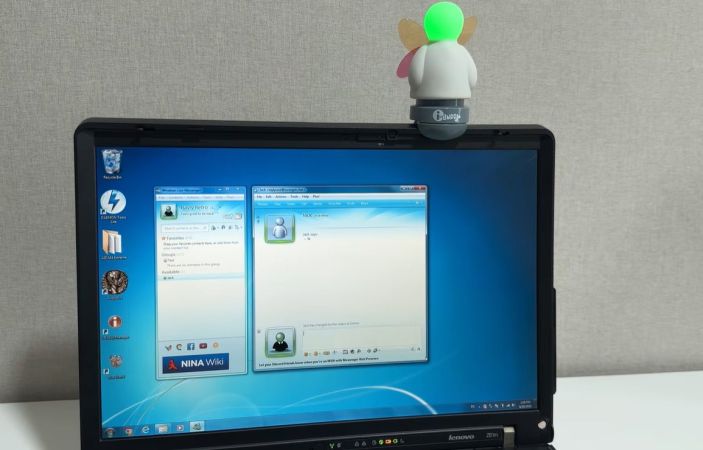
Some of our esteemed readers were not yet out of diapers back in 2013 when Microsoft decided to put MSN Messenger out to pasture, but the memories that this instant messenger’s (IM) interface and notification sounds have left are hard to erase. This also includes some of the weirdest accessories that this IM spawned, such as the USB-connected i-Buddy. Recently [Rayly Retro] got his mittens on a new-in-box one to revive alongside an era-appropriate Windows 7 PC.
What the i-Buddy gets you is the ability to light up the head in seven different colors, twist the torso and flap the butterfly wings, all of which can correspond to certain events in the MSN IM or for more general notifications, as set by software running on the connected PC. Interestingly, this i-Buddy is recognized by Windows as a USB HID, so no special driver is needed. A range of ways to program it exist too, including a .NET-based library from back when it was still being sold for around $20.
Although the MSN Messenger network’s servers have long since been dumped into an e-waste dumpster over at Microsoft HQ, an alternative exists in the form of the Escargot service using which a range of official clients can work again.
In the video it’s demonstrated how to create a user account with the Escargot site and how to patch the messenger – here Window Live Messenger 2009 – before signing in. With that step completed, getting the i-Buddy up and running is next. This took a lot of struggling, since the version of the i-Buddy software that comes with the device didn’t like Windows 7 much. Fortunately an old forum post led to a download of version 2.10, using which the gadget jumped to life, happily lighting up and flapping its wings.
After recently publishing a few videos covering research into the poor adhesion between chopped carbon fiber (CCF) and the thermoplastic filaments as used with FDM 3D printing, some of the feedback received by [I built a thing] included the idea that the missing step to make CCF additives work was post-print annealing. Naturally this claim had to be investigated, both through the resulting physical characteristics as well as on a microscopic level in the same scanning electron microscope (SEM) as before.
Post-annealing SEM scan, showing clear voids. (Credit: I built a thing, Youtube)
Theories as to why annealing the parts would help here seem to focus on increased bonding and filling of voids in the printed CCF-infused material, while there are the typical worries with annealing such as parts warping and shrinking to also take into account as potential downsides of this treatment.
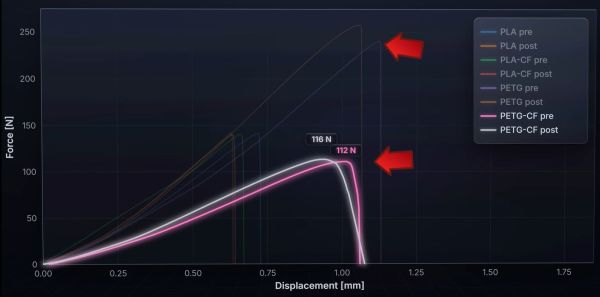
For the sample materials PETG and PETG-CF, as well as PLA and PLA-CF filaments are used, with each filament type featuring an annealed and not annealed version. These were then tested for tensile strength, stiffness and failure type, as well as dimensional accuracy and warping, before being examined under the SEM. A total of 160 samples were used, with 20 samples per material and annealing state.
Perhaps the biggest surprise here was how much PETG benefits from annealing, making it much more resilient to breaking, whereas neither PLA nor PLA-CF seemed to see much benefit. Shocking was how much worse PETG-CF performs than PETG, with the former being worse than both PLA and PLA-CF here.
In terms of dimensional accuracy, annealing caused a Z direction expansion while shrinking the samples in the other directions. The CCF addition here actually prevented much of the shrinking and expansion, showing the first clear benefit of this additive. Yet despite annealing at right above the glass transition temperature as is proper, this would seem to be the limit of this approach in terms of practical benefits.
Compared to the previous research that focused on PLA-CF, PETG-CF would seem to make the case even more strongly that there’s no real purpose to CCF additives, especially since you can already account for parts shrinkage during annealing before printing. That there’s no improvement to the CCF and thermoplastic interface adhesion is also no mystery, considering the science behind how e.g. thermoset materials create bonds with CF.
Usually the term ‘jailbreaking’ isn’t meant to be taken quite that literally, but in the case of the US prison tablet that [Hugh Jeffreys] got sent, it’s really quite apt. Unlike the typical transparent prison electronics, this tablet is hermetically sealed inside an opaque plastic case, with the Windows 10 install firmly locked-down and not allowing anything more to be done with it than access some prison-provided services via the browser in kiosk mode.
The first challenge was to see whether it could be booted at all, with just four metal pads visible on the side of the case. These turn out to correspond to USB pins, but the tablet only briefly tries to turn on with a charger connected. This means that a teardown is required, which ended up involving a hacksaw due to the sealed case.
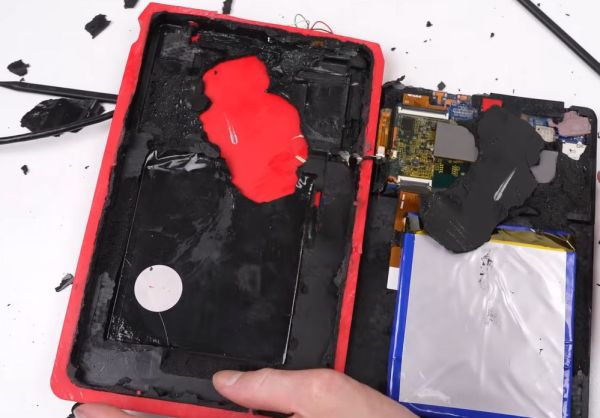
Inside the case is the Windows tablet with the back cover removed, presumably for easy access to extend its USB port. All of this is embedded in foam and more gunk that makes disassembly rather messy. With the case opened it becomes clear that the likely reason why this tablet was junked was due to a bad third-party charger board, as using the tablet’s own USB port it charges happily and even turns on.
From there it’s a bit of a fight with the locked-down Windows installation, but as it’s just a Windows 10 Home installation, there’s no drive encryption or such to get in the way. This allows for the device to be fully jailbroken, revealing its specifications as an Iview Optimus-C-8001, powered by an Intel Atom Z8350 at 1.44 GHz with a blistering 2 GB of RAM. The Windows installation was from 2018, with apparently no updates since.
Despite the very high school arts-and-crafts appearance of the case itself, the tablet itself isn’t too shabby considering the limited hardware specifications. Although getting the case off is a bit of a pain, it’s not a bad catch if you can find one of these puppies in the e-waste bin.
As great and streamlined as the Windows desktop experience is, one area where it’s at best disappointing and at worst rage-inducing is when it comes to its command line interface (CLI) offerings. In Windows 9x/ME this could be excused by the fact that it was essentially just a dressed-up MS-DOS CLI experience, but on Windows NT-based OSes no such excuse exists.
Yet even after Microsoft finally acknowledged the shortcomings of the cmd.exe shell by 2006, they then proceeded to go their own way with PowerShell, industry standards be damned. Especially for those of us who have no beef with the UNIX/BSD/Linux CLI experience and the joys of shell scripting, this insistence was disappointing. Simultaneously, everyone from OS X/MacOS to Haiku were happily offering a familiar CLI environment alongside POSIX compatibility.
Although Windows NT OSes were POSIX compliant, they never offered a suitable shell along with it, nor any of the other things you’d expect in a modern-day BSD, Haiku or Linux CLI environment. In a recent article by my esteemed colleague Al Williams, these sore points were somewhat addressed as far as basic CLI tools go, but the issue goes obviously much deeper than just the basic userland tools. Which is where MSYS2 comes into the picture.
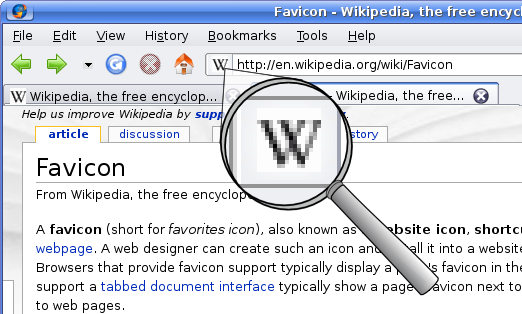
Putting hidden data in places where few expect it can be a fun hobby or even a professional career. In the case of [Tim Wehrle] it’s just the former. His most recent project in this area uses a favicon image for storing a HTML-based website and rendering its contents within the browser after the favicon has been downloaded.
To pull this off, a very basic HTML page was turned into a series of UTF-8 encoded bytes that were then declared to be a standard PNG image. The original 208 byte payload plus 4-byte PNG header only used part of a 9×9 pixel favicon. With a larger favicon image as typically used you could thus easily store more data, whether as visual noise like here or a bit more hidden.
Of course there’s a catch, and in this case it’s the Typescript code to unpack the bytes from the “image” and render them; you have to load that separately. But still, in these days of all-singing, all-dancing websites that take forever to render, it’s refreshing to see what you can do with so few bytes that they fit in a favicon.
As for the purpose of such an approach, that’s left as an exercise for the reader, but you’re more than welcome to take a poke at the GitHub project and the demonstration site..


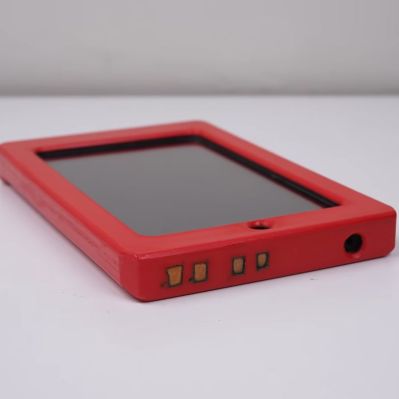 The first challenge was to see whether it could be booted at all, with just four metal pads visible on the side of the case. These turn out to correspond to USB pins, but the tablet only briefly tries to turn on with a charger connected. This means that a teardown is required, which ended up involving a hacksaw due to the sealed case.