Image

A T9 Keyboard For Your Smartphone

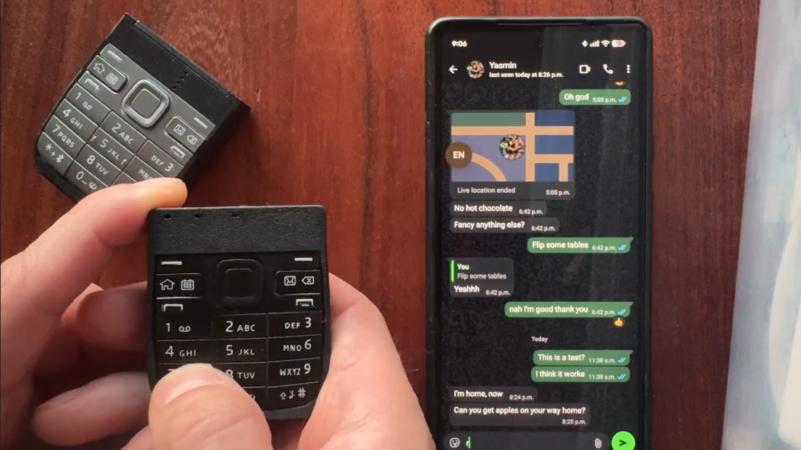
These days, most of us are fortunate enough to use smartphones with decent touchscreen keyboard capabilities. However, once upon a time, if you wanted to type something on a phone, you had to tap it out on the number keys instead. [Jarrett] is bringing that back with a custom T9 keyboard for modern phones. 

The build is designed around the keypad of the Nokia E52, a Symbian smartphone released in 2009—two years after Apple changed the game with the first iPhone. The phone keypad itself is laid over a custom PCB with Alps SKRK tactile switches corresponding to each individual key. Each is wired with a diode and the switches are scanned as a row/column array as is typical for keyboards. Reading the matrix is an ESP32-C6 microcontroller, which counts the keypresses and spits out the right letters over its Bluetooth connection to an attached smartphone or other device. Power is via a small lithium-ion battery, looked after by a TP4200 charger chip.

Overall, the keyboard works as you’d expect, allowing T9-style input to any compatible device that works with Bluetooth keyboards. [Jarrett] does have one regret, with the 0.98 N actuation force switches used leaving he keypad feeling a little mushy. The firmer 1.57 N switches were suspected to give a more satisfying response under thumb, which was a nice upgrade in the second revision build.

We’ve seen other builds in this vein before, too, albeit with bigger keys. If you’re coming up with your own esoteric input methods, don’t hesitate to notify the tipsline.
Image

Epson HX-20 Gets A Drive Upgrade

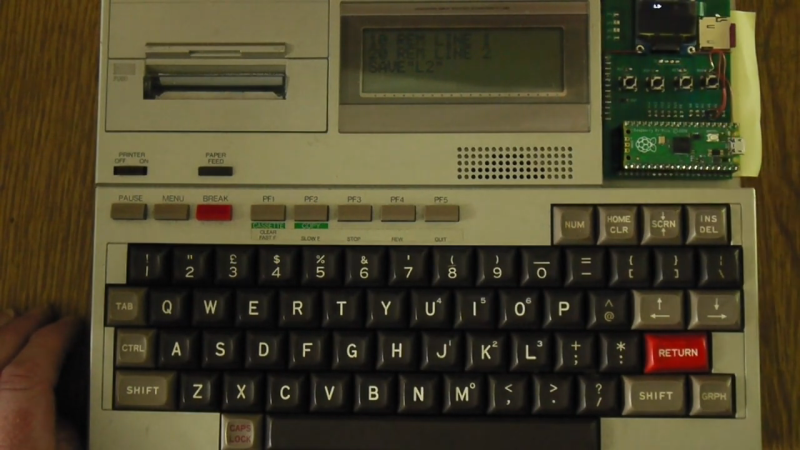
The Epson HX-20 is sometimes referred to as an early laptop computer. It’s a little odd in its form factor, and in its storage, relying on a microcassette drive to store data. It can be problematic to keep these tapes and drives going after so many decades, so [Andrew Menadue] has been tinkering with a more modern solution.

The replacement drive uses a Raspberry Pi Pico to emulate the original tape drive. The Pico uses a microSD card to store data instead of the magnetic media of old. The device has a small screen for showing status information and four buttons for navigation, allowing the faux drive to be controlled as to what “tape” it’s pretending to be. It’s also possible to use the device to emulate ROM cartridges that could be used with the HX-20 in place of its original tape deck storage solution.

We’ve seen some other old hardware get similar drive upgrades before, too. No surprise, because mechanical drives and media simply don’t last forever. Sometimes you need to build a replacement that’s viable today. Video after the break.

Continue reading “Epson HX-20 Gets A Drive Upgrade”

Image

Leaky Player Piano Gets MIDI Upgrade In YouTube Restomod

The word “restomod” is a bit nebulous, but it’s normally used in the automotive world to describe taking an old car and making it better-than-new with all the technological improvements the original builders would have used, had they been available. We think the word applies to [Alnwlsn]’s MIDI-actuated player piano, because what are those punched rolls of paper, but the MIDI of the 19th century?

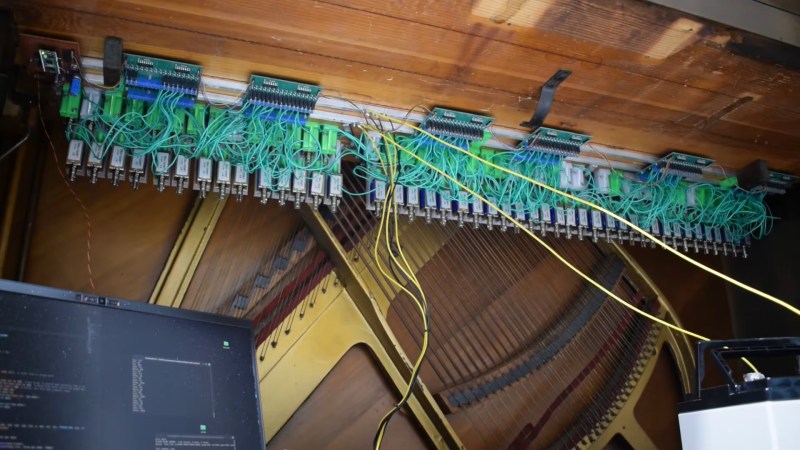
Unlike a lot of automotive restomods though, this one is mostly reversible. He did drill few holes and slots in the original wood, but nowhere that it would alter the integrity or original operation of the player piano mechanism. The MIDI-controlled solenoids just poke the same key paddles from below that the pneumatic mechanism used. From the listener or operator’s perspective, unless the doors that reveal the music scroll or lack thereof are open, the piano behaves exactly the same. Except now it has access to the whole wide array of tracks that exist in MIDI form, rather than a paltry selection of hard-to-find piano rolls.

Each of the relays is driven by a MOSFET via shift registers to get 88 outputs out of the single Pi Pico in charge, with a level shifter involved to get the RP2040 speaking 5 V logic. If you’re wondering how that gets volume control, no, the piano isn’t smacking keys at full volume all the time. He’s using the RP2040’s powerful PIO to create a sort of PWM signal to soften the solenoid blows when needed. To save his power supply, he’s also got it set up to stagger the pulses, so multiple relays aren’t pulsed at the same time when the MIDI file calls for chords.

There was actually more overlap between player pianos and MIDI than you might think, given this presentation of an Apple ][ being used to create the piano rolls.

Continue reading “Leaky Player Piano Gets MIDI Upgrade In YouTube Restomod”

Hackaday Links Column Banner

Hackaday Links: May 10, 2026

While Artemis II was primarily a demonstration flight of the architecture NASA plans to use for future lunar missions, it was also an excellent excuse for the crew to snap some photos of the Moon and Earth with the benefit of modern camera technology. If you’ve been looking forward to seeing more of the crew’s images, you’re in luck, as thousands of new images have recently been released.

ImageNow we don’t mean to beat up on the folks at NASA, but browsing through these images, we couldn’t help but be reminded of an article we saw on PetaPixel that discussed the space agency’s haphazard approach to sharing images online.

It’s really more like an unsorted file dump than anything, made worse by the fact that you have to access it through a government website that looks and performs like it was designed in the early 2000s. There’s even a prominent button that attempts to load a gallery feature that relies on the long-deprecated Adobe Flash. It would be nice to see the situation improved by the time astronauts actually touch down on the lunar surface, but we wouldn’t count on it.

Speaking of old tech, we’ve been following the resurgence of keyboard-equipped smartphones with great interest, as we imagine many of you have been. A recent CNBC article addresses the trend, although it didn’t quite take the nerd contingent into account. We want physical keys so we can work in the terminal and write code without fighting an on-screen keyboard, but of course, that’s not exactly what your average consumer is looking for.

It’s quite the opposite, in fact. A 20-something user referenced in the article explained how the younger generations see the physical keyboard as a way to be less connected to their phones, describing it as “an extra barrier of inconvenience that adds more steps into the thinking process.” If you need us, we’ll be collecting dust in the corner.

Continue reading “Hackaday Links: May 10, 2026”

Image

Peripherals Hacks

Custom peripheral projects are among the most rewarding. Especially if you’re like me and you sit at the computer eight hours per day, anything that you can use on a daily basis is super satisfying. This topic of DIY peripherals came up on the podcast while chatting with Kristina, who is no stranger to odd inputs herself.

We were talking about a trackball that had been modified to read twisting gestures, by a clever hijacking of the twin mouse sensors inside. If you do a lot of 3D modeling, you can absolutely get by with just a mouse and shift-ctrl-alt as modifiers, but it’s so much more immediate to use a dedicated 3D input device. (I’ve got an ancient serial Space Mouse just under my left hand as I type this.)

My old favorite, which I haven’t used in ages, is the guts of a 5” hard-drive platter stack that I turned into a scroll wheel. Unfortunately, I don’t have space for it on my desk anymore, but it was just so pleasing to scroll through a document with something that had some real chonky momentum to it.

And it’s easier than ever to make your own. The classic blocky macropad is a great introduction, but as long as you’re doing the design yourself, why not extend it, or at least make it fit your hand? Or take your flights of fancy even further away from the mainstream. Consider the Bluetooth mouse ring, for instance.

Point is, the software side of almost any peripheral device you can imagine is sorted out already, and interfacing with the hardware is equally simple. Peripheral hacks have such a low barrier to entry, but afford so many creative hardware possibilities. And nothing says “Jedi” like building your own lightsaber.

Image

A Keyboard For Anything, Without A Keyboard

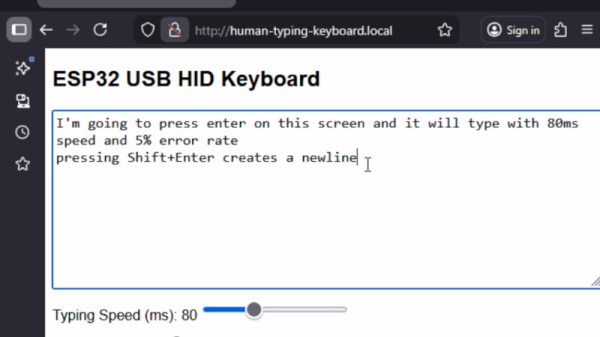
There are many solutions for remote control keyboards, be they Bluetooth, infrared, or whatever else. Often they leave much to be desired, and come with distinctly underwhelming physical buttons. [konkop] has a solution to these woes we’ve not seen before, turning an ESP32-S3 into a USB HID keyboard with a web interface for typing and some physical keyboard macro buttons. Instead of typing on the thing, you connect to it via WiFi using your phone, tablet, or computer, and type into a web browser. Your typing is then relayed to the USB HID interface.

The full hardware and software for the design is in the GitHub repository. The macro buttons use Cherry MX keys, and are mapped by default to the common control sequences that most of us would find useful. The software uses Visual Studio Code, and PlatformIO.

We like this project, because it solves something we’ve all encountered at one time or another, and it does so in a novel way. Yes, typing on a smartphone screen can be just as annoying as doing so with a fiddly rubber keyboard, but at least many of us already have our smartphones to hand. Previous plug-in keyboard dongles haven’t reached this ease of use.

ESP32 BTE Keyboard

Wired To Wireless: ESP32 Gives Your USB Keyboard Bluetooth

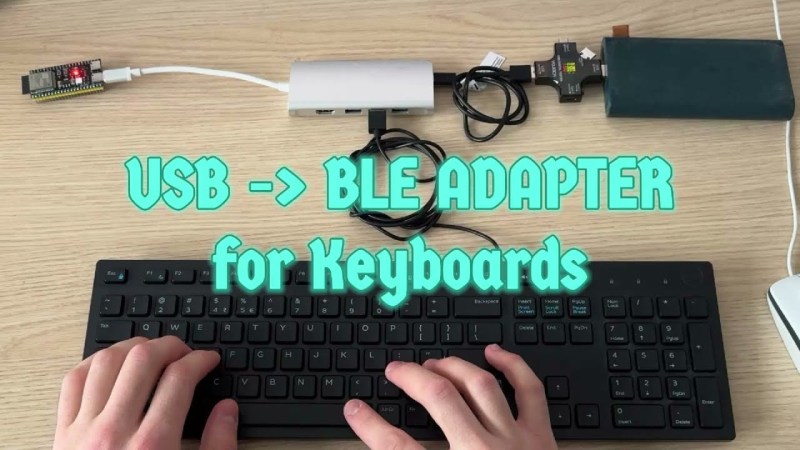
Few things rival the usability and speed of a full-sized keyboard for text input. For decades, though, keyboards were mostly wired, which can limit where you use your favorite one. To address this, [KoStard]’s latest project uses an ESP32 to bridge a USB keyboard to BLE devices.

The ESP32-S3 packs a ton of fantastic functionality into its small size and low price—including USB-OTG support, which is key here. Taking advantage of this, [KoStard] programmed an ESP32-S3 to host a keyboard over its USB port while connecting via BLE to devices like cellphones.

There are some slick tricks baked in, too: you can pair with up to three devices and switch between them using a key combo. Some of you might be wondering how you can just plug a microcontroller into a keyboard and have it work. The truth is, it doesn’t without extra hardware. Both the keyboard and ESP32-S3 need power. The simplest fix is a powered USB hub: it can be battery-powered for a truly mobile setup, or use a wired 5V supply so you never have to charge batteries.

We love seeing a simple, affordable microcontroller extend the usefulness of gear you already have. Let us know in the comments about other hacks you’ve used to connect keyboards to devices never designed for them.

Continue reading “Wired To Wireless: ESP32 Gives Your USB Keyboard Bluetooth”