Free image viewer and editor
JPEGView is a multimedia application developed by David Kleiner. This free-to-use application works as an image viewer as well as an editor. It allows you to adjust your pictures as soon as you open them and on the same user interface.

Unlock your creativity with Adobe Stock
Get 10 images or 1 video with a free trial
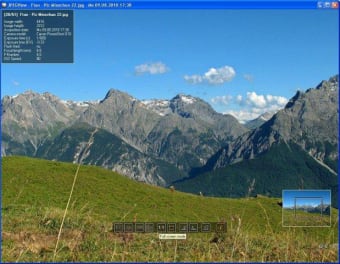
JPEGView works like Windows Photo Viewer but provides a larger array of functions other than zoom and rotation. It allows perspective correction, image enhancement and even displays the EXIF information. Moreover, it gives you a series of options by moving your mouse cursor. Note, however, that the photo editing features that the app offers are limited to basic ones.
What is JPEGView?
Desktop computers have native image viewers. However, most of them are only limited to loading the images and a few tools, such as zooming and rotating. If you notice a problem with a picture's colors, you would have to load it on a separate image editor. The problem is, most image editors eat up a lot of storage space. Not to mention, they often require payment for a license.
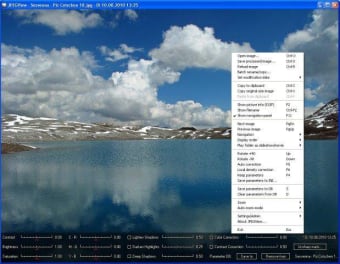
JPEGView is an alternative to both built-in image viewer and photo editor. As mentioned, this app allows you to view your pictures and make a few enhancements. It displays the image on the entire interface and even shows you the editing tools by moving the mouse cursor. If you hover your mouse on any part of the picture, you will find features, such as adjustment for brightness, contrast, and saturation.
Right-clicking, meanwhile, will reveal additional options, such as saving all changes, batch renaming, and changing EXIF dates. Applying changes only requires clicking a few checkboxes and moving a series of sliders. All edited images can then be saved as separate files and in various formats, such as JPG, PNG, TIFF, and BMP. Alternatively, you can save your changes in the database and leave your original image untouched.
Is JPEGView good?
Due to its enhanced functionality, JPEGView is a good alternative to Windows Photo Viewer. With this app, you can view your pictures and make a few changes, all while within the same interface. Not only that but the options are made available by moving your mouse cursor. The editing tools are basic and limited, but they are enough to correct minor issues on your images.