
Showing posts with label debian. Show all posts
Showing posts with label debian. Show all posts
Friday, January 18, 2019
Understanding Debian: The Universal Operating System
"And my final test as to whether or not Debian succeeded was: could the founder step away from the project and could the project keep going because that is the only point at which you know that the project has basically taken a life of its own." ~ Ian Murdock


Monday, May 19, 2014
Fire Ruby - howto start with Firebird and Ruby on Ubuntu / Debian
This howto is about installing firebird ruby driver on Ubuntu or any Debian based distro
you might need some firebird dependencies and if you need the stable Firebird server Firebird 2.5 guide to install it
The very basic firebird package to build only the driver is firebird2.5-dev
Then you need to install ruby and the recommended rails way is to use rbenv
Alternate way is to build install our gem (latest build-able is located here )
You will get something like this in terminal :
Now is time to install it using the gem command
Please read the README.
here is how i tested on my machine
Here is part of the example i ran on my pc
And here are the results for my ruby test
What is next class ? RoR on Firebird
you might need some firebird dependencies and if you need the stable Firebird server Firebird 2.5 guide to install it
The very basic firebird package to build only the driver is firebird2.5-dev
sudo apt-get install firebird2.5-dev git-coreand choose yes when asked
Then you need to install ruby and the recommended rails way is to use rbenv
rbenv install 2.1.2
rbenv global 2.1.2
ruby -v
Best way is to install it from gem
gem install fb
Alternate way is to build install our gem (latest build-able is located here )
git clone https://github.com/rowland/fb.git
cd fb/
gem build fb.gemspec
You will get something like this in terminal :
 Successfully built RubyGem
  Name: fb
  Version: 0.*.*
  File: fb-0.*.*.gem
Now is time to install it using the gem command
gem install fb-0.*.*.gem
Please read the README.
here is how i tested on my machine
Here is part of the example i ran on my pc
pico test.rb
And here are the results for my ruby test
ruby test.rb
ID: 0, Name: John 0
ID: 9, Name: John 9
What is next class ? RoR on Firebird
Monday, March 31, 2014
Compiling Linux Kernel Vanilla - Ubuntu/Debian way
Here is my guide on Compiling x.xx.x Vanilla Final - Ubuntu/Debian using the Debian way
This article is about compiling a kernel on Ubuntu systems. It describes how to build a custom kernel using the latest unmodified kernel sources from www.kernel.org (vanilla kernel) so that you are independent from the kernels supplied by your distribution.
Install the Required packages for building it
make-kpkg clean
you can install the headers too from /usr/src/linux-headers-3.*.*-*
in my case i can show you how the packages are named
I also created a python script http://github.com/mariuz/kernelcompile
that can be used like this
This article is about compiling a kernel on Ubuntu systems. It describes how to build a custom kernel using the latest unmodified kernel sources from www.kernel.org (vanilla kernel) so that you are independent from the kernels supplied by your distribution.
Install the Required packages for building it
apt-get install git-core kernel-package fakeroot build-essential ncurses-devThen download latest kernel version
cd /usr/src
sudo su
wget --continue http://www.kernel.org/pub/linux/kernel/v4.x/linux-4.xx.x.tar.bz2
tar jxvf linux-*.*.*.tar.bz2
cd linux-*.*.*

$ cp /boot/config-`uname -r` ./.config
$ make menuconfig
make-kpkg clean
fakeroot make-kpkg --initrd --append-to-version=-vanillaice kernel_image kernel_headers
cd ..
dpkg -i linux-image-*.*.*
dpkg -i linux-headers-*.*.*sudo shutdown -r now
you can install the headers too from /usr/src/linux-headers-3.*.*-*
in my case i can show you how the packages are named
ls *.deb
linux-image-*.*.*-vanillaice_4.4.*-vanillaice-10.00.Custom_amd64.deb
linux-headers-*.*.*-vanillaice_4.4.*-vanillaice-10.00.Custom_amd64.deb
I also created a python script http://github.com/mariuz/kernelcompile
that can be used like this
git clone https://mariuz@github.com/mariuz/kernelcompile.git
cd kernelcompile
sudo ./kernel-compile.py
Friday, March 14, 2014
php5 and firebird pdo on ubuntu / debian
The recommendd method is to use the official php5 source from ubuntu or debian and build only the pdo firebird extension and install it
You need to build the pdo extension from php from ubuntu source code here is the source for php package (apt-get source will do the job for any release)
Check to have in php.ini to have the next lines also with phpinfo() function
you can also check in apache if all is correct
by creating a page in /var/www/pdo_info.php
with this content
then in the browser press F3 and search PDO
to check if all is ok with the driver then create one small example that loads the driver and then is connecting to the database server
after the driver is loaded now you can use the pdo as usual , here is the fetch example
sudo apt-get install php5-dev firebird2.5-dev php-pear devscripts debget
You need to build the pdo extension from php from ubuntu source code here is the source for php package (apt-get source will do the job for any release)
apt-get source php5
cd php5-*
cd ext/pdo_firebird
phpize
sudo ln -s /usr/include/php5 /usr/include/php
./configure
make
sudo make install
Check to have in php.ini to have the next lines also with phpinfo() function
sudo pico/vi /etc/php5/conf.d/pdo.ini
# configuration for php PDO module
extension=pdo.so
extension=pdo_firebird.so


php -i | grep PDO
PDO
PDO support => enabled
PDO drivers => firebird
PDO_Firebird
PDO Driver for Firebird/InterBase => enabled
you can also check in apache if all is correct
by creating a page in /var/www/pdo_info.php
with this content
then in the browser press F3 and search PDO
to check if all is ok with the driver then create one small example that loads the driver and then is connecting to the database server
after the driver is loaded now you can use the pdo as usual , here is the fetch example
Sunday, November 11, 2012
Using Lazarus IDE with Firebird in Ubuntu and Debian
Install the ide

SQLdb tab also contains a component TIBConnection that you can place it on the form
We will connect to /var/lib/firebird/2.5/data/employee.fdb
On the form put an TIBConnection, TSQLTransaction,TSQLQuery,TDatasource and an TDBGrid
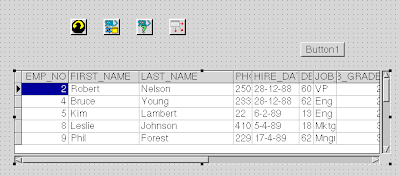
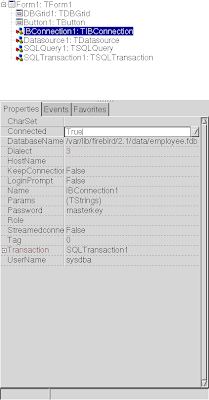
TIBConnection is configured to have DatabaseName=/var/lib/firebird/2.5/data/employee.fdb
Password=masterkey
Username=sysdba
and Transaction=SQLTransaction1
You can put it to be Connected = True
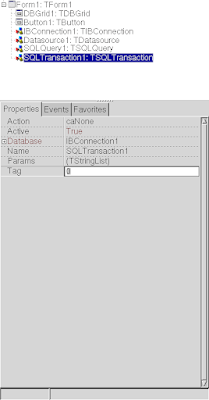
Then configure SQLTransaction1
to use
Database=IBConnection1
Active =True;
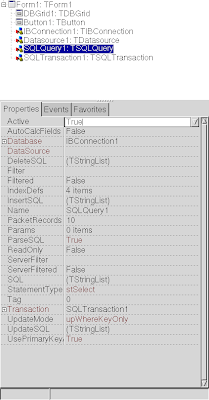
Configure TSQLQuery this way
Database:IBConnection1
SQL=select * from employee;
Active = True;
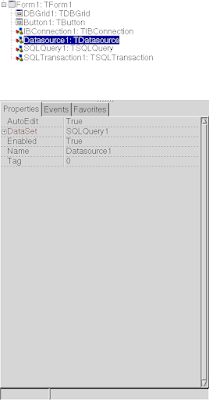
Configure TDatasource
DataSet=SQLQuery1
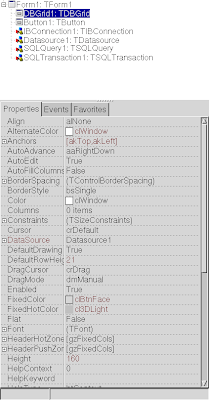
Configure TDBGrid
DataSource = DataSource1
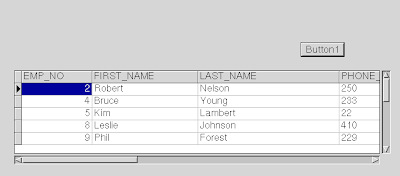
Next you can put an button and make them active from run time
procedure TForm1.Button1Click(Sender: TObject);
begin
SQLQuery1.Active:=true;
end;
sudo apt-get install lazarus-ideStart the ide from the console/terminal
lazarus-ide &If everything went well you'll see a new tab called SQLdb. This tab will contain two components a TSQLConnection and a TSQLQuery.

SQLdb tab also contains a component TIBConnection that you can place it on the form
We will connect to /var/lib/firebird/2.5/data/employee.fdb
On the form put an TIBConnection, TSQLTransaction,TSQLQuery,TDatasource and an TDBGrid

TIBConnection is configured to have DatabaseName=/var/lib/firebird/2.5/data/employee.fdb
Password=masterkey
Username=sysdba
and Transaction=SQLTransaction1
You can put it to be Connected = True

Then configure SQLTransaction1
to use
Database=IBConnection1
Active =True;

Configure TSQLQuery this way
Database:IBConnection1
SQL=select * from employee;
Active = True;

Configure TDatasource
DataSet=SQLQuery1

Configure TDBGrid
DataSource = DataSource1

Next you can put an button and make them active from run time
procedure TForm1.Button1Click(Sender: TObject);
begin
SQLQuery1.Active:=true;
end;

Tuesday, June 21, 2011
Mono Firebird Example updated for Mono 2.6/2.10.x release (#ubuntu / #debian)
Mono Firebird Example updated for Mono 2.6 release
First I hope you have Firebird 2.5 already installed with examples :)
Second Install Monodevelop and Mono
In my case was something like this on ubuntu
Also on Debian you can use mono 2.10.x by using experimental repository (after you add it in /etc/apt/sources.list)
You must download the .Net Provider 2.6.5 for mono binary version NETProvider-2.6.5-MONO_LINUX.7z
Extract it somewhere in the project dir where you want to build it
Create an new C# Console Project
Then add the Firebird .net assembly to the test project
References-> Edit References -> .Net Assembly
browse to the FirebirdSql.Data.FirebirdClient.dll that you downloaded before (and extracted)
then click Add button

Fill the Main.cs this way and Build Solution (Also add System.Data references)
Then click run after the solution is build and the result should be like this

First I hope you have Firebird 2.5 already installed with examples :)
Second Install Monodevelop and Mono
In my case was something like this on ubuntu
sudo apt-get install mono-gmcs mono-gac mono-utils monodevelop monodoc-browser monodevelop-nunit monodevelop-versioncontrol monodoc-gtk2.0-manual
Also on Debian you can use mono 2.10.x by using experimental repository (after you add it in /etc/apt/sources.list)
sudo apt-get -t experimental install mono-gmcs mono-gac mono-utils monodevelop monodoc-browser monodevelop-nunit monodevelop-versioncontrol monodoc-gtk2.0-manual
You must download the .Net Provider 2.6.5 for mono binary version NETProvider-2.6.5-MONO_LINUX.7z
Extract it somewhere in the project dir where you want to build it
Create an new C# Console Project
Then add the Firebird .net assembly to the test project
References-> Edit References -> .Net Assembly
browse to the FirebirdSql.Data.FirebirdClient.dll that you downloaded before (and extracted)
then click Add button

Fill the Main.cs this way and Build Solution (Also add System.Data references)
Then click run after the solution is build and the result should be like this

Saturday, March 05, 2011
Fixes to fbexport compilation on linux systems debian/ubuntu
It's easy to compile firebird export utility just download the version from sourceforge
cd fbexport-1.90
after that modify fbcopy/TableDependency.cpp
and add
make should complete the job (of course you need the firebird headers , check if you have them installed with dpkg -L firebird2.5-dev)
and the binary is in exe dir
cd fbexport-1.90
after that modify fbcopy/TableDependency.cpp
and add
#include <stdio.h>to the include section otherwise you will get the error error: ‘printf’ was not declared in this scope
make should complete the job (of course you need the firebird headers , check if you have them installed with dpkg -L firebird2.5-dev)
 make
g++ -c -O1 -DIBPP_LINUX -DIBPP_GCC -Iibpp -o fbcopy/args.o fbcopy/args.cpp
g++ -c -O1 -DIBPP_LINUX -DIBPP_GCC -Iibpp -o fbcopy/fbcopy.o fbcopy/fbcopy.cpp
g++ -c -O1 -DIBPP_LINUX -DIBPP_GCC -Iibpp -o fbcopy/TableDependency.o fbcopy/TableDependency.cpp
g++ -c -O1 -DIBPP_LINUX -DIBPP_GCC -Iibpp -o fbcopy/main.o fbcopy/main.cpp
g++ -c -O1 -DIBPP_LINUX -DIBPP_GCC -Iibpp -o ibpp/all_in_one.o ibpp/all_in_one.cpp
g++ -pthread -lfbclient ibpp/all_in_one.o fbcopy/args.o fbcopy/fbcopy.o fbcopy/TableDependency.o fbcopy/main.o  -oexe/fbcopy
g++ -c -O1 -DIBPP_LINUX -DIBPP_GCC -Iibpp -o fbexport/ParseArgs.o fbexport/ParseArgs.cpp
g++ -c -O1 -DIBPP_LINUX -DIBPP_GCC -Iibpp -o fbexport/FBExport.o fbexport/FBExport.cpp
g++ -c -O1 -DIBPP_LINUX -DIBPP_GCC -Iibpp -o fbexport/cli-main.o fbexport/cli-main.cpp
g++ -pthread -lfbclient ibpp/all_in_one.o fbexport/ParseArgs.o fbexport/FBExport.o fbexport/cli-main.o -oexe/fbexport
and the binary is in exe dir
exe/fbexport
--------------------------------
FBExport v1.80 by Milan Babuskov (mbabuskov), using IBPP 2.5.3.0
Tool for importing/exporting data with Firebird and InterBase databases.
Usage: fbexport -[S|Sc|Si|Sh|I|If|X|L] Options

 -S  Select = output to file  (S - binary, Si - INSERTs, Sc - CSV, Sh - HTML)
 -I  Insert = input from file
 -If Insert by Full SQL = input from file, by parameterized SQL
 -X  eXecute SQL statement, use with -F to execute sql scripts
 -L  List connected users

Options are:                           -H Host          [LOCALHOST]
 -D Database                           -U Username      [SYSDBA]
 -F Filename (use - for stdout)        -O Role
 -P Password                           -T Trim chars    [off]
 -A "Charset"                          -J "Date format" [D.M.Y]
 -Q "SQL Query statement"              -K "Time format" [H:M:S]
 -C # = Checkpoint at # rows [1000]    -M Commit at each checkpoint [off]
 -E # = Ignore up to # errors [0] Set to -1 to ignore all
 -R Rollback transaction if any errors occur while importing [off]
 -V Table = Verbatim copy of table (use -Q to set where clause if desired)
 -B Separator [,] = Field separator for CSV export. Allows special value: TAB
Command-line options are not case-sensitive (except the TAB setting)
Update
I have added a few more fixes in this fork on the github (related to linking errors) and included the compiling fixes from above
Wednesday, February 23, 2011
Gallium3 nouveau on !debian sid now enabled part two
After hitting the building mesa bug error in first part
: nouveau/nouveau_class.h: No such file or directory
I have decided to install libdrm 2.4.24 but there is no such thing in debian
so you must install by source from git
Then go back to mesa dir from git
Now you can play with opengl:openarena,xonotic or webgl
So i'm really free of nvidia's blobs
Update: seems that is possible to install nouveau gallium with a simple
: nouveau/nouveau_class.h: No such file or directory
I have decided to install libdrm 2.4.24 but there is no such thing in debian
so you must install by source from git
git clone git://anongit.freedesktop.org/git/mesa/drm
cd drm
./autogen.sh
./configure --enable-nouveau-experimental-api --prefix=/usr
sudo make install
Then go back to mesa dir from git
make
sudo cp lib/gallium/nouveau_dri.so /usr/lib/dri/
LIBGL_DEBUG=verbose glxinfo 2>&1 >/dev/null | grep so$
libGL: OpenDriver: trying /usr/lib/dri/tls/nouveau_dri.so
libGL: OpenDriver: trying /usr/lib/dri/nouveau_dri.so
libGL: OpenDriver: trying /usr/lib/dri/tls/nouveau_dri.so
libGL: OpenDriver: trying /usr/lib/dri/nouveau_dri.so
glxinfo | egrep renderer
OpenGL renderer string: Gallium 0.4 on NVAA
Now you can play with opengl:openarena,xonotic or webgl
So i'm really free of nvidia's blobs
Update: seems that is possible to install nouveau gallium with a simple
sudo apt-get install libgl1-mesa-dri-experimental

dpkg -L  libgl1-mesa-dri-experimental | grep nouveau
/usr/lib/dri/nouveau_dri.so
Tuesday, February 22, 2011
#oracle Virtualbox 4.0.x doesn't work on !debian sid
Seems that is a known issue ,
I have dist-upgraded and from vbox 3.x is now 4.0 but that is very slow
the windowsxp vm works with cpu 100% in top and the mouse moves like in slow motion
I will remove virtualbox and use virt-manager from now on

ps: yah i want to see my grades on the university website ...works on ie only fsck

I have dist-upgraded and from vbox 3.x is now 4.0 but that is very slow
the windowsxp vm works with cpu 100% in top and the mouse moves like in slow motion
I will remove virtualbox and use virt-manager from now on

ps: yah i want to see my grades on the university website ...works on ie only fsck

Saturday, February 12, 2011
libvirt-manager install tips on #Debian sid
A good idea is to add yourself to libvirt group and also kvm
the dir of /var/lib/libvirt/images is unwritable for the group libvirt (seems that is created with root.root )
so is good to make it group rw and change the owner to grup libvirt
otherwise you will get the dreaded message qemu: could not open disk image /var/lib/libvirt/images
Now i can install natty in the virtmanager

sudo adduser mariuz libvirt
sudo adduser mariuz kvm
the dir of /var/lib/libvirt/images is unwritable for the group libvirt (seems that is created with root.root )
so is good to make it group rw and change the owner to grup libvirt
sudo chmod g+rw /var/lib/libvirt/images/
otherwise you will get the dreaded message qemu: could not open disk image /var/lib/libvirt/images
Now i can install natty in the virtmanager

Sunday, September 12, 2010
A few days with #Gnash on #debian #sid #amd64
seems that on my systems amd64 the adobe's proprietary plugin is temporarily removed because of it's dependencies
Yes i do use the flashplayer-mozilla from debian multimedia but today update removed it also the nspluginwrapper
flashplayer-mozilla depends on nspluginwrapper and ia32-libs
but the new version of ia32-libs conflicts with older version of ia32-libs-gtk
debtree flashplayer-mozilla > out.dot
dot -T png -o out.png out.dot

or use the svg version to see the dependencies better
dot -T svg -o out.svg out.dot
so i will use gnash plugin >0.8.8 for a few days for the youtube videos that are not converted to webm (seems that is working in iceweasel, and google chrome, on arora i have one error)

it's not that bad : both cpus are used so is full multi threaded
some movies are working ok : like the new compiz 0.9.2 examples
but some are not (like the reea.net main splash movie)

Yes i do use the flashplayer-mozilla from debian multimedia but today update removed it also the nspluginwrapper
flashplayer-mozilla depends on nspluginwrapper and ia32-libs
but the new version of ia32-libs conflicts with older version of ia32-libs-gtk
debtree flashplayer-mozilla > out.dot
dot -T png -o out.png out.dot

or use the svg version to see the dependencies better
dot -T svg -o out.svg out.dot
so i will use gnash plugin >0.8.8 for a few days for the youtube videos that are not converted to webm (seems that is working in iceweasel, and google chrome, on arora i have one error)
apt-get install mozilla-plugin-gnash

it's not that bad : both cpus are used so is full multi threaded
some movies are working ok : like the new compiz 0.9.2 examples
but some are not (like the reea.net main splash movie)

Sunday, August 15, 2010
Why #ubuntu 64 bit not recommended for daily usage ? part two
if you think that 64 bit is not good for daily usage think again
some things like video decoding and encoding is faster even on atom based machines
and there is good reason because is so fast : the increased number of registers and
the registers are wider
http://x264dev.multimedia.cx/?p=499
Another thing is that all the apps are faster on 64bit than on 32bit and i can sense that speed
you know like when you overclock you cpu to gain something like 10% more in FPS
There is a feeling that system is faster on 64bit than on 32bit (more responsive)
Forget about flash , flash is slow on all systems be it quad or six core monsters
anyway is working without many issues on 64bit systems , So why the fark ubuntu is recomending
a slow operating system ?
http://tuxradar.com/content/ubuntu-904-32-bit-vs-64-bit-benchmarks

some things like video decoding and encoding is faster even on atom based machines
and there is good reason because is so fast : the increased number of registers and
the registers are wider
http://x264dev.multimedia.cx/?p=499
As these benchmarks show, ffvp8 is clearly much faster than libvpx, particularly on 64-bit. It’s even faster by a large margin on Atom, despite the fact that we haven’t even begun optimizing for it. In many cases, ffvp8′s extra speed can make the difference between a video that plays and one that doesn’t, especially in modern browsers with software compositing engines taking up a lot of CPU time. Want to get faster playback of VP8 videos? The next versions of FFmpeg-based players, like VLC, will include ffvp8. Want to get faster playback of WebM in your browser? Lobby your browser developers to use ffvp8 instead of libvpx. I expect Chrome to switch first, as they already use libavcodec for most of their playback system.
Another thing is that all the apps are faster on 64bit than on 32bit and i can sense that speed
you know like when you overclock you cpu to gain something like 10% more in FPS
There is a feeling that system is faster on 64bit than on 32bit (more responsive)
Forget about flash , flash is slow on all systems be it quad or six core monsters
anyway is working without many issues on 64bit systems , So why the fark ubuntu is recomending
a slow operating system ?
http://tuxradar.com/content/ubuntu-904-32-bit-vs-64-bit-benchmarks
At this point, using a 64-bit distro is rather like enabling hyperthreading on your CPU - you get a free performance boost for your PC, and if that means you can put off upgrading it for another six months then it's an easy win. As we said earlier, it's a nice bonus. Sure, 5-10% isn't a lot, but when it's across your whole desktop and comes at no cost, why not?

Wednesday, August 11, 2010
generating visitors stats with visitors and uzing gzip-ed logs
tip of the day using visitors stats
zcat /var/log/apache2/firebirdsqlro_access.log.*.gz | visitors - >stats.html
--
50345 lines processed in 2 seconds
0 invalid lines, 0 blacklisted referers
http://firebirdsql.ro/images/stats.html
I like the piwik stats interface and seems that is using html canvas instead of flash
http://piwik.org/
zcat /var/log/apache2/firebirdsqlro_access.log.*.gz | visitors - >stats.html
--
50345 lines processed in 2 seconds
0 invalid lines, 0 blacklisted referers
http://firebirdsql.ro/images/stats.html
I like the piwik stats interface and seems that is using html canvas instead of flash
http://piwik.org/
Monday, August 02, 2010
On #debian : shortcutting circular dependencies in apt or forcing them
I wonder if is possible to detect and shortcut the circular dependencies in apt tree , the kind of shortcut we have in sql for some joins (i don't remember the post exactly)
http://people.skolelinux.org/pere/blog/Circular_package_dependencies_harms_apt_recovery.html
http://people.skolelinux.org/pere/blog/Circular_package_dependencies_harms_apt_recovery.html
Saturday, October 11, 2008
Testing Firebird 2.1 on Debian experimental
Testing Firebird 2.1 on Debian experimental
Update: There is now Firebird 2.5 final in experimental
also if you want 2.1 is already in testing and unstable (no need for experimental repository)
Here is my sources.list
cat /etc/apt/sources.list
deb http://ftp.us.debian.org/debian/ unstable main
deb-src http://ftp.us.debian.org/debian/ unstable main
Add:
deb http://ftp.us.debian.org/debian/ experimental main
deb-src http://ftp.us.debian.org/debian/ experimental main
Then:
follow the examples extaction procedure from this page [Scrooll down and ignore the apt sources.list lines]
https://help.ubuntu.com/community/Firebird2.1
With firebird2.1-classic i have this error when i try to connect to employee.fdb
Engine Code : 335544653
Engine Message :
cannot attach to password database
This is a caveat with classic server and not a bug in Flamerobin.
This is the recipe to reproduce it:
* install Debian classic-server package
* (before anything else) connect to any database using a direct path
to the database, not server:/path/to/db using any program linked
with libfbembed, for example the firebird-supplied tools (sql,
gfix etc)
- this starts the lock manager as the currently running user
(let's name it 'X', which most probably is *not* 'firebird')
* try to connect to any database either using the server:/path/to/db
connection string, or using an utility that is linked with
libfbclient (which preepends localhost: on raw connection
strings), for example flamerobin
- you can't as that utility would connect via the fb_inet_server,
which runs as user 'firebird' by default and cannot open the
lock files created by the user 'X'.
To avoid this
* always use localhost: in front of any paths. this way the lock
files and the shared memory segment will be owned by the
'firebird' user.
Update: There is now Firebird 2.5 final in experimental
also if you want 2.1 is already in testing and unstable (no need for experimental repository)
Here is my sources.list
cat /etc/apt/sources.list
deb http://ftp.us.debian.org/debian/ unstable main
deb-src http://ftp.us.debian.org/debian/ unstable main
Add:
deb http://ftp.us.debian.org/debian/ experimental main
deb-src http://ftp.us.debian.org/debian/ experimental main
Then:
# apt-get update -t experimental
# apt-get install -t experimental firebird2.1-classic
or install super-server
# apt-get install -t experimental firebird2.1-classicInstall examples and flamerobin
apt-get install -t experimental firebird2.1-examples flamerobin
follow the examples extaction procedure from this page [Scrooll down and ignore the apt sources.list lines]
https://help.ubuntu.com/community/Firebird2.1
With firebird2.1-classic i have this error when i try to connect to employee.fdb
Engine Code : 335544653
Engine Message :
cannot attach to password database
This is a caveat with classic server and not a bug in Flamerobin.
This is the recipe to reproduce it:
* install Debian classic-server package
* (before anything else) connect to any database using a direct path
to the database, not server:/path/to/db using any program linked
with libfbembed, for example the firebird-supplied tools (sql,
gfix etc)
- this starts the lock manager as the currently running user
(let's name it 'X', which most probably is *not* 'firebird')
* try to connect to any database either using the server:/path/to/db
connection string, or using an utility that is linked with
libfbclient (which preepends localhost: on raw connection
strings), for example flamerobin
- you can't as that utility would connect via the fb_inet_server,
which runs as user 'firebird' by default and cannot open the
lock files created by the user 'X'.
To avoid this
* always use localhost: in front of any paths. this way the lock
files and the shared memory segment will be owned by the
'firebird' user.
Testing debian installer on windows box
I had at Lechinta an wubi installer but the cpu is too slow for ntfs-ng
so i decided to install debian/ubuntu on an native partition
So i installed the debian on windows and after it finished it rebooted and started
the classic debian installer (graphic mode)
I installed the base system then i dist-upgraded to lenny (testing)
and then to sid(unstable)
Just replace etch with testing in /etc/apt/sources.list
#apt-get update ; apt-get dist-upgrade
#reboot
Just replace testing with unstable in /etc/apt/sources.list
#apt-get update ; apt-get dist-upgrade
#reboot
so now i have an modern distro
The space is small on this p3 machine @500Mhz so i had to install an lightweight window manager
so i installed xfce4 from command line
#apt-get install xfce4 xorg gdm
#/etc/init.d/gdm start
Then i needed an browser so i typed
#sudo apt-get install iceweasel
That is firefox3.0.x under debian , they didn't accepted mozilla firefox restrictions and EULA so they decided to name it that way
Next install synaptic and it should give you an starting point to installing packages
#sudo apt-get install synaptic
Here is how to install flash player under debian
I had at Lechinta an wubi installer but the cpu is too slow for ntfs-ng
so i decided to install debian/ubuntu on an native partition
So i installed the debian on windows and after it finished it rebooted and started
the classic debian installer (graphic mode)
I installed the base system then i dist-upgraded to lenny (testing)
and then to sid(unstable)
Just replace etch with testing in /etc/apt/sources.list
#apt-get update ; apt-get dist-upgrade
#reboot
Just replace testing with unstable in /etc/apt/sources.list
#apt-get update ; apt-get dist-upgrade
#reboot
so now i have an modern distro
The space is small on this p3 machine @500Mhz so i had to install an lightweight window manager
so i installed xfce4 from command line
#apt-get install xfce4 xorg gdm
#/etc/init.d/gdm start
Then i needed an browser so i typed
#sudo apt-get install iceweasel
That is firefox3.0.x under debian , they didn't accepted mozilla firefox restrictions and EULA so they decided to name it that way
Next install synaptic and it should give you an starting point to installing packages
#sudo apt-get install synaptic
Here is how to install flash player under debian
Monday, September 15, 2008
Microsoft err Mozilla Demanding Firefox Display EULA In Ubuntu
what next ? eula for source codehttp://tech.slashdot.org/article.pl?sid=08/09/14/195203&from=rss
no wonder opensource will go the webkit route and it will be included in gnome by default (epiphany webkit )
mozilla looks more and more with microsoft (you know like in animal farm)
Thursday, August 21, 2008
adding locale in debian and php
sudo apt-get install language-pack-ro-base or
sudo apt-get install language-pack-fr-base
sudo dpkg-reconfigure locales
locale -a
C
de_AT.utf8
de_BE.utf8
de_CH.utf8
de_DE.utf8
de_LU.utf8
en_US.utf8
fr_BE.utf8
fr_CA.utf8
fr_CH.utf8
fr_FR.utf8
fr_LU.utf8
POSIX
ro_RO.utf8
write an php test script locales.php
setlocale(LC_TIME, 'ro_RO.UTF8'); // note the charset info !
echo strftime("%B");
php locales.php
august
sudo apt-get install language-pack-ro-base or
sudo apt-get install language-pack-fr-base
sudo dpkg-reconfigure locales
locale -a
C
de_AT.utf8
de_BE.utf8
de_CH.utf8
de_DE.utf8
de_LU.utf8
en_US.utf8
fr_BE.utf8
fr_CA.utf8
fr_CH.utf8
fr_FR.utf8
fr_LU.utf8
POSIX
ro_RO.utf8
write an php test script locales.php
setlocale(LC_TIME, 'ro_RO.UTF8'); // note the charset info !
echo strftime("%B");
php locales.php
august
Friday, May 23, 2008
specs for an new small server that will be used for web and db in the same time
Xeon quad core
Operating System Debian Stable 64
2000GB BW
100Mbps network
https://order.layeredtech.com/ConfigureServer.lt?method=display&productId=1775&__utma=1.1468572713.1210778814.1210778814.1211467849.2&__utmb=1&__utmc=1&__utmx=-&__utmz=1.1210778814.1.1.utmccn%3D(direct)
Or you can choose from this list
http://www.layeredtech.com/dedicated-servers/enterprise.php
the important stuff is memory/hdd and to be quad core
the operating system must be debian 64 bit or ubuntu server edition
Xeon quad core
16GB RAM 2x1000GB SATA HD on RAID 0
Operating System Debian Stable 64
2000GB BW
100Mbps network
https://order.layeredtech.com/ConfigureServer.lt?method=display&productId=1775&__utma=1.1468572713.1210778814.1210778814.1211467849.2&__utmb=1&__utmc=1&__utmx=-&__utmz=1.1210778814.1.1.utmccn%3D(direct)
Or you can choose from this list
http://www.layeredtech.com/dedicated-servers/enterprise.php
the important stuff is memory/hdd and to be quad core
the operating system must be debian 64 bit or ubuntu server edition
Thursday, May 22, 2008
openssl-blacklist update
You can test sslblacklist on any distro to se if they are broken
wget http://security.ubuntu.com/ubuntu/pool/main/o/openssl-blacklist/openssl-blacklist_0.1-0ubuntu0.6.06.1.tar.gz
tar -zxvf openssl-blacklist_0.1-0ubuntu0.6.06.1.tar.gz
cd openssl-blacklist-0.1/
mkdir -p /usr/share/openssl-blacklist/
cp blacklist.RSA-* /usr/share/openssl-blacklist/
./openssl-vulnkey ssl.key/random_debian.key
Not blacklisted:fb11451111111111111111111111111 ssl.key/random_debian.key


http://metasploit.com/users/hdm/tools/debian-openssl/
http://www.ubuntu.com/usn/usn-612-1
http://www.ubuntu.com/usn/usn-612-3
You can test sslblacklist on any distro to se if they are broken
wget http://security.ubuntu.com/ubuntu/pool/main/o/openssl-blacklist/openssl-blacklist_0.1-0ubuntu0.6.06.1.tar.gz
tar -zxvf openssl-blacklist_0.1-0ubuntu0.6.06.1.tar.gz
cd openssl-blacklist-0.1/
mkdir -p /usr/share/openssl-blacklist/
cp blacklist.RSA-* /usr/share/openssl-blacklist/
./openssl-vulnkey ssl.key/random_debian.key
Not blacklisted:fb11451111111111111111111111111 ssl.key/random_debian.key


http://metasploit.com/users/hdm/tools/debian-openssl/
Subscribe to:
Posts (Atom)
