Run a Self-Improving AI Agent On Managed  Hermes Agent Hosting

Image

Changelog

xCloud Changelog

We’re constantly making xCloud better with new features and improvements. Look at what we’ve got now and tell us what else you want!

  • No categories

🔥 New Features

🌟 xCloud Pulse — Native macOS Menu Bar Companion App

Introducing xCloud Pulse, a native macOS menu bar companion app for xCloud, built on the upcoming xCloud Public API.

xCloud Pulse works like a quick-access xCloud dashboard that lives directly in your Mac menu bar, helping you check important site and server information without opening the browser every time.

With xCloud Pulse, you can:

  • See every site and server at a glance, with live status the moment the app opens.
  • Check site status, PHP version, SSL, and backup state for any site in one place.
  • Catch critical issues, recent activity, warnings, and system logs as they happen.
  • Run quick actions such as purge cache, trigger backup, copy a server IP, or open the dashboard, each in a single click.
  • Search across every site, server, and action with a fast command palette, the way Spotlight works on your Mac.
  • Native macOS app, light on your machine and built on the xCloud Public API.

The goal is simple: make everyday xCloud tasks faster, whether you need to check a site, purge cache, review an issue, or trigger a backup without leaving your workflow.

xCloud Pulse is currently being fine-tuned, with UI improvements and polishing still in progress.

✨ Improvements & Bug Fixes

  • Added a cleaner and more helpful UI for pending server setup, making it easier for new users to complete pending server creation.
  • Improved Git branch search in the Deploy via Git site creation flow, allowing users to search and find more branches more reliably.

Bug Fixes

  • Fixed several billing issues related to self-managed servers.
  • Fixed an issue where the “Reading databases with users” event could fail on servers that had no databases.

🔖 Resources

  • No categories

🔥 New Features

🌟 xCloud API — Develop, Integrate, and Automate Programmatically

Take full control of your servers and sites through a modern RESTful API. Automate repetitive tasks, scale your infrastructure, and build directly on top of xCloud, all with enterprise-grade security. Create a token in your dashboard settings, set the permissions you need, and start building in about a minute.

  • Auto-provision servers through the API with no dashboard required.
  • Deploy fully configured sites in a single API call.
  • Manage SSH and sudo users programmatically, adding or removing access on demand.
  • Build CI/CD pipelines, client portals, SaaS tools, and internal dashboards on top of xCloud.
  • Pull live server and site data into any system you already use.
  • Enterprise-grade security with token-based, permission-scoped access on every request.

We will continue to expand API capabilities by introducing additional endpoints on a regular basis.

✨ Improvements & Bug Fixes

  • Improved the payment flow so customers can now securely save cards and pay invoices directly inside xCloud using embedded Stripe payments, with 3D Secure support for future renewals.
  • The limit of the additional domain has now been increased per team with Cloudflare.
  • Improved MySQL auto-healing so it no longer runs when the server is not in the correct state.
  • Fixed an issue related to the Hermes events feed and Status page.
  • Fixed MySQL repeatedly trying to repair itself during problems.
  • Fixed an activity issue where the site deletion was not showing in the activity log.
  • Resolved issues with the Hermes dashboard events feed disconnecting and reduced unnecessary task/poll requests on the Status page.
  • Fixed: Improved Vultr managed server creation errors by showing a clear message instead of the unclear “Invalid plan chosen” error.
  • Fixed: Local backup auto-delete now self-heals correctly when needed.
  • Added support for Hermes live chat with Hermes Agents.

🔖 Resources

  • No categories

🔥 New Features

🌟 PHP Extensions Management – Add PHP Extensions With Clicks, Not Code

Installing and managing PHP extensions no longer requires SSH access or command-line work. xCloud now lets you view, install, and remove PHP extensions for every PHP version directly from the dashboard.

  • One-click installation for supported extensions including APCu, Xdebug, LDAP, YAML, and more
  • One-click removal of extensions you no longer need
  • Dedicated Installed Extensions and Available Extensions sections with extension counts
  • Real-time status indicators for every extension
  • Built-in protection for core PHP extensions to prevent accidental removal
  • Confirmation prompts before extension removal for safer management
  • Unified PHP Configuration and Extensions interface for a cleaner management experience

✨ Improvements

Image
  • Reseller Panel: Resellers can now create products specifically with stacks (NGINX/OLS) or with AI Agents (OpenClaw, Hermes)
  • Improved global search result prioritization and navigation experience.
  • Added monitoring data source filtering across monitoring views.

Bug Fixes

  • Fixed Cloudflare redirect SSL issues on multi-domain redirect sites.
  • Enhanced white-label stack selection and product management.
  • No categories

🚀 New Feature

Global Search (Cmd+K / Ctrl+K)

Find anything in xCloud instantly. Press Cmd+K to search across all your servers, sites, and feature pages from anywhere in the dashboard. When you’re on a server page, the search automatically scopes to that server’s sites.

You’ll also see smart hints showing which features are available based on your server stack and site type, your recent searches, and provider and site-type logos to help you spot results faster. The old sidebar search has been retired, the new search palette replaces it. Keyboard and accessibility behavior has been polished too (focus handling, Esc to close, scroll-lock).

Improvements:

  • Guided SSH Key Setup Setting up SSH keys is now much easier. A new step-by-step guided UI walks you through the process during the sudo/SSH flow, so first-time setup is smoother and less error-prone.
Image

🐛 Bug Fixes

  • Fixed an issue with the Hostinger integration
  • Fixed an issue with the domain update feature
  • Fixed issues with NGINX packages
  • No categories

xCloud v2.6.2 introduces a new interactive browser SSH terminal, a redesigned server creation experience, new Hermes management panels, smarter Docker Compose environment setup, and safer confirmation modals for risky server actions. This release also includes server setup improvements, Mailbox validation updates, and multiple reliability fixes across sites, servers, backups, Supabase, WordPress, and dashboard workflows.

🚀 New Feature

🌟 Interactive Browser SSH Terminal — Open Server & Site Terminal From xCloud Dashboard

Open server, sudo user, or site user terminal sessions directly from the xCloud dashboard, no local SSH client required. Terminal access is permission-controlled and uses secure, single-use session tickets, so server credentials are not exposed to the browser.

🌟 Redesigned Server Creation Flow

We redesigned the server creation experience across all supported providers with a cleaner layout, improved plan selection, better stack options, and recommended plan support. This makes launching a new server easier, clearer, and more consistent.

🌟 New Hermes Management Panels

Hermes sites now include new dashboard panels for Status, Reset, Environment, and Updates. You can view service status, manage selected settings, reset configuration, and check updates more easily from xCloud.

⚡ Improvements

  • Safer Confirmation for Risky Server Actions – xCloud now shows a confirmation modal before high-impact actions like restarting the server, NGINX, LiteSpeed, or MySQL/MariaDB. This helps prevent accidental downtime.
  • Smarter Docker Compose Environment Setup – Custom Docker Compose setup now detects missing environment variables and helps prepare the .env file automatically. This makes Docker Compose deployments easier and reduces setup errors.
  • New server creation now uses Ubuntu 24.04 by default.
  • Improved server setup reliability for new servers.
  • Improved server plan categorization and recommendation support.
  • Improved dashboard design consistency across server creation pages.
  • Improved Hermes provider and channel setup instructions.
  • Improved Mailbox validation for reserved prefixes.
  • Improved service and permission handling across server pages.

🐛 Bug Fixes

  • Fixed Laravel NGINX 404 handling for PHP-served assets.
  • Fixed Supabase install/reinstall port conflict issues.
  • Fixed Supabase dashboard password configuration issues.
  • Fixed WordPress Git-clone site creation failure.
  • Fixed site deletion handling when no database engine exists.
  • Fixed CPU monitoring process detection.
  • Fixed empty MySQL backup size checks.
  • Fixed Wordfence manual scan timestamp saving.
  • Fixed sudo username validation.
  • Fixed Mailbox admin prefix and API error handling.
  • Fixed Site Events per-page dropdown and pagination issues.
  • No categories

🚀 New Feature

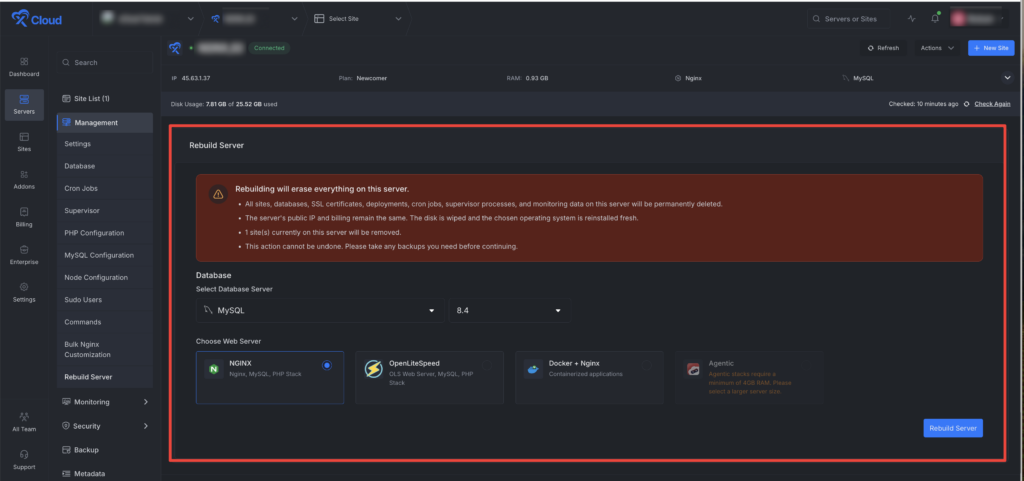
🌟 Introducing Server Rebuild on xCloud – One Click to a Fresh Server, Same IP & Billing

Reset your server to a day-one clean state without decommissioning, re-provisioning, or starting a new billing cycle. One click resets the stack while your IP, DNS records, firewall rules, and invoice stay exactly where they are.

Image
  • Switch your web stack: Choose between NGINX, OpenLiteSpeed, Docker + Nginx, or any of our Agentic stacks (OpenClaw, Paperclip, Hermes) — swap your entire web environment in a single action.
  • Change your database: Move to MySQL 8.4, MariaDB 11, depending on what your new stack needs.
  • Keep the same public IP: DNS records, firewall rules, and monitoring URLs stay intact, so there’s nothing to reconfigure on the network side.
  • Keep the same billing cycle: No new server, no new invoice, no prorated charges, your existing subscription continues uninterrupted.
  • Same security hardening, fresh disk: SSL, SSH, and 7G-firewall come back automatically on the rebuilt server, so you start clean without losing your baseline protection.

⚡ Improvements

  • Bills Payment page now displays detailed invoices above the billing history for faster reference.
  • Mailbox now correctly shows whether SMTP is available for the user’s plan.

🐛 Bug Fixes

  • Fixed stale database information appearing after deleting databases or users.
  • Fixed renewal billing issues affecting white-label subscriptions.
  • No categories

🔥 New Features

🌟 Client Reports For Professional Branded Website Maintenance Reports

Build Trust With Clear Website Maintenance Reports for Your Clients. Generate professional, fully branded site reports for your clients directly from the xCloud dashboard in just a few clicks.

  • Comprehensive Site Reports: Generate reports covering performance, security, backups, updates, and traffic all in one place. Choose your reporting period and customize which sections to include or exclude.
  • Full Branding Control: Add your own logo, company name, colors, and custom intro/outro messages. Your clients see your brand, not ours.
  • Custom Development Logging: Log custom development work you delivered during the reporting period so clients see exactly what they’re paying for.
  • Report Preview & History: Preview reports live before generating to avoid surprises. Access your full report history with download and delete options anytime.
  • Reports Include: App details and SSL certificate status, WordPress core and plugin/theme update logs, backup summary, security and vulnerability status, snapshots, PageSpeed Insights scores (mobile and desktop), traffic statistics, and custom development entries with hours and descriptions.

 Improvements

  • Improved dashboard workflows for a smoother site and server management experience.
  • Enhanced several user interface areas to make key information easier to find and understand.
  • Improved overall platform stability and reliability across common actions.

 Bug Fixes

  • Fixed issues affecting some site and server management workflows.
  • Resolved minor UI inconsistencies across the dashboard.
  • Improved error handling for a more reliable user experience.
  • No categories

🔥 New Features

🌟 Introduced Site Rules For OLS Server

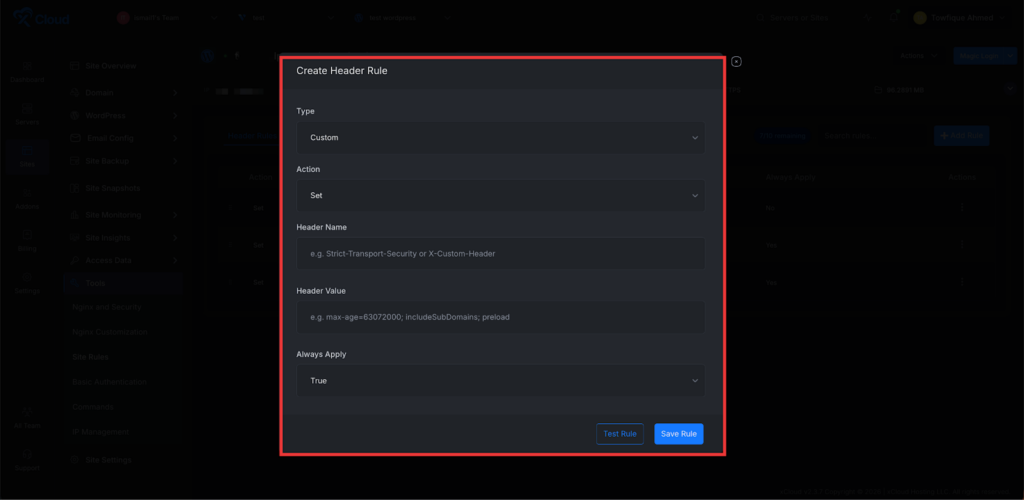
Manage HTTP Headers & Redirects for WordPress Sites. Create and manage HTTP headers and redirect rules for WordPress sites running OLS directly from the xCloud dashboard.

  • Add Custom Headers: Define custom HTTP response headers (security headers, caching headers, CORS, etc.) for your WordPress site directly from the dashboard. Strengthen site security, control browser caching, and manage cross-origin policies without manually editing nginx configuration files.
Image
  • Redirects: Set up 301/302 redirects for URLs, paths, or patterns from a clean, intuitive interface. Manage post-migration URL changes, enforce trailing slashes, or route legacy paths to new destinations — all without writing a single rewrite rule by hand.

⚡ Improvements

✅ Patchstack now tracks each site individually for more reliable scans, updates, and SSO.

✅ Vulnerability counts now match across all pages, “Last Scanned” is back, and you’ll get instant alerts on new threats.

🐛 Bug Fixes

🔧 Fixed Cloudflare WAF rule that was blocking Googlebot and breaking SEO on 100+ sites.

🔧 Fixed Push-to-Deploy toggle so disabling it actually stops deployments.

🔧 Fixed 502 errors on Node.js, N8N, and Uptime Kuma sites after re-enable.

🔧 Fixed misleading “select at least one database” error when editing database users.

🔧 Fixed orphaned staging sites left behind when deleting a production site.

🔧 Fixed backup table to show the real total instead of just the current page count.

  • No categories

 Improvements

  • Improved Mailbox Admin Visibility – NEW Mailbox management now has better admin tooling and reporting support.
  • Safer Staging Pull from Production – Pulling data from production to staging is now safer. – Sensitive mailer credentials are sanitized during staging sync. WordPress salts are refreshed for staging environments.PHP version parity is improved between production and staging. Helps prevent accidental use of production credentials in staging
  • Faster OpenClaw Server Readiness – We improved the infrastructure flow for OpenClaw server creation so eligible OpenClaw servers can be prepared and assigned faster.
  • Better Server Resize Billing Flow – Server resize billing now works more smoothly with the invoice payment modal.
  • Improved Service Sync ReliabilityWe added a more reliable server service sync flow to keep server service records aligned.
  • Cleaner Alert Notifications – We improved alert handling to prevent duplicate notifications for some alert events.This helps reduce noise and keeps notifications more accurate.
  • Stronger Supply Chain Protection – We added an npm package safety guard to reduce the risk of installing newly published potentially unsafe packages too quickly.
  • The server creation stack input has been updated with better design and positioning.

🐛 Bug Fixes:

  • Fixed an issue where the Rank Math NGINX rewrite template could generate unsafe or unreliable rewrite output.
  • Fixed an issue where the first server bill could be missing in some billing repair flows.
  • Fixed a duplicate bill hash issue during server bill repair.
  • Fixed server bill matching so products are matched correctly by renewal period.
  • Fixed an issue where PHP auto-healing installation could run incorrectly on Al Agent Hosting and Docker-based stacks.
  • Fixed a Redis extension issue that could cause instability during PHP installs on OpenLiteSpeed or NGINX servers.
  • Fixed an issue where the caching page could appear blank for sites without a Redis password.
  • Improved Redis password show/hide behavior on the caching page.
  • Hardened the sudo user provisioning script for better reliability.
  • Fixed server permission tests and backend handling around the newer server service structure.


  • No categories

🔥 New Features

  • ⚡ xCloud now provisions servers nearly 50% faster – We optimized how xCloud prepares new servers. Required services are prioritized first, while non-essential setup tasks are handled more efficiently in the background.
    📌 New servers can become ready faster.  
    📌 Initial setup feels smoother and less blocked.  
    📌 Users can start working sooner after creating a server.
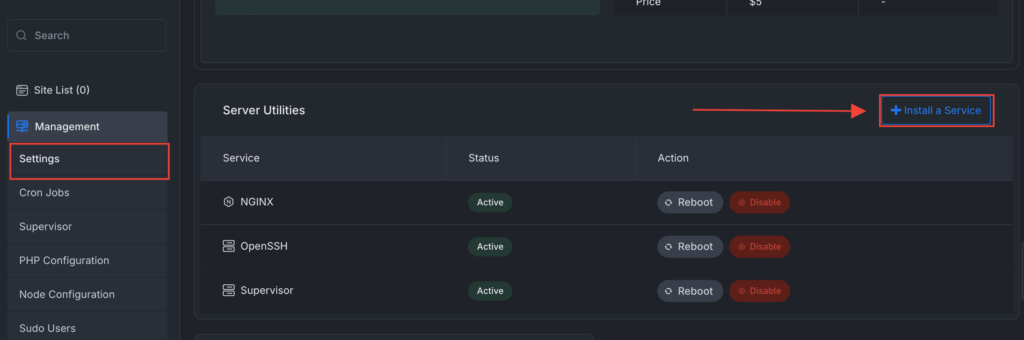
  • Install Services from the Dashboard – When you install a site, your required services will be auto-installed. But if you want, you can now also install supported services directly from the server management dashboard.
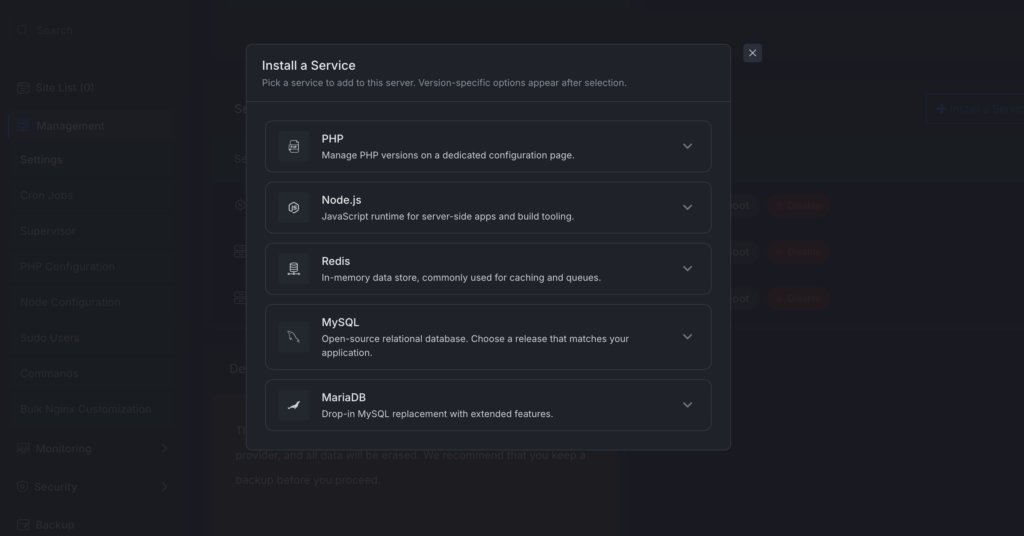
    Instead of relying on manual setup, users can open the Install a Service panel and choose which service or runtime they want to add to the server.
    📌 Install services from the server dashboard.
    📌 Supported options include PHP, Node.js, Redis, MySQL, and MariaDB.
    📌 Version-specific options appear after selecting a service.
    📌 Makes server customization easier without manual command-line work.

    Visit Server > Settings
Image

Then you can install the required service as per your need:

Image
  • Service Auto-Healing Foundation – xCloud now has a stronger foundation for detecting and recovering failed services.
    📌 Services can be tracked more reliably.
    📌 Failed or inactive services are easier to detect.
    📌 This improves long-term server reliability and prepares xCloud for better automatic recovery flows.

 Improvements

  • Smarter Service Management – Server services are now tracked in a more structured and reliable way.
    📌 More accurate service status tracking.
    📌 Clearer separation between services and runtimes.
    📌 Easier management for start, stop, restart, and install actions.
    📌 Better foundation for real-time service updates.
  • Live Service Status Updates — Service actions now provide better real-time feedback in the dashboard.
    📌 See service status changes without constantly refreshing the page.
    📌 Better visibility when installing, starting, stopping, or restarting services.
    📌 Easier to understand what is happening on your server.
  • Clearer Services and Runtime Display – The server management interface now shows services and runtimes more clearly.
    📌 Easier to understand which services are installed.  
    📌 Cleaner labels for server components.  
    📌 Better organization for PHP, Node.js, database services, and other runtimes.
  • Improved Database Options – Database-related options are now cleaner and easier to understand.
    📌 Better database picker during site creation.
    📌 More consistent naming and capitalization.
    📌 Less confusion when selecting database options.

    No action is required from users. Existing servers will continue working normally.

🐛 Bug Fixes:

📌 Improved WordPress migration verification so xCloud can better confirm when a migration has completed successfully.