#html Startups & Tools
Discover the best html startups, tools, and products on SellWithBoost.

Consolidating web design workflows into a single interface, this browser-based tool addresses the persistent friction designers face when analyzing and reusing web components. Rather than toggling between a dozen applications to inspect styles, download assets, extract colors, and audit accessibility, users get a unified extraction pipeline operating entirely within their browser. The product targets designers and developers who regularly analyze reference sites, rebuild designs from screenshots, or audit existing web properties. This includes UI/UX professionals documenting design systems, developers creating themeable applications, and accessibility specialists evaluating compliance. What distinguishes this offering is its architectural simplicity: everything runs locally in the browser, meaning no data leaves the user's machine and no server infrastructure bottlenecks the workflow. This privacy-first approach removes friction entirely—no uploading sensitive design files or site data to external services. The feature set spans multiple extraction modes. Full website downloads preserve complete offline bundles with all assets intact and functional. A design system extraction mode surfaces every color, gradient, and font in use, enabling rapid documentation. An inspection mode allows selecting individual elements to export as reusable components or clean CSS. A particularly clever addition integrates AI prompt generation, preparing outputs ready for ChatGPT, Claude, or Gemini to reconstruct designs programmatically. Media extraction gathers images, videos, icons, and animations in one place. For accessibility-focused teams, an audit mode runs WCAG compliance checks across all levels and generates professional reports with accessibility scoring. The exported code emphasizes production readiness, stripping bloat and delivering lean HTML and CSS suitable for immediate use. Multi-language support extends the interface globally across 10+ languages, with automatic adaptation to browser settings. The pricing model breaks the subscription paradigm. A permanent free tier grants 10 high-speed exports per period with basic single-page capture and limited asset extraction. A lifetime deal offering charges a one-time payment of $25—marked down from $69—for permanent access, completely eliminating recurring fees. This structure removes the psychological barrier that typically trips up tool adoption, particularly appealing to agencies and freelancers managing unpredictable project volumes. For teams prioritizing cost predictability over subscription models, the flat-fee approach wins by eliminating future billing uncertainty.
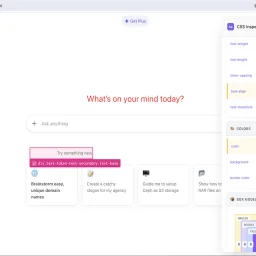
Debugging CSS issues on unfamiliar websites presents a familiar challenge for web developers and designers: how to quickly understand styling structure without struggling through the browser's default developer tools. CSS Inspector Pro addresses this need with a lightweight Chrome extension that layers an intuitive inspection interface over the inspection workflows most developers already use. The extension centers on three core workflows. First, it provides visual element selection through hover highlighting and click-to-select functionality, displaying element dimensions and selector information in real-time. Once an element is selected, developers can edit its CSS properties live with instant visual feedback, supported by color pickers and dropdown suggestions for common values. A granular revert system then allows undoing individual property changes or clearing all modifications at once, with visual indicators showing which properties have been modified. What distinguishes CSS Inspector Pro from existing inspection tools is its focus on immediate usability and simplicity. The interface organizes CSS properties by category—typography, colors, layout—rather than presenting an overwhelming flat list. A dedicated search function filters through computed properties as users type. The extension also includes a box model visualization that dynamically updates with the current element's dimensions, and tabs for viewing organized styles, all properties, or the underlying HTML source. The product appeals to a broad audience: web developers troubleshooting inherited styles on third-party sites, designers experimenting with aesthetic changes before committing to code, and students building foundational CSS understanding. The developer emphasizes privacy as a differentiator—the extension operates entirely locally, requires no signup, and collects no telemetry or usage data. All modifications remain temporary and disappear upon page refresh. The 50-user adoption rate and single five-star review suggest the extension is early in its lifecycle. Version 1.2.2, updated in February 2026, indicates ongoing maintenance. For developers who find themselves frequently inspecting unfamiliar CSS or iterating on styling without touching their editor, the extension offers a faster feedback loop than traditional browser developer tools allow.
