
Scope in JavaScript defines where a variable can be accessed or used within a program. It controls the visibility and lifetime of variables across different parts of the code.
- Determines the accessibility of variables in different parts of the program.
- Helps prevent conflicts by restricting variable usage to specific areas.
- Improves code organization and readability.
- Defines the lifetime of variables during program execution.
- Main types include global scope, local (function) scope, and block scope.
// Declaring a global variable
let x = 10;

function func() {

    // Declaring a local variable
    let y = 20;

    // Accessing Local and Global
    // variables
    console.log(x,",", y);
}

func();
There are several types of scopes of a variable. Let us understand these one by one.
1. Global and Local Scope
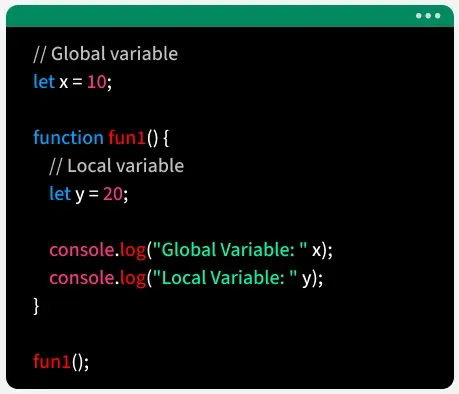
The image below shows Global and Local Scope in JavaScript to help understand their accessibility.
Global Scope
A global variable refers to a variable that is declared outside any function or block, so it can be used anywhere in the program, both inside functions and in the main code.
// Global Variable accessed from within a function
const x = 10;

function fun1() {
    console.log(x);
}

fun1();
The variable x is declared in the global scope and can be accessed inside functions. However, global scope behavior may vary depending on the execution environment (e.g., browser vs module).
Local Scope
A local variable is a variable declared inside a function, making it accessible only within that function. It cannot be used outside the function.
- Functions are objects and can be assigned to variables.
function fun2(){

    // This variable is local to fun2() and
    // cannot be accessed outside this function
    let x = 10;
    console.log(x);
}

fun2();
Here, the code defines a function fun2 with a local variable x, which is accessible only inside the function, and prints its value when the function is called.
- Before ES6 (Released in 2015), variables were declared only with
var, which is function-scoped (accessible within the function) and globally Scoped (Accessible everywhere) and prone to issues like hoisting and global pollution. - let and const were introduced with ES6. Variables declared with let and const are either block scoped or global-scooped.
2. Block and Lexical Scope
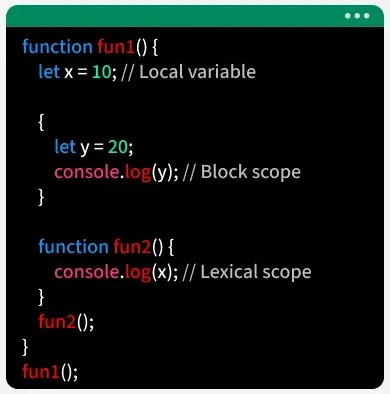
The image below shows Block and Lexical Scope in JavaScript to help understand their accessibility.
Block Scope
Block scope in JavaScript means variables declared with let or const inside { } are accessible only within that block, and accessing them before declaration (TDZ) causes a ReferenceError.
Variables declared with var do not have block scope. A var variable declared inside a function is accessible throughout that entire function, regardless of any blocks (like if statements or for loops) within the function. If var is declared used outside of any function, it creates a global variable.
{

    // Var can Accessible inside & outside the block scope
    var x = 10;

    // let , const Accessible only inside the block scope
    const y = 20;
    let z = 30;

    console.log(x);
    console.log(y);
    console.log(z);
}

console.log(x);
We have successfully accessed the variable with the var keyword because var does not have a block scope.
Lexical Scope
The variable is declared inside the function and can only be accessed inside that block or nested block is called lexical scope.
function func1() {
    const x = 10;

    function func2() {
        const y = 20;
        console.log(`${x} ${y}`);
    }

    func2();
}

func1();
This code demonstrates lexical scope, where func2 accesses the variable x from func1 and prints “10 20”.
Modular Scope
Module scope refers to variables and functions that are accessible only within a specific JavaScript module. It helps keep code organized and prevents variables from affecting the global scope.
// math.js (module file)
export const number = 10;

export function add(a, b) {
  return a + b;
}
// main.js (another file)
import { number, add } from "./math.js";

console.log(number);      // 10
console.log(add(5, 3));   // 8
- math.js has variables and functions inside its module scope.
- They are only accessible in other files when we use export and import.
