Showing posts with label plugin. Show all posts

Sunday, June 05, 2016

MySQL 5.7 ghost users

Several months ago I reported on Default Users in MySQL 5.7. With the addition of the sys schema the server needs an extra user to secure operations. The problem with extra users is that, if you are not aware of their existence and why they are needed, you may easily mismanage them. For example, you may have a cleanup routine that you run when you use a new server, and the routine may have a command like

DELETE FROM mysql.user WHERE user != 'root';

This was good up to MySQL 5.6. Then the sys schema was added, and with it the user mysql.sys, which may cause errors if you try to re-create views in the sys schema.

The latest user sneaking below the radar is mysqlxsys. Like its predecessor, it comes well documented, and if only I had read all the manual I'd had known that this user must exist, or things won't work.

Noun bug 9935

Here is how they did not work for me:

$ make_sandbox 5.7.12 -- -c plugin-load=mysqlx=mysqlx.so --no_show
    The MySQL Sandbox,  version 3.1.05
    (C) 2006-2016 Giuseppe Maxia
loading grants
.. sandbox server started
Your sandbox server was installed in $HOME/sandboxes/msb_5_7_12

Check that the plugin is loaded

$ ~/sandboxes/msb_5_7_12/use -e "show plugins" |grep mysqlx
mysqlx    ACTIVE    DAEMON    mysqlx.so    GPL

Check that the port is open

$ sudo netstat -atn  |grep LISTEN|grep 33060
tcp4       0      0  *.33060                *.*                    LISTEN

Try a connection:

$ mysqlsh -h 127.0.0.1 -umsandbox -pmsandbox test
mysqlx: [Warning] Using a password on the command line interface can be insecure.
Creating an X Session to msandbox@127.0.0.1:33060/test
MySQL Error (1045): Unable to switch context to user mysqlxsys

This was my fault, of course. MySQL-Sandbox uses an aggressive cleanup routine, which was necessary up to MySQL 5.6, and less so in MySQL 5.7, but just for the sake of completeness it's still there. The routine removes all users that are neither root or mysql.sys. In this case the installation failed because I was removing an user that was needed.

I am not alone in this affair. Also the MySQL Docker image does the same thing.

A fix is ready for both these issues. MySQL-Sandbox 3.1.08 is already available.

Monday, May 16, 2016

Custom commands during MySQL Sandbox installation

MySQL Sandbox 3.1.07 adds several options to execute shell or SQL commands during the sandbox installation.

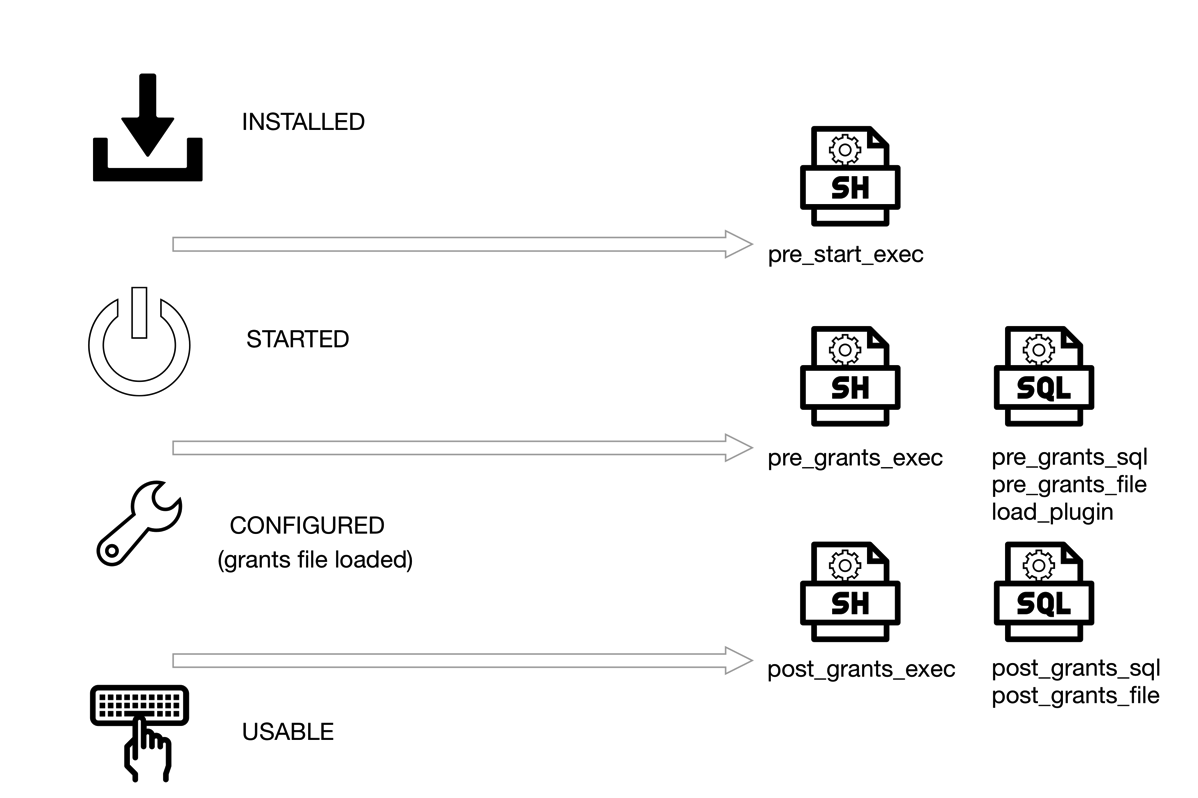
Mysql sandbox states and hooks

Figure 1: MySQL Sandbox states and where you can run the hooks

There are 3 options to run shell commands, 2 to run SQL queries, and 2 to run SQL files.

## Shell commands
--pre_start_exec=command  : runs 'command' after the installation, before the server starts
--pre_grants_exec=command : runs 'command' after the server starts, before loading the grants.
--post_grants_exec=command : runs 'command' after the loading the grants.

## SQL statements
--pre_grants_sql=query : runs 'query' before loading the grants.
--pre_grants_file=filename : runs SQL file 'filename' before loading the grants.
--post_grants_sql=query : runs 'query' after the loading the grants.
--post_grants_file=filename : runs SQL file 'filename' before loading the grants.

Moreover, a new option --load_plugin=plugin[:plugin_file_name] loads a given plugin before the grants file is loaded.

What can you use this for?

The need arose when I needed general log activated at start-up, but did not want the option to stay in the configuration file. Then I also found that running a SQL command to install a plugin and check its status would be nice to have. When enough cases piled up, I implemented a few changes that allow MySQL Sandbox to accept commands at specific stages of the deployment. Figure 1 shows where these hooks are available.

Some use cases for SQL:

  • activate general log;
  • install plugins (although there is a specialized option for that)
  • enable superreadonly : this will only work after loading grants. If enabled before, the user creation commands will fail.
  • show the status of database variables, status, and objects.

Some use case for shell commands:

  • See the composition of the sandbox at various stages;
  • Run diagnostic tools, backups, synchronization tasks;
  • Perform dangerous tasks to test the server responsiveness;
  • General purpose hacks.

When the shell command runs, MySQL Sandbox provides several environment variables that facilitate interaction with the database that has been installed.

SANDBOX_DIR   =  sandbox directory;
BASEDIR       =  base directory for the sandbox binaries
DB_DATADIR    =  data directory
MY_CNF        =  configuration file
DB_PORT       =  database port
DB_USER       =  database user
DB_PASSWORD   =  database password
DB_SOCKET     =  database socket
MYSQL_VERSION =  MySQL version (e.g. 5.7.12)
MYSQL_MAJOR   =  Major part of the version (e.g 5)
MYSQL_MINOR   =  Minor part of the version (e.g 7)
MYSQL_REV     =  Revision part of the version (e.g 12)
EXEC_STAGE    =  Stage of the execution (pre_start_exec, pre_grants_exec, post_grants_exec)

Mysql sandbox order of execution

Figure 2: MySQL Sandbox order of execution

You can combine shell and SQL calls for all stages. They will run in the order shown in Figure 2.

Examples

Let's install the XPlugin. And using the shell commands we can check the status of the system from the outside.

$ make_sandbox 5.7.12 -- --load_plugin=mysqlx \
  --pre_grants_exec='echo "##open ports";sudo netstat -atn  |grep LISTEN|grep 33060; echo "##"' \
  --post_grants_exec='echo "open ports";sudo netstat -atn  |grep LISTEN|grep 33060;echo "##"'
[...]
# Starting server
.. sandbox server started
# [pre_grants_exec] system "echo "##open ports";sudo netstat -atn  |grep LISTEN|grep 33060; echo "##""
##open ports
##
--------------
INSTALL PLUGIN mysqlx soname 'mysqlx.so'
--------------

--------------
select plugin_name, plugin_version, plugin_status from information_schema.plugins where plugin_name = 'mysqlx'
--------------

+-------------+----------------+---------------+
| plugin_name | plugin_version | plugin_status |
+-------------+----------------+---------------+
| mysqlx      | 1.0            | ACTIVE        |
+-------------+----------------+---------------+
# Loading grants
# [post_grants_exec] system "echo "open ports";sudo netstat -atn  |grep LISTEN|grep 33060;echo "##""
open ports
tcp4       0      0  *.33060                *.*                    LISTEN
##
Your sandbox server was installed in $HOME/sandboxes/msb_5_7_12

Here, the load_plugin option loads the plugin before the grants. Before this happens, the shell command runs netstat to check the status of port 33060, which is the one that the MySQL XProtocol uses by default. We can see that the port is not available at that stage. The same command running after the grants are loaded shows that the port is open.

Another example. This time we will use a shell script that uses most of the variables listed above:

$ cat t/test_init_exec.sh
#!/bin/bash
echo "----------------------------------------------------------------"
echo "Stage: $EXEC_STAGE"
if [ "$EXEC_STAGE" == "pre_start_exec" ]
then
    echo "PWD <$PWD> "
    echo "VER <$MYSQL_VERSION> "
    echo "DIR <$SANDBOX_DIR> "
    echo "DATADIR <$DB_DATADIR> "
    echo "BASEDIR <$BASEDIR> "
    echo "SOCKET <$DB_SOCKET> "
    echo "MY_CNF <$MY_CNF>"
    echo "USER/PASSWORD/PORT <$DB_USER> <$DB_PASSWORD> <$DB_PORT> "
    echo "Version components <$MYSQL_MAJOR> <$MYSQL_MINOR> <$MYSQL_REV>"
fi
cd $SANDBOX_DIR
# ls
echo '## Data directory'
ls  data
echo "----------------------------------------------------------------"

The script shows the value of the variables for the first stage only and the contents of the data directory:

$ make_sandbox 5.7.12 --  --pre_start_exec=./t/test_init_exec.sh --post_grants_exec=./t/test_init_exec.sh
[...]
# [pre_start_exec] system "./t/test_init_exec.sh"
----------------------------------------------------------------
Stage: pre_start_exec
PWD <$HOME/workdir/git/mysql-sandbox>
VER <5.7.12>
DIR <$HOME/sandboxes/msb_5_7_12>
DATADIR </Users/gmax/sandboxes/msb_5_7_12/data>
BASEDIR <$HOME/opt/mysql/5.7.12>
SOCKET </tmp/mysql_sandbox5712.sock>
MY_CNF <$HOME/sandboxes/msb_5_7_12/my.sandbox.cnf>
USER/PASSWORD/PORT <msandbox> <msandbox> <5712>
Version components <5> <7> <12>
## Data directory
auto.cnf        ib_buffer_pool        ibdata1            mysql            performance_schema    sys
----------------------------------------------------------------
# Starting server
.. sandbox server started
# Loading grants
# [post_grants_exec] system "./t/test_init_exec.sh"
----------------------------------------------------------------
Stage: post_grants_exec
## Data directory
auto.cnf        ib_logfile0        ibdata1            msandbox.err        mysql_sandbox5712.pid    performance_schema    test
ib_buffer_pool        ib_logfile1        ibtmp1            mysql            mysqld_safe.pid        sys
----------------------------------------------------------------
Your sandbox server was installed in $HOME/sandboxes/msb_5_7_12

We can see that the data directory, before the server starts, contains only the files created by mysqld --initialize-insecure, while after the start and the grant load we get the InnoDB log files, the .pid files, and the test database (created by the grants script).

Monday, May 02, 2016

Taking the MySQL document store for a spin

This is not a comprehensive review, nor an user guide. It's a step-by-step account of my initial impressions while trying the new MySQL XProtocol and the document store capabilities. In fact, I am barely scratching the surface here: more articles will come as time allows.

MySQL 5.7 has been GA for several months, as it was released in October 2015. Among the many features and improvements, I was surprised to see the MySQL team emphasizing the JSON data type. While it is an interesting feature per se, I failed to see the reason why so many articles and conference talks were focused around this single feature. Everything became clear when, with the release of MySQL 5.7.12, the MySQL team announced a new release model.

Overview

In MySQL 5.7.12, we get the usual MySQL server, which shouldn't have new features. However, in an attempt to combine the stability of the server with a more dynamic release cycle, the server ships with a new plugin, unimaginatively named X-Plugin, which supports an alternative communication protocol, named X-Protocol.

In short, the X-Protocol extends and replaces the traditional client/server protocol, by allowing asynchronous communication to the server, using different API calls, which are available, as of today, in Javascript, Python, C#, and Java, with more languages to come.

The reason for this decision is easy to see. Many developers struggle with relational tables and SQL, while they understand structures made of arrays and associative arrays (maps.) This is also one of the reasons for the recent popularity of NoSQL databases, where schemas and tables are replaced by collections of documents or similar schema-less structures. With this new release, MySQL wants to offer the best of two worlds, by allowing developers to use the database with the tools they feel most comfortable with.

To use the new plugin, you need two components:

  • The plugin itself, which ships with the server package, but is not enabled by default;
  • The MySQL shell, a new command line tool that you have to download and install separately and will allow you to use Javascript or Python with the database.

As a QA professional, I am a bit concerned about this mix of GA and alpha features (The MySQL shell is defined as alpha software. and the shell itself says development preview in its help). Theoretically, the two worlds should be separated. If you don't install the plugin, the server should work as usual. But practice and experience tell me that there are dangers waiting for a chance to destroy our data. If you want a single piece of advice to summarize this article, DON'T USE the new MySQL shell with a production server. That said, let's start a quick tour.

Installation

You need to install the shell, which comes in a package that is different from the rest of MySQL products. The manual shows how to install it on OSX or Linux. The only mention that this product could be dangerous to use is a note reminding the user to enable the MySQL Preview Packages when installing from a Linux repository. The procedure, on any operating system, will install library and executables globally. Unlike the server package, it is not possible to install it in a user-defined directory, like you install the server with MySQL Sandbox. In this context, the standard Oracle disclaimer may have a meaning that goes beyond a regular CYA.

Next, you need to enable the plugin. You can do it in three ways:

(1)

$ mysqlsh --classic -u youruser -p --dba enableXProtocol
mysqlx: [Warning] Using a password on the command line interface can be insecure.
Creating a Classic Session to youruser@localhost:3306
Enter password:
No default schema selected.

enableXProtocol: Installing plugin mysqlx...
enableXProtocol: done

(2)

Start the server with --plugin-load=mysqlx=mysqlx.so. This will enable the plugin, although it does not seem to work the way it should.

(3)

Enable the plugin with a SQL command.

mysql> install plugin mysqlx soname 'mysqlx.so';

I prefer method #3 because is the only one that does not have side effects or misunderstanding. The issue that hit me when I tried method #1 for the first time is that calling mysqlsh --classic uses the client/server protocol on port 3306 (or the port that you defined for the database) while subsequent calls will use the X-Protocol on port 33060.

Alternatives. Using Docker

If what I said previously has made you cautious and you have decided not to use the shell in your main computer (as you should), there are alternative ways. If you have a data center at your disposal, just fire a virtual machine and play with it. However, be aware that the MySQL shell does not install in Ubuntu 15.04 and 16.04.

A lightweight method to try on the new shell without endangering your production server is to use a Docker image for MySQL, or a combination of MySQL Sandbox and Docker.

In Docker, the MySQL shell does not ship together with the server. It requires a separate image. A quick guide is available in a recent article. I don't like the current approach: having two images is a waste of space. It would be acceptable if the images were based on a slim Linux distribution, such as Alpine. Since they run on OracleLinux, instead, you need to download two beefy images to start testing. With a fast internet connection this should not be a problem, but if you live in a place where 3 MBPS is the norm or if you are traveling, this could become an annoyance. Once you have pulled the images, you can use them at will, even without internet connection.

The above mentioned quick guide suggests using docker run --link to connect the two containers. I recommend a different approach, as the link option is now considered legacy.

$ docker network create mynet
edcc36be21e54cdb91fdc91f2c320efabf62d36ab9d31b0142e901da7e3c84e9
$ docker network ls
NETWORK ID          NAME                DRIVER
a64b55fb7c92        bridge              bridge
0b8a52002dfd        none                null
cc775ec7edab        host                host
edcc36be21e5        mynet               bridge

$ docker run --name mybox  -e MYSQL_ROOT_PASSWORD=secret -d --net mynet mysql/mysql-server:5.7.12 \
    --plugin-load=mysqlx=mysqlx.so
ecbfc322bb17ec0b1511ea7321c2b10f9c7b5091baee4240ab51b7bf77c1e424

$ docker run -it --net mynet mysql/shell -u root -h mybox -p
Creating an X Session to root@mybox:33060
Enter password:
No default schema selected.

Welcome to MySQL Shell 1.0.3 Development Preview

Copyright (c) 2016, Oracle and/or its affiliates. All rights reserved.

Oracle is a registered trademark of Oracle Corporation and/or its
affiliates. Other names may be trademarks of their respective
owners.

Type '\help', '\h' or '\?' for help.

Currently in JavaScript mode. Use \sql to switch to SQL mode and execute queries.
mysql-js>

The first command creates a network (called mynet).

The second command creates the server container, which is launched using the network mynet and with the plugin-load option (which seems to work well with the docker image). When you use a docker network, the container name is recognized by the network as an host name, and can be called by other members of the network. This is much cleaner than using --link.

The third command runs the MySQL shell, using the same network. This allows us to use the container name (mybox) without any other options.

Running the MySQL Javascript shell

My favorite setup for this test is a mix of MySQL Sandbox for the server and Docker for the shell. This way I can use the alpha shell without polluting my Linux host and use a feature rich MySQL Sandbox to control the server.

Here is what I do:

$ make_sandbox 5.7.12 -- --no_show -c general_log=1 -c general_log_file=general.log

I start a sandbox with MySQL 5.7.12 (tarball expanded and renamed into /opt/mysql/5.7.12), with the general log enabled. We need this to peek under the hood when we use the document store.

Next, we load the sample world_x database from the MySQL documentation page.

$ ~/sandboxes/msb_5_7_12/use  -e 'source world_x.sql'

Finally, we enable the plugin.

$ ~/sandboxes/msb_5_7_12/use  -e "install plugin mysqlx soname 'mysqlx.so'"

Now we can connect the shell:

$ docker run -it --net host mysql/shell -u msandbox -pmsandbox world_x
mysqlx: [Warning] Using a password on the command line interface can be insecure.
Creating an X Session to msandbox@localhost:33060/world_x
Default schema `world_x` accessible through db.

Welcome to MySQL Shell 1.0.3 Development Preview

Copyright (c) 2016, Oracle and/or its affiliates. All rights reserved.

Oracle is a registered trademark of Oracle Corporation and/or its
affiliates. Other names may be trademarks of their respective
owners.

Type '\help', '\h' or '\?' for help.

Currently in JavaScript mode. Use \sql to switch to SQL mode and execute queries.
mysql-js>

What have we done? We use the network named 'host', which is a standard Docker protocol that lets a container use the host environment. We don't need to specify a port, since the shell assumes 33060 (enabled by the X-Plugin). The username and password are the usual ones for a sandbox. We enter inside a Javascript shell, where we can communicate with the database server using an alternative syntax. Let's see what we have:

  • We have an "X-Session" using port 33060 and working on database world_x;
  • There is a help, same as in the MySQL client;
  • The database world_x is accessible through the variable db.
  • Note: all the commands used below are the same for Python and Javascript. There are differences only when using the language extensively.

With the above elements, we can try getting data from the database.

mysql-js> db.collections
{
    "CountryInfo": <Collection:CountryInfo>
}

mysql-js> db.tables
{
    "City": <Table:City>,
    "Country": <Table:Country>,
    "CountryLanguage": <Table:CountryLanguage>
}

What does it mean? Let's abandon the Javascript shell and look at the traditional client:

mysql [localhost] {msandbox} (world_x) > show tables;
+-------------------+
| Tables_in_world_x |
+-------------------+
| City              |
| Country           |
| CountryInfo       |
| CountryLanguage   |
+-------------------+
4 rows in set (0.00 sec)

Here we see 4 tables, while the Javascript console lists only 3. However, the fourth table has the same name as the "collection." Let's have a look:

mysql [localhost] {msandbox} (world_x) > desc CountryInfo;
+-------+-------------+------+-----+---------+------------------+
| Field | Type        | Null | Key | Default | Extra            |
+-------+-------------+------+-----+---------+------------------+
| doc   | json        | YES  |     | NULL    |                  |
| _id   | varchar(32) | YES  |     | NULL    | STORED GENERATED |
+-------+-------------+------+-----+---------+------------------+
2 rows in set (0.00 sec)

mysql [localhost] {msandbox} (world_x) > show create table CountryInfo\G
*************************** 1. row ***************************
       Table: CountryInfo
Create Table: CREATE TABLE `CountryInfo` (
  `doc` json DEFAULT NULL,
  `_id` varchar(32) GENERATED ALWAYS AS (json_unquote(json_extract(`doc`,'$._id'))) STORED
) ENGINE=InnoDB DEFAULT CHARSET=utf8
1 row in set (0.00 sec)

Look what we got! A JSON column with a dynamic index implemented as a virtual column. Now we can appreciate why the JSON data type was such an important thing.

Back to the Javascript shell, let's get something from the database. (You can get all the commands I am using, and much more, from the manual.)

mysql-js> db.collections.CountryInfo.find("_id='USA'")
[
    {
        "GNP": 8510700,
        "IndepYear": 1776,
        "Name": "United States",
        "_id": "USA",
        "demographics": {
            "LifeExpectancy": 77.0999984741211,
            "Population": 278357000
        },
        "geography": {
            "Continent": "North America",
            "Region": "North America",
            "SurfaceArea": 9363520
        },
        "government": {
            "GovernmentForm": "Federal Republic",
            "HeadOfState": "George W. Bush"
        }
    }
]
1 document in set (0.00 sec)

Apart from the feeling of being back in the good old times when MySQL was still playing with IPO dreams (look at the HeadOfState field in the above data), this record is a straightforward JSON document, where data that should belong to different normalized tables are bundled together in this unified view. So, we are really querying a Table that contains JSON data associated with an _id. We know because the general log lists what happens after our simple query:

SELECT doc FROM `world_x`.`CountryInfo` WHERE (`_id` = 'USA')

Let's try a more complex query. We want all countries in Oceania with a population of more than 150,000 people, and whose Head of State is Elisabeth II. The query is a bit intimidating, albeit eerily familiar:

mysql-js> db.collections.CountryInfo.find("government.HeadOfState='Elisabeth II' AND geography.Continent = 'Oceania' AND demographics.Population > 150000").fields(["Name", "demographics.Population","geography.Continent"])
[
    {
        "Name": "Australia",
        "demographics.Population": 18886000,
        "geography.Continent": "Oceania"
    },
    {
        "Name": "New Zealand",
        "demographics.Population": 3862000,
        "geography.Continent": "Oceania"
    },
    {
        "Name": "Papua New Guinea",
        "demographics.Population": 4807000,
        "geography.Continent": "Oceania"
    },
    {
        "Name": "Solomon Islands",
        "demographics.Population": 444000,
        "geography.Continent": "Oceania"
    }
]
4 documents in set (0.00 sec)

Here is the corresponding SQL query recorder in the general log:

SELECT JSON_OBJECT(
    'Name', JSON_EXTRACT(doc,'$.Name'),'demographics.Population', \
    JSON_EXTRACT(doc,'$.demographics.Population'),'geography.Continent', \
    JSON_EXTRACT(doc,'$.geography.Continent')
) AS doc 
FROM `world_x`.`CountryInfo` \
WHERE (
    ((JSON_EXTRACT(doc,'$.government.HeadOfState') = 'Elisabeth II') \
    AND (JSON_EXTRACT(doc,'$.geography.Continent') = 'Oceania')) \
    AND (JSON_EXTRACT(doc,'$.demographics.Population') > 150000)
    )

I am not sure which one I prefer. The SQL looks strange, with all those JSON functions, while the Javascript command seems more readable (I had never thought I would say what I have just said!)

Enough with reading data. I want to manipulate some. I'll start by creating a new collection.

 mysql-js> db.createCollection('somethingNew')
 <Collection:somethingNew>

And the general log shows what should not be a surprise, as we have seen a similar structure for CountryInfo:

CREATE TABLE `world_x`.`somethingNew` (doc JSON, \
_id VARCHAR(32) \
    GENERATED ALWAYS AS (JSON_UNQUOTE(JSON_EXTRACT(doc, '$._id'))) \
    STORED NOT NULL UNIQUE
) CHARSET utf8mb4 ENGINE=InnoDB

Now, to the data manipulation:

mysql-js> mynew=db.getCollection('somethingNew')
<Collection:somethingNew>

The variable mynew can access the new collection. It's a shortcut to avoid db.collections.somethingNew

mysql-js> db.collections
{
    "CountryInfo": <Collection:CountryInfo>,
    "somethingNew": <Collection:somethingNew>
}
mysql-js> mynew.find()
Empty set (0.00 sec)

As expected, there is nothing inside the new collection. Now we enter a very minimal record.

mysql-js> mynew.add({Name:'Joe'})
Query OK, 1 item affected (0.01 sec)

mysql-js> mynew.find()
[
    {
        "Name": "Joe",
        "_id": "e09ef177c50fe6110100b8aeed734276"
    }
]
1 document in set (0.00 sec)

The collection contains more than what we have inserted. There is an apparently auto-generated _id field. Looking at the general log, we see that the data includes the new field.

INSERT INTO `world_x`.`somethingNew` (doc) VALUES ('{\"Name\":\"Joe\",\"_id\":\"e09ef177c50fe6110100b8aeed734276\"}')

As you can see, an _id field was added automatically. We could override that behavior by providing our own value:

mysql-js> mynew.add({_id: "a dummy string", Name:"Frank", country: "UK"})

The data inserted now includes the _id filed with our manual value. The general log says:

INSERT INTO `world_x`.`somethingNew` (doc) VALUES ('{\"Name\":\"Frank\",\"_id\":\"a dummy string\",\"country\":\"UK\"}')

The value of _id, however, must be unique, or the engine will generate an error:

mysql-js> mynew.add({_id: "a dummy string", Name:"Sam", country: "USA"})
MySQL Error (5116): Document contains a field value that is not unique but required to be

If all this gives you a sense of deja-vu, you're right. This feels and smells a lot like MongoDB, and I am sure it isn't a coincidence.

Synchronizing operations

As our last attempt for the day, we will see what happens when we manipulate data in SQL and then retrieve it in Javascript or Python.

We leave the JS console open, and we do something in SQL

mysql [localhost] {msandbox} (world_x) > drop table somethingNew;
Query OK, 0 rows affected (0.01 sec)

How does it look like on the other side?

mysql-js> db.collections
{
    "CountryInfo": <Collection:CountryInfo>,
    "somethingNew": <Collection:somethingNew>
}
mysql-js> db.getCollections()
{
    "CountryInfo": <Collection:CountryInfo>,
    "somethingNew": <Collection:somethingNew>
}

Oops! mysqlsh didn't get the memo! It still considers somethingNew to be available.

mysql-js> db.collections.somethingNew.find()
MySQL Error (1146): Table 'world_x.somethingNew' doesn't exist

We need to refresh the connection. Unlike the SQL client, you need to specify the connection parameters.

mysql-js> \connect msandbox:msandbox@localhost:33060/world_x
Closing old connection...
Creating an X Session to msandbox@localhost:33060/world_x
Default schema `world_x` accessible through db.

mysql-js> db.collections
{
    "CountryInfo": <Collection:CountryInfo>
}

We can see the same happening when we create a new table in SQL. The session in mysqlsh keeps showing the cached contents, and we need to refresh the session to see the changes. Looking at the general log, there are no changes when we issue commands asking for metadata, such as db.collections or db.tables. Instead, when we refresh the session, we see this:

SELECT table_name, COUNT(table_name) c FROM information_schema.columns \
   WHERE ((column_name = 'doc' and data_type = 'json') 
   OR (column_name = '_id' and generation_expression = 'json_unquote(json_extract(`doc`,''$._id''))')) \
   AND table_schema = 'world_x' GROUP BY table_name HAVING c = 2
SHOW FULL TABLES FROM `world_x`

The first query lists all tables that contain a JSON document and a generated _id (these are the collections). The second one lists all tables. Then the shell removes from the table list all the ones that were in the collections list.

Given the way it is done, we can cheat the system easily by creating something that looks like a collection, but has extra fields:

CREATE TABLE strangedoc (doc JSON, \
_id VARCHAR(32) \
    GENERATED ALWAYS AS (JSON_UNQUOTE(JSON_EXTRACT(doc, '$._id'))) \
    STORED NOT NULL UNIQUE,
    secret_stash varchar(200),
    more_secret_info mediumtext
) CHARSET utf8mb4 ENGINE=InnoDB;

mysql [localhost] {msandbox} (world_x) > insert into strangedoc (doc,secret_stash,more_secret_info) values \
('{"_id": "abc", "name": "Susan"}', \
'and now for something completely different', \
'Lorem ipsum dolor sit amet, consectetur adipisicing elit, sed do eiusmod tempor incididunt ut labore et dolore magna aliqua.');
Query OK, 1 row affected (0.00 sec)

mysql [localhost] {msandbox} (world_x) > select * from strangedoc\G
*************************** 1. row ***************************
             doc: {"_id": "abc", "name": "Susan"}
             _id: abc
    secret_stash: and now for something completely different
more_secret_info: Lorem ipsum dolor sit amet, consectetur adipisicing elit, sed do eiusmod tempor incididunt ut labore et dolore magna aliqua.
1 row in set (0.00 sec)

And the Javascript console will be unaware of the extra material:

mysql-js> db.collections
{
    "CountryInfo": <Collection:CountryInfo>,
    "strangedoc": <Collection:strangedoc>
}
mysql-js> db.strangedoc.find()
[
    {
        "_id": "abc",
        "name": "Susan"
    }
]
1 document in set (0.00 sec)

We can add contents to the collection in Javascript, and the database server won't protest (provided that the extra fields are nullable or have a default value). Is it a bug or a feature?

Parting thoughts

As I have said at the beginning, this is a very simple exploration. More work is required to test the full potential of the new model. My impressions are mildly positive. On one hand, it's an exciting environment, which promises to expand to better usefulness with more programming languages and possibly better coordination between shell and server software. On the other hand, there are many bugs, and the software is still very green. It will require more iterations from the community and the development team before it could be trusted with important data.

Monday, November 01, 2010

Book review: MySQL 5.1 plugin development

MySQL 5.1 Plugin Development MySQL 5.1 Plugin Development,
by Sergei Golubchik and Andrew Hutchings.
Packt Publishing, 2010.
Executive summary: Highly recommended. If you want to develop MySQL extensions, buy this book. It's a must, written by two expert professionals who probably know more than anyone else on this matter. The book is full of practical examples explained with the theoretical information necessary to make it stick.

This book fills a gap in the world of MySQL documentation. Although the MySQL docs are extensive and thorough, to the point that sometimes you wished that the writers were less verbose and stick more to the topic, when it comes to the plugin architecture, there are still more some unanswered questions. I guess that the ones who have implemented MySQL extensions so far have read the code, more than the documentation.
But, back to the point. The void is filled now, and in such a wonderful way! I have to disclose that I was the reviewer of this book, and while this fact puts me in a conflicting position when it comes to a review, it has also given me inner reason for praise, beyond the experience of a regular reader. The people who have worked with me will know that I am hard to please, and so my review was peppered with suggestions for improvements that, I admit it, made the authors' life quite difficult. I mostly complained that some of the examples proposed for each chapter were not enough useful and interesting. In short, there was not enough incentive for the reader to start coding immediately. I am glad to report that the authors were very responsive, and, rather than being annoyed by my demands, did work enthusiastically at the examples in the book until they became a true gem in this category. This book will surprise you for its practical approach, when it guides you through the examples, until you end up with a working extension.
The first chapter is probably the part that will save many hours of attempts to everyone who wants to build a plugin. In that chapter the authors explain how to build the different types of plugins in several operating systems. If you have ever tried to build a plugin, you will appreciate this chapter.
The book's body covers every type of plugin that you can create in MySQL, from the classic UDF to the more recent storage engine. For each chapter, you will have code ready to compile and try on your own, and the line-by-line explanation of what that code does, and why it was written the way it is.
Whenever the code is less than intuitive, the authors take care of it with additional theoretical and practical explanation, making sure that the reader is fully informed on the topic, and can complete the task effectively.
Summing up, this is not a book for the idle reader. It's a a practical help for the doers, the ones who want to get the job done, and need guidance through the maze of the MySQL plugin protocol.

Update. There is also a review at Slashdot.

Sunday, June 06, 2010

Performance gain of MySQL 5.1 InnoDB plugin

plugin performanceYou know already that InnoDB in MySQL 5.5 has great improvements in performance and scalability. You will have to wait a few months for that, though, because MySQL 5.5 is not GA yet.
But if you need some extra performance in MySQL 5.1, you may want to use the Innodb Plugin instead of the built-in one. As of version 5.1.47, the Innodb plugin is of GA quality, and it comes with a good out-of-the-box improvement compared to the built-in engine.

To test my assumptions, I used one of my test Linux servers to perform a sysbench on 5.0.91, 5.1.47 built-in and plugin, and 5.5.4. The MySQL servers were all configured with
innodb_buffer_pool_size=5G

MySQL 4.1.47 was tested both as out-of-the-box, and with the plugin enabled.

ignore_builtin_innodb
# note: the following statements must go all in one line
plugin-load=innodb=ha_innodb_plugin.so;innodb_trx=ha_innodb_plugin.so;innodb_locks=ha_innodb_plugin.so;innodb_lock_waits=ha_innodb_plugin.so;innodb_cmp=ha_innodb_plugin.so;innodb_cmp_reset=ha_innodb_plugin.so;innodb_cmpmem=ha_innodb_plugin.so;innodb_cmpmem_reset=ha_innodb_plugin.so

default-storage-engine=InnoDBinnodb_file_per_table=1
innodb_file_format=barracudainnodb_strict_mode=1

The test was the same for all the servers. A simple sysbench both read-only and read/write on a 1M records table.

sysbench \
--test=oltp \
--oltp-table-size=1000000 \
--mysql-db=test \
--mysql-user=$USER \
--mysql-password=$PASSWD \
--mysql-host=$HOST \
--mysql-port=$PORT \
--max-time=60 \
--oltp-read-only=$ON_OFF \
--max-requests=0 \
--num-threads=8 run

What came out is that, by using the innodb plugin instead of the built-in engine, you get roughly 15% more in read-only, and close to 8% in read/write.
Image
Image
Note that 5.5. enhancements are more impressive in scalability tests with more than 8 cores. In this server, I have just tested a simple scenario.

I did some more testing using "ROW_FORMAT=COMPRESSED KEY_BLOCK_SIZE=X" in the InnoDB table, where X changed from 4 to 16. But sysbench didn't seem to play well with compression. For low values of KEY_BLOCK_SIZE, you actually get a much worse result than the built-in engine. I have yet to figure out how I would use this compressed InnoDB in practice.

Image

Sunday, May 30, 2010

MySQL Sandbox now with plugins, more tests, instrumentation

MySQL SandboxThe latest release of MySQL Sandbox, 3.0.12, has integrated plugin installation features, as mentioned in my previous post.
Not only that. This version has also more tests, fixes a couple of bugs, and introduces basic instrumentation. Now each script released with MySQL Sandbox, and every one that the Sandbox itself installs, can leave a trail in a file.

Let's start with the plugin. The documentation has been updated to cover this new feature. And 27 new tests give me some confidence that it should work as advertised.
While I was waiting for the test suite to finish its 238 tests, I was wondering how much was going on under the hood. So I spent one hour implementing some basic instrumentation, not only in the make_* scripts, but also in every script that the sandbox installs. The code is quite modular, and adding this feature was easy.
Now, if you want to use this instrumentation, you need to create a file, and set the operating system variable $SBINSTR to the full path of that file prior to using the Sandbox. Then, every script will leave an entry in that file, saying its name, the current time, and which parameters was using.
This is what I got after running the test suite. 66 instances of MySQL installed to perform over 200 tests, in about 18 minutes.


MySQL Sandbox scriptscalls
make_sandbox 66
low_level_make_sandbox 66
make_replication_sandbox 8
make_multiple_sandbox 7
make_multiple_custom_sandbox 2
Installed scriptscalls
use 440
stop 192
start 128
clear 56
sandbox_action 56
sbtool 34
stop_all 30
use_all 20
clear_all 13
start_all 12
send_kill 11
restart 9
initialize_slaves 8
restart_all 4
change_paths 2
change_ports 1
total 1165

The new release is available from Launchpad or directly from the CPAN

Tuesday, December 15, 2009

Getting started with MySQL 5.5


MySQL 5.5

Some time go, we announced a new release model for MySQL. As all new things, it had some initial hiccups (with MySQL 5.4 we were still getting acquainted with the new model), but now it seems to be in full swing.
By the time you read these lines, MySQL 5.5 will be available. If the mirrors aren't seeded yet, the impatient can compile and use the new version from the launchpad source tree..

Overview

What's this new release anyway? I'll leave it to Kaj's blog to give you the full description. Suffice it to say that this release is the second milestone of the current installment. It is of beta quality, and it will mature to RC quality. There will be yet another milestone before we release a GA in mid 2010.
One thing that this milestone shows is that there are no dead weights. If a feature doesn't make the deadline, i.e. it doesn't reach beta quality by the scheduled date, it will be dropped, and eventually rescued at the next milestone.
With the introduction of the milestone model, we have also increased our internal QA, especially thanks to the Random Query Generator, which finds bugs in early stages of the code faster than any other method. (1)

Built-in InnoDB plugin

The InnoDB plugin 1.0.5 is included in the distribution, and, unlike MySQL 5.1, it's built-in. There is no need to load and register the plugin. The performance enhancements developed for MySQL 5.4 are now available together with the other enhancements available with the InnoDB plugin. This was already available in the previous milestone, but it's worth mentioning it now, because not many people are aware of that.

Semi-synchronous replication

Of all the new features, this one is probably the most relevant. It is based on a patch made by Google to the InnoDB engine, and adapted by MySQL developers to make it engine-independent.
In short, it's a safety device that establishes some internal communication between master and slaves, and makes sure that at least one slave has received the changes being committed. That is, before committing, the master waits until at least one slave has acknowledged that it has received the portion of binary log necessary to reproduce the transaction.
UPDATE As Harrison Fisk rightly notes, there is a mistake in my description. The acknowledgment of the transaction being sent to the slave only happens after the master's commit to the binary log.
Some caveats apply:
  • It's called semi-synchronous replication, because it doesn't necessarily apply to all the slaves. Although you can manually check if the replication has worked for all the slaves, it's enough for the master to make sure that at least one slave has got the goods.
  • Received by a slave doesn't mean "executed". The slave acknowledges when it has got the binary log, even if the SQL thread is busy or stopped.
  • If there is no slave that can acknowledge receipt (e.g. slaves are all down or stopped), then the master reverts to the normal asynchronous operation.

To use this feature, you need to install two plugins: one for the master and one for each slave. No need to compile anything, though. They are provided with the binaries. All you need to do is load the appropriate plugin for each server.
master >  INSTALL PLUGIN rpl_semi_sync_master SONAME 'libsemisync_master.so';

slave1 > INSTALL PLUGIN rpl_semi_sync_slave SONAME 'libsemisync_slave.so';

Additionally, there are a few variables that you must set, either in the options file or online.
master > SET GLOBAL rpl_semi_sync_master_enabled=1;
slave1 > SET GLOBAL rpl_semi_sync_slave_enabled=1;

Now that the system is ready, let's see how to use it.
Before doing anything, we ask for the value of two important status variables:
SHOW STATUS LIKE 'Rpl_semi_sync%tx';
+-----------------------------+-------+
| Variable_name | Value |
+-----------------------------+-------+
| Rpl_semi_sync_master_no_tx | 0 |
| Rpl_semi_sync_master_yes_tx | 0 |
+-----------------------------+-------+

The first one is the number of failed synchronized transactions, the second one is the number of successful ones. Since nothing has happened so far, they are both zero.
create table t1 (i int not null primary key) engine=innodb;
Query OK, 0 rows affected (0.13 sec)

SHOW STATUS LIKE 'Rpl_semi_sync%tx';
+-----------------------------+-------+
| Variable_name | Value |
+-----------------------------+-------+
| Rpl_semi_sync_master_no_tx | 0 |
| Rpl_semi_sync_master_yes_tx | 1 |
+-----------------------------+-------+
The first operation (a table creation) was successfully transferred to a slave. Let's do one more.
set autocommit=0;
Query OK, 0 rows affected (0.00 sec)

insert into t1 values (1);
Query OK, 1 row affected (0.00 sec)

COMMIT;
Query OK, 0 rows affected (0.00 sec)

SHOW STATUS LIKE 'Rpl_semi_sync%tx';
+-----------------------------+-------+
| Variable_name | Value |
+-----------------------------+-------+
| Rpl_semi_sync_master_no_tx | 0 |
| Rpl_semi_sync_master_yes_tx | 2 |
+-----------------------------+-------+
Also this one was successful.
Now, let's try something sneaky. On each slave, we execute "STOP SLAVE SQL_THREAD". Normal replication would not work, but semi-synchronous replication will go on.

insert into t1 values (2);
Query OK, 1 row affected (0.01 sec)

SHOW STATUS LIKE 'Rpl_semi_sync%tx';
+-----------------------------+-------+
| Variable_name | Value |
+-----------------------------+-------+
| Rpl_semi_sync_master_no_tx | 0 |
| Rpl_semi_sync_master_yes_tx | 3 |
+-----------------------------+-------+
2 rows in set (0.00 sec)

The semi-synch replication has worked. However, if we query both master and slaves, only the master has the new record. The slaves have it only in their relay logs, which you can easily ascertain with mysqlbinlog.

Enhanced partitioning syntax

About one year ago, I briefly announced that this feature was in the making. With some interface improvement, it is now part of the regular partitioning. It's an extension of partitioning BY RANGE. As you know, you can only partition on one column value, and you can only partition on INTEGER columns. Both these restrictions were lifted in 5.5, with a syntax change that makes the code more readable and the overall feature more usable.
You can now partition by date, datetime, varchar, and char columns, not just integers, and you can use more than one column in your list. The most immediate usage of this extension is the ability of using dates without resorting to functions that convert the dates into integers. For example:
CREATE TABLE t2 
(dt date,a int, b int, c int)
PARTITION BY RANGE COLUMNS (dt)
(
PARTITION p0 VALUES LESS THAN ('2007-01-01'),
PARTITION p1 VALUES LESS THAN ('2008-01-01'),
PARTITION p2 VALUES LESS THAN ('2009-01-01'),
PARTITION p3 VALUES LESS THAN (MAXVALUE)
);
The COLUMNS keyword does the trick. The manual has more examples.

The partition helper has been updated to handle this new feature and generate partitions accordingly.

SIGNAL and RESIGNAL


If you have used stored routines extensively, you will certainly have asked yourself "why isn't there any way of raising an exception?" In the SQL standard, exception handling is implemented using the SIGNAL and RESIGNAL keywords, which were notably missing in MySQL 5.0 and 5.1 stored routines.
There have been many clever hacks by several community members to emulate the missing SIGNAL, but none were quite satisfactory. After long waiting here we have SIGNAl and RESIGNAL, which make stored routines programming much more robust and easier to debug. An authoritative example on how to use the new syntax is available in Roland Bouman's blog.

There is more. For the complete list of features, have a look at the official manual.
Happy hacking!

UPDATE Added more partitions to the example, as suggested by Jon.

(1) For the more technologically savvy, here's how Philip Stoev, one of my distinguished QA colleagues, describes the enhancements:
Historically, most of the MySQL tests have been manually created, however a modern database is so complex that it is impossible to test manually even a tiny percentage of the available functionality. Therefore for Betony [codename for MySQL 5.5], and the upcoming Celosia [5.6], the majority of our testing effort was concentrated around stochastic testing, using random data and millions of random queries to validate the behavior of the server across a wide range of scenarios and workloads.
For each new feature, and some existing ones, we automatically generated tests that attempt to cover all relevant SQL constructs, including the interaction between the feature being tested and existing code within the server. For features that have concurrency implications, we ran the random queries as a stress test or along with concurrent DDL statements. For areas such as the partitioning, we used the random queries to functionally validate the new code, by comparing the result from each query to a reference source, such as a previous version of the server.

Tuesday, August 18, 2009

Testing the InnoDB plugin with MySQL snapshots


MySQL plugins

The cat is out of the bag.
MySQL 5.1 will include the InnoDB plugin, and thanks to
labs.mysql.com
you can try the new version right away.
Here is a step-by-step guide to testing the InnoDB plugin with MySQL snapshot 5.1.39 and MySQL Sandbox.

1. Install MySQL::Sandbox
This is a straightforward part. Please refer to the manual for the details.

2. get the binaries
Check the list of available binaries and download the one that matches your architecture and operating system.

3. Install the sandbox
Since we want to use the InnoDB plugin, we need to start the Sandbox with the builtin innodb engine disabled.
make_sandbox \
/path/to/mysql-5.1.39-snapshot20090812-osx10.5-i386.tar.gz \
-c ignore-builtin-innodb
The option passed with "-c" will be written to the options file.
Make sure that the sandbox is installed and the server starts. If it doesn't, check the error log at $HOME/sandboxes/msb_5_1_39/data/msandbox.err and try to figure out what happened.

4. Check the available engines
~/sandboxes/msb_5_1_39/use
Welcome to the MySQL monitor. Commands end with ; or \g.
Your MySQL connection id is 2
Server version: 5.1.39-snapshot20090812 Source distribution

Type 'help;' or '\h' for help. Type '\c' to clear the current input statement.

select engine, support from information_schema.engines;
+------------+---------+
| engine | support |
+------------+---------+
| MyISAM | DEFAULT |
| MRG_MYISAM | YES |
| BLACKHOLE | YES |
| CSV | YES |
| MEMORY | YES |
| FEDERATED | NO |
| ARCHIVE | YES |
+------------+---------+
As you can see, InnoDB is not in the list.

5. Install the innodb plugin
install plugin innodb soname 'ha_innodb_plugin.so';
Query OK, 0 rows affected (0.85 sec)

select @@innodb_version;
+------------------+
| @@innodb_version |
+------------------+
| 1.0.4 |
+------------------+

6. Install the additional INFORMATION SCHEMA tables
INSTALL PLUGIN INNODB_TRX SONAME 'ha_innodb_plugin.so';
Query OK, 0 rows affected (0.00 sec)

INSTALL PLUGIN INNODB_LOCKS SONAME 'ha_innodb_plugin.so';
Query OK, 0 rows affected (0.00 sec)

INSTALL PLUGIN INNODB_LOCK_WAITS SONAME 'ha_innodb_plugin.so';
Query OK, 0 rows affected (0.00 sec)

INSTALL PLUGIN INNODB_CMP SONAME 'ha_innodb_plugin.so';
Query OK, 0 rows affected (0.00 sec)

INSTALL PLUGIN INNODB_CMP_RESET SONAME 'ha_innodb_plugin.so';
Query OK, 0 rows affected (0.00 sec)

INSTALL PLUGIN INNODB_CMPMEM SONAME 'ha_innodb_plugin.so';
Query OK, 0 rows affected (0.00 sec)

INSTALL PLUGIN INNODB_CMPMEM_RESET SONAME 'ha_innodb_plugin.so';
Query OK, 0 rows affected (0.00 sec)

7. Finally, check the results
select plugin_name, plugin_type, plugin_status from information_schema.plugins;
+---------------------+--------------------+---------------+
| plugin_name | plugin_type | plugin_status |
+---------------------+--------------------+---------------+
| binlog | STORAGE ENGINE | ACTIVE |
| partition | STORAGE ENGINE | ACTIVE |
| ARCHIVE | STORAGE ENGINE | ACTIVE |
| BLACKHOLE | STORAGE ENGINE | ACTIVE |
| CSV | STORAGE ENGINE | ACTIVE |
| FEDERATED | STORAGE ENGINE | DISABLED |
| MEMORY | STORAGE ENGINE | ACTIVE |
| MyISAM | STORAGE ENGINE | ACTIVE |
| MRG_MYISAM | STORAGE ENGINE | ACTIVE |
| InnoDB | STORAGE ENGINE | ACTIVE |
| INNODB_TRX | INFORMATION SCHEMA | ACTIVE |
| INNODB_LOCKS | INFORMATION SCHEMA | ACTIVE |
| INNODB_LOCK_WAITS | INFORMATION SCHEMA | ACTIVE |
| INNODB_CMP | INFORMATION SCHEMA | ACTIVE |
| INNODB_CMP_RESET | INFORMATION SCHEMA | ACTIVE |
| INNODB_CMPMEM | INFORMATION SCHEMA | ACTIVE |
| INNODB_CMPMEM_RESET | INFORMATION SCHEMA | ACTIVE |
+---------------------+--------------------+---------------+
Now you can read the InnoDB plugin manual and have as much fun as you can.

Saturday, March 15, 2008

PBXT, or how to really exploit the plugin architecture

MySQL 5.1 introduces the plugin interface, a series of API that allow the load and unload of server components at runtime.
The idea behind this architecture is to make MySQL server really expandable.
Surprisingly, the latest engines being developed in house (Falcon and Maria) are not implemented using the plugin technology. The best example of how to take advantage of this interface comes from the outside. Paul McCullagh's PBXT is a transactional engine that can be loaded at run time.
To use it, you can either download the pre-compiled plugin library, and load it into your server, or get the source code and build the whole server from scratch.
Of course, the most interesting option is the pre-compiled binary. I downloaded the latest 5.1.23 binaries for Mac OS X, and the corresponding plugin library for my system.
I installed the server using MySQL Sandbox, and then ran this command:
show variables like 'plugin_dir';
+---------------+----------------------------------+
| Variable_name | Value |
+---------------+----------------------------------+
| plugin_dir | /Users/gmax/opt/mysql/5.1.23/lib |
+---------------+----------------------------------+
This command tells me in which directory I should copy the library I just downloaded from primebase site.
$ cp ~/Downloads/libpbxt.so /Users/gmax/opt/mysql/5.1.23/lib
Now I can load the component.
INSTALL PLUGIN pbxt SONAME 'libpbxt.so';
Query OK, 0 rows affected (0.03 sec)

select * from information_schema.engines where engine='pbxt'\G
*************************** 1. row ***************************
ENGINE: PBXT
SUPPORT: YES
COMMENT: High performance, multi-versioning transactional engine
TRANSACTIONS: YES
XA: NO
SAVEPOINTS: NO
That's it! The additional engine is up and running! No compilation needed.

A rather unorthodox test follows. With the help of Patrick Crews I created a test employees database with about 4 million records in 6 tables. Not huge, but not trivial either.
I loaded this database using MyISAM, InnoDB and PBXT, and compared the loading times. Not surprisingly, MyISAM and InnoDB are much faster than PBXT.
Engine          Loading time
------------- ------------
MyISAM 1m08.546s
Innodb 1m46.622s
PBXT 3m20.842s
However, the database includes a test suite (If you have been following my blog, you shouldn't be surprised about that), which calculates the number of records and a global CRC for all the tables. This check includes queries like the following:
SET @crc= '';
INSERT INTO tchecksum
SELECT @crc := SHA1(CONCAT_WS('#',@crc,
emp_no,birth_date,first_name,last_name,gender,hire_date))
FROM employees ORDER BY emp_no;
INSERT INTO found_values VALUES ('employees', (SELECT COUNT(*) FROM employees), @crc);
Heavy stuff. I don't know how much relevant these queries are in real world applications, but that is what I had at hand without squeezing my brains, and this is the result of running the whole test that calculates the global CRC of 4 million records:
Engine          Checking time
------------- -------------
MyISAM 0m26.312s
Innodb 0m31.627s
PBXT 0m26.230s
In this particular test (repeated three times with two different operating systems), PBXT is faster than both MyISAM and InnoDB.
The engine is still green, and perhaps my test is silly, but this start is promising!