Showing posts with label script. Show all posts

Thursday, April 19, 2012

A few hacks to simulate mysqldump --ignore-database

A few days ago, Ronald Bradford asked for a mysqldump –ignore-database option.

As a workaround, he proposes:
mysqldump --databases `mysql --skip-column-names \
   -e "SELECT GROUP_CONCAT(schema_name SEPARATOR ' ') \
   FROM information_schema.schemata WHERE schema_name \
   NOT IN ('mysql','performance_schema','information_schema');" \
   >` >/mysql/backup/rds2.sql

It's a clever solution, but unfortunately it only works if you have a handful of schemas. If your databases happens to have several dozens (or hundreds or thousands) of schemas (which is where you need this option more), then the output will be truncated to the length of group_concat_max_len (by default, 1024.)

There are two alternative methods.

The all-shell method

This method lets shell commands filter the wanted databases. In its simplest way, it goes
DATABASE_LIST=$(mysql -NBe 'show schemas' | grep -wv 'mysql\|personnel\|buildings')
mysqldump --all-databases $DATABASE_LIST

Notice that, when you use --all-databases, information_schema and performance_schema are filtered off by default.

This method works, because the default length of the command line in Unix is much longer than group_concat_max_len:

$ getconf ARG_MAX
131072  # Linux

$ getconf ARG_MAX
262144  # Mac OSX

(in Windows it's much shorter: 8191, but since I haven't used Windows for ages, I don't really care).

A more elaborate method would require a scripting wrapper around the above instructions, but I think that as it is, it's simple enough to be remembered.

The options file method

If the length of all your database names combined is more than the maximum allowed by the shell, and all you want is filtering a few databases off a huge list, there is still hope.

Let's assume that you want to ignore mysql, personnel, and buildings from your backup.

echo '[mysqldump]' > mydump.cnf
mysql -NBe "select concat('ignore-table=', table_schema, '.', table_name) \
  from information_schema.tables \
  where table_schema in ('mysql', 'personnel', 'buildings')" \
  >> mydump.cnf

Now the options file looks like this:

[mysqldump]
ignore-table=mysql.db
ignore-table=mysql.host
ignore-table=mysql.user
[...]
What we need to do is tell mysqldump to get its information from this options file, and it will duly skip all the tables that are listed in there.
mysqldump --defaults-file=./mydump.cnf  -u $DBUSER -p$DBPWD --all-databases
There are two drawbacks with this approach:
  • There will be a DROP DATABASE IF EXISTS and CREATE DATABASE for each of the excluded schemas, although no tables will be dumped.
  • This method only works with --default-options-file. Theoretically, it should also work with --default-extra-file, but it doesn't. Therefore, if you are relying on an options file for connection parameters, they should be added to this file or listed in the command line.
Summing up, there is no perfect solution, but there are enough hacks available that you probably would find what suits you.

Monday, November 19, 2007

Multiple scripts in MySQL Proxy

MySQL Proxy is being beefed up, to make it ready for prime time. New features are being added, and old ones are improved and tested.
Testing the Proxy is an adventure in its own right. It's a tool that was designed to get in the middle of the scene and change things. Testing its features is more challenging than testing a straightforward application, even more complex like a database server. So the test suite for MySQL Proxy is much more complex and feature rich than the corresponding suite for the database server.
While researching to create the next edition of the test suite, able to cope with more features and corresponding testing requests, I developed a Lua script that enhances the current Proxy features and allows you to load several scripts, and use them all at once.
The script (load-multi.lua) is available in the latest Subversion tree. The usage is not difficult.
From any client, you need to send a query
PLOAD script_name;
The script you indicate will then be available to all the clients.
If your script contains functions that are used at session start (connect_server, read_handshake, read_auth, read_auth_result), they will be available when the next client connects. If your script uses read_query and read_query_result, they will be available immediately.
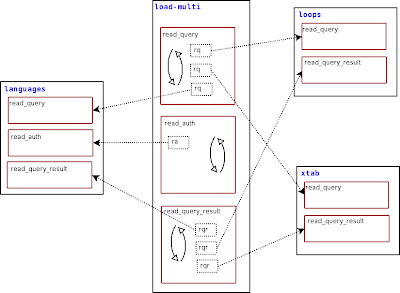
The mechanics of how this works is simple. You load one or more script containing one or more of the above mentioned functions that hook to the Proxy, and the load-multi module will stack each function in a list. For each hook, the load-multi module loops through the loaded functions, executes each one and tests the result. If the function returns a non null value, then that value is passed back to the Proxy.
load-multi
This means that if you have two scripts that can handle a particular query, only the first one that has been loaded will get a chance to evaluate the query.
When loading modules, you must check the order in which you are loading them. If you load first a script that handles every query, such as a logging application, subsequent scripts would be just filling memory.
There are more goodies.
Your scripts can use some global functions that load-multi prepares for you. Each of these routines is in the proxy.global namespace, so they are available to all clients and their loaded scripts.
One first useful application that can be plugged to this module is a script that lists the status of loaded functions:
-- show_handlers.lua
function read_query (packet)
if packet:byte() ~= proxy.COM_QUERY then
return
end
local query = packet:sub(2)
if query:match('select pload status') then
local header = { 'module', 'handler' }
local rows = {}
for id, lmodule in pairs(proxy.global.handler_status) do
for i,h in pairs(lmodule) do
table.insert(rows, { id, h.func } )
end
end
return proxy.global.make_dataset(header,rows)
end
end
Load this script with PLOAD show_handlers, and any client will be able to get a list of modules, with the function that each one introduced.
pload show_handlers;
+-------------------------------+
| info |
+-------------------------------+
| module "show_handlers" loaded |
+-------------------------------+
1 row in set (0.01 sec)

pload auth1;
+-----------------------+
| info |
+-----------------------+
| module "auth1" loaded |
+-----------------------+
1 row in set (0.03 sec)

select pload status;
+---------------+-------------------+
| module | handler |
+---------------+-------------------+
| show_handlers | read_query |
| auth1 | read_auth |
| auth1 | disconnect_client |
| auth1 | read_handshake |
| auth1 | connect_server |
| auth1 | read_auth_result |
+---------------+-------------------+
6 rows in set (0.01 sec)

This new module has the ability of extending its own behavior. If you like playing with new features, you should try this one!

Blocking specific queries

Imagine having a database with 100 tables and you want to allow a user to read from all of it, except one.
But of the table of the knowledge of good and evil, thou shalt not select of it

That's an old problem, with an ugly solution. You must either move the forbidden table to another database or to explicitly authorize the user to read each one of the other 99 tables.

A friend of mine had a similar problem. She has a huge database with thousand of tables, and she wants to prevent the users from issuing a "SHOW TABLES" command. Why? Because, with thousands of tables, the response time of MySQL can easily become very slow. It is a design problem, not easily solvable, and the best course of action here is to deny access to this command.

The bad news is that MySQL has no provision for this kind of restrictions.
The good news is that you can solve this problem with an easy MySQL Proxy script.
And you don't even need to write it. Just download the appropriate script from MySQL Forge and use it.
It's quite easy to customize. The interesting part is in the following lines:

local SHOW_REGEXP = make_regexp_from_command('show')

queries_to_filter = {
{
prefix = SHOW_REGEXP,
keywords = { 'SHOW', 'TABLES'} ,
},
}

SHOW_REGEXP is a variable containing a regular expression built from the command you want to consider. For performance reasons, before tokenizing every query, a quick search is pergormed, and only if that search is positive the query is analyzed further. In this case, the script will first check if there is a 'SHOW' at the start of the query. Then it will tokenize the query, and check if all the elements (SHOW and TABLES) are present. The tokenizer can separate literal values from strings. Therefore, if your query contains something like SELECT "SHOW TABLES" as X, it won't block the query.
To make the restriction more robust, there are also rules for 'SHOW TABLE STATUS', 'SELECT FROM INFORMATION_SCHEMA.TABLES", and "EXECUTE" (to prevent smart users from using prepared statements as a workaround).
mysql> show tables;
ERROR 7777 (X7777): command <SHOW TABLES> is not allowed
mysql> show table status;
ERROR 7777 (X7777): command <SHOW TABLE STATUS> is not allowed
mysql> select * from information_schema.tables;
ERROR 7777 (X7777): command <SELECT FROM INFORMATION_SCHEMA TABLES> is not allowed

mysql> select schema_name from information_schema.schemata;
+--------------------+
| schema_name |
+--------------------+
| information_schema |
| test |
+--------------------+
2 rows in set (0.00 sec)

Now, if you want to prevent someone from accessing the good_and_evil table, you can do the following:

local SELECT_REGEXP = make_regexp_from_command('select')

queries_to_filter = {
{
prefix = SELECT_REGEXP,
keywords = { 'SELECT', 'FROM', 'GOOD_AND_EVIL'} ,
},
}

And your beloved table becomes taboo.
Try it!