本文最后更新于 1986 天前,其中的信息可能已经有所发展或是发生改变。
压缩工具-zstd

1.工具解释
主要介绍 zstd 工具的作用和性能测试
我们称 Zstandard 或 Zstd 是一种快速的无损压缩算法,是针对 zlib 级别的实时压缩方案,以及更好的压缩比。它由一个非常快的熵阶段,由 Huff0 和 FSE 库提供。这个项目是作为开源的 BSD 许可收费的库,以及一个生成和解码 .zst 格式。
开源地址:https://github.com/facebook/zstd
介绍:https://facebook.github.io/zstd/
性能介绍
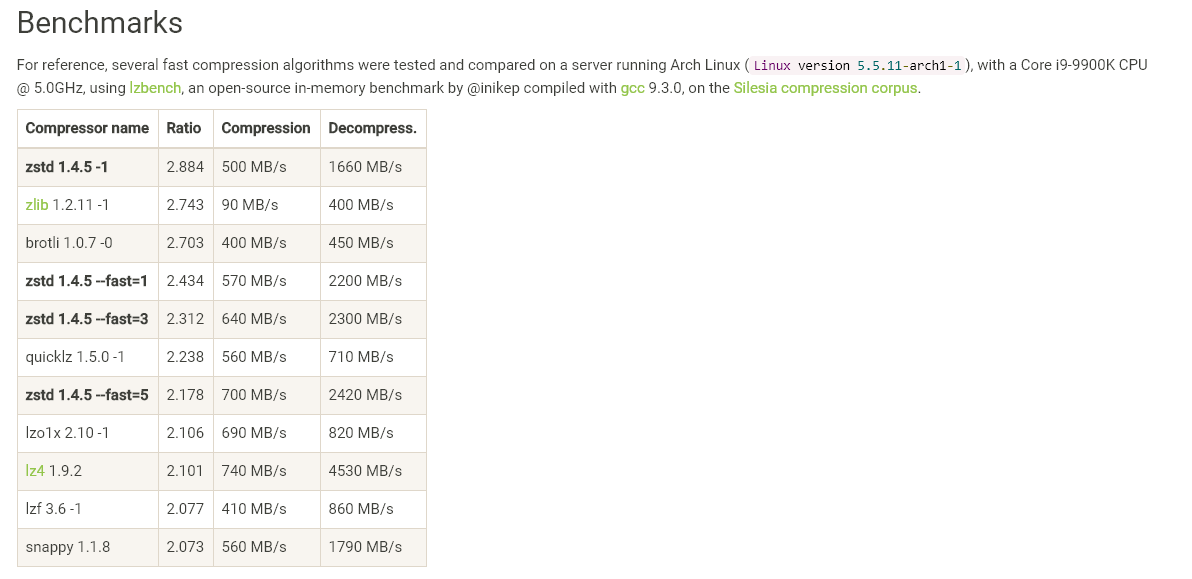
Zstd 还可以压缩速度为代价提供更强的压缩比,Speed vs Rtrade 可以通过小增量进行配置。在所有设置中,解压速度保持不变,并在所有 LZ压缩算法( 比如 zlib 或者lzma) 共享的属性中保持不变。
更加具体可到:https://facebook.github.io/zstd/ 查看介绍
2.参数命令
主要介绍 zstd 工具的安装和全部的参数命令
安装方式
# Ubuntu
$ apt install zstd

# CentOS
$ yum install zstd

# 编译安装
$ git clone https://github.com/facebook/zstd.git
$ cd zstd; make; sudo make install

# RPM包安装
# http://rpmfind.net/linux/rpm2html/search.php?query=zstd 搜索下载#
#如:zstd-1.4.7-1.el7.x86_64.rpm
参数命令
$ zstd --help
使用方式 :
      zstd [args] [FILE(s)] [-o file]

参数选项 :
 -#     : 压缩级别(1-19,默认值为3)
 -d     : 解压
 -D file: 使用文件作为字典
 -o file: 结果存储在文件中
 -f     : 在没有提示的情况下覆盖输出并(解压)压缩链接
--rm    : 成功解压缩后删除源文件
 -k     : 保存源文件(默认)
 -h/-H  : 显示帮助/长帮助并退出

高级选项 :
 -V     : 显示版本号并退出
 -v     : 详细模式
 -q     : 静默输出
 -c     : 强制写入标准输出
 -l     : 输出zstd压缩包中的信息
--ultra : 启用超过19级,最多22级(需要更多内存)
 -T#    : 使用几个线程进行压缩(默认值:1个)
 -r     : 递归地操作目录
--format=gzip : 将文件压缩为.gz格式
 -M#    : 为解压设置内存使用限制

字典生成器 :
--train ## : 从一组训练文件中创建一个字典
--train-cover[=k=#,d=#,steps=#] : 使用带有可选参数的cover算法
--train-legacy[=s=#] : 有选择性地使用遗留算法(默认值:9)
 -o file : “file”是字典名(默认:字典)
--maxdict=# : 将字典限制为指定大小(默认值:112640)
--dictID=# : 强制字典ID为指定值(默认:随机)

性能测试参数 :
 -b#    : 基准测试文件,使用#压缩级别(默认为1)
 -e#    : 测试从-bX到#的所有压缩级别(默认值:1)
 -i#    : 最小计算时间(秒)(默认为3s)
 -B#    : 将文件切成大小为#个独立块(默认:无块)
--priority=rt : 将进程优先级设置为实时


#---------------------------
英文解释:
[gpadmin@mdw34: /data3/data_bk_tmp/lte_min]$zstd --help
*** zstd command line interface 64-bits v1.4.7, by Yann Collet ***
Usage :
      zstd [args] [FILE(s)] [-o file]

FILE    : a filename
          with no FILE, or when FILE is - , read standard input
Arguments :
 -#     : # compression level (1-19, default: 3)
 -d     : decompression
 -D DICT: use DICT as Dictionary for compression or decompression
 -o file: result stored into `file` (only 1 output file)
 -f     : overwrite output without prompting, also (de)compress links
--rm    : remove source file(s) after successful de/compression
 -k     : preserve source file(s) (default)
 -h/-H  : display help/long help and exit

Advanced arguments :
 -V     : display Version number and exit
 -c     : force write to standard output, even if it is the console
 -v     : verbose mode; specify multiple times to increase verbosity
 -q     : suppress warnings; specify twice to suppress errors too
--no-progress : do not display the progress counter
 -r     : operate recursively on directories
--filelist FILE : read list of files to operate upon from FILE
--output-dir-flat DIR : processed files are stored into DIR
--output-dir-mirror DIR : processed files are stored into DIR respecting original directory structure
--[no-]check : during compression, add XXH64 integrity checksum to frame (default: enabled). If specified with -d, decompressor will ignore/validate checksums in compressed frame (default: validate).
--      : All arguments after "--" are treated as files

Advanced compression arguments :
--ultra : enable levels beyond 19, up to 22 (requires more memory)
--long[=#]: enable long distance matching with given window log (default: 27)
--fast[=#]: switch to very fast compression levels (default: 1)
--adapt : dynamically adapt compression level to I/O conditions
 -T#    : spawns # compression threads (default: 1, 0==# cores)
 -B#    : select size of each job (default: 0==automatic)
--single-thread : use a single thread for both I/O and compression (result slightly different than -T1)
--rsyncable : compress using a rsync-friendly method (-B sets block size)
--exclude-compressed: only compress files that are not already compressed
--stream-size=# : specify size of streaming input from `stdin`
--size-hint=# optimize compression parameters for streaming input of approximately this size
--target-compressed-block-size=# : generate compressed block of approximately targeted size
--no-dictID : don't write dictID into header (dictionary compression only)
--[no-]compress-literals : force (un)compressed literals
--format=zstd : compress files to the .zst format (default)

Advanced decompression arguments :
 -l     : print information about zstd compressed files
--test  : test compressed file integrity
 -M#    : Set a memory usage limit for decompression
--[no-]sparse : sparse mode (default: enabled on file, disabled on stdout)

Dictionary builder :
--train ## : create a dictionary from a training set of files
--train-cover[=k=#,d=#,steps=#,split=#,shrink[=#]] : use the cover algorithm with optional args
--train-fastcover[=k=#,d=#,f=#,steps=#,split=#,accel=#,shrink[=#]] : use the fast cover algorithm with optional args
--train-legacy[=s=#] : use the legacy algorithm with selectivity (default: 9)
 -o DICT : DICT is dictionary name (default: dictionary)
--maxdict=# : limit dictionary to specified size (default: 112640)
--dictID=# : force dictionary ID to specified value (default: random)

Benchmark arguments :
 -b#    : benchmark file(s), using # compression level (default: 3)
 -e#    : test all compression levels successively from -b# to -e# (default: 1)
 -i#    : minimum evaluation time in seconds (default: 3s)
 -B#    : cut file into independent blocks of size # (default: no block)
 -S     : output one benchmark result per input file (default: consolidated result)
--priority=rt : set process priority to real-time
3.命令演示
常用命令
# 将一个文件压缩成一个后缀为.zst的新文件
# 如果命令后面没有文件或文件为-的话,则读取标准输入
$ zstd file

# 在压缩操作后删除源文件
# 默认情况下,源文件在成功压缩或解压缩后不会被删除
$ zstd --rm file

# 解压zst压缩包
$ zstd -d file.zst

# 解压zst压缩包到标准输出
$ zstd -dc file.zst

# 查看zst压缩包
$ zstd -l file.zst
$ zstdcat file.zst
高级用法
# 输出详细信息
$ zstd -v file
$ zstd -v -d file.zst

# 压缩一个文件同时指定压缩级别(19最高,0最低,3为默认)
$ zstd -level file
$ zstd -9 file

# 使用更多的内存(压缩和解压时)以达到更高的压缩比
$ zstd --ultra -level file

# 解压缩为单进程
# 多个进程并发执行压缩过程(0表示自动使用所有CPU核心)
$ zstd -T0 file
$ zstd -T4 file
$ zstd -T4 -d file.zst
