clickhouse备份和恢复
为什么要备份CK
虽然CK有复制表之类的引擎,也有一些保护措施(不能人工删除使用带有MergeTree引擎且包含超过50Gb数据的表),但是无法避免的人为失误,以及倒霉透顶的机器集群故障,或者合规要求等,为了再加一份保险,就需要用到只要是数据库,就有备份的必要性
备份方法和工具来源于官网:https://clickhouse.com/docs/zh/operations/backup
使用建议先在测试环境或开发环境,把相关脚本OK了再上生产噢~
手工备份
手工备份,是使用CK的ALTER TABLE ... FREEZE PARTITION ...命令来实现,是利用硬链接到一个目录(/var/lib/clickhouse/shadow),恢复时从 /var/lib/clickhouse/bakcup 寻找指定的名称进行恢复
需要注意的是 手工备份和恢复 都不会涉及到表结构,只单纯的备份和恢复数据,因此相关表结构需要 另外存档和自行创建
基于上述要求,先自行创建
/var/lib/clickhouse/{shadow,bakcup},注意这2个目录权限属主属组是clickhouse如果在配置文件指定了data数据目录,则是在指定目录下创建
备份例子
alter table tableName freeze
#不进入交互模式,直接运行
echo 'alter table tableName freeze ' | clickhouse-client -u xxxx --password  xxxx
恢复例子
alter table tableName attach partition Namexxx
#不进入交互模式,直接运行
echo 'alter table tableName attach partition Namexxx ' | clickhouse-client -u xxxx --password  xxxx

#查看恢复表数据
echo 'select count() from tableName' | clickhouse-client -u xxxx --password  xxxx
工具备份
官方推荐的工具 clickhouse-backup,地址:https://github.com/AlexAkulov/clickhouse-backup
此工具不但可以备份数据,还可以备份表结构,另外还支持备份到第三方存储,比如S3(OSS)
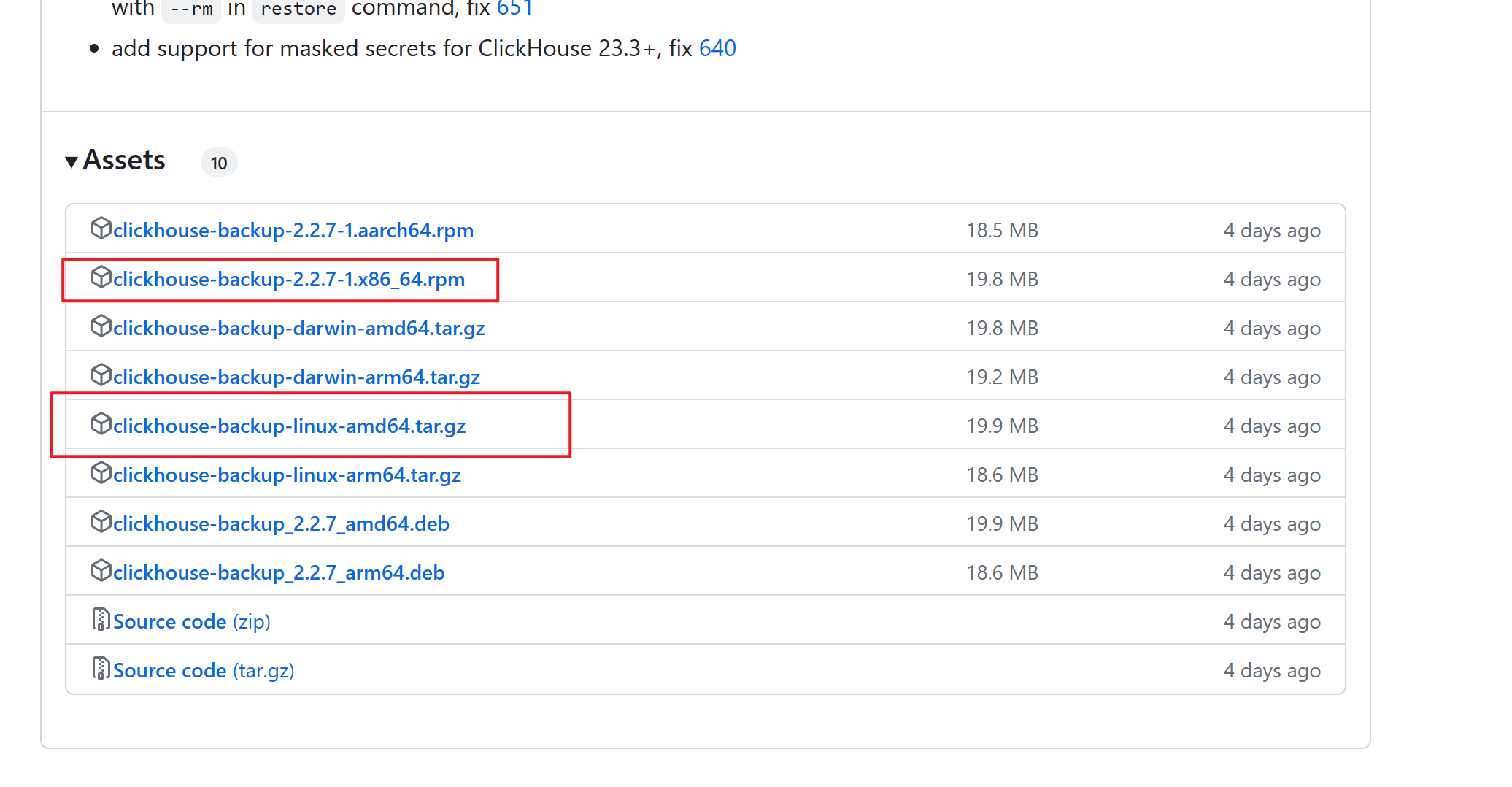
从releases下载一个包既可,rpm包的直接rpm -ivh 安装就可以全局使用了,这里我使用的tar包。
安装部署
tar -zxvf clickhouse-backup.tar.gz # 解压
cd clickhouse-backup
cp clickhouse-backup /usr/local/bin/   # 将可执行文件复制到/usr/local/bin
mkdir /etc/clickhouse-backup # /etc下创建一个目录,用来放置配置文件config.yml
cp config.yml /etc/clickhouse-backup/
配置文件config.yml如下
general:
  remote_storage: none           # REMOTE_STORAGE, if `none` then `upload` and  `download` command will fail
  max_file_size: 1099511627776      # MAX_FILE_SIZE, 1G by default, useless when upload_by_part is true, use for split data parts files by archives
  disable_progress_bar: true     # DISABLE_PROGRESS_BAR, show progress bar during upload and download, makes sense only when `upload_concurrency` and `download_concurrency` is 1
  backups_to_keep_local: 1       # BACKUPS_TO_KEEP_LOCAL, how many latest local backup should be kept, 0 means all created backups will be stored on local disk
                                 # You shall run `clickhouse-backup delete local <backup_name>` command to remove temporary backup files from the local disk
  backups_to_keep_remote: 2      # BACKUPS_TO_KEEP_REMOTE, how many latest backup should be kept on remote storage, 0 means all uploaded backups will be stored on remote storage.
                                 # If old backups are required for newer incremental backup then it won't be deleted. Be careful with long incremental backup sequences.
  log_level: info                # LOG_LEVEL, a choice from `debug`, `info`, `warn`, `error`
  allow_empty_backups: false     # ALLOW_EMPTY_BACKUPS
  # concurrency means parallel tables and parallel parts inside tables
  # for example 4 means max 4 parallel tables and 4 parallel parts inside one table, so equals 16 concurrent streams
  download_concurrency: 1        # DOWNLOAD_CONCURRENCY, max 255, by default, the value is round(sqrt(AVAILABLE_CPU_CORES / 2))
  upload_concurrency: 1          # UPLOAD_CONCURRENCY, max 255, by default, the value is round(sqrt(AVAILABLE_CPU_CORES / 2))

  # RESTORE_SCHEMA_ON_CLUSTER, execute all schema related SQL queries with `ON CLUSTER` clause as Distributed DDL.
  # Check `system.clusters` table for the correct cluster name, also `system.macros` can be used.
  # This isn't applicable when `use_embedded_backup_restore: true`
  restore_schema_on_cluster: ""
  upload_by_part: true           # UPLOAD_BY_PART
  download_by_part: true         # DOWNLOAD_BY_PART
  use_resumable_state: true      # USE_RESUMABLE_STATE, allow resume upload and download according to the <backup_name>.resumable file

  # RESTORE_DATABASE_MAPPING, restore rules from backup databases to target databases, which is useful when changing destination database, all atomic tables will be created with new UUIDs.
  # The format for this env variable is "src_db1:target_db1,src_db2:target_db2". For YAML please continue using map syntax
  restore_database_mapping: {}
  retries_on_failure: 3          # RETRIES_ON_FAILURE, how many times to retry after a failure during upload or download
  retries_pause: 30s             # RETRIES_PAUSE, duration time to pause after each download or upload failure
clickhouse:
  username: default                # CLICKHOUSE_USERNAME
  password: ""                     # CLICKHOUSE_PASSWORD
  host: localhost                  # CLICKHOUSE_HOST, to backup data clickhouse-backup requires access to the same file system as clickhouse-server, to host could be address of other docker container on the same machine, or IP address binded on some network interface on the same host.
  port: 9000                       # CLICKHOUSE_PORT, don't use 8123, clickhouse-backup doesn't support HTTP protocol
  # CLICKHOUSE_DISK_MAPPING, use this mapping when your `system.disks` are different between the source and destination clusters during backup and restore process
  # The format for this env variable is "disk_name1:disk_path1,disk_name2:disk_path2". For YAML please continue using map syntax
  disk_mapping: {}
  # CLICKHOUSE_SKIP_TABLES, the list of tables (pattern are allowed) which are ignored during backup and restore process
  # The format for this env variable is "pattern1,pattern2,pattern3". For YAML please continue using map syntax
  skip_tables:
    - system.*
    - INFORMATION_SCHEMA.*
    - information_schema.*
  timeout: 5m                  # CLICKHOUSE_TIMEOUT
  freeze_by_part: false        # CLICKHOUSE_FREEZE_BY_PART, allow freezing by part instead of freezing the whole table
  freeze_by_part_where: ""     # CLICKHOUSE_FREEZE_BY_PART_WHERE, allow parts filtering during freezing when freeze_by_part: true
  secure: false                # CLICKHOUSE_SECURE, use TLS encryption for connection
  skip_verify: false           # CLICKHOUSE_SKIP_VERIFY, skip certificate verification and allow potential certificate warnings
  sync_replicated_tables: true # CLICKHOUSE_SYNC_REPLICATED_TABLES
  tls_key: ""                  # CLICKHOUSE_TLS_KEY, filename with TLS key file
  tls_cert: ""                 # CLICKHOUSE_TLS_CERT, filename with TLS certificate file
  tls_ca: ""                   # CLICKHOUSE_TLS_CA, filename with TLS custom authority file
  log_sql_queries: true        # CLICKHOUSE_LOG_SQL_QUERIES, enable logging `clickhouse-backup` SQL queries on `system.query_log` table inside clickhouse-server
  debug: false                 # CLICKHOUSE_DEBUG
  config_dir:      "/etc/clickhouse-server"              # CLICKHOUSE_CONFIG_DIR
  restart_command: "systemctl restart clickhouse-server" # CLICKHOUSE_RESTART_COMMAND, use this command when restoring with --rbac or --config options
  ignore_not_exists_error_during_freeze: true # CLICKHOUSE_IGNORE_NOT_EXISTS_ERROR_DURING_FREEZE, helps to avoid backup failures when running frequent CREATE / DROP tables and databases during backup, `clickhouse-backup` will ignore `code: 60` and `code: 81` errors during execution of `ALTER TABLE ... FREEZE`
  check_replicas_before_attach: true # CLICKHOUSE_CHECK_REPLICAS_BEFORE_ATTACH, helps avoiding concurrent ATTACH PART execution when restoring ReplicatedMergeTree tables
  use_embedded_backup_restore: false # CLICKHOUSE_USE_EMBEDDED_BACKUP_RESTORE, use BACKUP / RESTORE SQL statements instead of regular SQL queries to use features of modern ClickHouse server versions
azblob:
  endpoint_suffix: "core.windows.net" # AZBLOB_ENDPOINT_SUFFIX
  account_name: ""             # AZBLOB_ACCOUNT_NAME
  account_key: ""              # AZBLOB_ACCOUNT_KEY
  sas: ""                      # AZBLOB_SAS
  use_managed_identity: false  # AZBLOB_USE_MANAGED_IDENTITY
  container: ""                # AZBLOB_CONTAINER
  path: ""                     # AZBLOB_PATH, `system.macros` values could be applied as {macro_name}
  compression_level: 1         # AZBLOB_COMPRESSION_LEVEL
  compression_format: tar      # AZBLOB_COMPRESSION_FORMAT, allowed values tar, lz4, bzip2, gzip, sz, xz, brortli, zstd, `none` for upload data part folders as is
  sse_key: ""                  # AZBLOB_SSE_KEY
  buffer_size: 0               # AZBLOB_BUFFER_SIZE, if less or eq 0 then it is calculated as max_file_size / max_parts_count, between 2Mb and 4Mb
  max_parts_count: 10000       # AZBLOB_MAX_PARTS_COUNT, number of parts for AZBLOB uploads, for properly calculate buffer size
  max_buffers: 3               # AZBLOB_MAX_BUFFERS
s3:
  access_key: ""                   # S3_ACCESS_KEY
  secret_key: ""                   # S3_SECRET_KEY
  bucket: ""                       # S3_BUCKET
  endpoint: ""                     # S3_ENDPOINT
  region: us-east-1                # S3_REGION
  acl: private                     # S3_ACL
  assume_role_arn: ""              # S3_ASSUME_ROLE_ARN
  force_path_style: false          # S3_FORCE_PATH_STYLE
  path: ""                         # S3_PATH, `system.macros` values could be applied as {macro_name}
  disable_ssl: false               # S3_DISABLE_SSL
  compression_level: 1             # S3_COMPRESSION_LEVEL
  compression_format: tar          # S3_COMPRESSION_FORMAT, allowed values tar, lz4, bzip2, gzip, sz, xz, brortli, zstd, `none` for upload data part folders as is
  # look details in https://docs.aws.amazon.com/AmazonS3/latest/userguide/UsingKMSEncryption.html
  sse: ""                          # S3_SSE, empty (default), AES256, or aws:kms
  sse_kms_key_id: ""               # S3_SSE_KMS_KEY_ID, if S3_SSE is aws:kms then specifies the ID of the Amazon Web Services Key Management Service
  sse_customer_algorithm: ""       # S3_SSE_CUSTOMER_ALGORITHM, encryption algorithm, for example, AES256
  sse_customer_key: ""             # S3_SSE_CUSTOMER_KEY, customer-provided encryption key
  sse_customer_key_md5: ""         # S3_SSE_CUSTOMER_KEY_MD5, 128-bit MD5 digest of the encryption key according to RFC 1321
  sse_kms_encryption_context: ""   # S3_SSE_KMS_ENCRYPTION_CONTEXT, base64-encoded UTF-8 string holding a JSON with the encryption context
                                   # Specifies the Amazon Web Services KMS Encryption Context to use for object encryption.
                                   # This is a collection of non-secret key-value pairs that represent additional authenticated data.
                                   # When you use an encryption context to encrypt data, you must specify the same (an exact case-sensitive match)
                                   # encryption context to decrypt the data. An encryption context is supported only on operations with symmetric encryption KMS keys
  disable_cert_verification: false # S3_DISABLE_CERT_VERIFICATION
  use_custom_storage_class: false  # S3_USE_CUSTOM_STORAGE_CLASS
  storage_class: STANDARD          # S3_STORAGE_CLASS, by default allow only from list https://github.com/aws/aws-sdk-go-v2/blob/main/service/s3/types/enums.go#L787-L799
  concurrency: 1                   # S3_CONCURRENCY
  part_size: 0                     # S3_PART_SIZE, if less or eq 0 then it is calculated as max_file_size / max_parts_count, between 5MB and 5Gb
  max_parts_count: 10000           # S3_MAX_PARTS_COUNT, number of parts for S3 multipart uploads
  allow_multipart_download: false  # S3_ALLOW_MULTIPART_DOWNLOAD, allow faster download and upload speeds, but will require additional disk space, download_concurrency * part size in worst case

  # S3_OBJECT_LABELS, allow setup metadata for each object during upload, use {macro_name} from system.macros and {backupName} for current backup name
  # The format for this env variable is "key1:value1,key2:value2". For YAML please continue using map syntax
  object_labels: {}
  # S3_CUSTOM_STORAGE_CLASS_MAP, allow setup storage class depending on the backup name regexp pattern, format nameRegexp > className
  custom_storage_class_map: {}
  debug: false                     # S3_DEBUG
gcs:
  credentials_file: ""         # GCS_CREDENTIALS_FILE
  credentials_json: ""         # GCS_CREDENTIALS_JSON
  credentials_json_encoded: "" # GCS_CREDENTIALS_JSON_ENCODED
  bucket: ""                   # GCS_BUCKET
  path: ""                     # GCS_PATH, `system.macros` values could be applied as {macro_name}
  compression_level: 1         # GCS_COMPRESSION_LEVEL
  compression_format: tar      # GCS_COMPRESSION_FORMAT, allowed values tar, lz4, bzip2, gzip, sz, xz, brortli, zstd, `none` for upload data part folders as is
  storage_class: STANDARD      # GCS_STORAGE_CLASS

  # GCS_OBJECT_LABELS, allow setup metadata for each object during upload, use {macro_name} from system.macros and {backupName} for current backup name
  # The format for this env variable is "key1:value1,key2:value2". For YAML please continue using map syntax
  object_labels: {}
  # GCS_CUSTOM_STORAGE_CLASS_MAP, allow setup storage class depends on backup name regexp pattern, format nameRegexp > className
  custom_storage_class_map: {}
  debug: false                 # GCS_DEBUG
cos:
  url: ""                      # COS_URL
  timeout: 2m                  # COS_TIMEOUT
  secret_id: ""                # COS_SECRET_ID
  secret_key: ""               # COS_SECRET_KEY
  path: ""                     # COS_PATH, `system.macros` values could be applied as {macro_name}
  compression_format: tar      # COS_COMPRESSION_FORMAT, allowed values tar, lz4, bzip2, gzip, sz, xz, brortli, zstd, `none` for upload data part folders as is
  compression_level: 1         # COS_COMPRESSION_LEVEL
ftp:
  address: ""                  # FTP_ADDRESS
  timeout: 2m                  # FTP_TIMEOUT
  username: ""                 # FTP_USERNAME
  password: ""                 # FTP_PASSWORD
  tls: false                   # FTP_TLS
  path: ""                     # FTP_PATH, `system.macros` values could be applied as {macro_name}
  compression_format: tar      # FTP_COMPRESSION_FORMAT, allowed values tar, lz4, bzip2, gzip, sz, xz, brortli, zstd, `none` for upload data part folders as is
  compression_level: 1         # FTP_COMPRESSION_LEVEL
  debug: false                 # FTP_DEBUG
sftp:
  address: ""                  # SFTP_ADDRESS
  username: ""                 # SFTP_USERNAME
  password: ""                 # SFTP_PASSWORD
  key: ""                      # SFTP_KEY
  path: ""                     # SFTP_PATH, `system.macros` values could be applied as {macro_name}
  concurrency: 1               # SFTP_CONCURRENCY
  compression_format: tar      # SFTP_COMPRESSION_FORMAT, allowed values tar, lz4, bzip2, gzip, sz, xz, brortli, zstd, `none` for upload data part folders as is
  compression_level: 1         # SFTP_COMPRESSION_LEVEL
  debug: false                 # SFTP_DEBUG
custom:
  upload_command: ""           # CUSTOM_UPLOAD_COMMAND
  download_command: ""         # CUSTOM_DOWNLOAD_COMMAND
  delete_command: ""           # CUSTOM_DELETE_COMMAND
  list_command: ""             # CUSTOM_LIST_COMMAND
  command_timeout: "4h"          # CUSTOM_COMMAND_TIMEOUT
api:
  listen: "localhost:7171"     # API_LISTEN
  enable_metrics: true         # API_ENABLE_METRICS
  enable_pprof: false          # API_ENABLE_PPROF
  username: ""                 # API_USERNAME, basic authorization for API endpoint
  password: ""                 # API_PASSWORD
  secure: false                # API_SECURE, use TLS for listen API socket
  certificate_file: ""         # API_CERTIFICATE_FILE
  private_key_file: ""         # API_PRIVATE_KEY_FILE
  integration_tables_host: ""  # API_INTEGRATION_TABLES_HOST, allow using DNS name to connect in `system.backup_list` and `system.backup_actions`
  allow_parallel: false        # API_ALLOW_PARALLEL, enable parallel operations, this allows for significant memory allocation and spawns go-routines, don't enable it if you are not sure
  create_integration_tables: false # API_CREATE_INTEGRATION_TABLES, create `system.backup_list` and `system.backup_actions`
  complete_resumable_after_restart: true # API_COMPLETE_RESUMABLE_AFTER_RESTART, after API server startup, if `/var/lib/clickhouse/backup/*/(upload|download).state` present, then operation will continue in the background
本地和远程创建备份
备份数据到本地
因为我这里使用的tar包,在执行命令时需要指定配置文件,如不想指定,将配置文件放到/etc/clickhouse-backup/config.yml既可,默认备份到/var/lib/clickhouse/backup该路径下
如果在配置文件指定了data数据目录,则是在指定目录下创建,那就是
path/clickhouse/backup
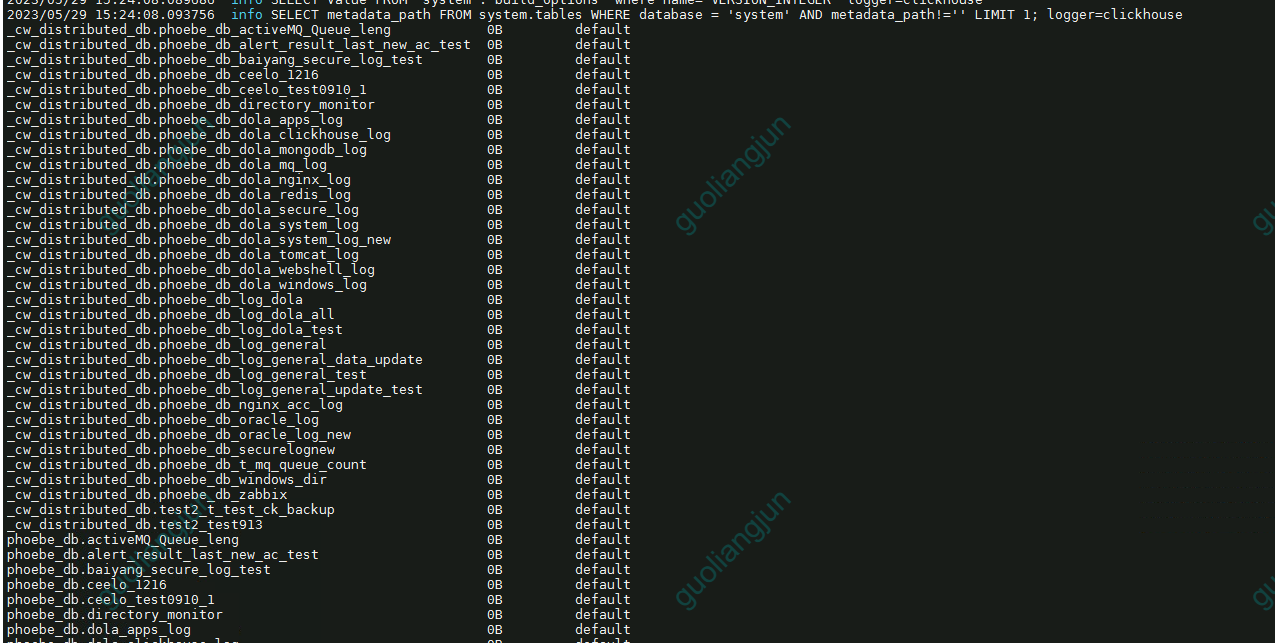
查看可以备份的表
/usr/local/bin/clickhouse-backup tables
备份命令
#备份全部表
/usr/local/bin/clickhouse-backup -c config.yml create
#备份全部表,并为此次备份指定名称,,默认以当前时间,以文件夹方式存在
/usr/local/bin/clickhouse-backup -c config.yml create bak_Namexxx
#备份指定表
/usr/local/bin/clickhouse-backup -c config.yml create -t default.tableName bak_Namexxx
#备份多表
/usr/local/bin/clickhouse-backup -c config.yml create -t default.tableName1,default.tableName2 bak_Namexxx

#查看备份列表
/usr/local/bin/clickhouse-backup -c config.yml list
#删除某次备份
/usr/local/bin/clickhouse-backup -c config.yml delete local bak_Namexxx
恢复命令
#恢复某个备份名称 数据和表结构
/usr/local/bin/clickhouse-backup -c config.yml restore bak_Namexxx
#指定表还原数据 和表结构
/usr/local/bin/clickhouse-backup -c config.yml restore -t default.tableName bak_Namexxx
#还原表结构
/usr/local/bin/clickhouse-backup -c config.yml restore -s
#还原数据
/usr/local/bin/clickhouse-backup -c config.yml restore -d
远程创建备份
clickhouse-backup备份工具支持好几种远程,如s3/ftp/sftp等等;如果需要远程备份需要修改config.yml文件中的remote_storage参数,具体看官方文档介绍
#创建远程备份
/usr/local/bin/clickhouse-backup -c config.yml update
#下载远程备份到本地
/usr/local/bin/clickhouse-backup -c config.yml download
#恢复远程备份
/usr/local/bin/clickhouse-backup -c config.yml restore_remote

#----------------------------------------------------------------------
# 使用scp,将备份上传到服务器上,如果config.yml中设置了sftp,则不需要这一步
scp -rp /var/lib/clickhouse/backup/备份名 name@host:/data/clickhouse-backup/

# 但如果通过配置文件里的sftp上传备份到服务器
/usr/local/bin/clickhouse-backup upload bak_Namexxx
crontab定时备份
clickhouse_backup.sh
#!/bin/bash
BACKUP_NAME=ch_backup_$(date +%Y-%m-%dT%H-%M-%S)

/usr/local/bin/clickhouse-backup create $BACKUP_NAME  #本地备份
/usr/local/bin/clickhouse-backup upload $BACKUP_NAME  # 本地备份之后,上传到远程服务器
