kube-bench安全检测工具的部署和使用
前因
最近需要对容器镜像检测安排检测预研的工作,其中就涉及了kube-bench检测k8s集群的方面。
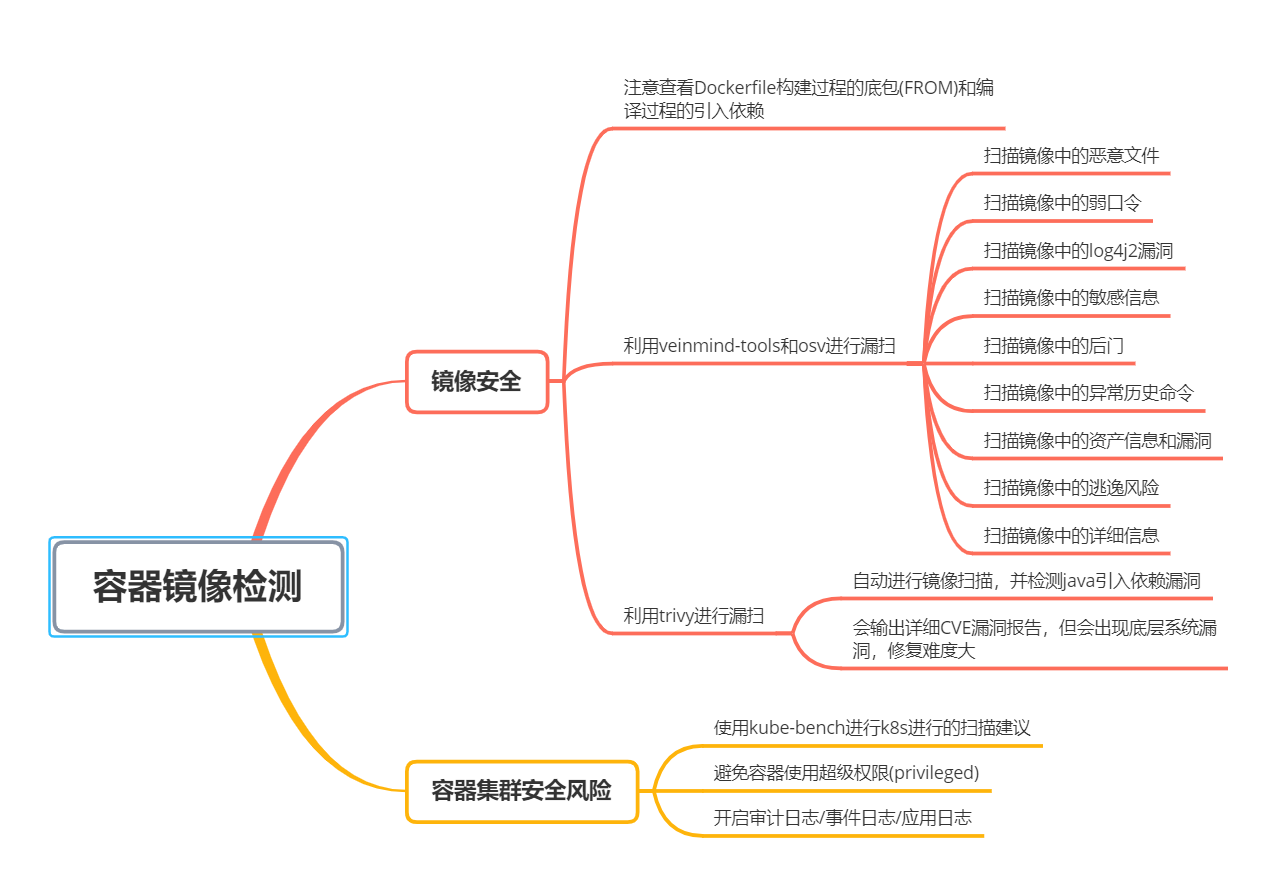
什么是kube-bench?
Kube-Bench是一款针对Kubernete的安全检测工具,从本质上来说,Kube-Bench是一个基于Go开发的应用程序,它可以帮助研究人员对部署的Kubernete进行安全检测
那么,kube-bench到底是检测kubernetes集群的什么呢?
主要是检测kubernetes集群的各个组件的配置文件,查看这些配置文件是否符合安全基线的标准。
官方说明:https://github.com/aquasecurity/kube-bench
安装 Kube-Bench
Kube-bench的安装和使用非常简单,以下是安装步骤:
下载kube-bench二进制文件
从kube-bench的GitHub仓库下载二进制文件,https://github.com/aquasecurity/kube-bench/releases
上传到kubernetes集群的master节点,解压后,得到一个可执行文件kube-bench,一个配置文件夹cfg:
[root@k8s-master01 kube-bench]# ll
total 25068
drwxr-xr-x 20 root    root        329 Aug 31 08:37 cfg
-rwxr-xr-x  1 rancher docker 25667871 Jul 25 17:47 kube-bench
执行此命令即可开始安全检测:
./kube-bench run --targets=master --config-dir ./cfg --config ./cfg/config.yaml > result
结果如下:
[root@k8s-master01 kube-bench]# more result
[INFO] 1 Master Node Security Configuration
[INFO] 1.1 Master Node Configuration Files
[FAIL] 1.1.1 Ensure that the API server pod specification file permissions are set to 644 or more restrictive (Automated)
[FAIL] 1.1.2 Ensure that the API server pod specification file ownership is set to root:root (Automated)
[FAIL] 1.1.3 Ensure that the controller manager pod specification file permissions are set to 644 or more restrictive (Automated)
[FAIL] 1.1.4 Ensure that the controller manager pod specification file ownership is set to root:root (Automated)
[FAIL] 1.1.5 Ensure that the scheduler pod specification file permissions are set to 644 or more restrictive (Automated)
[FAIL] 1.1.6 Ensure that the scheduler pod specification file ownership is set to root:root (Automated)
[FAIL] 1.1.7 Ensure that the etcd pod specification file permissions are set to 644 or more restrictive (Automated)
[FAIL] 1.1.8 Ensure that the etcd pod specification file ownership is set to root:root (Automated)
[PASS] 1.1.9 Ensure that the Container Network Interface file permissions are set to 644 or more restrictive (Manual)
[PASS] 1.1.10 Ensure that the Container Network Interface file ownership is set to root:root (Manual)
[FAIL] 1.1.11 Ensure that the etcd data directory permissions are set to 700 or more restrictive (Automated)
[FAIL] 1.1.12 Ensure that the etcd data directory ownership is set to etcd:etcd (Automated)
[FAIL] 1.1.13 Ensure that the admin.conf file permissions are set to 644 or more restrictive (Automated)
[FAIL] 1.1.14 Ensure that the admin.conf file ownership is set to root:root (Automated)
[FAIL] 1.1.15 Ensure that the scheduler.conf file permissions are set to 644 or more restrictive (Automated)
[FAIL] 1.1.16 Ensure that the scheduler.conf file ownership is set to root:root (Automated)
[FAIL] 1.1.17 Ensure that the controller-manager.conf file permissions are set to 644 or more restrictive (Automated)
[FAIL] 1.1.18 Ensure that the controller-manager.conf file ownership is set to root:root (Automated)
[FAIL] 1.1.19 Ensure that the Kubernetes PKI directory and file ownership is set to root:root (Automated)
[WARN] 1.1.20 Ensure that the Kubernetes PKI certificate file permissions are set to 644 or more restrictive (Manual)
[WARN] 1.1.21 Ensure that the Kubernetes PKI key file permissions are set to 600 (Manual)
[INFO] 1.2 API Server
[PASS] 1.2.1 Ensure that the --anonymous-auth argument is set to false (Manual)
[PASS] 1.2.2 Ensure that the --token-auth-file parameter is not set (Automated)
[PASS] 1.2.3 Ensure that the --kubelet-https argument is set to true (Automated)
[PASS] 1.2.4 Ensure that the --kubelet-client-certificate and --kubelet-client-key arguments are set as appropriate (Automated)
[FAIL] 1.2.5 Ensure that the --kubelet-certificate-authority argument is set as appropriate (Automated)
[PASS] 1.2.6 Ensure that the --authorization-mode argument is not set to AlwaysAllow (Automated)
[PASS] 1.2.7 Ensure that the --authorization-mode argument includes Node (Automated)
[PASS] 1.2.8 Ensure that the --authorization-mode argument includes RBAC (Automated)
[WARN] 1.2.9 Ensure that the admission control plugin EventRateLimit is set (Manual)
[PASS] 1.2.10 Ensure that the admission control plugin AlwaysAdmit is not set (Automated)
[WARN] 1.2.11 Ensure that the admission control plugin AlwaysPullImages is set (Manual)
[WARN] 1.2.12 Ensure that the admission control plugin SecurityContextDeny is set if PodSecurityPolicy is not used (Manual)
[PASS] 1.2.13 Ensure that the admission control plugin ServiceAccount is set (Automated)
[PASS] 1.2.14 Ensure that the admission control plugin NamespaceLifecycle is set (Automated)
[FAIL] 1.2.15 Ensure that the admission control plugin PodSecurityPolicy is set (Automated)
[PASS] 1.2.16 Ensure that the admission control plugin NodeRestriction is set (Automated)
[PASS] 1.2.17 Ensure that the --insecure-bind-address argument is not set (Automated)
[PASS] 1.2.18 Ensure that the --insecure-port argument is set to 0 (Automated)
[PASS] 1.2.19 Ensure that the --secure-port argument is not set to 0 (Automated)
[PASS] 1.2.20 Ensure that the --profiling argument is set to false (Automated)
[PASS] 1.2.21 Ensure that the --audit-log-path argument is set (Automated)
[PASS] 1.2.22 Ensure that the --audit-log-maxage argument is set to 30 or as appropriate (Automated)
[PASS] 1.2.23 Ensure that the --audit-log-maxbackup argument is set to 10 or as appropriate (Automated)
[PASS] 1.2.24 Ensure that the --audit-log-maxsize argument is set to 100 or as appropriate (Automated)
[WARN] 1.2.25 Ensure that the --request-timeout argument is set as appropriate (Manual)
[PASS] 1.2.26 Ensure that the --service-account-lookup argument is set to true (Automated)
[PASS] 1.2.27 Ensure that the --service-account-key-file argument is set as appropriate (Automated)
[PASS] 1.2.28 Ensure that the --etcd-certfile and --etcd-keyfile arguments are set as appropriate (Automated)
[PASS] 1.2.29 Ensure that the --tls-cert-file and --tls-private-key-file arguments are set as appropriate (Automated)
[PASS] 1.2.30 Ensure that the --client-ca-file argument is set as appropriate (Automated)
[PASS] 1.2.31 Ensure that the --etcd-cafile argument is set as appropriate (Automated)
[WARN] 1.2.32 Ensure that the --encryption-provider-config argument is set as appropriate (Manual)
[WARN] 1.2.33 Ensure that encryption providers are appropriately configured (Manual)
[PASS] 1.2.34 Ensure that the API Server only makes use of Strong Cryptographic Ciphers (Manual)
[INFO] 1.3 Controller Manager
[PASS] 1.3.1 Ensure that the --terminated-pod-gc-threshold argument is set as appropriate (Manual)
[PASS] 1.3.2 Ensure that the --profiling argument is set to false (Automated)
[PASS] 1.3.3 Ensure that the --use-service-account-credentials argument is set to true (Automated)
[PASS] 1.3.4 Ensure that the --service-account-private-key-file argument is set as appropriate (Automated)
[PASS] 1.3.5 Ensure that the --root-ca-file argument is set as appropriate (Automated)
[PASS] 1.3.6 Ensure that the RotateKubeletServerCertificate argument is set to true (Automated)
[PASS] 1.3.7 Ensure that the --bind-address argument is set to 127.0.0.1 (Automated)
[INFO] 1.4 Scheduler
[PASS] 1.4.1 Ensure that the --profiling argument is set to false (Automated)
[PASS] 1.4.2 Ensure that the --bind-address argument is set to 127.0.0.1 (Automated)

== Remediations master ==
1.1.1 Run the below command (based on the file location on your system) on the
master node.
For example, chmod 644 /etc/kubernetes/manifests/kube-apiserver.yaml

1.1.2 Run the below command (based on the file location on your system) on the master node.
For example,
chown root:root /etc/kubernetes/manifests/kube-apiserver.yaml

1.1.3 Run the below command (based on the file location on your system) on the master node.
For example,
chmod 644 /etc/kubernetes/manifests/kube-controller-manager.yaml

1.1.4 Run the below command (based on the file location on your system) on the master node.
For example,
chown root:root /etc/kubernetes/manifests/kube-controller-manager.yaml

1.1.5 Run the below command (based on the file location on your system) on the master node.
For example,
chmod 644 /etc/kubernetes/manifests/kube-scheduler.yaml

1.1.6 Run the below command (based on the file location on your system) on the master node.
For example,
chown root:root /etc/kubernetes/manifests/kube-scheduler.yaml

1.1.7 Run the below command (based on the file location on your system) on the master node.
For example,
chmod 644 /etc/kubernetes/manifests/etcd.yaml

1.1.8 Run the below command (based on the file location on your system) on the master node.
For example,
chown root:root /etc/kubernetes/manifests/etcd.yaml

1.1.11 On the etcd server node, get the etcd data directory, passed as an argument --data-dir,
from the below command:
ps -ef | grep etcd
Run the below command (based on the etcd data directory found above). For example,
chmod 700 /var/lib/etcd

1.1.12 On the etcd server node, get the etcd data directory, passed as an argument --data-dir,
from the below command:
ps -ef | grep etcd
Run the below command (based on the etcd data directory found above).
For example, chown etcd:etcd /var/lib/etcd

1.1.13 Run the below command (based on the file location on your system) on the master node.
For example,
chmod 644 /etc/kubernetes/admin.conf

1.1.14 Run the below command (based on the file location on your system) on the master node.
For example,
chown root:root /etc/kubernetes/admin.conf

1.1.15 Run the below command (based on the file location on your system) on the master node.
For example,
chmod 644 /etc/kubernetes/scheduler.conf

1.1.16 Run the below command (based on the file location on your system) on the master node.
For example,
chown root:root /etc/kubernetes/scheduler.conf

1.1.17 Run the below command (based on the file location on your system) on the master node.
For example,
chmod 644 /etc/kubernetes/controller-manager.conf

1.1.18 Run the below command (based on the file location on your system) on the master node.
For example,
chown root:root /etc/kubernetes/controller-manager.conf

1.1.19 Run the below command (based on the file location on your system) on the master node.
For example,
chown -R root:root /etc/kubernetes/pki/

1.1.20 audit test did not run: failed to run: "find /etc/kubernetes/pki/ -name '*.crt' | xargs stat -c permissions=%a", output: "find: ‘/etc/kubernetes/pki/’: No such file or directory\nstat: missing operand\nTry '
stat --help' for more information.\n", error: exit status 123
1.1.21 audit test did not run: failed to run: "find /etc/kubernetes/pki/ -name '*.key' | xargs stat -c permissions=%a", output: "find: ‘/etc/kubernetes/pki/’: No such file or directory\nstat: missing operand\nTry '
stat --help' for more information.\n", error: exit status 123
1.2.5 Follow the Kubernetes documentation and setup the TLS connection between
the apiserver and kubelets. Then, edit the API server pod specification file
/etc/kubernetes/manifests/kube-apiserver.yaml on the master node and set the
--kubelet-certificate-authority parameter to the path to the cert file for the certificate authority.
--kubelet-certificate-authority=<ca-string>

1.2.9 Follow the Kubernetes documentation and set the desired limits in a configuration file.
Then, edit the API server pod specification file /etc/kubernetes/manifests/kube-apiserver.yaml
and set the below parameters.
--enable-admission-plugins=...,EventRateLimit,...
--admission-control-config-file=<path/to/configuration/file>

1.2.11 Edit the API server pod specification file /etc/kubernetes/manifests/kube-apiserver.yaml
on the master node and set the --enable-admission-plugins parameter to include
AlwaysPullImages.
--enable-admission-plugins=...,AlwaysPullImages,...

1.2.12 Edit the API server pod specification file /etc/kubernetes/manifests/kube-apiserver.yaml
on the master node and set the --enable-admission-plugins parameter to include
SecurityContextDeny, unless PodSecurityPolicy is already in place.
--enable-admission-plugins=...,SecurityContextDeny,...

1.2.15 Follow the documentation and create Pod Security Policy objects as per your environment.
Then, edit the API server pod specification file /etc/kubernetes/manifests/kube-apiserver.yaml
on the master node and set the --enable-admission-plugins parameter to a
value that includes PodSecurityPolicy:
--enable-admission-plugins=...,PodSecurityPolicy,...
Then restart the API Server.

1.2.25 Edit the API server pod specification file /etc/kubernetes/manifests/kube-apiserver.yaml
and set the below parameter as appropriate and if needed.
For example,
--request-timeout=300s

1.2.32 Follow the Kubernetes documentation and configure a EncryptionConfig file.
Then, edit the API server pod specification file /etc/kubernetes/manifests/kube-apiserver.yaml
on the master node and set the --encryption-provider-config parameter to the path of that file: --encryption-provider-config=</path/to/EncryptionConfig/File>

1.2.33 Follow the Kubernetes documentation and configure a EncryptionConfig file.
In this file, choose aescbc, kms or secretbox as the encryption provider.


== Summary master ==
37 checks PASS
19 checks FAIL
8 checks WARN
0 checks INFO

== Summary total ==
37 checks PASS
19 checks FAIL
8 checks WARN
0 checks INFO
每一个检测点都有标号,例如,1.1.1指的是 Ensure that the API server pod specification file permissions are set to 644 or more restrictive (Automated)
如果此检测点是FAIL也就是失败,下面的 Remediations master 将会提示如何修复.
输出总体上可以分为三部分,第一部分是检测结果,第二部分是 Remediations master 这一行后面的安全整改建议,第三部分是安全检测结果总结,
- [PASS]:测试通过
- [FAIL]:测试未通过,重点关注,在测试结果会给出修复建议
- [WARN]:警告,可做了解
- [INFO]:信息,没什么可说的,就是字面意思
容器运行kube-bench
此方法我未验证,参考:https://github.com/aquasecurity/kube-bench/blob/v0.6.17/docs/running.md#running-kube-bench
您可以避免在主机上安装kube-bench,方法是在使用主机PID名称空间的容器中运行它,并挂载主机上配置文件和其他文件所在的/etc和/var目录,以便kube-bench检查它们的存在和权限。
docker run --pid=host -v /etc:/etc:ro -v /var:/var:ro -t docker.io/aquasec/kube-bench:latest --version 1.18
运行Kubernetes集群
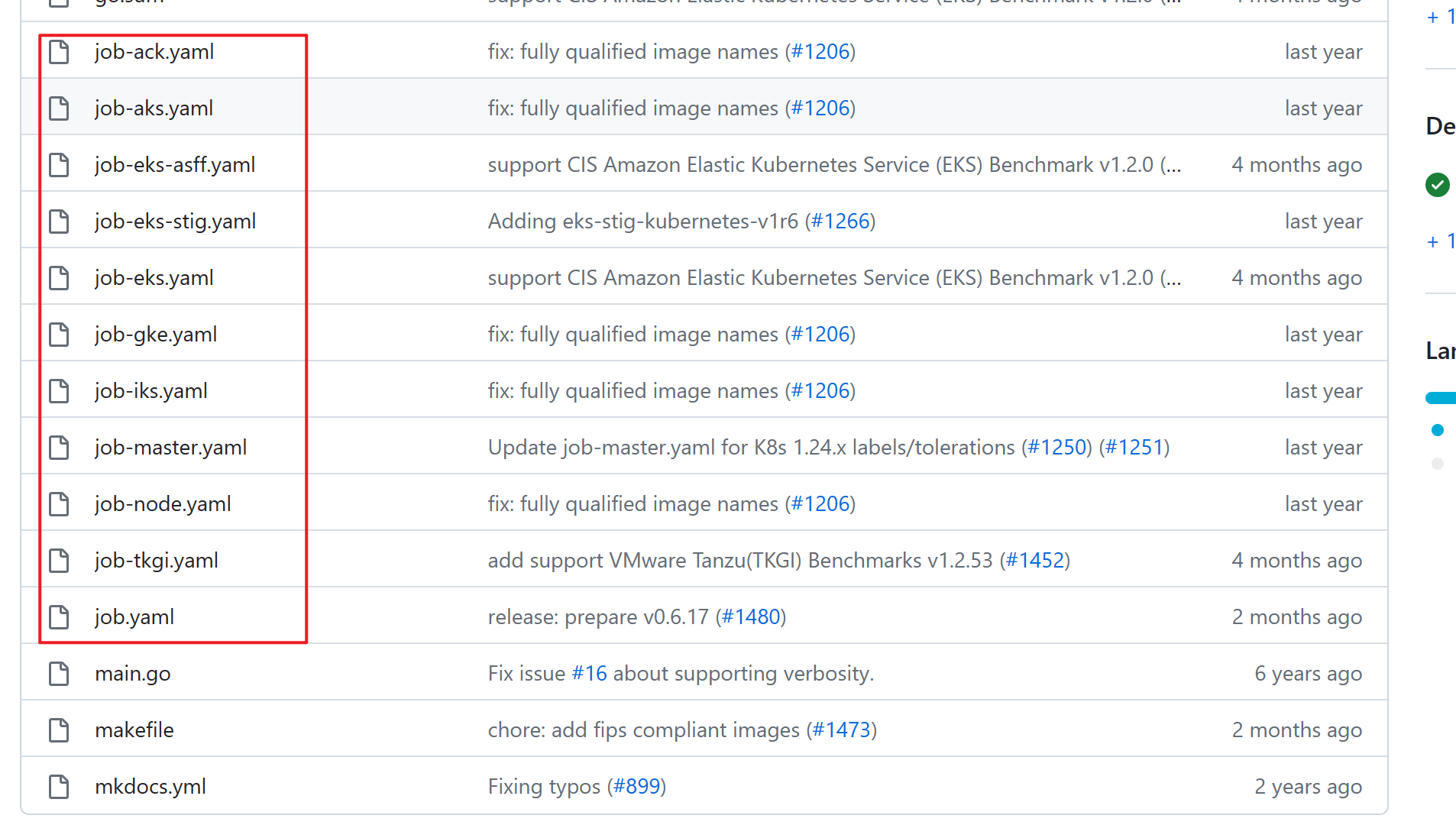
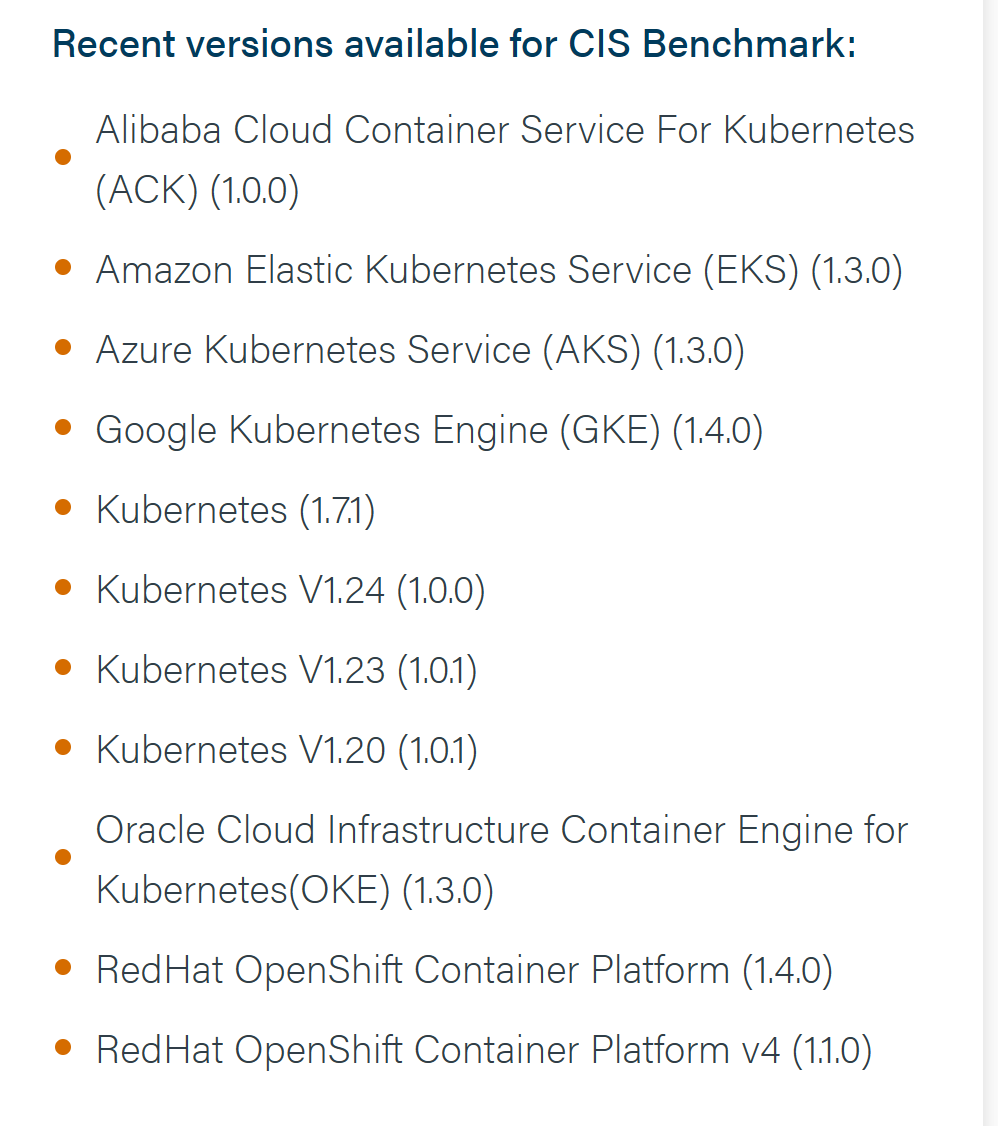
在集群内运行·kube-bench·的job类型pod,如下图有支撑的类型
执行过程
选择job.yaml 这个文件,执行它:
[root@k8s-master kube-bench-0.6.17]# kubectl apply -f job.yaml
job.batch/kube-bench created
等待job任务完成,状态变为completed:
[root@k8s-master kube-bench-0.6.17]# kubectl get po
NAME               READY   STATUS      RESTARTS   AGE
kube-bench-rn9dg   0/1     Completed   0          62s
查看此pod的日志,该日志即为安全检测的结果
[root@k8s-master kube-bench-0.6.17]# kubectl logs kube-bench-rn9dg
[INFO] 4 Worker Node Security Configuration
[INFO] 4.1 Worker Node Configuration Files
[PASS] 4.1.1 Ensure that the kubelet service file permissions are set to 644 or more restrictive (Automated)
[PASS] 4.1.2 Ensure that the kubelet service file ownership is set to root:root (Automated)
[PASS] 4.1.3 If proxy kubeconfig file exists ensure permissions are set to 644 or more restrictive (Manual)
[PASS] 4.1.4 Ensure that the proxy kubeconfig file ownership is set to root:root (Manual)
[PASS] 4.1.5 Ensure that the --kubeconfig kubelet.conf file permissions are set to 644 or more restrictive (Automated)
[PASS] 4.1.6 Ensure that the --kubeconfig kubelet.conf file ownership is set to root:root (Manual)
如果想只检测master,那么执行 job-master.yaml 这个文件即可,此文件的内容如下:
---
apiVersion: batch/v1
kind: Job
metadata:
  name: kube-bench-master
spec:
  template:
    spec:
      hostPID: true
      affinity:
        nodeAffinity:
          requiredDuringSchedulingIgnoredDuringExecution:
            nodeSelectorTerms:
              - matchExpressions:
                  - key: node-role.kubernetes.io/control-plane
                    operator: Exists
              - matchExpressions:
                  - key: node-role.kubernetes.io/master
                    operator: Exists
      tolerations:
        - key: node-role.kubernetes.io/master
          operator: Exists
          effect: NoSchedule
        - key: node-role.kubernetes.io/control-plane
          operator: Exists
          effect: NoSchedule
      containers:
        - name: kube-bench
          image: docker.io/aquasec/kube-bench:latest
          command: ["kube-bench", "run", "--targets", "master"]
          volumeMounts:
            - name: var-lib-etcd
              mountPath: /var/lib/etcd
              readOnly: true
            - name: var-lib-kubelet
              mountPath: /var/lib/kubelet
              readOnly: true
            - name: var-lib-kube-scheduler
              mountPath: /var/lib/kube-scheduler
              readOnly: true
            - name: var-lib-kube-controller-manager
              mountPath: /var/lib/kube-controller-manager
              readOnly: true
            - name: etc-systemd
              mountPath: /etc/systemd
              readOnly: true
            - name: lib-systemd
              mountPath: /lib/systemd/
              readOnly: true
            - name: srv-kubernetes
              mountPath: /srv/kubernetes/
              readOnly: true
            - name: etc-kubernetes
              mountPath: /etc/kubernetes
              readOnly: true
              # /usr/local/mount-from-host/bin is mounted to access kubectl / kubelet, for auto-detecting the Kubernetes version.
              # You can omit this mount if you specify --version as part of the command.
            - name: usr-bin
              mountPath: /usr/local/mount-from-host/bin
              readOnly: true
            - name: etc-cni-netd
              mountPath: /etc/cni/net.d/
              readOnly: true
            - name: opt-cni-bin
              mountPath: /opt/cni/bin/
              readOnly: true
            - name: etc-passwd
              mountPath: /etc/passwd
              readOnly: true
            - name: etc-group
              mountPath: /etc/group
              readOnly: true
      restartPolicy: Never
      volumes:
        - name: var-lib-etcd
          hostPath:
            path: "/var/lib/etcd"
        - name: var-lib-kubelet
          hostPath:
            path: "/var/lib/kubelet"
        - name: var-lib-kube-scheduler
          hostPath:
            path: "/var/lib/kube-scheduler"
        - name: var-lib-kube-controller-manager
          hostPath:
            path: "/var/lib/kube-controller-manager"
        - name: etc-systemd
          hostPath:
            path: "/etc/systemd"
        - name: lib-systemd
          hostPath:
            path: "/lib/systemd"
        - name: srv-kubernetes
          hostPath:
            path: "/srv/kubernetes"
        - name: etc-kubernetes
          hostPath:
            path: "/etc/kubernetes"
        - name: usr-bin
          hostPath:
            path: "/usr/bin"
        - name: etc-cni-netd
          hostPath:
            path: "/etc/cni/net.d/"
        - name: opt-cni-bin
          hostPath:
            path: "/opt/cni/bin/"
        - name: etc-passwd
          hostPath:
            path: "/etc/passwd"
        - name: etc-group
          hostPath:
            path: "/etc/group"
