Tag: software

Silence’s Collected Serial-Fishing tutorials

Hello all mates,
This is another package of my friends – also a REPT’s member – Silence.
There are many serial- fishing tutorial in this package.
See this pic:
Silence serialfishing
And here is the link to download all the package (3 parts with total size is 526.3MB)

UPDATE: DOWNLOAD LINKS ARE FIXED (THANKS TO JJHACKER):

Part1: http://www.mediafire.com/download/63m14mp5snsy5rz/Collected.Patching_Tutorials.part1.rar

Part2: http://www.mediafire.com/download/opxyq5fn3lasi1f/Collected.Patching_Tutorials.part2.rar

Part3: http://www.mediafire.com/download/1deup9u0jp73190/Collected.Patching_Tutorials.part3.rar

Levis/REPT

And if you prefer, let’s visit us at : http://team-rept.com

Silence’s Collected Patching Tutorials

Hello all mates,
Today i would like to introduce to you – my dear visitors – a great package of patching tutorial created by my Teammate, Silence.
Just look at this picture:
silence patching tour
All tutorial are included in that package. He made the big goal, this release is really great! 😀
UPDATE
Download links fixed (Thanks for JJHACKER):

Part1: http://www.mediafire.com/download/u48g2nnp878yukd/Collected.Patching%20Tutorials.part1.rar

Part2: http://www.mediafire.com/download/m8ix93k8etsqye5/Collected.Patching%20Tutorials.part2.rar

Part3: http://www.mediafire.com/download/iwuq447n6wikxvi/Collected.Patching%20Tutorials.part3.rar

Enjoys and best regards
Levis/REPT

[.NET] Tutorial Keygenning XP Repair Pro

Hello all mates,
This is my tutorial about keygenning for one commercial application – XP Repair pro
The method to keygen is not hard, so just feel free to watch it. I tried my best to make it become more easier to understand (for both starters and advanced people)
and please remember: this tutorial is ONLY FOR EDUCATIONAL PURPOSES

Link download tutorial (swf format):
DOWNLOAD LINK UPPIT

[ASM] Silences Programming Tour with MASM32

Here’s what my friend, Silence – another member of REPT, did as a gift for this christmas :). A Nice collection about Programming with Assembly.
Silence is back with a new tutorial tour! This time with a
brand new tutorial-serie of 11 parts(!) about programming
in windows x32.
In this serie I will learn you how to code in masm32.
Everything is very well explained, each line, each word &
each API.

This tour is called “General Edition” simply because I will
learn you general masm32 programming. In example I will
learn you how to code a simple messagebox up to a
mp3 music player

Note: This tour doesn’t contain any illegal content

Title: Silences Programmings Tour – MASM32 (General Edition)
Total Duration: 267,68 minutes
Format: swf
Content: (including source)

1. Introduction, Setup & Skeleton of Exe (18:04)
2. Our first MessageBox (12:49)
3. Our first DialogBox (18:57)
4. DialogBox in Detail (27:56)
5. Default toolbar controls part 1 (RichEdit, Trackbar,
Radiobutton & Checkbox) (27:27)
6. Default toolbar controls part 2 (Progressbar & Tabs) (25:00)
7. Default toolbar controls part 3 (Listbox) (19:15)
8. Default DialogBoxes (Color, Font, Open, Save, Print,
Page-Setup, Find-Text, Find-Replace) (38:00)
9. Simple file management (29:27)
10. Showing Bitmap image & Playing mp3 files (25:30)
11. Windows Registry + Final words (27:03)

Link download (Direct link – REPT’s ZONE):
DOWNLOAD DIRECT LINK BY REPT
Mirror link (tuts4you):
DOWNLOAD VIA TUTS4YOU
and the Password to extract is: HAPPYxMAS
Merry christmas (again) and Happy new Year!!!

Best regards,
Levis/REPT

[.NET] Create a NFO Viewer in C#

Just a small piece in programming world :). I feel that it’s very exciting.

The tutorial written by DarkTyranno. will show you the way to create a nfo viewer with many effects (region-window, scrolling text, music, etc…).
This tutorial i grabbed at CodeProject, so you can see it by this link:

http://www.codeproject.com/Articles/505994/Creating-a-NFO-Viewer-in-Csharp-as-a-beginner


Enjoy and best regards,

Levis/REPT

BugDbg Pre-Alpha 3 has been out!

Updated today with some enhancements:

Pre-alpha 3 released

• added File – “Attach to process” option
• added Debug – “Detach debuggee” option
• added possibility to modify Register value from context menu
• added new commands “inject”, “detach”
• improvments, bug fixes

Update version 0.7.1 (Jan 14 2013)
Changelog:

version 0.7.1• added assemble command “a”
• added File – “Save patched executable as…” option
• added Configuration – Options – Misc page
• improvments, bug fixes

Link download:

DIRECT DOWNLOAD LINK
Thanks to cyberbob for his hard works

Enjoy and best Regards,
Levis/REPT

[Update] BugDbg Pre-Alpha 2 Released

Fully quote from cyberbob

small update, Pre-alpha 2 released.
added Debug – “Step out” command
added new commands bpinstr, u
added different line highlight when jump is taken
improvments, bug fixes

He’s working very hard and effective.

And the link download is:
http://www.pespin.com/bugdbg.rar (DIRECT LINK)
Don’t forget to visit his site : PESPIN to find more interesting stuffs.

Enjoys and best regards,
Levis/REPT

BugDbg – 64bit Debugger

I found this excellent tool of cyberbob ([url]http://www.pespin.com[/url]) named “BugDbg”, a tool which can help you debug 64bit exe file, with many good features( trace into, trace over, breakpoint, Register viewer, memory dump viewer, commandline, start/stop/restart debugging, etc…).
He’s working on it, and this’s the first version released.
Tested on Win7 64bit, works like a charm :Lovestruck:

Screenshot:
bugdbg_scr1

Image

Image
It’s under construction, and still lost some features to make it as strong as Olly. I think it will become the best 64bit-debugger in future :Big Grin:

Discussion topic at Tuts4you:
GO TO THREAD AT TUTS4YOU
and the link download:
DOWNLOAD DIRECT LINK
It need more works to become perfect, many features needed to add into. But now, It’s really sweet tool.
All credits go to the author – CyberBob.

Regards,
Levis

IDR Interactive Delphi Reconstructor 2.5.3 beta Download

My friend, NewHitman Shared a useful tool to disassembly Delphi files:

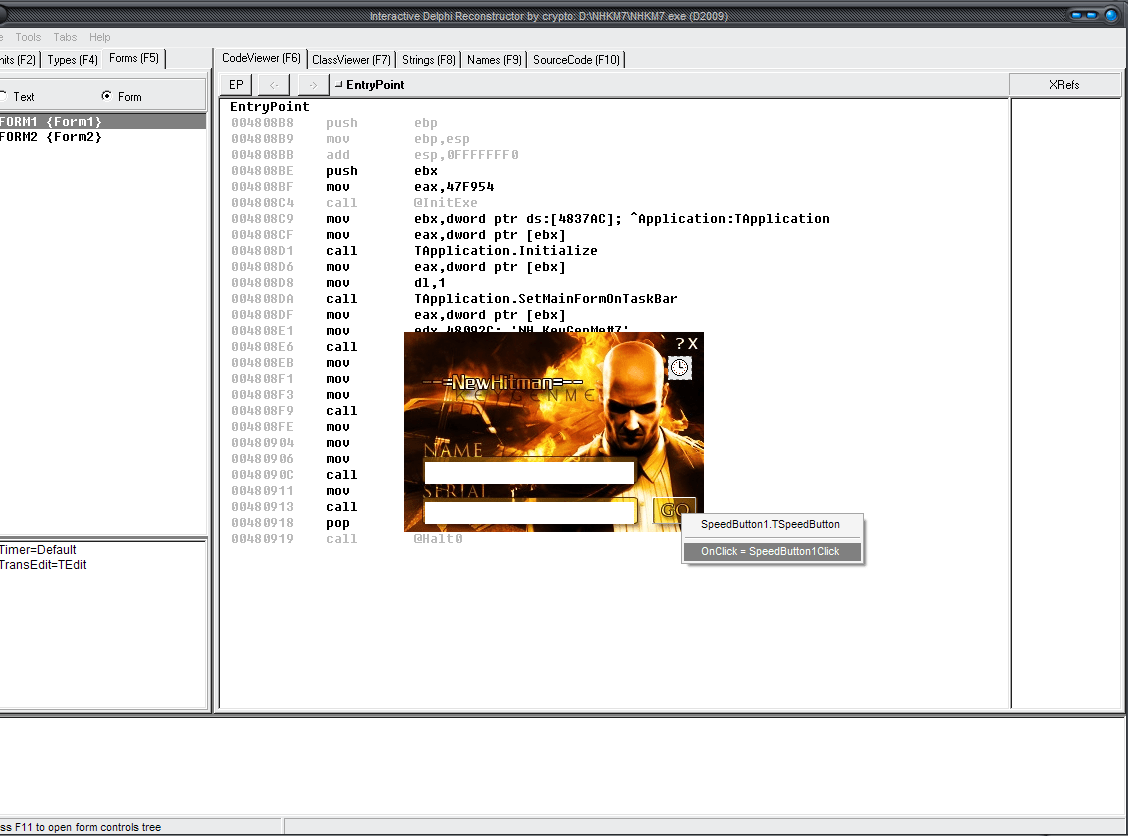
IDR (Interactive Delphi Reconstructor) – decompiler of executable files (EXE) and dynamic libraries (DLL), written in Delphi and executed in Windows32 environment.

IDR allows you to reconstruct any delphi written application and view lot of things such as units ,types , forms and guide you to the start of each event routine by following its address , but the good stuff in this tool is that it can generate for you a map file that can be used with debuggers such as Olly ,so it will make your reversing better .
IDR comes with a lot of packages to be able to decompile Exes written in Delphi 2,3,4,5,6,7,2005;2006,2007,2009,2010.

Homepage:

Demo picture:
IDR

Total size : 432 mb
Packed size : 55mb
Download Link :
DOWNLOAD LINK MEDIAFIRE

Thanks to NewHitman for uploading and introducing it.

Enjoys and best regards,
Levis/REPT

Best Regards

[SITE RIP] DelphiZeus’s tutorials about API Programming with Delphi

Hello all mates,

I know this site :
http://www.angelfire.com/hi5/delphizeus/

has many good tutorial about Delphi Programming with API.
So i decided to rip all the site and save them as PDF files, which easier to download and store them in our drive.
In my opinion, all tutorials are very good and well explained, very useful for Delphi coders.

Contents Index:

1. – Creating a .dpr program
Explains using only the Program (.dpr) unit to create an application
1a. – Reading the C code in Win32 API Help
Tips for Pascal coders to help read the Microsoft C-Code in the API Help.
2. – Making a API window and message loop program
Shows how to create a Windows GUI program with windows and a message loop
3. – More Messages and Changing Windows Properties
Explores changing the message parameters, and a window’s properties.
3a. – SmallUtils Unit an Alternative to SysUtil
A utilities unit so you don’t have to use SysUtils and add 20 Kb to your program
4. – PChar, it’s a Pointer
Gives some examples for using the PChar in API parameters
5. – Fonts and using HDC
Explains some basic graphical concepts, the Device Context and Font creation
6. – Brushes and Pens, with intro to timers
More examples of DC Drawing functions with Brushes and Pens and a Timer
7. – Buttons and Edit Controls
Shows how to use options and subclassing to get Buttons and Edits to do more
8. – Using Dialogs
Instructions for creating REAL dialogs in delphi, using the DIALOG resource creation
9. – Non-Modal Dialogs and Scroll Bars
Outlines the creation of Non-Modal Dialogs and shows how to use Scroll Bars.
10. – Menus and Listboxes
Gives information about creating and using Menus and Listboxes
11. – Code In Units, Combo Boxes
A program that divides the code into Units, and uses Combo Boxes.
12. – Programs with XP Themes
How to have your programs use the XP Theme Control Drawing.
13. – MakeApp a Universal Unit
The MakeApp.pas is a Reusable Code Unit, that can be used in many programs.
13a. – Example code for MakeApp Unit
Code Examples for the MakeApp Unit and do Drag and Drop with DragAcceptFiles.
13b. – A Visual “Graphic” Control Unit
The GrafCtrl.pas Unit has code for making Non-Windowed “image only” controls.
13c. – Example code for GrafCtrl Unit
converted by Web2PDFConvert.com Code Examples for the GrafCtrl Unit using the G Controls.
14. – Using System Open and Save Dialogs
How to create and use the standard system Open and Save Dialog Boxs.
15. – Reading and Writing Disk Files
How to Create and Access Files on Disk to Read and Write File Data.
15a. – Program Code for Using Files
Code for the UseFiles Program, to show methods to use Disk Files.
16. – More Top Level “PopUp” Windows
How to create and use Pop-Up windows, methods for docking and animation.
16A. – A Unit for Modal Message Windows
Methods to have pop-up Modal Windows that block code progression.
17. – Tray Icons in your Program
A program that places a Tray Icon in the task bar’s status area.
18. – a Text Editing Program (like Notepad)
A compleate text editing program like Notepad, with Registry data and printing
19. – A Note Posting Program with List Box
A program that displays a yellow Post Note and shows how to use List Boxes
20. – Using MuliMedia and Thread Timers
An Animation program that displays text scrolling and a moving ball
The next pages are for things not directly related to API programming instruction.
21. – A Delphi Unit used to save Icons to file
Has functions to save Icon files in 256 and Full Color Formats
22. – Builing Custom Files with TFileStream
Tells you how to create files with TFileStream that contain several different Data segments
23. – Creating HTML Dialog Boxes
Shows you how to produce an IE Browser Window Dialog Box.
23. – Web Links to Delphi Sites

All credits go to site’s author : Wes Turner.
Download link:
UPPIT LINK

box.com:
BOX.COM LINK

Minus.com:
MINUS.COM LINK

Dropbox:
DROPBOX LINK

Enjoy and Best Regards,
Levis