

 Member
 Victorhck
Contribuye con la web Number Research en su búsqueda de números con este script en Bash
En la web Number Research Inc. están intentando encontrar y documentar todos* los números disponibles.

*Actualmente, la web está centrando su investigación en números enteros positivos. Una vez que esto se haya completado, podremos analizar negativos y decimales. (sic).
Vale, es una fricada infinita, pero ¿por qué no? y ¿por qué no automatizar esa búsqueda? He creado un script en Bash que hace esa tarea por tí.
Allá por el mes de marzo de 2026, en mis feeds, pude leer la web de Microsiervos (te recomiendo que la incluyas entre tus feeds) que la web Number Research se había enfrascado en la tarea de la búsqueda de todos los números enteros positivos.
Tarea a largo plazo, por lo que parece… Y ya al acabar esa tarean empezarían con los números negativos (definitivamente tienen guasa).
La cosa es que vas a la web en cuestión y en un simple cuadro de búsqueda pones el número que quieres registrar, digamos el 42. Si nadie lo ha buscado antes, pues muy bien, ya has colaborado con la búsqueda de un número, pero siento decirte que ya muchas personas antes que tu lo habrán buscado.
Igual que otros muchos números. A fecha de publicación de este artículo se habían «encontrado» casi 8 millones de números.
Pero buscar así a mano, puede ser muy entretenido por un rato, como pasatiempo, pero poco efectivo. Así que ¿por qué no automatizar un poco el envío de números a buscar a la web mediante un script en bash?
Pues dicho y hecho, en Codeberg te dejo un script en bash que he realizado para automatizar el envío de números a la página en cuestión.
- Descarga el script mediante wget
wget https://codeberg.org/victorhck/Number_Research/raw/branch/main/num.sh - Dale permisos de ejcución:
chmod +x num.sh - y a buscar:
./num.sh
En la primera ejecución del script te preguntará en qué número quieres empezar la búsqueda, y a partir de ahí ya todo está automatizado.
El script envía el número a la web, si no existe, ¡bien! has contribuido con un número y pasa al siguiente consecutivo. Si ya está encontrado, suma 100 y vuelve a preguntar… y así indefinidamente…
Bueno, o hasta que tu quieras. Cuando quieras detener el script pulsa Ctrl+C y el script guardará en un archivo el número para la siguiente sesión de búsqueda, además de las estadísticas actuales y globales que se guardan en un archivo oculto llamado .numberresearch_state
Es una frikada sin más, pero si estás en tu ordenador, siempre puedes dejar una pestaña de una terminal con el script corriendo para aportar en la búsqueda de números…
Enlaces de interés
Llega KStars 3.8.4 con asistente de orientación con IA
Sigue el desarrollo del planetario de la Comunidad KDE. Hoy me complace anunciar que llega KStars 3.8.4 con asistente de orientación con IA. Un imprescindible para los amantes de la astronomía ideal para tener a mano este día previo al eclipse.
Llega KStars 3.8.4 con asistente de orientación con IA
Esta aplicación se ha convertido ya en un recurrente en el blog desde el lanzamiento de la versión 3.0, la cual supuso un gran salto en cuanto calidad y funcionalidades. A partir de entonces, cada pocos meses me alegra compartir que su desarrollo sigue viento en popa.
Así que me complace escribir que la evolución de esta tercera rama sigue a buen ritmo y que esta nueva versión trae muchas novedades, de la cuales he seleccionado las siguientes:
- Añadido el primer guiado del mundo impulsado por IA.
- Inclusión de un servidor MCP que permite conectarse a cualquier modelo de lenguaje grande (LLM) para un control total, de momento solo con un subconjunto limitado de funciones, y esperamos que el servidor MCP esté completamente operativo en la próxima versión.
- Se ha mejorado la calibración del rotador, la compatibilidad con la transmisión en directo de la cámara de guiado y el rendimiento del programador con listas de tareas extensas.
- Añadido una corrección integral de la inclinación para las máscaras de mosaico.
Para finalizar hay que destacar que también se han corregido docenas de problemas de estabilidad y otras pequeñas mejoras que podréis leer en la entrada del proyecto y que muestran sin lugar a dudas el buen estado del proyecto
¿Qué es KStars?

Para los que no lo sepan, KStars es un programa de planetario para el escritorio KDE, con él podemos ver en nuestra pantalla de ordenador todo el cielo de cualquier parte del mundo.
Es decir, proporciona una representación gráfica exacta del cielo nocturno, desde cualquier lugar de la Tierra, en cualquier fecha y hora. La exhibición incluye hasta 2.5 millones de estrellas (con addons adicionales), 13.000 objetos del cielo profundo, las 88 constelaciones, los 8 planetas, el Sol y la Luna, y miles de cometas y asteroides.
Tiene características para atraer a usuarios de todos los niveles, desde aficionados a profesionales, teniendo un gran potencial educativo.
La entrada Llega KStars 3.8.4 con asistente de orientación con IA se publicó primero en KDE Blog.
H.264 の動画再生はできるが CPU 使用率が高い
openSUSEでは OpenH264 により、インストールした状態で H.264 の動画を再生できるようになっています。しかしながら、高解像度、高フレームレートの動画を再生すると、CPUが100%に張り付いてしまい、スムーズに再生できません。
これは、GPUに含まれているハードウェアデコーダーが使えないためです。openSUSE の公式パッケージとして提供されている gstreamer や VLC は、特許に関連した知財リスクを避けるため、OpenH264以外のx264、ハードウェアデコーダーを使用した H.264 を無効化してビルドされています。
Packman リポジトリから提供されている VLC や ffmpeg では、ハードウェアデコーダーが使えるようになっています。必要な場合は、無効化されている背景を考慮の上、試してみて下さい。
Get Agama dressed for success
The announcement of Agama 22 described some of the novelties regarding the visual appearance and contained a sentence you may have overlooked. Along with new functionality like the dark mode, it came the machinery that lets any distribution ("product" in Agama's jargon) restyle the whole installer without touching a single line of Agama code. If you always wanted Agama to look a bit more like your favorite distribution, keep reading.
Customizing the Agama appearance is as easy as dropping in the right directories a single CSS file named after your product id and the corresponding logos. That is it. The installer picks that up and wears your colors, your logo, your typography and other styles. Including light and dark scheme and with the accessibility floor kept intact.
Describing that takes a paragraph, and we just spent it. So instead of describing it further, let's see it in action in two fully fictional scenarios.
A tale of two distros
Meet Lucie, a contributor to a Linux distribution that uses a color palette based on a nice shade of light blue and that is somehow related to another distribution that uses a nice hat as logo. Of course, any resemblance to reality is pure coincidence. 😉
Lucie wants to see how an Agama-based installation could look for her beloved distribution. One afternoon, she spends a few minutes creating a simple skin that defines the primary colors.
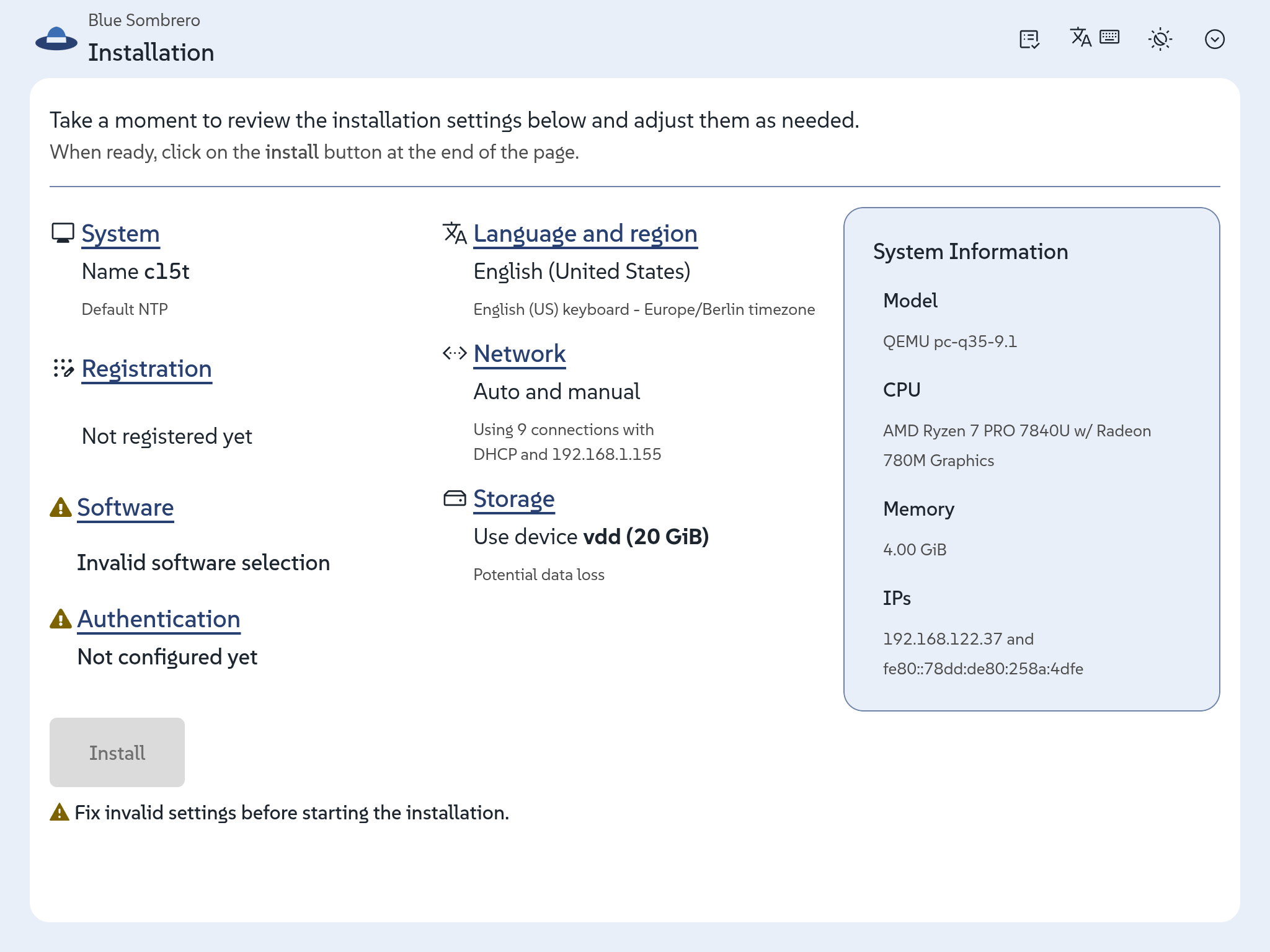
Then she realizes she also needs to adapt those colors for the dark scheme.
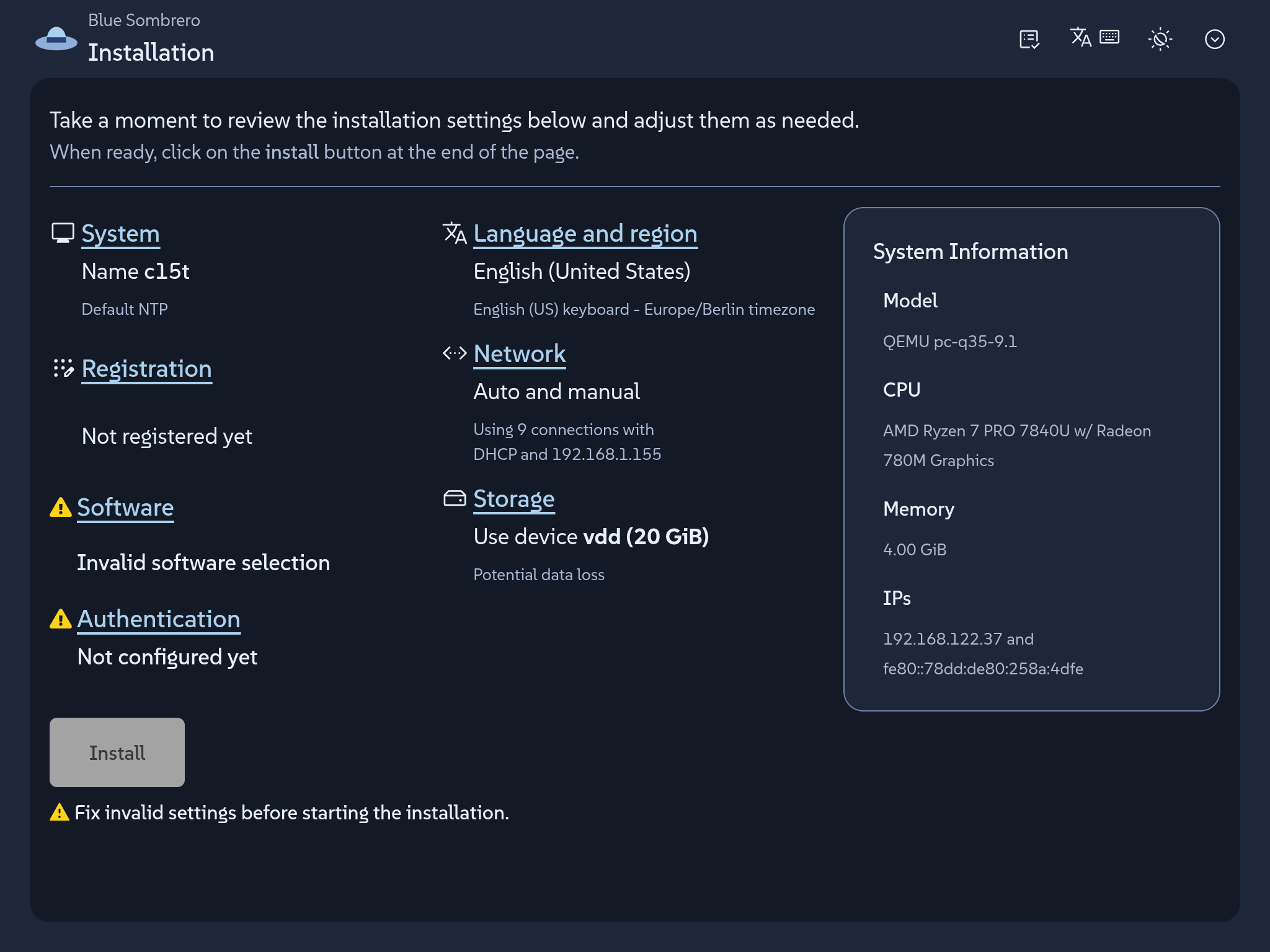
And that is. No need to define typeface, sizes, corners, etc. All of that stays at Agama's values, which still results in a quite nice installer that looks as a fully coherent product. Agama ships no product skin on its own, so Lucie's CSS file is not overriding anything; it is filling a gap that was intentional left for each product.
Now meet Charles. He develops his own respin of openSUSE Leap just for fun and he wants to see how far he can go in customizing Agama to his very own personal taste. What about some '80s vibe with big phosphor green letters on charcoal, a pixel typeface, every corner square, and a prompt caret for a logo?
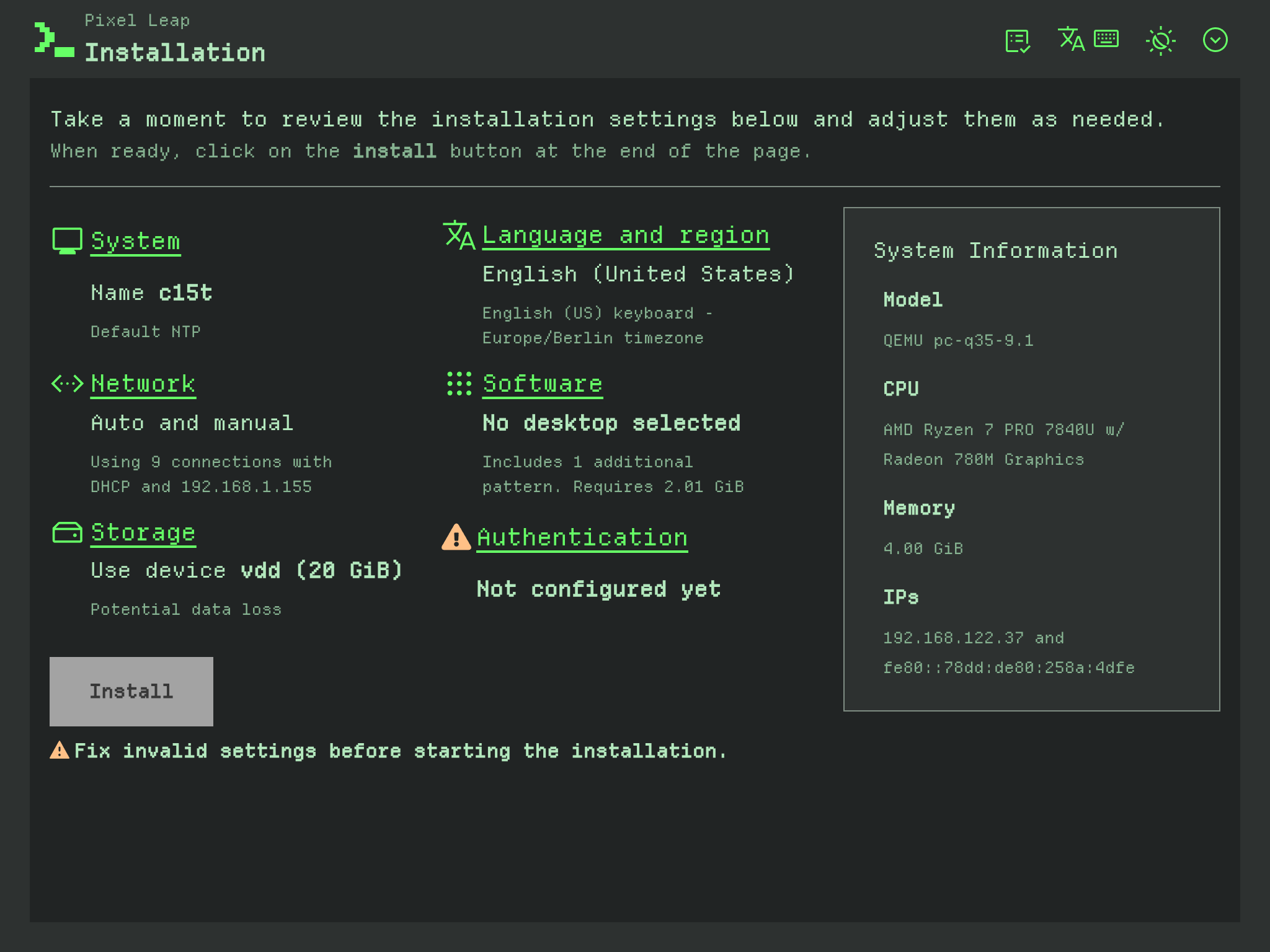
That is exactly how Charles envisioned the dark mode. But a proper skin also needs to take care of the light scheme. So after adjusting some colors he also comes with the following combination.
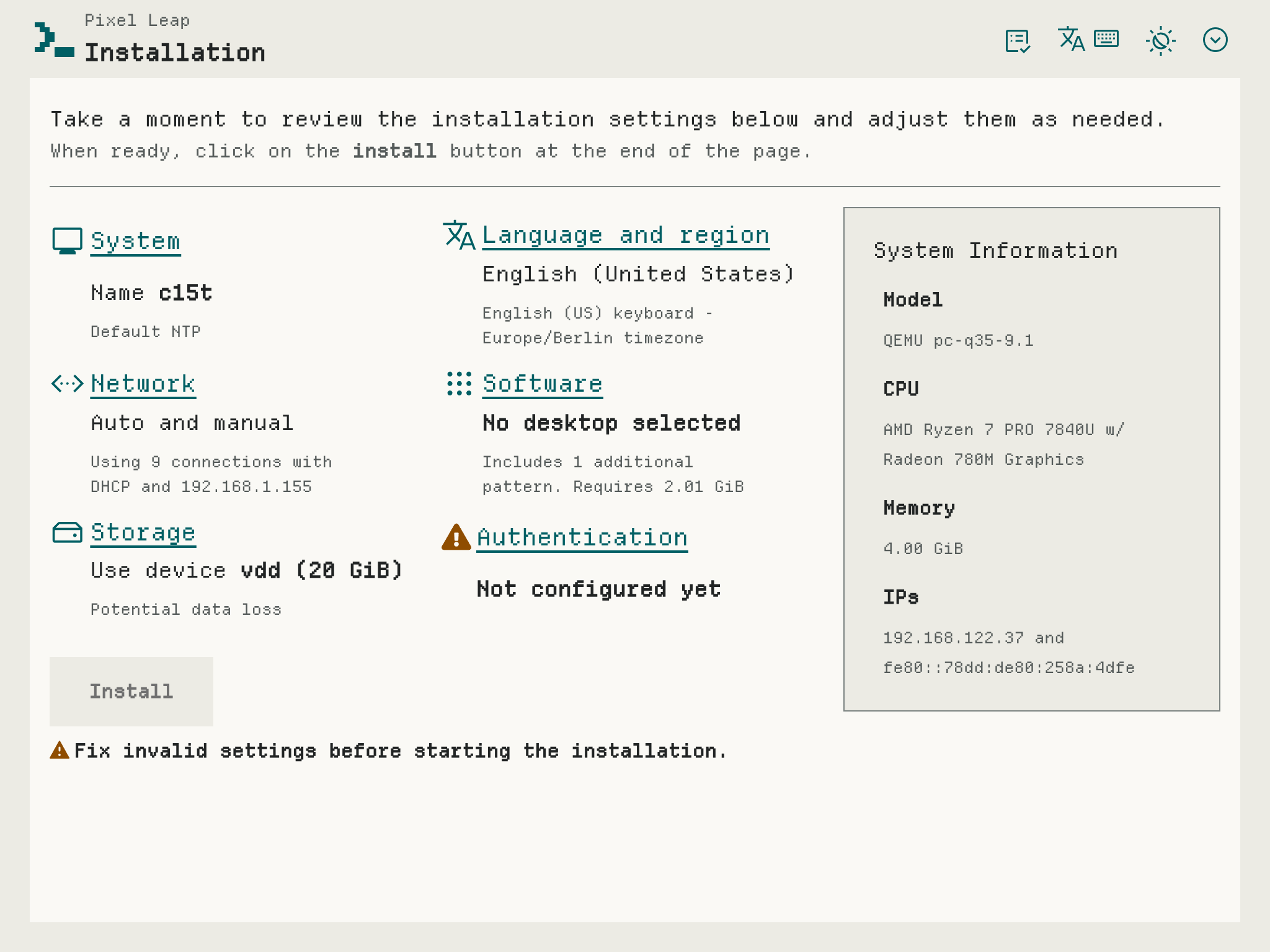
Two products, one shared set of customizable visual roles, and not a line of Agama code touched.
Learn how to do it
The work that matters happens before the CSS file is written: choosing the colors, deciding what each scheme should look like, checking that every pair actually reads on screen. Once those decisions exist, putting them in is the short part... no matter whether you are Lucie setting a few roles or Charles configuring every possible one.
But what "role" means in this context? A product stylesheet sets only properties named
--agm-t--something. Those are the so-called roles, named after what they mean in an installer: the
brand color, the page surface, the danger status, the focus ring.
/* Light theme. */


:root:where(:not(.pf-v6-theme-dark)) {


  --agm-t--brand--color: #3c6eb4;


  --agm-t--brand--text--color: #fff;


  --agm-t--link--color: #294172;


  --agm-t--surface--color--raised: #e8eff8;


  --agm-t--status--danger--color: #c42366;


}
There are relatively few roles to set, which is actually a very intentional feature. Instead of customizing any occurrence of a certain color in the UI, just say once "this is my brand color" and buttons, toggles, progress bars, selected rows and focus rings follow along.
All that is explained in the theming guide, that comes along with two ready-to-copy examples similar to the ones described above and even with a draft AI prompt in case you want to outsource the fun.
Then you only need to add a your logos, stylesheet and eventually fonts to the installer medium.
Those files travel to the medium in your own package, which is the part we like best: your branding
stays in your repository, versioned with the rest of your distribution, and ships on your schedule
rather than waiting for an Agama release. The
packaging guide
walks through it. It also includes a few things you may want to know, like how to make your
installer start in dark mode or how to preview the result without packaging anything by just copying
two files into a running installer (eg. over scp) and reloading the browser.
Have a lot of fun
We know that regular users do not usually create their own installable distributions, so the audience of this blog post may be a bit more restricted than those posts announcing new Agama versions. Nevertheless, we welcome any feedback including any personal exercise just for fun!
Meanwhile we will keep working on improving several aspects of the installer. As usual you can reach
out to us at the #yast channel at Libera.chat or the
Agama project at GitHub.

Venue Update for openSUSE.Asia Summit 2026
The openSUSE.Asia Summit 2026 Organizing Committee would like to announce an important update regarding the conference venue.
After careful consideration, openSUSE.Asia Summit 2026 will now take place at:
Convention Hall Universitas Islam Negeri (UIN) Sunan Kalijaga Yogyakarta, Special Region of Yogyakarta, Indonesia
This replaces the previously announced venue at the Teaching Industry Learning Center (TILC), Vocational School, Universitas Gadjah Mada (UGM).
This change has been made due to technical considerations identified during the event preparation process. Our priority is to ensure the conference runs smoothly and provides the best possible experience for attendees, speakers, sponsors, exhibitors, and volunteers.
We would like to express our sincere appreciation to Universitas Gadjah Mada for their support and cooperation throughout the planning process. The venue change was made solely due to technical and logistical considerations as we worked to ensure the best possible experience for all participants.
Interestingly, the Convention Hall at UIN Sunan Kalijaga also hosted the very first openSUSE.Asia Summit in Indonesia back in 2016. We are excited to return to a venue that has become part of the summit’s history.
The conference dates remain unchanged:
- October 3-4 2026 - Yogyakarta, Indonesia
The new venue provides the facilities needed to accommodate conference sessions, sponsor exhibitions, community activities, and networking opportunities throughout the two-day event.
Participants who have already registered do not need to take any action. Registration, tickets, and all scheduled activities will continue as planned, with only the venue being updated.
We would also like to express our sincere gratitude to Universitas Islam Negeri Sunan Kalijaga for welcoming openSUSE.Asia Summit 2026 and supporting this year’s conference.
Thank you for your continued support. We look forward to welcoming the openSUSE community from across Asia to Yogyakarta this October.
Cómo desenfocar tu fondo de pantalla en Plasma
No sabía muy bien como presentar esta entrada hasta que me he dado cuenta que en realidad es un artículo estilo «Cómo». Hoy os explico cómo desenfocar tu fondo de pantalla en Plasma utilizando un complemente específico que además nos ofrece algunas opciones interesantes.
Cómo desenfocar tu fondo de pantalla en Plasma
Tenemos muchas opciones de personalización del fondo de pantalla en el escritorio Plasma de Comunidad KDE. Podemos tener desde fondos fijos a animados, pasando por carruseles o que cambian según la hora del día.
Y estas opciones no paran de crece poco a poco con más opciones como la que os presento hoy. Se trata de Blurred wallpaper una creación de 2N-r y hace lo siguiente: aplica un efecto de desenfoque o atenuación al fondo que se visualiza cuando una aplicación no ocupa la pantalla completa (claro, si no, no se puede visualizar).
En la imagen inferior podéis ver el efecto sobre mi escritorio con las configuración por defecto de desenfoque al 40%.

Este efecto desaparece justo cuando se minimizan todas las pantallas, lo cual hace que tu equipo tenga un comportamiento muy natural. Además, este efecto te permite focalizar tu atención en lo que realmente te interesa y funciona tanto con imágenes fijas como con presentaciones de diapositivas.
Entre sus opciones de configuración nos encontramos algunos como desactivar la opción para las presentaciones de diapositivas, seleccionar desenfoque y/o atenuación, el radio del desenfoque, el color de la atenuación y el tiempo de transición de los efectos.

Para instalarlo simplemente sigue los siguientes pasos:
- Botón derecho sobre el fondo de pantalla y seleccionar Escritorio y Fondo de Pantalla.
- En Tipo de Fondo de Pantalla seleccionar la opción Obtener Novedades Candentes.
- Buscamos Blurred wallpaper e instalamos.
- Ahora en Tipo de Fondo de Pantalla seleccionamos Active Blur y ya nos aparecen las opciones de arriba.
La entrada Cómo desenfocar tu fondo de pantalla en Plasma se publicó primero en KDE Blog.
Planet News Roundup
This is a roundup of articles from the openSUSE community listed on planet.opensuse.org.
The community blog feed aggregator lists the featured highlights below from July 31 to August 6. This week highlights the winner of the openSUSE.Asia Summit 2026 logo competition ahead of the October summit in Yogyakarta, and Tumbleweed reached a major milestone with GCC 16 becoming the default system compiler. On the KDE side, Plasma 6.7.4 arrived as the fourth bugfix release, work moved forward on making KIO dramatically faster at copying small files, and the Call for Papers opened for Akademy-es 2026 in Madrid.
Here is a summary and links for each post:
3 Native Platformer Games for Linux
The KDE Blog continues its series on native Linux games with three platformers highlighted by the Planeta Tecno channel. The picks are Cow’s Revenge, a comedic run about a genetically enhanced cow taking revenge on butchers, Cave Story, an RPG-flavoured classic of the genre, and Frogatto & Friends, praised for its polished art and quest-driven story.
Submit Your Talk to Akademy-es 2026 in Madrid
The KDE Blog announces that the Call for Papers is open for Akademy-es 2026, held Oct. 23–25 at Camping Arco Iris in Villaviciosa de Odón, Madrid. The venue was chosen deliberately to emphasise the community side of KDE, marking both KDE’s 30th and Akademy-es’s 20th anniversary. Proposals for 45-minute talks or 10-minute lightning talks are accepted until September 3 at akademy-es-org@kde-espana.org.
openSUSE Asia Summit 2026 Logo Competition Winner Announced
openSUSE News reveals that A. Thalida won the openSUSE.Asia Summit 2026 logo competition. The design becomes the official visual identity of this year’s conference. Nine entries arrived from contributors across several countries. The winner was chosen by a vote of the openSUSE.Asia Committee and the local organising team. The summit takes place Oct. 3–4, 2026 in Yogyakarta, Indonesia.
Fourth Plasma 6.7 Update
The KDE Blog covers the fourth bugfix release of Plasma 6.7. The post also recaps the headline features of the 6.7 series, including per-screen virtual desktops, a microphone volume test, and a quick light/dark theme switcher.
KDE Will Be Faster at Copying Small Files
The KDE Blog reports on Méven Car’s work fixing a long-standing KIO slowdown when copying thousands of small files. The bug was first filed back in 2014. The fix replaces the socket pair still used between KIO workers and applications with a zero-copy in-memory transport, and cuts redundant filesystem checks on the destination.
Free Software Foundation Newsletter Roundup – August 2026
Victorhck translates and summaries the FSF’s monthly supporter bulletin for August. Highlights include a call to oppose the GUARD Act and age-verification laws that could make anonymous use of machine learning tools impossible, and news that the German state of Mecklenburg-Vorpommern has moved around 5,000 employees to Nextcloud.
Geeko Magazine 2026 Summer Edition Announced
The Geeko Blog of the Japanese openSUSE user group announces the Summer 2026 special edition. Articles cover upgrading to Leap 16.0, making Samba servers browsable, terminal-based Linux desktops with bcon, KDE Plasma, and building with the Open Build Service.
This July in KDE Linux
The KDE Blog has a July report that highlights the community’s immutable “OS of the future”. New this month is an integrated QA system that catches critical performance and login regressions before they reach users, alongside kernel security tweaks, faster boot from trimmed modules, and on-demand CUPS.
Emoji Resizing – This Week in Plasma
The KDE Blog looks at Plasma 6.8 and the ability to make emojis in the picker larger or smaller. Other changes include pixel-by-pixel screen positioning with arrow keys in Display Configuration, QR code detection in Spectacle, and a modernised system tray widget.
Linux Saloon 213 | News Flight Night
CubicleNate recaps a wide-ranging community episode of Linux Saloon covering VPN usage and how people manage user accounts on their machines. News topics included Arch Linux disabling AUR package adoption as a countermeasure against malware and upcoming features in Ubuntu 26.10.
How Extremadura Changed Free Software Forever – Episode 2 of “La era de las distros”
The KDE Blog promotes the second episode of Lorenzo Carbonell’s podcast on Spain’s regional educational distributions, this time telling the story of LinEx. Guest Jesús Rubio, joined by Jesús González Barahona, explains how a largely rural region took on Microsoft in the early 2000s and turned technological sovereignty into something actually installed on thousands of machines.
openSUSE Tumbleweed Review of Week 31
Victorhck and Dominique Leuenberger report on the five snapshots released this week, headlined by GCC 16 landing as Tumbleweed’s new default system compiler in snapshot 0726. The full-repository rebuild made that snapshot exceptionally large, and linux-glibc-devel 7.1 followed in 0728 alongside the return of multipath-tools 0.15~1 after last week’s revert.
My Plasma Desktop for July 2026 #viernesdeescritorio
The KDE Blog shares the 74th installment of its monthly desktop showcase. This time on a new Slimbook Evo ultrabook running KDE Neon with Plasma 6.7.3 on Wayland. The vertical left-hand panel holds a digital clock, virtual desktop switcher, icons-only task manager, system tray, desktop view and application launcher.
Creating the Ultimate Vertical Monitor Workspace
CubicleNate chronicles a home office upgrade that began with a six-monitor rig built from inadequate screens. An LG DualUP monitor proved a step forward, which led to settling on a dual INNOCN display setup aimed at maximising productivity. Despite some connection trouble and mismatched pixel density, the new vertical layout markedly improved both usability and desk efficiency.
Tiny Wins for Packagers: End-of-Week Update (2026-07-31)
The Open Build Service team publishes its weekly roundup of small fixes, minor features and new external contributions. Shipped items include de-grouping when filter_search_text sits on top of filter_labels, fixed overlapping labels on image template radio buttons, clearer visual cues that attributes are expandable, and rejection of release targets pointing back at the same repository.
View more blogs or learn to publish your own on planet.opensuse.org.
Barra de tareas alternartiva para tu escritorio, Punchi Dock – Plasmoides para Plasma 6 (37)
Ya llevo mucho tiempo promocionando plasmoides para Plasma 6, y al parecer es un tema inagotable. De hecho, el número de ellos presentados en la KDE Store no para de aumentar, así que esta sección tiene cuerda para rato. De esta forma, os presento Punchi Dock, una barra de tareas alternativa para tu escritorio Plasma llena de funciones y personalización extrema con el que llegamos al widget número 37 de la serie.
Barra de tareas alternartiva para tu escritorio, Punchi Dock – Plasmoides para Plasma 6 (37)
Como he comentado en otras ocasiones, de plasmoides tenemos de todo tipo funcionales, de configuración, de comportamiento, de decoración o, como no podía ser de otra forma, de información sobre nuestro sistema como puede ser el uso de disco duro, o de memoria RAM, la temperatura o la carga de uso de nuestras CPUs.
Así que espero que le deis la bienvenida a Punchi Dock, una creación de punchipunchi que nos proporciona una barra de tareas alternativa para tu Plasma llena de posibilidades.
En palabras de su creador:
Punchi Dock Remastered es un dock de lanzadores e interfaz de tareas nativo para KDE Plasma 6, diseñado principalmente para Wayland. Puede funcionar como dock flotante o integrarse en un panel de Plasma respetando el tema activo.
Este repositorio es una reescritura modular del proyecto original Punchi Dock Plasmoid. Actualmente el proyecto está preparando su camino hacia una versión estable 1.0.

Sus funcionalidades, extraídas de su github, son notables, :
- Modos dock flotante y panel de Plasma.
- Lanzadores fijados y entradas dinámicas de tareas opcionales.
- Lanzadores personalizados con preservación segura de comandos y argumentos.
- Tarjetas de ventanas, miniaturas vivas y controles para ventanas agrupadas.
- Carpetas configurables con vistas de rejilla, lista y detalle, además de notas rápidas, papelera, separadores y calendario.
- Visualizador de audio PipeWire opcional con seis estilos, colores dinámicos o del tema Plasma y hasta 48 elementos visuales.
- Popups adaptados al tema de Plasma con animaciones de apertura configurables y transiciones fluidas entre miniaturas y menús.
- Acciones nativas de aplicacion y ventana en los menus contextuales de launchers fijados y tareas dinamicas.
- Tarjetas multimedia MPRIS contextuales con caratula, informacion de pista y controles de reproduccion.
- Operaciones asíncronas de papelera con actividad, progreso, sonido de finalización y notificaciones temáticas de KDE.
- Temas externos JSON almacenados en una biblioteca administrada, con importación recursiva de carpetas, borrado y fallback seguro al fondo Plasma.
- Renderers plano 2D y repisa 2.5D con separadores, bordes, gradientes, rims y glow acotado definidos por cada tema.
- Reloj y calendario con sombras adaptadas al tema para conservar legibilidad sobre fondos variables.
- Compatibilidad dinámica con APIs de TaskManager disponibles en distintas versiones de Plasma 6.
- Iconos de ventanas para aplicaciones portables y asociación de tareas mediante identificadores de aplicación o URL de lanzador.
- Tamaño estable de iconos al alternar un panel Plasma entre Siempre visible y Ocultar automáticamente.
- Integración QML nativa en C++ para descubrir aplicaciones, servicios de ejecución, análisis de audio y operaciones de papelera.

Y como siempre digo, si os gusta el plasmoide podéis «pagarlo» de muchas formas en la página de KDE Store, que estoy seguro que el desarrollador lo agradecerá: puntúale positivamente, hazle un comentario en la página o realiza una donación. Ayudar al desarrollo del Software Libre también se hace simplemente dando las gracias, ayuda mucho más de lo que os podéis imaginar, recordad la campaña I love Free Software Day de la Free Software Foundation donde se nos recordaba esta forma tan sencilla de colaborar con el gran proyecto del Software Libre y que en el blog dedicamos un artículo.
Más información: KDE Store
¿Qué son los plasmoides?
Para los no iniciados en el blog, quizás la palabra plasmoide le suene un poco rara pero no es mas que el nombre que reciben los widgets para el escritorio Plasma de KDE.
En otras palabras, los plasmoides no son más que pequeñas aplicaciones que puestas sobre el escritorio o sobre una de las barras de tareas del mismo aumentan las funcionalidades del mismo o simplemente lo decoran.
Aquí bajo os muestro los últimos publicados en el blog.
-
Barra de tareas alternartiva para tu escritorio, Punchi Dock – Plasmoides para Plasma 6 (37)
 Información meteorológica en tiempo real con Meteoclimatic Feeds – Plasmoides para Plasma 6 (36)
 -
Información meteorológica en tiempo real con Meteoclimatic Feeds – Plasmoides para Plasma 6 (36)
 Información meteorológica en tiempo real con Meteoclimatic Feeds – Plasmoides para Plasma 6 (36)
 -
Información meteorológica en tu escritorio con Bare Weather – Plasmoides para Plasma 6 (35)
 Calendario original para tu escritorio, Almanac Asimetric – Plasmoides para Plasma 6 (2)
La entrada Barra de tareas alternartiva para tu escritorio, Punchi Dock – Plasmoides para Plasma 6 (37) se publicó primero en KDE Blog.

Linux Saloon 215 | Odyssey Linux
