Showing posts with label riscos. Show all posts

Thursday, November 8, 2012

Packman

If you've already installed RISC OS RC5 on your Raspberry Pi, you do not have to burn a new SD card with dd to get RC6. You can use PackMan.

Image
A.K.A. Pacman meet Cyrano de Bergerac

I thought you said Puckman


!PackMan is the package manager for RISC OS. It will connect to a repository and download your selections, or perform an upgrade.

Image
Bundled apps, including !PackMan
The Packman user guide is here:
https://www.riscosopen.org/wiki/documentation/show/PackMan%20User%27s%20Guide

Note that after the upgrade, your config.txt will be overwritten, so if you made modifications (for the hdmi modes or the memory split), make a note of them.

Nut Pi for RISC OS

RISC OS Open is bringing some interesting things to the table as far as the Raspberry Pi and RISC OS is concerned.

They have a package of commercial software for RISC OS, specifically designed to run on the Raspberry Pi, at a discount.

What is cool is that it comes on a Nut Pi branded SD card (a usb key might have been better, in order to transfer to the Raspberry Pi, but still, nothing a card reader cant fix).

It includes Photodesk 3.12 which retails by itself for £84: Photodesk. It also comes with 19 other software programs originally for the Acorn computers.

The Nut Pi SD card is available here: https://www.riscosopen.org/content/sales/nutpi, for £35.

My suggestion for RISC OS Open: add a link in other currencies. In particular in US dollars.

Wednesday, October 31, 2012

MagPi

I just received a printed copy of The Mag Pi #6, from the folks at ModMyPi.
I do have the PDFs for #1 to #6 but when I heard somebody was printing it at a commercial printer, I figured I had to get a copy. Although it is #6, it is the first copy to be printed on paper.

It reminded me of the good old magazines I would get as a kid such as InCider, Compute etc. BTW, digging in my old magazines, I saw that Compute was published on Wendover Ave in Greensboro, NC. That's interesting to me because that's not too far from where I'm at.

And speaking of this area, if you live near it, I would like to suggest you check out PYPTUG. We'll be having a workshop with Python and the Raspberry Pi on November the 10th.

Anyway, back to The MagPi:

Image
#6 October 2012
Image
QR Code, even

And speaking of ModMyPi, I ordered a "surprise" color mix case. It's the cheapest option they have, but you never know what colors you'll get. Red and Black, I think that worked out well for me:

Image
Image
Replacing the white case of my RISC OS laptop

Color contrast works well with my Motorola LapDock RISC OS machine.

Imprimer son boitier

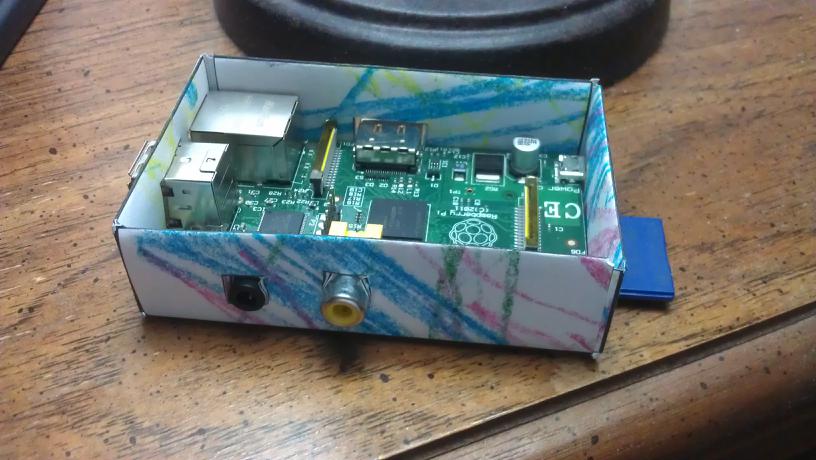
Il existe des douzaines de boitiers pour le Raspberry Pi sur le marche. En acier, en acrylique, en thermoplastique, en polyvinyle, en bois, en aluminium, en cuivre, et, pourquoi pas, en papier!

L'avantage ici, c'est que c'est gratuit, si on a une imprimante. Attention toutefois aux marges et au type de papier. En effet, certains des PDF sont pour le format A4 et d'autres pour US Letter. Il faut donc faire un ajustement des marges etc si on n'a pas le bon papier.

Punnet

Image

Il y a plus d'information ici: http://www.raspberrypi.org/archives/1310
et un PDF.

A ciel ouvert


Image
Et un coup de crayons a colorier
Autre variation sur le boitier en papier:
http://www.iammer.com/raspi/case.html
Et le PDF A4

 C'est clair


Celui-ci est une variante en papier acétate transparent:

http://h2database.com/raspi/
Et le PDF.
Image

Mimétisme

Image

Micro BBC Micro en papier
Et celui-ci une imitation d'un BBC Micro:
Raspberry Pi BBC Micro paper case
Et le PDF.

Je vous suggere de cliquer sur le label riscos a droite si vous voulez en savoir plus sur le BBC et RISC OS, et aussi cette file de messages sur le forum Raspberry Pi.

[edit: l'image du Punnet n'etait plus disponible a l'URL original]

@f_dion

Tuesday, October 30, 2012

RISC laptop: cables / cabos

HDMI, USB, Micro, Mini, A/B, M/F ... ?

Image
Motorola Atrix LapDock (Micro USB B M, Micro HDMI M)
Image
Micro USB B (F)->USB A (F) , USB A (M)->USB A (M)
Image
Image
Micro HDMI (F)->Micro HDMI (M) , Micro HDMI (F)->HDMI (M)
Image
Image
USB, HDMI

Raspberry Pi v1.1, v2.0

Image
RPi v1.1, v2.0: 2 cables / cabos
Image

Raspberry Pi v1.0

Image
USB A (M)->Micro USB B (M)

Image
RPi v1.0: 3 cables / cabos

Off

Image
HDMI = On/Off

Image


Monday, October 29, 2012

RISC "Laptop"

Image
RISC OS
Image
Motorola RISC OS Laptop?
Image
BBC(!) News

Image
Touchpad

RISC OS

Acorn Proton


Que es? Al principio de los anos 80, el Acorn Proton paso de computadora obscura, un prototipo, a un de los mas famosos ordenador, a causa de la BBC. La máquina fue lanzada como el BBC Microcomputer (Beeb Micro), especialmente para ponerles en las escuelas. Fueron vendidos casi 1.5 million de machinas durante 12 anos, la mayoría en Europa. En los Estados Unidos, el Apple ][ fue sin competición en las escuelas.

Hay muchos detalles en wikipedia.
Image

Acorn Archimedes


En 1987 empezó el Acorn Archimedes y el BBC Archimedes . Fue el primer ordenador personal con CPU RISC ARM de 32 bits.

RISC OS

RISC OS es el sistema operativo de los computadores Acorn con CPU ARM. El Raspberry Pi también es basado en el CPU ARM, y es posible ahora de utilizar RISC OS con el Pi.

Hay una pagina en ingles aqui

Preparación


Descargar el OS aqui: riscos-2012-10-16-RC5

Ponerlo en una tarjeta SD con dd. Si la instalación es directamente de un Raspberry Pi con el OS Raspbian, ver este articulo: autoreplicación.
Pero en vez de:
sudo dd bs=1M if=2012-09-18-wheezy-raspbian.img of=/dev/sda 
hay que hacer:
bunzip2 ro519-rc5-1876M.img.bz2
sudo dd bs=1M if=ro519-rc5-1876M.img of=/dev/sda

Cual sea el sistema operativo, el GPU busca el fichero config.txt. La definición se encuentra en elinux.

Image
Raspberry Pi con tarjeta SD RISC OS
Image
Al iniciar
Image
Boot de RISC OS

Image
El escritorio (1920x1080)

Hay mas detalles tambien en el sitio http://www.riscosopen.org, pero en este momento no es posible connectar al sitio.

Documentacion de RISC OS en el sitio: http://foundation.riscos.com/Private/

Foro RISC OS de raspberrypi.org: http://www.raspberrypi.org/phpBB3/viewforum.php?f=55