New to Rust? Grab our free Rust for Beginners eBook Get it free →
Node.js and MySQL Tutorial: Connect, Query, and Pool with mysql2

Install the mysql package, point it at MySQL 8, and the handshake dies with ER_NOT_SUPPORTED_AUTH_MODE. I reproduced that against MySQL 8.4.11 and MySQL 9.7.2 before a single query reached either server.
mysql2 speaks the same protocol, adds a promise API and prepared statements, and authenticates through caching_sha2_password, the plugin MySQL has used by default since 8.0. Swapping the driver keeps your SQL and changes how connections are held.
How a Node.js app reaches MySQL
Node.js ships no MySQL client of its own, so a driver package has to implement the protocol MySQL speaks. Connecting is two negotiations in one step, because the driver opens a socket and then has to answer whichever authentication plugin the server asks for.
MySQL 8.0 moved that second negotiation to caching_sha2_password, and the mysql package never implemented it. Its last release was 2.18.1 in 2020, so a small script with correct credentials still cannot finish the handshake.
const mysql = require('mysql');

const connection = mysql.createConnection({
  host: '127.0.0.1',
  port: 3307,
  user: 'notes_app',
  password: 'notes_pw_2026',
  database: 'notes_app',
});

connection.connect((err) => {
  if (err) {
    console.log('connect failed');
    console.log('  code     ', err.code);
    console.log('  errno    ', err.errno);
    console.log('  sqlState ', err.sqlState);
    return;
  }
  console.log('connected');
  connection.end();
});
node legacy-connect.js
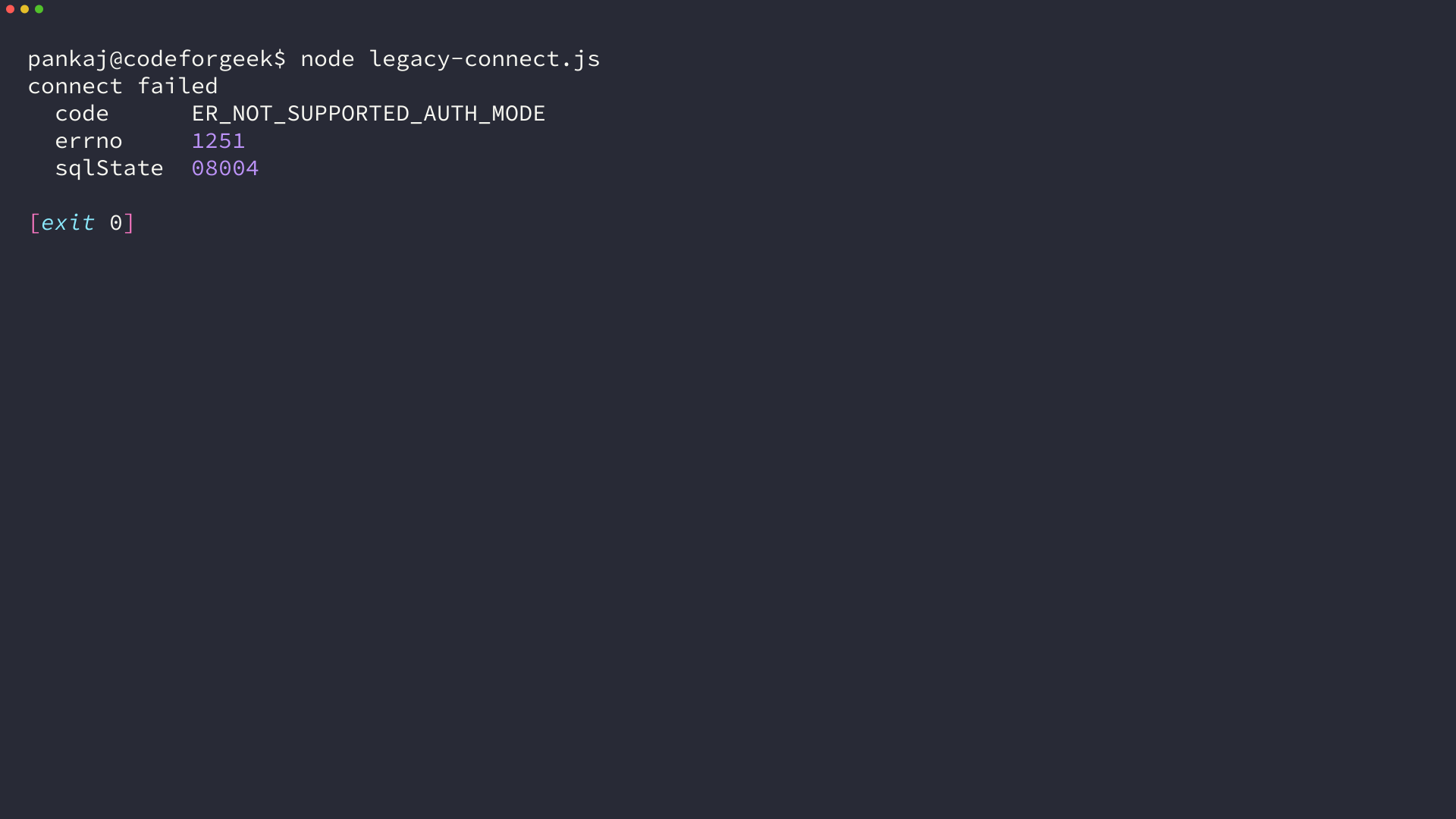
The handshake fails first. The driver’s own message says the client does not support the authentication protocol the server requested, and it names neither the package that is wrong nor the line that installed it. The same question has collected more than 800 votes on Stack Overflow and five open issues on the driver’s own tracker.
What to have ready before the first connection
Before the first connection, four pieces have to line up: a Node release, a MySQL release, a database user, and the driver.
| Item | How to check | What it decides |
|---|---|---|
| Node.js | node –version | the current lines are 24 (LTS) and 26, and the –env-file flag needs 20.6 or newer |
| MySQL | SELECT VERSION() | 8.4 is the LTS image and 9 is the current one, and their plugin lists differ |
| App user | SELECT user, host, plugin FROM mysql.user | the plugin stored for that user is what the handshake has to satisfy |
| mysql2 | npm install mysql2 | the driver that implements caching_sha2_password |
The two servers I tested publish MySQL on ports 3307 and 3308, which is why the samples below set the port explicitly. Everything else in them matches a default install on port 3306.
node --version
npm --version
v26.8.2
11.19.1
Both servers answered the same way for every step that follows. I pointed the same script at 8.4.11 and at 9.7.2, and mysql2 connected to both with no code change.
Connect Node.js to MySQL with mysql2
The project keeps one pool in one module and hands that module to the scripts that use it, so the credentials live in a single file and connections are reused instead of rebuilt. That module is the only place a credential appears and the only place the connection ceiling is set.
Step 1: Create the project and install the driver
Start with an empty directory and the driver.
mkdir notes-app
cd notes-app
npm init -y
npm install mysql2
added 12 packages, and audited 13 packages in 3s

3 packages are looking for funding
  run `npm fund` for details

found 0 vulnerabilities
The install pulled mysql2 3.24.4 when I ran it, and the package exposes a callback API alongside the promise API at mysql2/promise.
Step 2: Create the database, table, and application user
The user is where the handshake is decided. CREATE USER with IDENTIFIED BY picks the server’s default plugin, which is caching_sha2_password on MySQL 8 and 9, and that is the plugin mysql2 implements.
CREATE DATABASE IF NOT EXISTS notes_app;

CREATE USER IF NOT EXISTS 'notes_app'@'%' IDENTIFIED BY 'notes_pw_2026';
GRANT SELECT, INSERT, UPDATE, DELETE ON notes_app.* TO 'notes_app'@'%';
FLUSH PRIVILEGES;

USE notes_app;

CREATE TABLE IF NOT EXISTS notes (
  id INT UNSIGNED NOT NULL AUTO_INCREMENT,
  title VARCHAR(120) NOT NULL,
  body TEXT NOT NULL,
  created_at TIMESTAMP NOT NULL DEFAULT CURRENT_TIMESTAMP,
  updated_at TIMESTAMP NOT NULL DEFAULT CURRENT_TIMESTAMP ON UPDATE CURRENT_TIMESTAMP,
  PRIMARY KEY (id),
  KEY idx_created_at (created_at)
);
Run it as an administrator, then confirm the plugin the server stored for that user.
mysql -u root -p < setup.sql
mysql -u root -p -e "SELECT user, host, plugin FROM mysql.user WHERE user = 'notes_app'"
user      host  plugin
notes_app %     caching_sha2_password
If you would rather build the table from Node.js than from a SQL file, the walkthrough on creating a table through the driver covers the same ground with the same API.
Step 3: Build the pool module
Put the credentials in a file the process reads at startup, then create the pool once. Every script after this one imports that module instead of building its own connection.
DB_HOST=127.0.0.1
DB_PORT=3307
DB_USER=notes_app
DB_PASSWORD=notes_pw_2026
DB_NAME=notes_app
const mysql = require('mysql2/promise');

const pool = mysql.createPool({
  host: process.env.DB_HOST,
  port: Number(process.env.DB_PORT),
  user: process.env.DB_USER,
  password: process.env.DB_PASSWORD,
  database: process.env.DB_NAME,
  waitForConnections: true,
  connectionLimit: 10,
  queueLimit: 0,
  enableKeepAlive: true,
});

module.exports = { pool };
The –env-file flag arrived in Node 20.6 and keeps the password out of the source file. connectionLimit defaults to 10, waitForConnections queues work instead of failing it, and queueLimit 0 leaves that queue unbounded.
Step 4: Run inserts and selects with prepared statements
execute() prepares the statement on the server and binds the values, so the driver never builds SQL by concatenating strings. Placeholders stand in for values only, which is why the table and column names here are written into the statement rather than passed as parameters.
const { pool } = require('./db');

async function addNote(title, body) {
  const [result] = await pool.execute(
    'INSERT INTO notes (title, body) VALUES (?, ?)',
    [title, body]
  );
  return result.insertId;
}

async function listNotes() {
  const [rows] = await pool.execute(
    'SELECT id, title, created_at FROM notes ORDER BY id DESC LIMIT ?',
    [5]
  );
  return rows;
}

async function renameNote(id, title) {
  const [result] = await pool.execute(
    'UPDATE notes SET title = ? WHERE id = ?',
    [title, id]
  );
  return result.affectedRows;
}

async function deleteNote(id) {
  const [result] = await pool.execute('DELETE FROM notes WHERE id = ?', [id]);
  return result.affectedRows;
}

async function main() {
  const id = await addNote('First note', 'Written from Node with a prepared statement.');
  console.log('inserted id', id);

  console.log('inserted id', await addNote('Second note', 'A second row.'));

  const changed = await renameNote(id, 'First note (renamed)');
  console.log('rows updated', changed);

  console.log('rows now:');
  console.table(await listNotes());

  const removed = await deleteNote(id);
  console.log('rows deleted', removed);
}

main()
  .catch((err) => {
    console.error(err.code, err.message);
    process.exitCode = 1;
  })
  .finally(() => pool.end());
node --env-file=.env notes.js
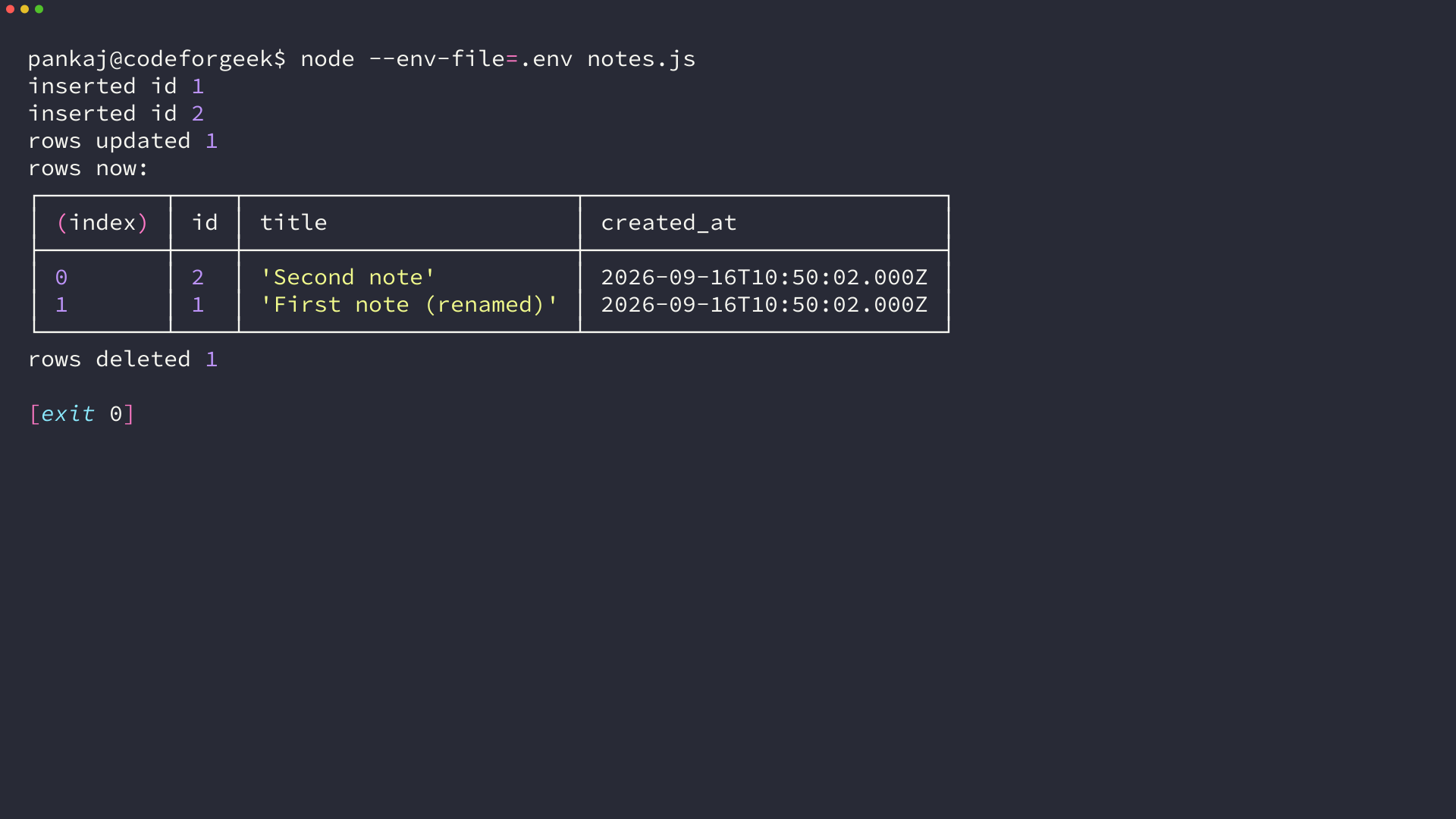
mysql2 caches each prepared statement in an LRU, so a second call to execute() with the same SQL reuses the server-side plan instead of preparing it again. The delete at the end of the script is the same statement the delete walkthrough wraps in an Express handler.
Step 5: Wrap related writes in a transaction
A transaction has to run on a single connection, so the script checks one out of the pool and returns it in a finally block.
const { pool } = require('./db');

async function countNotes() {
  const [rows] = await pool.execute('SELECT COUNT(*) AS total FROM notes');
  return rows[0].total;
}

async function main() {
  console.log('notes before', await countNotes());

  const conn = await pool.getConnection();
  try {
    await conn.beginTransaction();
    await conn.execute('INSERT INTO notes (title, body) VALUES (?, ?)', ['tx one', 'first row']);
    await conn.execute('INSERT INTO notes (title, body) VALUES (?, ?)', ['tx two', 'second row']);
    await conn.execute('INSERT INTO notes (body) VALUES (?)', ['no title']);
    await conn.commit();
    console.log('committed');
  } catch (err) {
    await conn.rollback();
    console.log('rolled back after', err.code, '-', err.message);
  } finally {
    conn.release();
  }

  console.log('notes after', await countNotes());
}

main()
  .catch((err) => {
    console.error(err.code, err.message);
    process.exitCode = 1;
  })
  .finally(() => pool.end());
node --env-file=.env tx.js
notes before 1
rolled back after ER_NO_DEFAULT_FOR_FIELD - Field 'title' doesn't have a default value
notes after 1
The third insert omits a NOT NULL column on purpose. commit() never runs, rollback() discards the two inserts before it, and the count returns to where it started. I wrote the failing insert that way so the rollback would show up in the count.
Step 6: Call a stored procedure
CALL returns one result set per SELECT inside the procedure, so the rows sit at index 0 of the array that comes back.
CREATE PROCEDURE list_recent_notes(IN max_rows INT)
BEGIN
  SELECT id, title FROM notes ORDER BY id DESC LIMIT max_rows;
END
const [resultSets] = await pool.query('CALL list_recent_notes(?)', [3]);
console.log('result sets returned:', resultSets.length);
console.table(resultSets[0]);
result sets returned: 2
┌─────────┬────┬───────────────┐
│ (index) │ id │ title         │
├─────────┼────┼───────────────┤
│ 0       │ 4  │ 'tx two'      │
│ 1       │ 3  │ 'tx one'      │
│ 2       │ 2  │ 'Second note' │
└─────────┴────┴───────────────┘
The second result set is the statement’s status packet and carries no rows. The row limit travels through a placeholder, while the procedure name is written into the statement.
Keep the pool bounded under load
A pool caps the number of connections the process opens and makes the rest of the work wait for one. The server sees the cap, not the traffic.
| Option | Default | What it does |
|---|---|---|
| connectionLimit | 10 | the ceiling on connections this pool opens |
| waitForConnections | true | queue a request when every connection is busy |
| queueLimit | 0 | the queue is unbounded, so requests wait rather than fail |
| idleTimeout | 60000 | close an idle connection after a minute |
| maxIdle | equals connectionLimit | how many idle connections stay open |
I ran the same workload at three ceilings and sampled the server’s Threads_connected counter every 50 milliseconds while it ran.
const mysql = require('mysql2/promise');

const env = {
  host: process.env.DB_HOST,
  port: Number(process.env.DB_PORT),
  user: process.env.DB_USER,
  password: process.env.DB_PASSWORD,
  database: process.env.DB_NAME,
};

const configs = process.argv.length > 2
  ? [[Number(process.argv[2]), Number(process.argv[3] ?? 40)]]
  : [[3, 24], [10, 40], [40, 40]];

async function run(limit, jobs) {
  const pool = mysql.createPool({ ...env, waitForConnections: true, connectionLimit: limit, queueLimit: 0 });
  const probe = await mysql.createConnection(env);

  let peak = 0;
  const sampler = setInterval(async () => {
    const [rows] = await probe.query("SHOW STATUS LIKE 'Threads_connected'");
    peak = Math.max(peak, Number(rows[0].Value));
  }, 50);

  const started = Date.now();
  await Promise.all(
    Array.from({ length: jobs }, (_, i) => pool.execute('SELECT SLEEP(0.3) AS s, ? AS job', [i]))
  );
  const elapsed = Date.now() - started;
  clearInterval(sampler);

  console.log(`connectionLimit=${limit} jobs=${jobs} peak_threads=${peak} elapsed_ms=${elapsed}`);

  await probe.end();
  await pool.end();
}

async function main() {
  for (const [limit, jobs] of configs) {
    await run(limit, jobs);
  }
}

main().catch((err) => {
  console.error(err.code, err.message);
  process.exitCode = 1;
});
node --env-file=.env pool-check.js
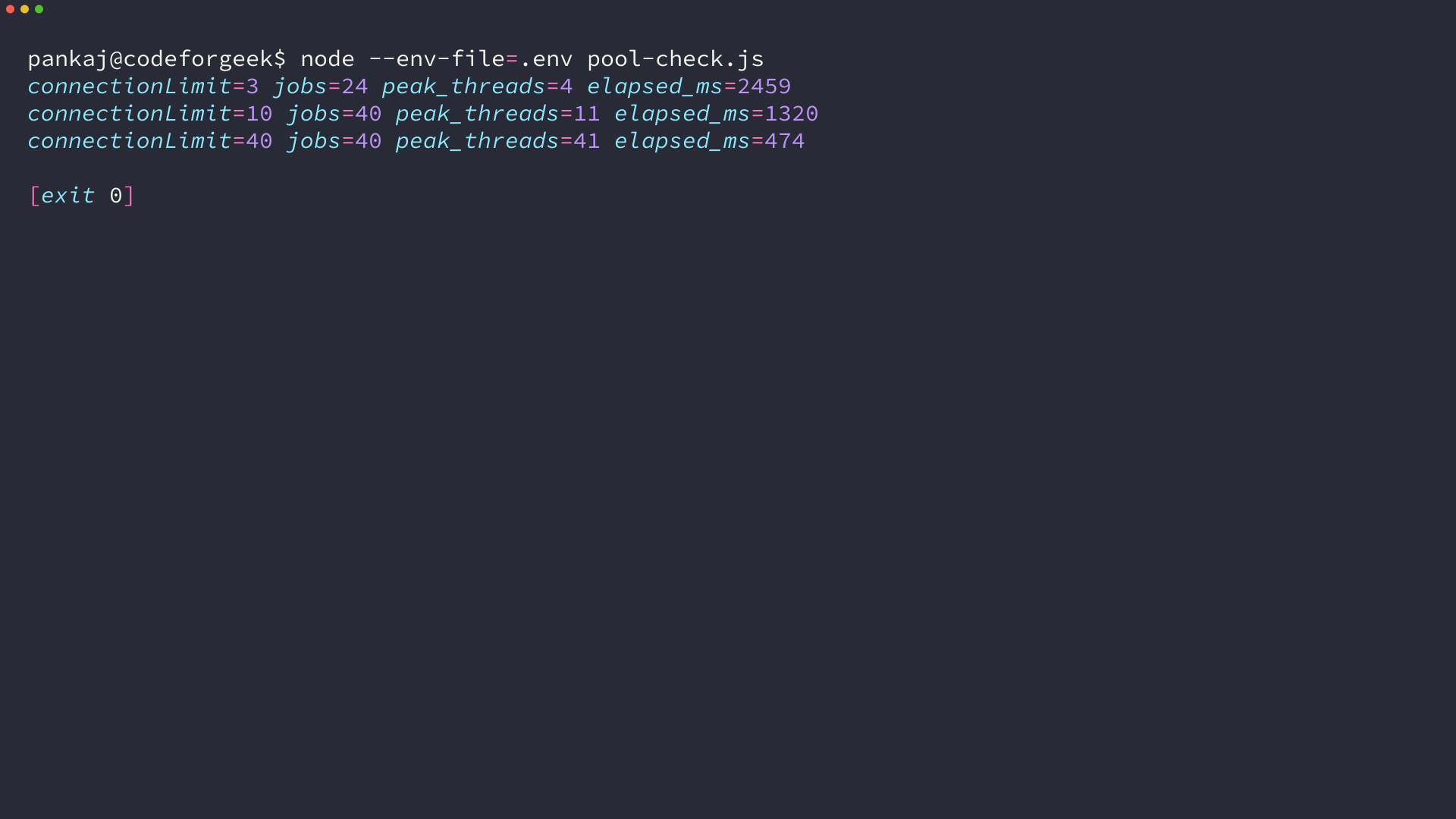
At a ceiling of three connections, 24 queries took 2.5 seconds. A ceiling of ten carried 40 queries in 1.3 seconds, and the peak thread count landed one above each ceiling because the sampling probe held its own connection.
The cost of a higher ceiling is server side. Every connection takes MySQL memory and a thread, so the number belongs in the server’s max_connections budget divided across the app processes you run, not in the peak request count.
The connection errors you will actually hit
Every error below carries the code and the message the driver or the server returned.
| Error | What produced it | What to change |
|---|---|---|
| ER_NOT_SUPPORTED_AUTH_MODE | the mysql package against MySQL 8.4.11 and 9.7.2 | install mysql2 |
| Plugin ‘mysql_native_password’ is not loaded | CREATE USER … IDENTIFIED WITH mysql_native_password on 8.4.11 | use the server’s default plugin |
| ER_ACCESS_DENIED_ERROR | a wrong password, a wrong user, or a host that does not match the grant | check the user’s host part |
| ECONNREFUSED | nothing listening on that host and port | check the port and the bind address |
| ER_DBACCESS_DENIED_ERROR | a user with no grant on the named database | grant on the schema |
| ER_NO_DEFAULT_FOR_FIELD | an insert that omits a NOT NULL column | fix the statement, then check that the rollback ran |
| No connections available. | waitForConnections false with the queue full | queue the request instead of rejecting it |
| Can’t add new command when connection is in closed state | a connection the server closed while it sat idle | let the pool replace it |
The plugin error is the one you meet while following advice rather than while writing new code. On 8.4.11 that plugin is installed but disabled, and on 9.7.2 the server does not ship it at all.
ERROR 1524 (HY000) at line 1: Plugin 'mysql_native_password' is not loaded
That message names the plugin rather than the password, which is why a workaround copied from a MySQL 8.0 thread stops working here.
An idle connection produces the second confusing failure, because the server closes a connection it considers unused and the next query on that object never reaches it. A pool hides that failure.
Can't add new command when connection is in closed state
I shrank one session’s wait_timeout, returned that connection to the pool, waited past the timeout, and queried again, and the pool handed out a fresh connection while the query returned its rows.
Back-pressure produces a message that names no limit. With waitForConnections set to false and a single connection in the pool, three of four concurrent queries were rejected, and nothing in the message says which ceiling they hit.
Check the server’s plugin list before you trust a fix
The server will tell you which authentication plugins it has loaded, and that is the fact a connection fix from a forum thread assumes.
const { pool } = require('./db');

async function main() {
  const [version] = await pool.query('SELECT VERSION() AS version');
  const [plugins] = await pool.query(
    "SELECT PLUGIN_NAME, PLUGIN_STATUS FROM information_schema.plugins WHERE PLUGIN_TYPE = 'AUTHENTICATION'"
  );

  console.log('server', version[0].version);
  console.table(plugins);

  await pool.end();
}

main().catch((err) => {
  console.error(err.code, err.message);
  process.exitCode = 1;
});
node --env-file=.env check-server.js
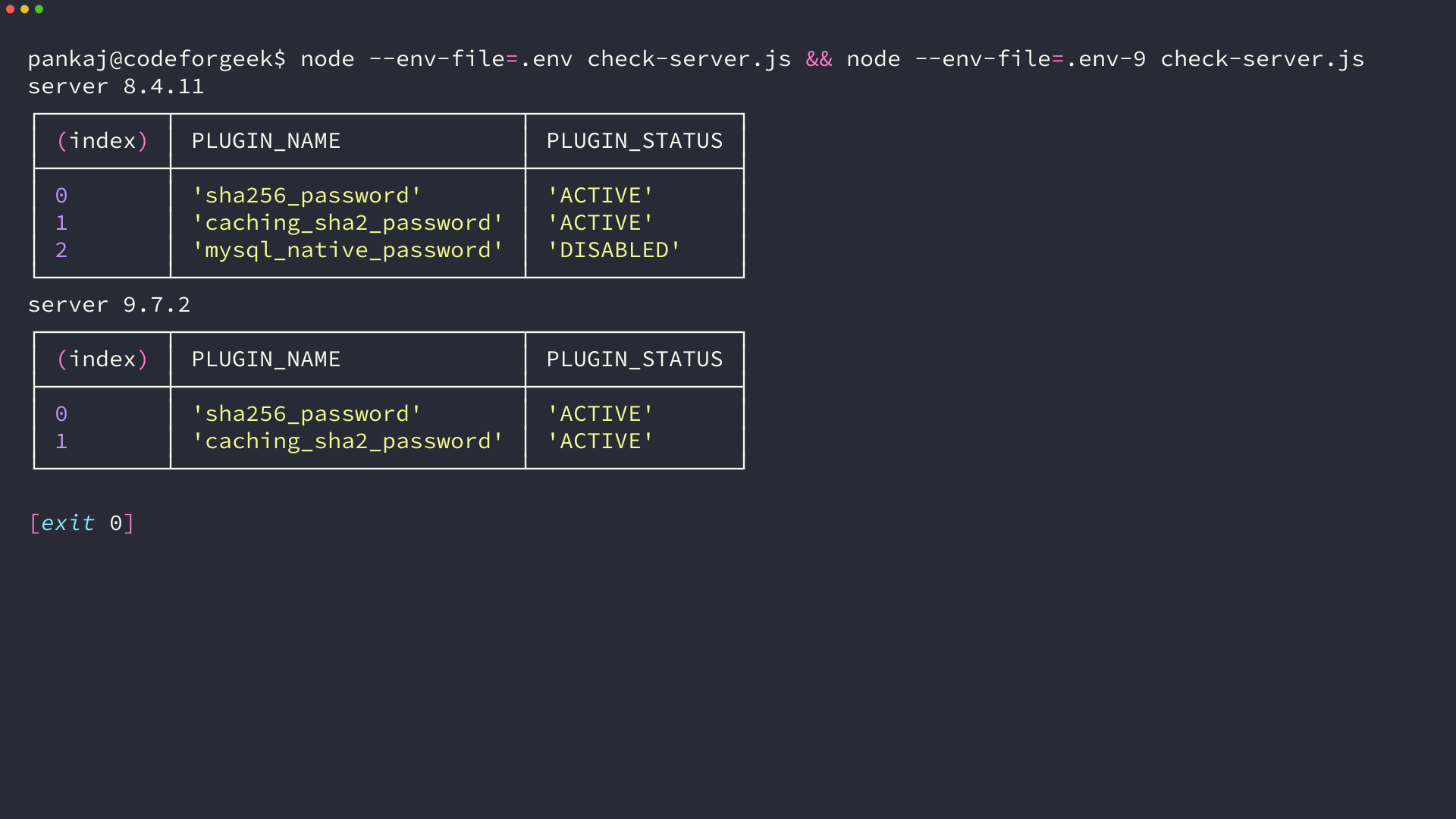
MySQL 8.4.11 lists mysql_native_password with a status of DISABLED, and 9.7.2 does not list it at all. Any fix that depends on that plugin therefore has an expiry date, and the version number in the error message is the only hint you get about it.
I ran that check against both servers, and the row for mysql_native_password is the one that moves. Run it against the server you deploy to before pasting a fix, because the plugin list belongs to the server and travels with the database rather than with your code.
Node.js and MySQL questions that keep coming up
A handful of questions come up under this topic, and each answer comes from the same two servers.
Can I keep using the mysql package with MySQL 8 or MySQL 9?
No. The handshake fails with ER_NOT_SUPPORTED_AUTH_MODE before any password is checked, on MySQL 8.4.11 and on MySQL 9.7.2. That package’s last release was 2.18.1 in 2020.
Does switching to mysql2 mean rewriting my queries?
No. mysql2 speaks the same protocol and runs the same SQL, so the statements stay as they are. What changes is the result shape, because the promise API returns rows first and field metadata second.
Should I call query() or execute()?
Use execute() whenever a value comes from outside your code, because it prepares the statement and binds the value on the server. Use query() when the SQL is fixed and the values are already yours.
How many connections should the pool allow?
Set connectionLimit from the server’s max_connections divided by the number of app processes. In the measurement above, ten connections carried 40 queries in 1.3 seconds and forty carried the same queries in half a second, so the ceiling trades server memory for queue time.
Does mysql2 work with MariaDB?
Yes. mysql2 connected to MariaDB 10.11.14 over a local socket on this machine, and the promise API, prepared statements, and the pool worked there unchanged.