

Running a Linux command from Python takes one call, and the one you pick decides whether the output lands in a variable. os.system is the short version, and the number it returns is not the exit code you expect.
subprocess.run runs the same command and hands back the text, the error text, and the plain exit status. It needs Python 3.7 or newer for capture_output and text.
What Python actually does with a Linux command
Python does not run the command itself. It asks the kernel to start a child process, and that child is the program you named, with its own standard input, output, and error streams.
When the arguments arrive as a list, the program starts directly and each list item is one argument. When they arrive as a single string with a shell requested, Python starts a shell first, and the shell is what decides what the string means.
| Call | What comes back | Where the output goes | Reach for it when |
|---|---|---|---|
| os.system(“ls -1”) | the status encoded for wait() | straight to the interpreter’s stdout | you want the text on screen and nothing else |
| subprocess.run([“ls”, “-1”]) | a CompletedProcess object | to the terminal, or into the object when captured | this is the default choice for a script |
| subprocess.Popen([“ls”, “-1”]) | a Popen object holding the pipes | wherever you point the pipes | you need the output before the command finishes |
That shell step is where the interesting behaviour lives, because the shell does four things to a string before any program starts. It splits the string into words, expands wildcards, substitutes variables, and then reads the punctuation that joins programs together.
So a string like ls *.txt runs a different command from the one you imagined, and a string with a delimiter in it runs two. The list form skips all four steps, which is why it is the shape to prefer.
The Python documentation recommends subprocess over os.system, and the reason sits in what comes back rather than in style. os.system cannot hand the command’s text to your script, so a program built on it can display results and never act on them.
import os
import subprocess

os.system("ls -1")              # prints the listing, returns an encoded status
subprocess.run(["ls", "-1"])    # returns a CompletedProcess, prints the same listing
A script that cannot read its own command output can only announce failure, and one that can read it can decide what to do next.
What you need in place first
Check the interpreter before anything else, because the two arguments that make the modern call comfortable only exist from 3.7 onward. If this prints 3.6 or lower, build a newer Python from source before continuing.
python3 --version
Every example on this page uses the standard library only, so there is no install step and no virtual environment to set up. The commands involved are ls, wc, ping, mkdir, touch, uname, and df, and all of them ship with a default Ubuntu installation except ping, which comes from the iputils-ping package that a minimal server image sometimes omits.
I ran these examples on 3.12.3, and the two arguments that make the modern call comfortable arrived in 3.7. Give the listings something to show by creating a working directory with a file and a subfolder in it, then run the rest from there.
mkdir -p ~/command-demo && cd ~/command-demo
touch notes.txt
mkdir -p reports
Running a command with subprocess.run
subprocess.run is the call to reach for by default, and what you add to it decides how much of the command the rest of the script can see.
Start the program directly
Pass the program name and every argument as separate list items, and nothing in that list is interpreted. A file named notes and a file named notes.txt are two different arguments, and neither one can turn into something else on the way.
import subprocess

subprocess.run(["ls", "-1"])
The child inherits your terminal here, so the listing appears exactly as it would if you had typed the command yourself. Nothing comes back to the script except the exit code wrapped in the result object.
Capture the text the command printed
capture_output attaches pipes to both output streams, and text decodes what comes through them into strings instead of bytes, which is what turns a printed listing into a value the rest of the script can use.
import subprocess

result = subprocess.run(["ls", "-1"], capture_output=True, text=True)

print("returncode:", result.returncode)
print("files:")
print(result.stdout, end="")
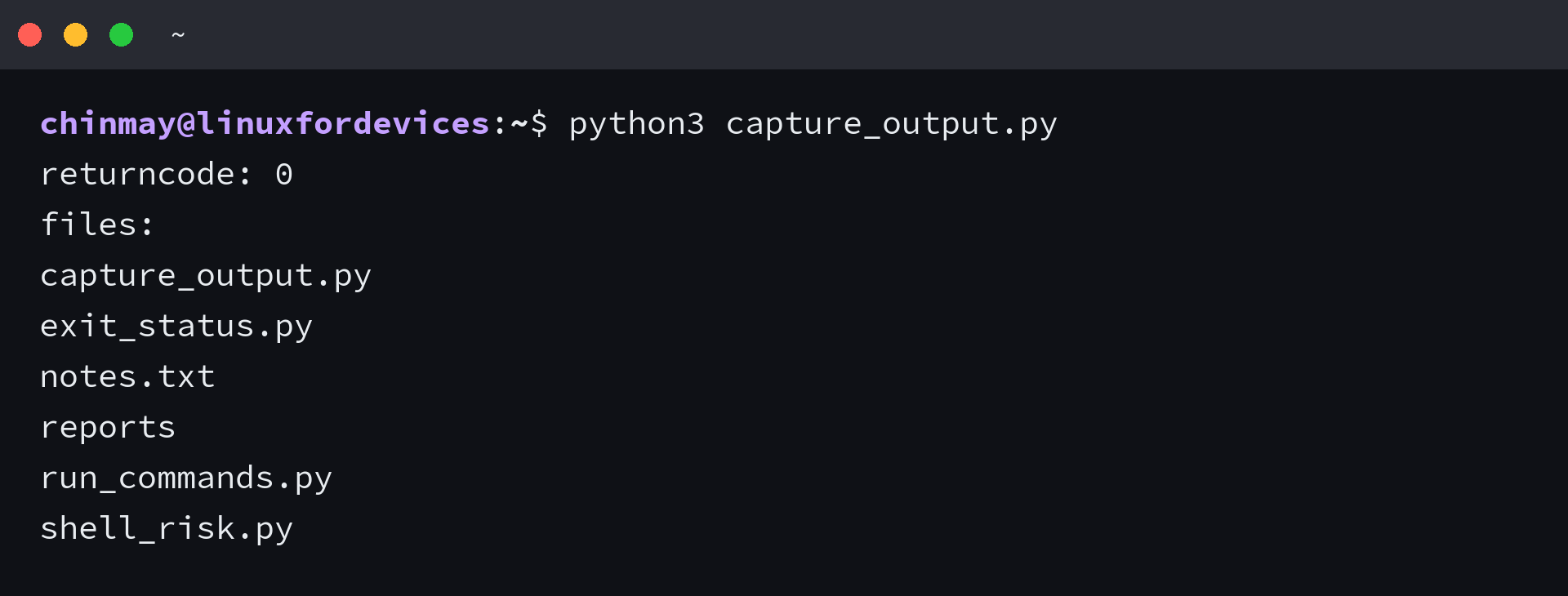
I printed the return code beside the text so one run carries both halves of what came back, with the newline intact and stderr empty because nothing went wrong. Keeping the two streams apart is what lets a script log an error without also logging the successful output that came before it.
Leave text out and stdout comes back as bytes. I dropped it for the sample below, and the value printed with a b prefix and the line breaks as escapes rather than new lines. Add encoding as well when the command writes something other than UTF-8.
import subprocess

raw = subprocess.run(["ls", "-1"], capture_output=True)
print(raw.stdout[:40])
Read the exit code instead of guessing
A return code of 0 means the command finished normally, and a negative value means a signal ended it, which is what a interrupt key produces. That code is the only reliable statement about whether the command did its job.
check makes a non-zero exit raise instead of passing silently, and a script that must not continue past a failed step is where that belongs. The ls command exits 2 when a path is missing, so a missing path makes the check raise straight away.
subprocess.run(["ls", "-1"], check=True)
What comes out of a failed check is subprocess.CalledProcessError, and that exception carries the command, the code, and both streams. That is enough detail to name the exact command in a log line and still show the message the program produced.
Run it from another directory
cwd changes the directory the child starts in, and env replaces the environment it inherits. Both matter once a script is meant to run from a timer rather than from the directory you happen to be sitting in.
import subprocess

result = subprocess.run(["pwd"], cwd="/tmp", capture_output=True, text=True)
print("command ran in:", result.stdout.strip())
Leave env out and the child inherits the current environment, which is the behaviour a script wants until a command depends on a variable that has to be set first.
import os
import subprocess

env = dict(os.environ, APP_ENV="staging")

result = subprocess.run(["printenv", "APP_ENV"], env=env, capture_output=True, text=True)
print("APP_ENV is", result.stdout.strip())
I passed a copy of the environment with one key added, and the command read it straight back. That is the shape to use, because a bare dictionary drops PATH and every other variable the command may be reading.
The older helpers you will still meet
A lot of existing code calls the earlier helpers, and knowing what each one gives back is what makes reading that code quick. I ran all four side by side, and the modern call covers each of them.
| Older helper | What it gives back | Modern equivalent |
|---|---|---|
| subprocess.call | the exit code, and nothing else | subprocess.run |
| subprocess.check_output | the output as bytes, raising on a non-zero exit | subprocess.run with capture_output and check |
| subprocess.getoutput | the output as one string, with the exit code dropped | subprocess.run with capture_output |
| os.popen | a file object you read yourself, with the shell always on | subprocess.run, or Popen when the output has to stream |
import subprocess

print(subprocess.getoutput("ls -1 | wc -l"))
print(subprocess.check_output(["ls", "-1"]).splitlines()[:2])
Recognize these rather than adopt them. Each one drops something the modern call keeps, whether that is the exit code, the text stream, or the choice about the shell, and the dropped piece is usually the one you need the day the command fails.
Shell syntax, input, and time limits
An argument list handles nearly every command, so a shell is the exception rather than the default. Where you do need one, the string you hand over becomes program text, and that is the part worth handling with care.
When a shell is genuinely required
Some things only a shell can do, and an argument list cannot carry any of them because nothing in that list is interpreted.
- a pipe between two programs, as in ls | wc -l
- a redirect into or out of a file, written with > or <
- a wildcard the shell expands, as in *.txt
- a variable the shell substitutes, as in $HOME
- a chain of commands in one call, separated by a semicolon or joined with &&
With shell requested, the string goes to /bin/sh and the pipe becomes the shell’s problem rather than yours, which is the common case where that trade is worth making.
import subprocess

result = subprocess.run("ls -1 | wc -l", shell=True, capture_output=True, text=True)
print("entries:", result.stdout.strip())
Run several commands in a row
Joining commands with a shell operator runs them in a single call, and there is no clean way to tell from the outside which one failed. Running them one at a time in Python keeps that answer, and the loop stays readable as steps are added.
import shlex
import subprocess

steps = ["ls -1", "wc -l notes.txt"]

for step in steps:
    result = subprocess.run(shlex.split(step), capture_output=True, text=True, check=True)
    print(step, "->", "exit", result.returncode)
I kept the steps in a list, so the loop stops on the first non-zero exit and the line for the failed step never prints. That is the behaviour a setup script wants, and reversing it means catching the exception and deciding whether the next step still makes sense.
Keep user text out of the shell
The same switch is what makes user text dangerous, because the shell reads punctuation as instructions. A folder name is a plain string to your script and a small program to the shell, and string concatenation is what hands it over.
import subprocess

folder = "reports; echo second command ran"

risky = subprocess.run("ls " + folder, shell=True, capture_output=True, text=True)
print("with shell:", risky.stdout.strip().replace("\n", " | "))

try:
    safe = subprocess.run(["ls", folder], capture_output=True, text=True, check=True)
    print("as a list :", safe.stdout.strip())
except subprocess.CalledProcessError as error:
    print("as a list : exit", error.returncode, "and only ls ran")

I ran both calls against the same string, and the shell version listed the folder and then ran a command that was never in my script. The list version passed the whole string as one argument, so it failed as a missing file and the extra command never started.
Where a command string has to be assembled, shlex.split turns it into the argument list the list form expects while keeping quoted values together. That covers the escaping problem the older Stack Overflow answers describe without opening the shell to injected text.
import shlex

print(shlex.split("ping -c 2 -W 1 127.0.0.1"))
Feed input to a command
input writes a string to the child’s standard input and closes it, which is how you drive a program that reads from stdin. It needs text so the argument is accepted as a string rather than a byte sequence, and it cannot be combined with an explicit stdin argument.
import subprocess

result = subprocess.run(["wc", "-l"], input="alpha\nbeta\ngamma\n", text=True, capture_output=True)
print("lines received:", result.stdout.strip())
Stop a command that hangs
timeout kills the child after the given number of seconds and raises subprocess.TimeoutExpired. That is the difference between a script that waits forever on a host which stopped answering and one that moves on and reports the address.
import subprocess

try:
    subprocess.run(["sleep", "30"], timeout=2)
except subprocess.TimeoutExpired:
    print("gave up after 2 seconds")
I gave a 30 second sleep a two second limit, and the call raised TimeoutExpired instead of waiting it out, which is the limit a long-running command needs before the script goes into a timer.
Read output before the command finishes
subprocess.run waits for the command to exit before it returns anything, so it cannot show progress on a job that takes minutes. Popen hands you the pipe itself and lets the script read it a line at a time as the lines arrive.
import subprocess

with subprocess.Popen(["ls", "-1"], stdout=subprocess.PIPE, text=True) as process:
    for line in process.stdout:
        print("saw:", line.rstrip())
The with block matters here, because leaving it closes the pipes and waits for the child to finish. Without it a script that walks away from a Popen leaves a process running behind it.
A script that runs commands for you
The pieces above combine into a menu that runs common commands and reports what each one said, and every command in it exists on a default Ubuntu install.
#!/usr/bin/env python3
"""Run common Linux commands from a menu, using subprocess.run only."""

import subprocess
import sys

MENU = """1) List directories
2) Create a file
3) Create a directory
4) Ping a host
5) Show kernel details
6) Show disk usage
7) Check the Python version
8) Exit"""


def run(argv, **kwargs):
    """Run one command, print what came back, and return its exit code."""
    result = subprocess.run(argv, capture_output=True, text=True, **kwargs)
    if result.stdout:
        print(result.stdout, end="")
    if result.stderr:
        print(result.stderr, end="", file=sys.stderr)
    if result.returncode != 0:
        print(f"[exit {result.returncode}]", file=sys.stderr)
    return result.returncode


def main():
    while True:
        print(MENU)
        choice = input("Enter your choice: ").strip()

        if choice == "1":
            run(["ls", "-1"])
        elif choice == "2":
            name = input("File name: ").strip()
            run(["touch", name])
        elif choice == "3":
            name = input("Folder name: ").strip()
            run(["mkdir", "-p", name])
        elif choice == "4":
            host = input("Host (blank for 127.0.0.1): ").strip() or "127.0.0.1"
            packets = input("Packets (blank for 3): ").strip() or "3"
            run(["ping", "-c", packets, host])
        elif choice == "5":
            run(["uname", "-a"])
        elif choice == "6":
            run(["df", "-h", "."])
        elif choice == "7":
            run([sys.executable, "--version"])
        elif choice == "8":
            return 0
        else:
            print("Pick a number from the menu.")
        print()


if __name__ == "__main__":
    raise SystemExit(main())
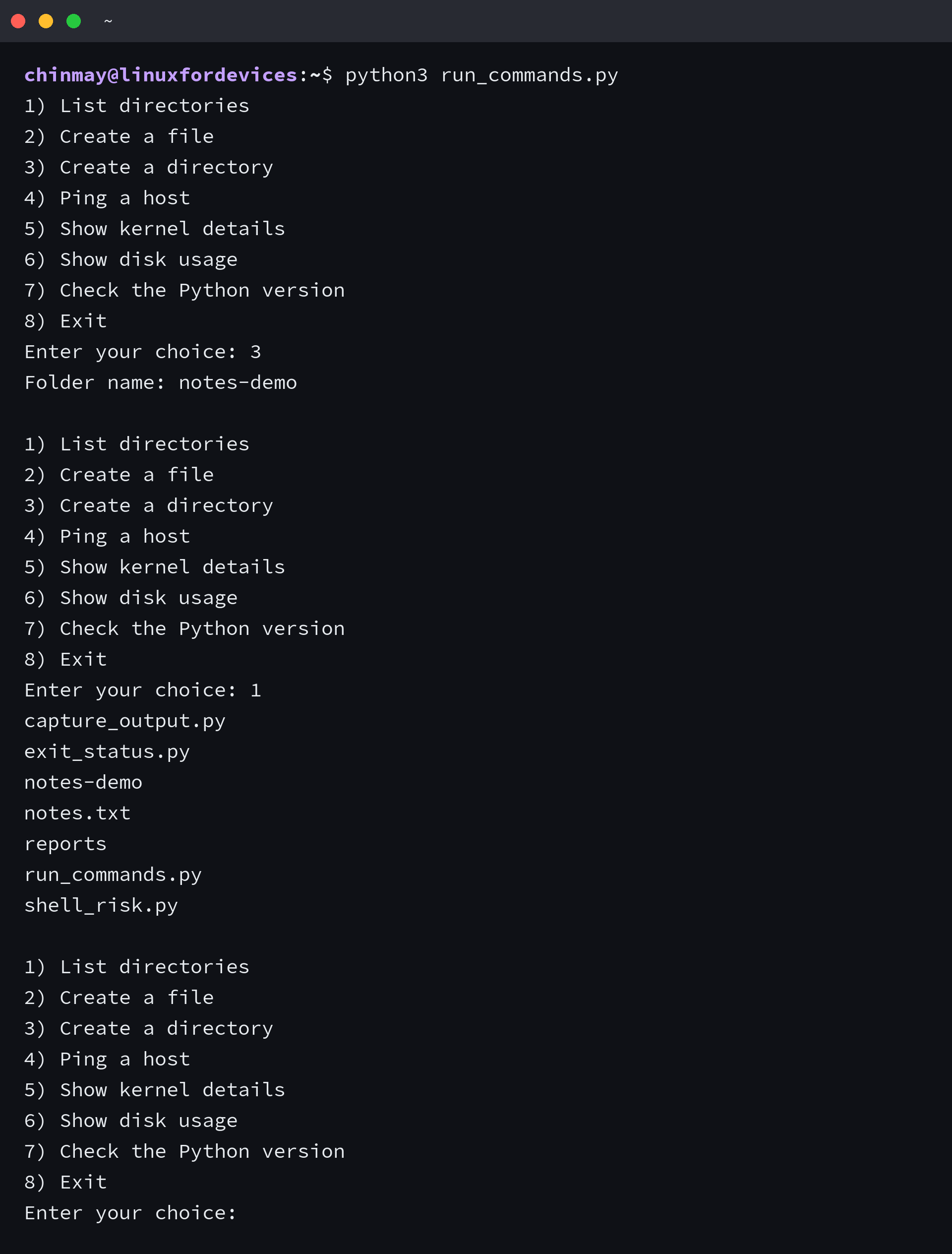
The run helper captures both streams, sends each one to the matching destination, and returns the exit code instead of raising, so a single failed command does not end the menu.
Option three is the mkdir command with its parent flag, so a folder that already exists is not an error. The name typed at the prompt goes into the argument list as one item, which keeps a name with a space or a delimiter inside it intact no matter what the user typed.
I kept the raising behaviour out of the helper on purpose, because a menu that quits on the first bad input is worse than one that says what went wrong. For a script that runs unattended the opposite choice is correct, and check with an exception handler gets you there.
The same approach sits behind the automation scripts in Python for Linux system administrators, where a small amount of Python replaces a shell script that grew past the point of being readable.
When the command fails
Nearly every failure a command script produces arrives as one of three exceptions, and each one carries different fields. Knowing which field holds the message saves a debugging round.
| Exception | Raised when | Useful fields |
|---|---|---|
| FileNotFoundError | the program is not on PATH | filename |
| CalledProcessError | the command exited non-zero and check was set | cmd, returncode, stdout, stderr |
| TimeoutExpired | the command outlived the time limit | cmd, timeout, output |
The program is not installed
A missing program raises FileNotFoundError before anything runs. I asked for one that is not on PATH, and the exception named it without starting a process at all.
import subprocess

try:
    subprocess.run(["totally-not-installed", "--version"], check=True, capture_output=True, text=True)
except FileNotFoundError as error:
    print("no such program:", error.filename)
The command ran and returned non-zero
With check set, a non-zero exit becomes an exception that still holds the captured streams. Printing the command, the code, and the error text is usually all the diagnosis a failed step needs.
import subprocess

try:
    subprocess.run(["ls", "/etc/no-such-file"], check=True, capture_output=True, text=True)
except subprocess.CalledProcessError as error:
    print("command failed:", error.cmd)
    print("exit code:", error.returncode)
    print("stderr:", error.stderr.strip())
A script that fails should tell whatever called it that it failed, and handing the exit code to sys.exit is the way a cron job learns to mark the run as failed rather than as a quiet success.
import subprocess
import sys

try:
    subprocess.run(["ls", "/etc/no-such-file"], check=True, capture_output=True, text=True)
except subprocess.CalledProcessError as error:
    print(error.stderr.strip(), file=sys.stderr)
    sys.exit(error.returncode)
The exit status is not always the exit code
os.system returns whatever the C system call produced, and on Unix that value is the child’s status encoded for wait. A command that exits 1 comes back as 256, because the code sits in the second byte of the returned value.
import os
import subprocess

missing = "/etc/no-such-file"

status = os.system("ls " + missing)
code = subprocess.run(["ls", missing], capture_output=True).returncode

print("os.system returned     :", status)
print("subprocess returned    :", code)
print("exit code inside status:", os.waitstatus_to_exitcode(status))
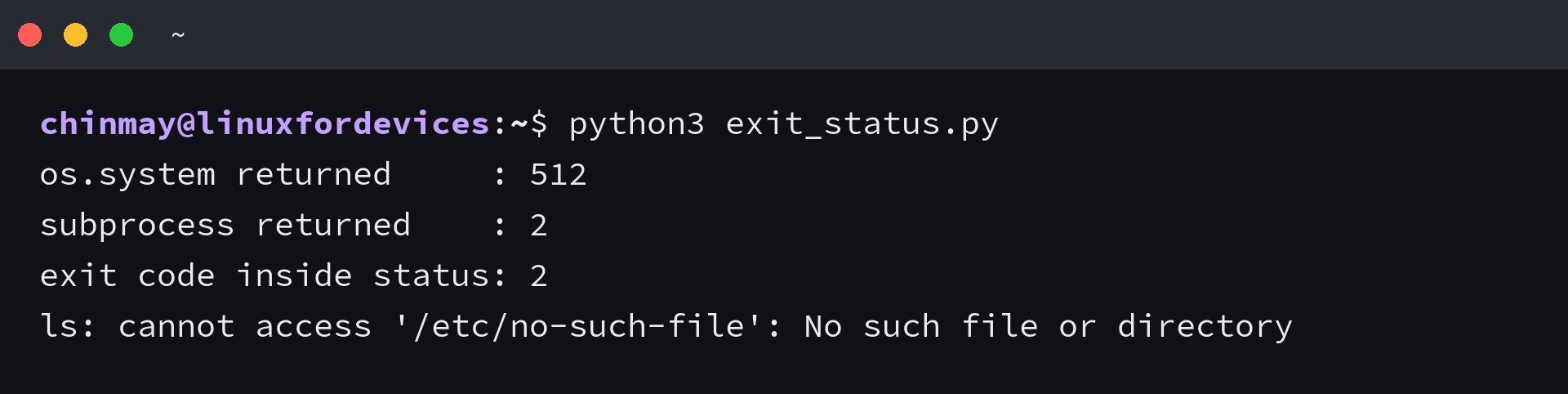
I ran both calls against the same missing file, and os.system reported 512 while subprocess.run reported 2. os.waitstatus_to_exitcode turned the first number into the second one, which confirms the encoding rather than the failure.
An os.system check against 1 never matches, because the value it returns is not the exit code. Convert it with os.waitstatus_to_exitcode before comparing, or use subprocess.run and compare its return code directly.
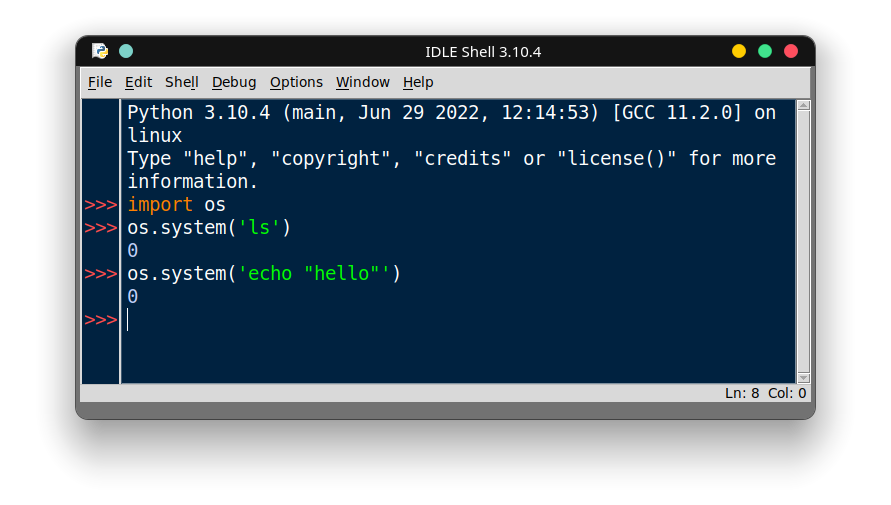
An interactive session shows the same shape. Both calls returned 0 and the command text went to the interpreter’s standard output rather than into the window, so what a reader sees there is the status and not the listing.
Putting the script on your PATH
The menu is more useful without python3 in front of it, and one move into a directory that is already on PATH gets you there. A shell alias does the same job in one line if you would rather keep the file where it is.
mkdir -p ~/.local/bin
cp run_commands.py ~/.local/bin/run-commands
chmod +x ~/.local/bin/run-commands
If that directory is not on PATH yet, bashrc and bash profile is where the export goes. The next step after that is a timer, and crontabs in Linux covers the schedule syntax for the one you want.
For a job that has to keep running on a schedule without a terminal open, repeating a command every few seconds shows the wrapper that survives a logout. The same idea scaled to system packages is what automatic updates with a cron job does.
Frequently asked questions
The same questions come up in the search results and in the reader threads, so they are answered here against the code on this page.
How do I run a shell command from Python and get its output?
Call subprocess.run with the program and its arguments as a list, plus capture_output=True and text=True. The command’s text comes back in the stdout attribute of the returned object, and its error text comes back in stderr.
Is os.system or subprocess better for running a command?
subprocess is the recommended choice. os.system cannot capture the command’s output inside the script and returns a status encoded for wait() rather than a plain exit code. subprocess.run returns both the text and the exit code.
Why does os.system return 256 instead of 1?
On Unix the return value of os.system is the child’s status encoded in the format wait() uses, and the exit code sits in the second byte. A command that exits 1 therefore comes back as 256. os.waitstatus_to_exitcode converts that value back into the exit code.
Do I need shell=True to run a Linux command from Python?
Not for a normal command. Pass the program and its arguments as a list and no shell is involved. Set shell=True only when the command needs shell syntax such as a pipe, a redirect, a wildcard, or several commands in one string, and never build that string from input you do not control.
How do I put a time limit on a command started from Python?
Pass timeout with the number of seconds. If the command is still running when the limit passes, subprocess kills the child and raises subprocess.TimeoutExpired, which carries the command, the limit, and any output captured before the kill.
Can I run several Linux commands in one Python call?
Yes, but only with a shell. A single string containing commands joined by a shell operator needs shell=True, because the shell is what reads the operator. The safer alternative is running each command with its own subprocess.run call and chaining them in Python.
