Summary: in this tutorial, you’ll learn how to use the NumPy ravel() to return a contiguous flattened array.
Introduction to the NumPy ravel() function #
The ravel() function accepts an array and returns a 1-D array containing the elements of the input array:
numpy.ravel(a, order='C')In this syntax:
ais a numpy array. It can be any array-like object e.g., a list. An array-like object is an object that can be converted into a numpy array.orderspecifies the order of elements. Check out theflatten()method for detailed information on the order parameter and its values.
NumPy ravel() function example #
Let’s take some examples of using the ravel() function.
1) Using NumPy ravel() function to flatten an array #
The following example uses the ravel() function to flatten a 2-D array:
import numpy as np
a = np.array([[1, 2], [3, 4]])
b = np.ravel(a)
print(b)Output:
[1 2 3 4]How it works.
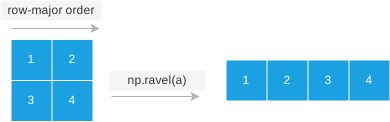
First, create a 2-D array:
a = np.array([[1, 2], [3, 4]])Second, flatten the array using the ravel() function:
b = np.ravel(a)Third, display the array:
print(b)2) ravel() function vs. flatten() method #
The flatten() method creates a copy of an input array while the ravel()ravel()
import numpy as np
a = np.array([[1, 2], [3, 4]])
b = np.ravel(a)
# change element at index 0
b[0] = 0
# show both b & a array
print(b)
print(a)How it works.
First, use the ravel() function to create a view of the array a:
b = np.ravel(a)Second, change the element from index 0 of the array b to zero:
b[0] = 0Third, show both arrays a and b. Since array b is a view of array a, the change in array b is reflected in array a:
print(b)
print(a)Another important difference between the flatten()ravel()flatten()ndarray while you can call the ravel()
Summary #
- Use the numpy
ravel()function to return a contiguous flattened array.
Thank you for your feedback!
