
Summary: in this tutorial, you will learn how to use the SQL DROP TABLE statement to remove a table from the database.
Introduction to SQL DROP TABLE statement #
As the database evolves, you will need to delete obsolete tables from the database. To delete a table, you use the DROP TABLE statement.
Here’s the syntax for the DROP TABLE statement:
DROP TABLE table_name;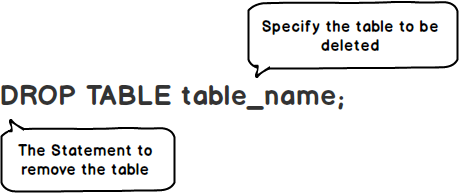
In this syntax, you specify the name of the table you want to drop after the DROP TABLE keywords.
The DROP TABLE statement removes both the data and structure of a table permanently.
If the table does not exist, the database system will issue an error.
To conditionally drop a table only if it exists, you can use the IF EXISTS option:
DROP TABLE IF EXISTS table_name;In this case, the database system may issue a warning or notice if the table does not exist.
Note that to delete only data from a table, you use the DELETE or TRUNCATE TABLE statement.
SQL DROP TABLE statement example #
First, create a new table called emergency_contacts to store the emergency contacts of employees:
CREATE TABLE emergency_contacts (
id INT PRIMARY KEY,
first_name VARCHAR(255) NOT NULL,
last_name VARCHAR(255) NOT NULL,
relationship VARCHAR(50) NOT NULL,
employee_id INT NOT NULL
);Second, use the DROP TABLE statement to drop the emergency_contacts table:
DROP TABLE emergency_contacts;Summary #
- Use SQL
DROP TABLEstatement to remove a table from the database.
Databases #
- PostgreSQL DROP TABLE Statement
- Oracle DROP TABLE Statement
- SQL Server DROP TABLE Statement
- MySQL DROP TABLE Statement
- SQLite DROP TABLE Statement
- Db2 DROP TABLE Statement
- MariaDB DROP TABLE Statement
Quiz #
SQL DROP TABLE Statement
Thank you for your feedback!
