Buy Bitcoin

$300
~ 0 BTC
$500
~ 0 BTC
$1,000
~ 0 BTC
How to buy Bitcoin with Google Pay
CEX.IO offers a variety of funding solutions to help eligible customers seamlessly buy and sell Bitcoin, along with 200+ carefully vetted digital assets. Whether you prefer to buy Bitcoin with a credit/debit card, bank transfers, or digital wallets, we’ve got you covered.
CEX.IO has served retail crypto customers for over a decade. The platform holds a FinCEN MSB registration (31000061475486), an NMLS ID (1804170), and state money transmitter licenses across 36 US states plus DC. SOC 2 Type II and ISO 27001 audits cover the core systems. The Google Pay checkout on the CEX.IO mobile and Wallet apps runs on top of that regulated base. You tap Buy, pick Bitcoin, choose Google Pay, and confirm on your phone with fingerprint or face unlock. BTC lands in your CEX.IO Wallet in seconds. Spot trading fees start at 0.25%.
One convenient solution is Google Pay, a fast and secure way to deposit funds by linking your credit/debit card or bank account. While CEX.IO already supports direct purchases via cards and bank transfers, some users may find Google Pay more practical for managing their transactions in one place.
Google Pay on CEX.IO: Key Things to Know
Whether using our web-based platform for desktops and laptops or crypto mobile apps for Android and iOS, you need to ensure that our payment services recognize Google Pay as a viable payment method. To do that, you must create an account with Google Pay and link your preferred funding method. This way, you ensure seamless integration to our mobile/desktop products and services.
With that off the table, here are a few more aspects to keep in mind if you’re looking to buy crypto with Google Pay:
- Each Google Pay transaction is subject to more security than usual CEX.IO payments.
- Google Pay does not charge additional fees for debit cards or paying with a current balance.
- The CEX.IO App is compatible with Google Pay.
- While CEX.IO supports Google Pay, this service may not be available on all crypto exchanges.
- CEX.IO users can not withdraw funds to their Google Pay accounts.
Now that you know more about Google Pay and its pros and cons, let’s learn how to use this service to buy crypto through our crypto mobile app.
Buying Bitcoin with Google Pay using the CEX.IO App
Once you establish your Google Pay account and link your preferred payment method, you may proceed with the crypto purchase through the selected mobile app (iOS or Android). Follow these steps to buy BTC with Google Pay at CEX.IO:
Step 1 – Download and Install the CEX.IO App
Visit your Google Play or App Store and type “CEX.IO App” in the search bar. Tap download to get the app, and then tap install. This process should not take more than one minute, though it might depend on your device and operating system.
Step 2 – Create an Account
Once you install the app, you need to create an account. Tap on the Register and fill in the required information, such as your:
- Country of residence
- Email address
- New CEX.IO password
Accept the terms and conditions to complete the account creation process.
Step 3 – Account and Identity Verification
Upon registering, we’ll send you a confirmation email. Visit your email inbox and click on the link provided by CEX.IO. Then, you can proceed with the identity verification. Since our platform is licensed and regulated, this process is mandatory to comply with KYC/AML policies and typically takes under five minutes to complete. Here are the steps to verify:
- Select the country you’re currently residing in.
- Provide your ZIP code.
- Type in your state, city, and street address.
- Complete a short questionnaire if required.
- Enter your phone number.
- Finish the facial recognition verification.
- Scan your valid ID, passport, or driver’s license. Ensure the document is current and not expired.
Step 4 – Buy Bitcoin with Google Pay
Once you’ve registered and verified your account, you’re ready to make your first purchase with Google Pay. There are two ways to acquire crypto with Google Pay:
Obtain BTC through Wallet
- At the bottom navigation menu, locate and tap on Wal
- Select Buy.
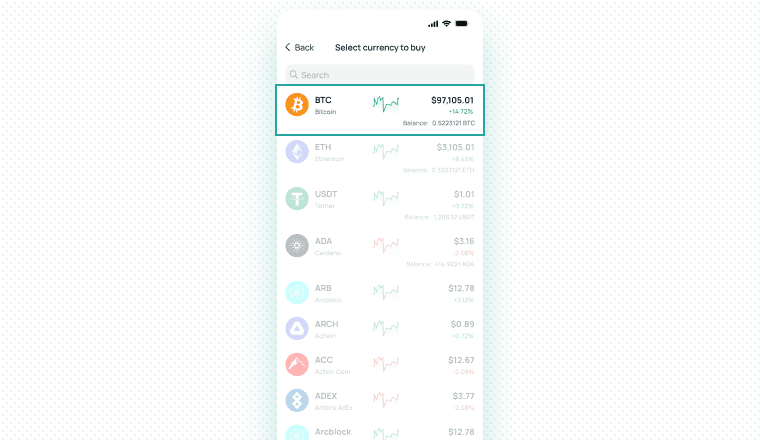
- Choose BTC as the cryptocurrency you prefer to buy, or select other assets you might be interested in.
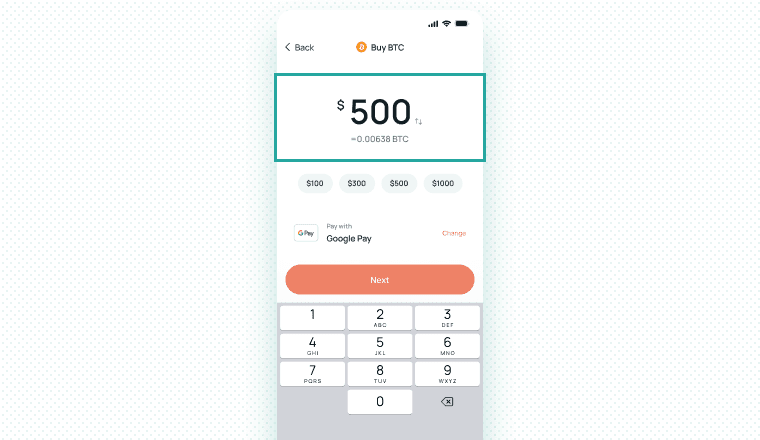
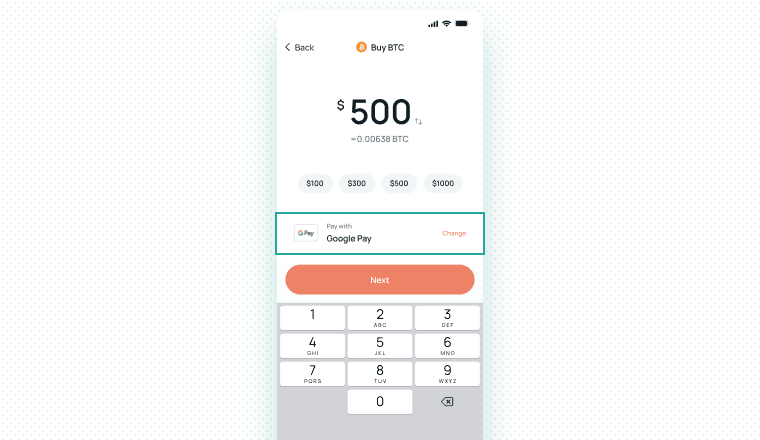
- Specify the amount of fiat you want to spend for the purchase.
- Tap on Buy with Google Pay.
- If Google Pay is not presented as a payment gateway by default, select Change Payment Method.
- You can also use this feature to change your payment method preferences in case you’re not able to use your Google Pay account for whatever reason. This allows you to buy crypto with a prepaid card (though we generally don’t recommend this) or any other available funding gateway.
Utilize our Buy Functionality
- Find and tap on Buy from the bottom navigation menu (located next to Wallet).
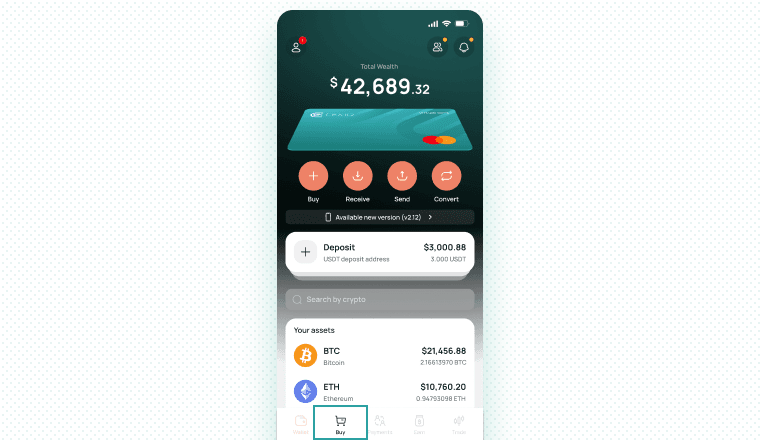
- Choose the preferred cryptocurrency from the dropdown menu.
- Enter the amount.
- Tap Buy with Google Pay.
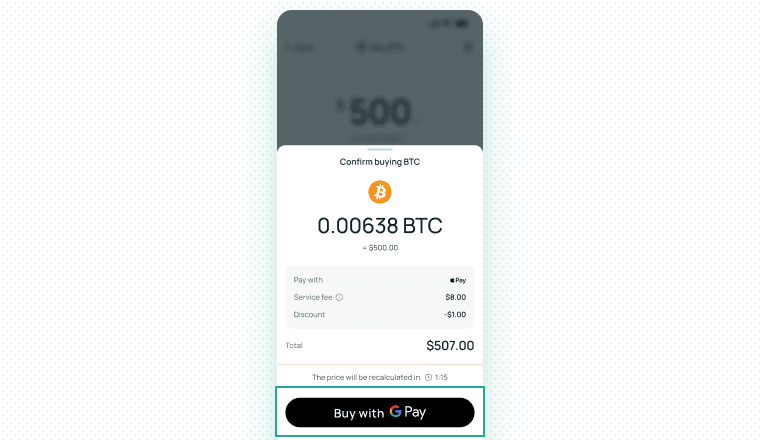
- Alternatively, tap Change Payment Method to select the most suitable funding solution.
Why use CEX.IO to buy Bitcoin with Google Pay?
Licensing and regulation
CEX.IO runs as a FinCEN-registered Money Services Business. The MSB number is 31000061475486. The NMLS entity ID is 1804170. State money transmitter licenses cover 36 US states plus DC. The exchange passes SOC 2 Type II audits and holds ISO 27001 certification on its core systems. CEX.IO has served retail customers for over nine years.
Speed and cost
Google Pay sends the payment to CEX.IO in seconds once you confirm on your phone. CEX.IO charges no Google Pay platform fee on top of the card-network fee. Spot trading fees start at 0.25% on 30-day volume up to $10,000 and drop as volume grows.
Security
Google Pay sends a tokenised card number to CEX.IO. The exchange never sees your real 16-digit card number. CEX.IO adds 2FA on every login and every withdrawal, AML screening on every deposit, device fingerprinting, and 24/7 fraud monitoring. Most customer crypto sits in cold storage.
Google Pay vs other payment methods on CEX.IO
Every row below reflects a payment method that CEX.IO lists on limits and commissions page. If a method does not appear there, CEX.IO does not support it.
| Method | Fee profile | Speed | Best for |
| Google Pay | Card-network fee + Spot fee from 0.25% | Instant | Android-first users who want tokenised security |
| Apple Pay | Card-network fee + Spot fee from 0.25% | Instant | iOS-first users |
| Visa / Mastercard (raw entry) | Card-network fee + Spot fee from 0.25% | Instant | Users on desktop or a browser without Google Pay |
| ACH / SEPA / SWIFT / Faster Payments (bank transfer) | Free or low deposit fee + Spot fee from 0.25% | Minutes to 5 days | Large tickets, lowest all-in cost |
| Skrill | Skrill-side fees apply + Spot fee from 0.25% | Instant once funded | Skrill users outside the US |
| Neteller | Neteller-side fees apply + Spot fee from 0.25% | Instant once funded | Neteller users outside the US |
| PayPal | PayPal-side fees apply + Spot fee from 0.25% | Instant once funded | Users with PayPal funds on hand |
| Crypto deposit (USDT, USDC, BTC…) | Network fee only | Minutes after confirmations | Users with crypto elsewhere |
Google Pay vs Apple Pay Comparison
| Attribute | Google Pay | Apple Pay |
| Platform | Android + Chrome on desktop | iOS + Safari on macOS |
| Tokenised card number | Yes | Yes |
| Device-level auth | Fingerprint / face unlock / PIN | Face ID / Touch ID / passcode |
| Supported cards on CEX.IO | Visa, Mastercard | Visa, Mastercard |
| Fees on CEX.IO | Card-network fee + Spot fee from 0.25% | Card-network fee + Spot fee from 0.25% |
| Best use case | Android wallet-first buyers | iOS wallet-first buyers |
FAQ
Which Cryptocurrencies Can I Buy with Google Pay?
In addition to buying Bitcoin with a Google Pay balance, eligible customers can use this payment service to obtain other 200+ selected digital assets from our vast offerings. However, due to varying regulations between countries, some cryptocurrencies may not be available in your region. Use the dropdown menu as explained above to find the assets supported in your country.
What are the Benefits of using Google Pay?
Google Pay allows users to store their credit/debit card information, as well as their bank account details, for seamless online purchases. Other benefits of Google Pay include a higher level of security, as users don’t need to leave their credit card or bank details during purchases, and potentially faster transaction confirmations.
Does Google Pay charge fees?
Google Pay itself does not charge any fees. However, there might be charges associated with the selected routing payment provider. For example, if you link your credit and debit card with Google Pay, you might pay between 0.49% and 4.99% + service charge fee, a standard commission for using cards issued by Visa and Mastercard.
What countries support Google Pay?
Google Pay is a globally accepted service available in 72+ countries, including the UK, France, Germany, Kuwait, Saudi Arabia, Serbia, Sweden, Switzerland, and Denmark. For maximum convenience, please make sure CEX.IO is licensed to operate in your country. For more information, please refer to our support guide.
How does withdrawal work with Google Pay?
While eligible customers can use Google Pay to buy Bitcoin and other cryptocurrencies, this service is not currently available for withdrawals. However, CEX.IO offers plenty of other cash-out methods to accommodate users' varying needs.
Here’s how to withdraw crypto holdings from your CEX.IO account using our mobile app:
- Log in to your CEX.IO app using established credentials.
- Tap Wallet.
- Select Convert.
- Choose the cryptocurrency you want to convert.
- Specify the amount.
- Choose your preferred cash-out method.
- Click the box to accept the Terms of Use, Refund Policy, Payment Conditions, and Cardholder’s Agreement.
- Confirm your withdrawal.
How to send crypto to/from CEX.IO using Google Pay?
Google Pay does not support sending or receiving cryptocurrencies. If you want to acquire crypto or expand your portfolio, you can use our Wallet functionality to make direct crypto purchases or utilize Spot Trading to obtain assets under potentially more favorable market conditions.
Is Google Pay safe for buying Bitcoin?
Yes. A Google Pay Bitcoin purchase carries less risk than a raw card entry on a checkout form. Three reasons drive this:
- Google Pay tokenises the card number. CEX.IO receives a one-time virtual number, never your real card digits.
- Google Pay requires device-level authentication — fingerprint, face unlock, or PIN — on every purchase.
- CEX.IO screens every deposit through AML rules and locks every withdrawal behind 2FA.
Three layers of control stack on top of each other: Google, your bank, and CEX.IO.
What other payment methods can I use to buy Bitcoin (BTC)?
In addition to Google Pay, CEX.IO offers eligible users to buy crypto with different cash and cash-less methods, such as:
- Apple Pay
- Credit/debit cards
- Bank transfers (SWIFT and SEPA)
- FasterPayments
- MoneyGram
- Skrill
- Neteller
- Epay
- PayPal (for US-based customers only)
Can I buy Bitcoin with Google Pay on CEX.IO?
Yes. CEX.IO accepts Google Pay on the mobile and Wallet apps. Bitcoin lands in your CEX.IO Wallet in seconds after the card authorises the payment.
Do I need to create a wallet to buy Bitcoin with Google Pay?
No external wallet is required to buy Bitcoin with Google Pay on CEX.IO. When you complete a purchase, your Bitcoin is automatically credited to your secure CEX.IO custodial wallet. This built-in wallet allows you to store, manage, sell, or withdraw your BTC directly from your account — so you don’t need to create or connect an external wallet unless you prefer to. If you want full control over your assets, you can transfer your funds to a personal wallet such as a hardware or mobile wallet. Still, CEX.IO offers its own safe and convenient wallet, making it easy for beginners to get started without additional setup.
Can I buy Bitcoin with Google Pay without verification?
No, identity verification is required to purchase Bitcoin using Google Pay on CEX.IO. As part of CEX.IO’s compliance with global financial regulations, you must complete at least the Identity Verification level to access fiat deposit and purchase features, including Google Pay. This involves uploading a valid government-issued ID and, in some cases, proof of residence. Without this verification, you won’t be able to use Google Pay or any other fiat payment method on the platform.
Is it safe to buy Bitcoin with Google Pay?
Yes, buying Bitcoin with Google Pay on CEX.IO is safe. Google Pay uses secure encryption and tokenization to protect your card details during transactions. CEX.IO is a regulated platform with robust security features including two-factor authentication (2FA), encrypted data storage, and account monitoring. Your funds and personal information are protected by these security measures. As with any financial transaction, it's recommended to enable 2FA and use a secure internet connection to enhance your safety when making crypto purchases.
How much Bitcoin can I buy with Google Pay?
The amount of Bitcoin you can buy using Google Pay depends on your CEX.IO account verification level and account age. For new verified users (less than 3 months), the daily purchase limit is $1,000 and the monthly limit is $3,000 for card-based payments, including Google Pay. After 3 months, these limits increase. You can view your personal limits in the “Limits and Commissions” section of your CEX.IO account dashboard. These limits apply to all fiat purchases and are subject to change based on regulatory requirements.
How long does it take to buy Bitcoin with Google Pay?
Buying Bitcoin with Google Pay on CEX.IO is typically fast and completed within minutes. Once your payment is processed via Google Pay, Bitcoin is credited to your CEX.IO wallet shortly after confirmation. However, the actual time may vary depending on factors such as payment approval by your bank, transaction volume, and network activity. If your account is verified and payment details are correct, most transactions are near-instant. Any delays can be monitored via your CEX.IO transaction history.
What are the fees to buy Bitcoin with Google Pay?
When buying Bitcoin with Google Pay on CEX.IO, you’ll pay fees based on the Instant Buy feature. These typically include a processing fee ranging from 0.49% to 4.99%, depending on your country, transaction amount, and payment provider. In addition, a service charge may apply and is shown before you confirm the purchase. Google Pay itself does not charge extra fees, but your card issuer might apply currency conversion or international transaction charges. All applicable fees are transparently displayed during checkout so you can review the total cost before proceeding.
Is there a minimum amount of Bitcoin I can buy on CEX.IO with Google Pay?
Yes, there is a minimum purchase requirement when using Google Pay on CEX.IO’s Instant Buy feature. As of the latest update, the minimum purchase amount is $20 USD (or equivalent) per transaction. This minimum may vary slightly based on market conditions, currency, and local payment provider restrictions. If your order doesn’t meet the minimum, the system will prompt you to adjust the amount. Be sure your linked Google Pay card has enough available balance to cover the total including fees.
What fiat currencies can I use to buy Bitcoin with Google Pay?
CEX.IO supports several major fiat currencies for Bitcoin purchases, including USD, EUR, and GBP, which are also compatible with Google Pay depending on your card issuer and region. During checkout, the available currencies will be shown based on your profile settings and the card connected to your Google Pay account. If your card operates in a currency different from your CEX.IO account, currency conversion may apply, and your bank may charge an additional fee. Always review the final currency and exchange rate before confirming your payment.
Do I need KYC to buy Bitcoin with Google Pay?
Yes. Every Google Pay buy on CEX.IO runs through KYC. Verification completes in 15–30 minutes on a valid government ID.
Can I use Google Pay to withdraw Bitcoin?
No. Google Pay handles inbound payments. For withdrawals use a bank transfer (ACH, SEPA, SWIFT, Faster Payments) or send crypto to an external wallet.
