Skip to content

Parse.ly Product & Support Updates

  • First-party tracking restores referrer data affected by iOS 26

    Last December, we shared that Apple’s iOS 26 update increases direct traffic by limiting the referrer information Safari passes to analytics tools. Since then, our engineering team has developed and validated a solution: first-party tracking, which serves the Parse.ly tracker from a subdomain you own. Sites running it have seen referrer attribution recover substantially, with traffic from social platforms, search engines, aggregators, and other referral sources once again correctly categorized instead of appearing as Direct.

    First-party tracking is available now to all customers through a Support-guided setup.

    What’s happening

    Safari on iOS 26 (and macOS Tahoe) withholds referrer data in many cases when analytics scripts load from a third-party domain. Because the standard Parse.ly tracker loads from our CDN, an increasing share of iOS traffic arrives without a referrer and is categorized as Direct. 

    With first-party tracking, the tracker and data collection endpoints run on a subdomain of your own site (for example, fpa-cdn.yourdomain.com). Safari treats these requests as first-party, so referrer data is preserved and your attribution reflects where readers actually came from.

    What you’ll see

    After setup, expect your share of Direct traffic to return to pre-iOS 26 levels, with those sessions reattributed to their true sources: social platforms, search engines, aggregators, and other referrers. The improvement applies from the time your site switches over. Historical data is not restated.

    How to get set up

    Setup requires a few DNS changes on your side and coordination with our team. You can preview the full process in our first-party analytics documentation. Here’s how it works:

    1. Contact us. Open a ticket with Parse.ly Support and request first-party tracking. Include the domain for each site you track with Parse.ly. The DNS records in the next step are unique to your domain, and this step is what generates them.

    2. Add DNS records. We’ll send you a set of CNAME records to create for each domain. These route tracking through your own subdomains and let us issue a security certificate for them. 

    3. We verify and activate. Once the records are in place, we handle validation and set up your first-party configuration.

    4. Update your tracking code. We’ll provide a small change to how the Parse.ly tracker loads on your site. For Parse.ly WordPress plugin users, this is especially simple, and we’ll share the exact change to apply to your setup.

    5. Confirm the data. We’ll verify events are flowing, and referrer attribution is recovering. You can watch the shift yourself in the Referrers report in your dashboard.

    If you manage multiple sites or API keys, let us know up front, and we’ll plan the rollout with you.
  • Product update: Faster Google Search Console reporting

    Parse.ly rebuilt the data infrastructure behind its Google Search Console (GSC) integration, which powers Google Search Keywords, Google Discover, and Google News reporting in the Dashboard. The upgrade is now live for all accounts.

    GSC-powered reports now load dramatically faster, even across long date ranges, with two full years of historical Google search data. Exploring keyword and search performance becomes truly interactive: changing date ranges, comparing articles, and digging into keywords no longer means waiting on every click. As part of this work, Parse.ly is also continuously improving the accuracy of GSC data in the Dashboard, so you may notice adjustments to some GSC-sourced metrics as they come into closer alignment with Google Search Console.

    This change applies only to data sourced from Google Search Console, such as clicks, impressions, and average position. Page views, visitors, engaged time, and all other Parse.ly metrics are unaffected. See Google Search Console FAQs for details on GSC data timing.

  • New in Journeys: Explore pathways from all campaign parameters and Google keywords

    Since launching Journeys, Parse.ly has heard how valuable it is to trace the full path from acquisition to conversion — and how much you want to view that path through the specific lens your team cares about.

    Today, Parse.ly is expanding Journeys to do exactly that.

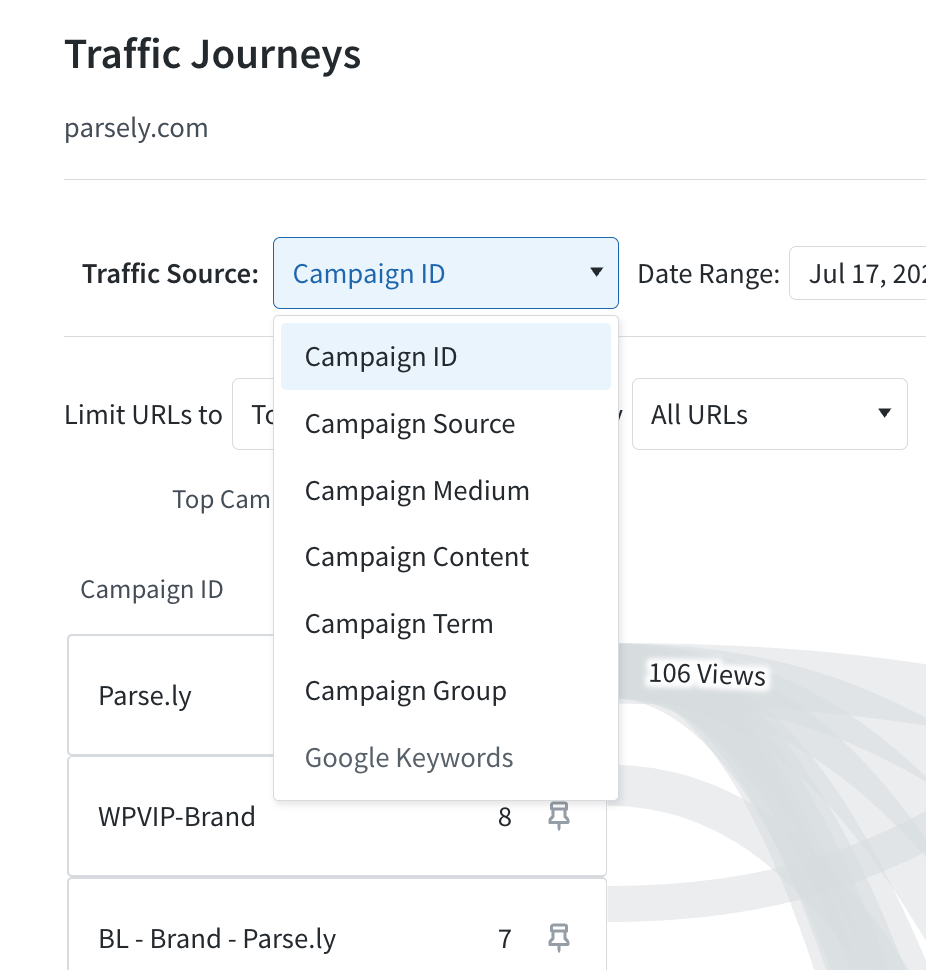
    The entry-point picker now supports the full range of campaign paramaters — Campaign ID, Source, Medium, Content, Term, and Campaign Group — alongside Google Search keywords. Instead of seeing arrivals through a single view, you can explore how any UTM parameter pulls readers into your content and on to conversion. Curious how your email medium stacks up against a paid source, or which content variations bring in the most engaged visitors? It’s now a single click.

    Image

    Every parameter reconciles with your existing Campaigns reporting, so the numbers in Journeys match the ones you already trust. Parse.ly has also refined the Google Keywords experience, making it clear when Search Console data is available for your selected date range.

    Learn more about Journeys.

  • Product update: Improving Google Search and Discover historical attribution

    What’s happening

    Parse.ly is continually working to improve the accuracy of Google Search and Google Discover reporting. As part of that effort, Parse.ly is calibrating Search and Discover attribution against Google Search Console (GSC), the authoritative source for Google click data. This update is rolling out over the next several weeks for customers who have enabled GSC, beginning in July 2026.

    Once the update reaches your account, Parse.ly will apply each day’s GSC data in the next data rebuild. The rebuild adjusts the split between Google Search and Google Discover to match GSC’s reported data for each article.

    The calibration will affect data back to October 15, 2025, when Parse.ly first began distinguishing between Google Search and Discover referrals. So, past reporting will reflect the improved attribution.

    What you’ll see

    When the update reaches your account, Google Search and Discover page view numbers in the Dashboard will update. The updates will apply from October 15, 2025 to four days ago. At the article level, the split between Search and Discover will align more closely with GSC’s reporting.

    Total page views do not change. This update only adjusts the attribution split between Google Search and Google Discover; no traffic is added or removed.

    Because GSC data arrives with a delay, the three most recent days will continue to show Parse.ly’s real-time attribution. Parse.ly continues to refine its real-time attribution as part of a separate effort.

    Why it matters

    GSC is the canonical source to differentiate Google Search and Google Discover traffic. This change will align each article’s Search and Discover attribution with GSC, so editorial and audience teams can evaluate historical Discover performance with confidence without needing to rectify these tools. Site-level totals may still differ from GSC aggregates, since Parse.ly measures page views and GSC measures clicks; see Understanding Google Discover data for details.

  • iOS 26 update increases direct traffic

    Apple’s iOS 26 update introduces privacy enhancements that are affecting referrer data across the web. If you’ve noticed an increase in direct traffic in your Parse.ly dashboard recently, this update is likely the cause.

    What’s happening

    Safari in iOS 26 includes expanded privacy protections that limit referrer information sent to websites. According to WebKit’s documentation, Safari’s Advanced Fingerprinting Protection now “prevents known fingerprinting scripts from reading state that could be used for navigational tracking, such as query parameters and document.referrer.”

    In practice, this means a significant portion of traffic from iOS 26 devices arrives without referrer data and is therefore categorized as “Direct” in analytics platforms, including Parse.ly.

    What we’re seeing

    Across the Parse.ly network, we’ve observed a notable increase in sessions without referrer data from iOS 26 devices. Previous iOS versions typically showed around 20% of sessions without a referrer. With iOS 26, that average percentage has increased substantially to around 65%.

    iOS 26.2, which began rolling out to developers on December 8 and saw full public release on December 12.

    What this means for your data

    An increase in direct traffic doesn’t mean your audience behavior has fundamentally changed. Your readers are still arriving from social media, search, email newsletters, and other referral sources—Safari is simply no longer passing that information along in many cases.

    This change primarily affects:

    • Visitors using Safari on iOS 26 or later
    • Visitors using Safari on macOS Tahoe
    • Campaign tracking parameters (such as UTM parameters) in some scenarios

    What you can do

    • Watch for trends: Compare your referrer breakdown before and after iOS 26 adoption increases to understand the impact on your specific audience.
    • Consider your mobile audience: Sites with higher iOS and Safari usage will likely see more pronounced effects.

    This is part of a broader industry shift toward privacy-first browsing. Unfortunately, there’s no technical workaround for these browser-level changes. Parse.ly will continue to report referrer data accurately when it’s available, while respecting the privacy choices users and browsers make.

    If you have questions about changes in your traffic data, reach out to us at support@parsely.com.

  • Introducing Journeys: Understand How Audiences Arrive, Engage, and Convert

    We’re excited to introduce Journeys, a new Parse.ly feature that connects acquisition, content, and conversion data in a single view. With Journeys, teams can finally see how readers discover your site, which content captures their attention, and what leads them to convert.

    Journeys brings together data from Campaigns, Google Search Console, and Conversions, and uses an interactive Sankey diagram to map the pathways visitors take through your site, making it easier than ever to understand which channels and content truly drive business results.

    Learn more about Journeys.

    Improvements & Bug Fixes

    • If you have access to multiple dashboards, it’s now possible to set one as your default. See how to set this up in the account settings documentation.
    • Listing tabs, referrer categories, and the information panel will now be preserved when changing the timeline view (e.g. switching from daily to weekly or selecting a new date range).
    • New referrer categories (AI, Aggregator) will now appear in Stats Over Time exports.
    • Fixed an issue where Parse.ly Sage was not displaying the correct user query history.
    • The “hours left” metric in Goal tracking now reflects your site’s timezone for more accurate progress updates.
    • Resolved an issue that made it difficult to use the author and tag filters on shared links.
  • Product update: Exports to include new referrer categories

    Parse.ly will expand data exports to include the Aggregators and AI referrer categories introduced in the Referrer Dashboard refresh. This update will ensure consistent, complete data across your exports and dashboard views.

    The new columns will appear in the Stats Over Time reports run beginning 15:00 UTC on Tuesday, Nov. 18, 2025. The new columns will be reflected in all other reports (including Top Performers exports) beginning Wednesday, Aug. 5, 2026.


    What’s new

    • New referrer categories in exports
      Exported data now includes Aggregator and AI referrer categories, matching what appears in the dashboard.
    • Improved data consistency
      The referrer categories in CSV and API exports now align with the categories shown in your Referrers tabs and reports.
    • Note to users importing Stats Over Time CSV files
      The Aggregators and AI columns will be added to the CSV exports, following the Social refs column. If you are relying on a specific column order for data imports, note the changes that will occur with this update.
    Image
    Before
    Image
    After
  • New feature release: Configure headline testing in the Parse.ly WordPress plugin

    We’re excited to announce that you can now inject and configure the required JavaScript snippet for Parse.ly Headline Testing directly from your WordPress Admin area. This update to the Parse.ly Plugin helps your team set up and manage headline testing without manually injecting scripts.

    This functionality is available beginning with version 3.21.0 of the plugin.

    Why it matters

    Until now, setting up Parse.ly Headline Testing required manually inserting JavaScript snippets. This new update removes that friction—helping teams experiment faster, learn what resonates with readers, and continuously improve engagement with less setup time.

    Whether your site publishes breaking news or evergreen content, Headline Testing helps your editors make data-driven decisions that boost performance.

    What’s included

    • Headline Testing Configuration: Enable or disable Parse.ly Headline Testing directly in your WordPress Admin.
    • One-line Script Injection: Automatically adds the Parse.ly Headline Testing script (https://experiments.parsely.com/vip-experiments.js)—no manual code required.
    • Advanced Installation Option: Inline headline testing logic for developers who need deeper control.
    • Flicker Control: Reduce visual flicker when swapping headlines (available with Advanced Installation).
    • Live Updates: Automatically refresh headline variations on infinite-scroll or dynamically loaded pages.
    • Granular Settings: Adjust Live Update Timeout and control behavior after page load.

    For now, experiments themselves still need to be created and managed directly from the Parse.ly Dashboard. We’re actively exploring ways to bring full experiment management directly into WordPress in a future update.

    Get started

    To configure Headline Testing:

    1. In your WordPress Admin sidebar, go to Parse.ly → Settings.
    2. Select the Headline Testing tab.
    3. Choose your preferred installation method and configuration options.
    4. Click Save Changes

    For best results, use the One-line Snippet method unless your site uses custom caching or rendering logic. Visit your homepage’s source code to confirm the headline testing script is injected correctly.

    For detailed documentation, see the Parse.ly Plugin Headline Testing Documentation.

  • Referrer page refresh and real-time Google Discover

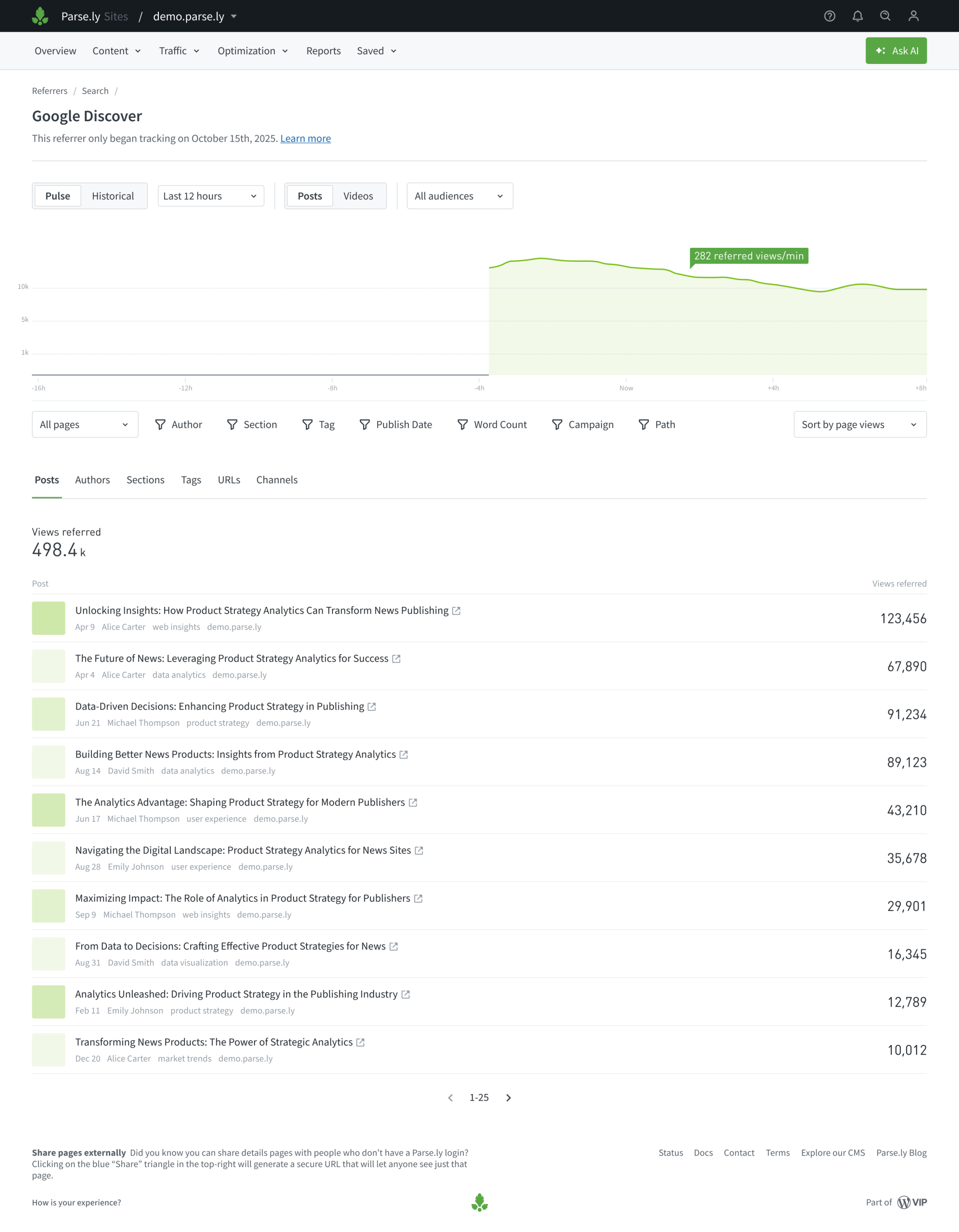
    Parse.ly has released important improvements to referral traffic, especially from Google. These updates will make it easier to distinguish between Google Search and Google Discover, track emerging referral patterns and react quickly to traffic spikes.

    What’s new

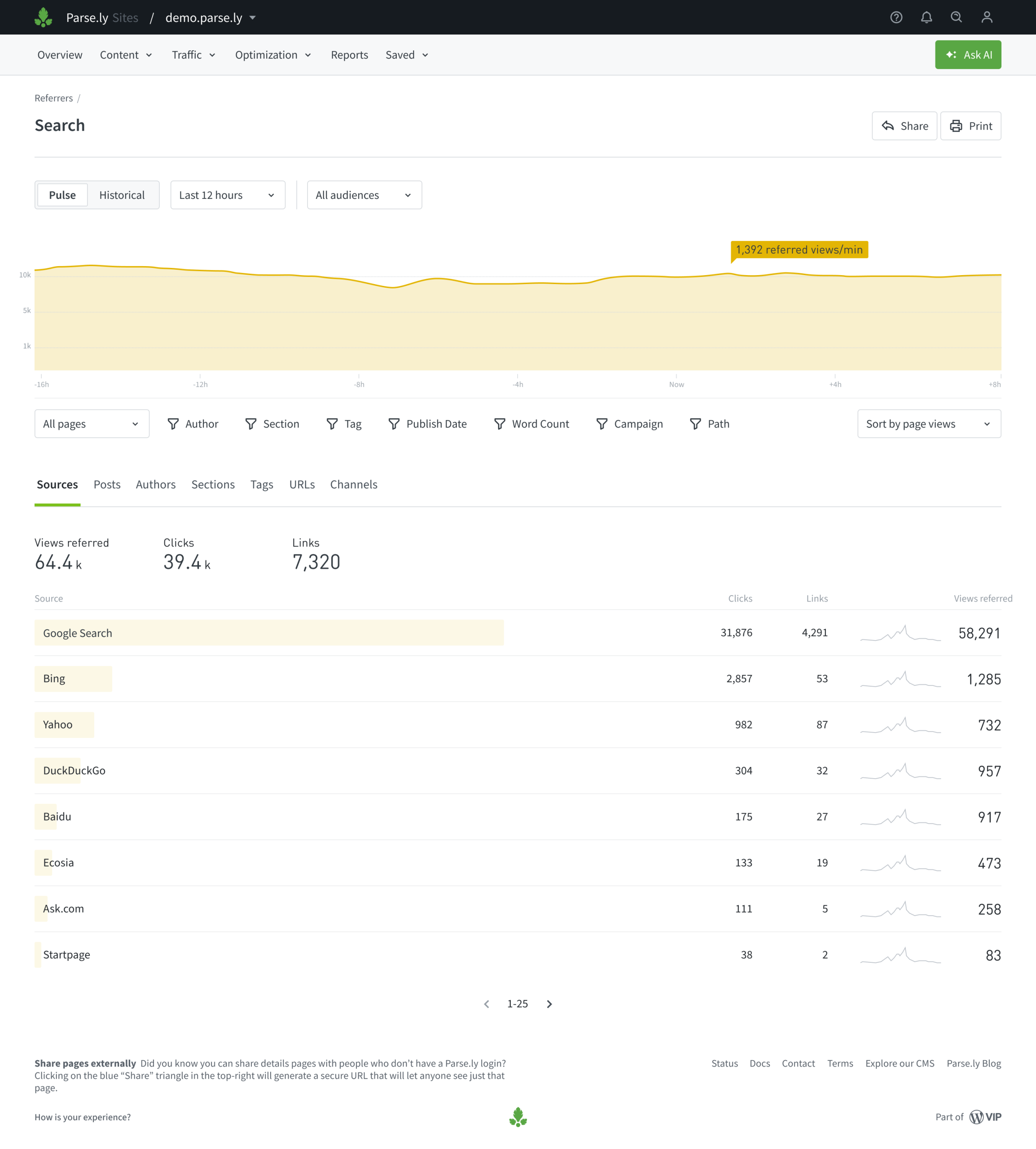
    • The Referrers page (located within the Traffic menu) will split real-time Google traffic into two sources: Google Search and Google Discover.
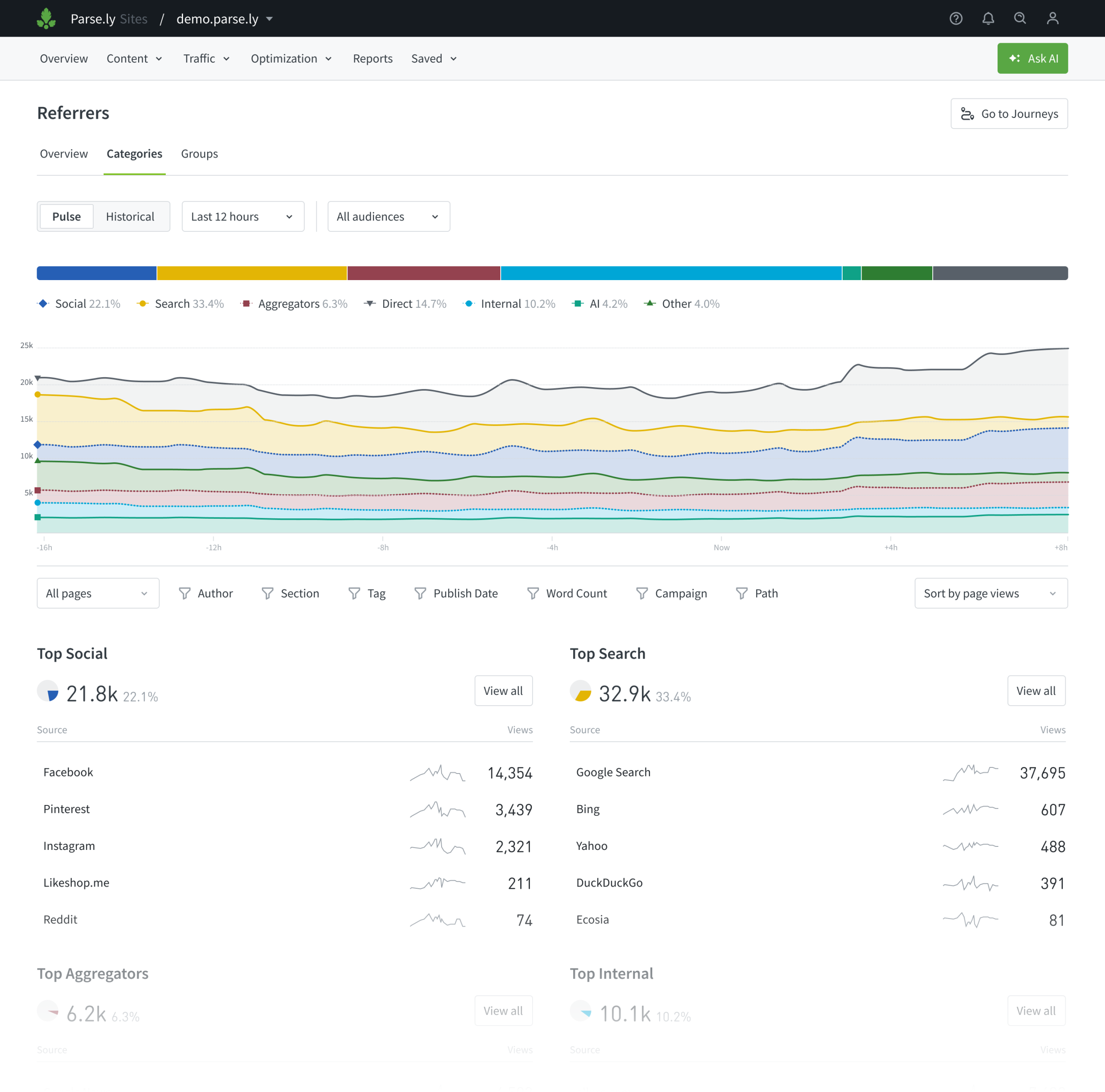
    • The Referrers page will include tabs for overview, categories and groups to better organize traffic insights.
    • The Referrer Groups tab will include two new groups that preserve historical consistency with previous tracking:
      • Google (Discover & Search): combines Google Search and Google Discover, maintaining the same aggregate view of Google traffic used before this update.
      • Legacy Search Referrers: Contains all sources that were included in the Search referrer category prior to October 15, 2025.
    • The Referrers page will include new referrer categories for Aggregators and AI referrals.
    • The Referrers categories tab will include a new stacked chart to showcase referrer category trends over time.

    Why this matters

    • You will be able to take advantage of trending stories and spikes from Google Discover as they happen.
    • You will have a clearer view of shifting traffic patterns over time.
  • Product update: October 3, 2025

    Overlay improvements

    Parse.ly has released important updates to the Overlay that include:

    • New color scale: The Overlay now uses a refreshed color scale, moving from purple to light green. Purple represents the lowest performance values, while light green represents the highest, making it easier to interpret differences at a glance.
    • More accurate metric labels: The metric label now uses “percentage points (pp)” to reflect absolute change, rather than suggesting relative change. For example, an increase from 2% to 10% click-through rate will display as +8pp.
    • Flexible comparison ranges: Previously, comparisons were fixed to 10 minutes vs. a six-day average. You can now select your own windows, such as two hours vs. five days, and compare against the same period in the past. Past-period comparisons can range from one day to one month, making it easier to evaluate performance in different publishing cycles. A new five-minute data view also allows teams to monitor changes as they happen.
    • Badge size metric: For teams using Overlay in fullscreen mode, a new option lets you enlarge metrics for easier viewing.

    These updates are a direct response to customer requests. Please keep the feedback coming as the team continues working on a complete overhaul to the Overlay experience. Stay tuned.

    Image

    Improvements & Bug Fixes

    • The issue where Path filters were not being applied in Goals has been resolved.
    • The save button in Goal creation is now disabled when ‘0’ is entered as the goal number, preventing the creation of unnecessary goals.
    • Switching between Pulse and Historical views should now behave correctly, and the graph will no longer block you from changing the date range on some listing pages.

Last updated: November 12, 2025