

Table of Content
The PHP “while” loop is a simple tool that repeatedly runs a block of code as long as a certain condition remains true. It’s like saying, “Keep doing this task until a specific situation changes.”.
However, this loop is especially handy when we don’t know beforehand how many times we’ll need to repeat the action.
Let’s move into the section below to understand the tasks of the while loop and its syntax in PHP.
PHP While Loop Syntax
The while loop is a control structure that allows you to execute blocks of code until the condition is evaluated as true.
Additionally, it is very useful for tasks such as reading lines from a file until the end is reached or waiting for an event to occur while continually checking for its occurrence.
Here is the syntax of the while loop:
while (expression) {
   // Here is the block of code
}
It has two parts, which are:
- Condition: This is the Boolean part evaluated before each iteration of the loop.
- Code Block: It is the curly braces {} part that contains the repeated block of code.
Anyway, let’s see how the while loop works in PHP.
How the While Loop Works in PHP?
Check the following figure you will see the full task for the PHP while loop.
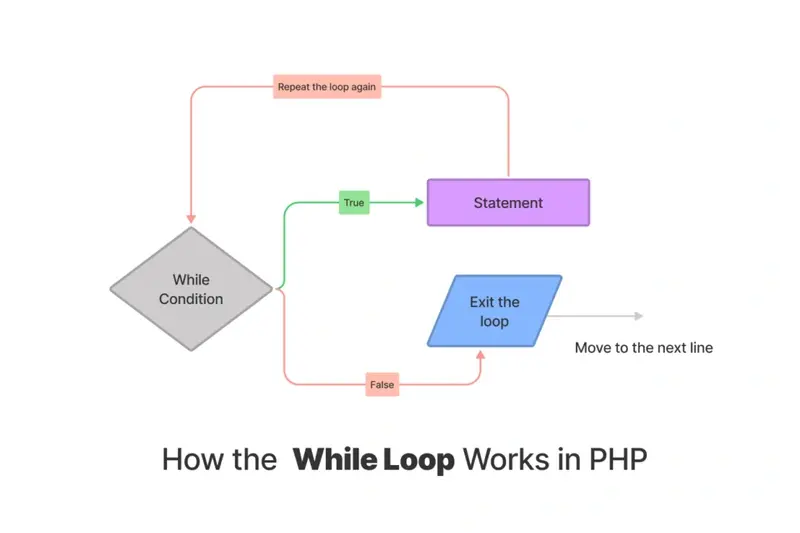
As you understood, the while is doing a loop until it reaches “false” to exit the loop, so if it is true, it will execute the statement part.
For example:
$i = 0;
  While( $i < 10 ) {
    echo " $i <br />";

    $i++;
  }
The output would be like this 0 1 2 3 4 5 6 7 8 9
So if the condition is returning true when the $i is smaller than 10 so it will do another loop.
Each time it will do the same task, once it reaches the 10 result then it will exit the loop.
In the next section, I will focus on the one statement syntax for PHP while loop. Let’s move forward.
PHP While Infinite Loop
To execute only one line inside the while loop you have to use the following pattern in your PHP code.
while( true )
   … statement
This pattern only executes the first line after the condition brace. In this syntax there are no curly braces.
For example.
while( true )
    echo "CodedTag.com ";
Anyway, in the following section, you will understand the embedded while loop section. Let’s get started.
Embedded PHP While Loop with HTML Markups
The embedded while loop can be worked with any code else such as JavaScript or HTML markup language.
The main pattern for this syntax can be like the following one.
<?php  while( true ): ?>
    // .. JavaScript, PHP, HTML, OR whatever here ..
<?php endwhile; ?>
So, it executes the statement pattern according to the condition. For example.
<?php
  $i = 0;
  while( $i < 5 ):
?>
<h1>Welcome to CodedTag Tutorials.. </h1>
<?php endwhile; ?>
That’s all, in the following section I will move to the nested while loop.
Usage of Nested While Loop
The nested while loop means that you can use while loop inside another while loop. Let’s see an example;
// This example will print the multiplication table.
$basic = 1;
while($basic <= 12 ) {
   $factor = 1;
   while( $factor <= 12 ) {
     echo $basic . " x " . $factor . " = " . ($basic * $factor); // z x y = xyz
     echo "<br />";
     $factor++;
   }


   $basic++;

}
Let’s summarize it.
Wrapping Up
In this tutorial, you learned about while loop and you saw many examples for it such as: Nested while loop, one statement while loop, infinite while loop with no curly braces example. Let’s summarize them in a few points.
- Nested While Loop is a while loop inside another while loop.
- One Statement While Loop showing a one single code, so there is no curly braces.
- Infinite While Loop: this indefinitely runs, typically by using a condition that always evaluates to true (
while (true)).
Thank you for reading. Happy Coding!
Similar Reads
Constants in PHP store fixed values that don’t change during execution. We will cover the following topics in this article:…
A PHP script can break the page or allow code injection if it outputs user input directly into HTML. The…
PHP array_flip swaps keys with values. It works well when you need values as keys in fast lookups. What is…
The mb_strtolower() function in PHP turns every letter in a string into lowercase. It works with multibyte encodings like UTF-8.…
PHP variable function is a variable that is used to assign a function name with parentheses (). However, the PHP interpreter…
PHP’s if-elseif statement is a fundamental construct that allows developers to control the flow of their code based on different conditions. In…
Deleting records in MongoDB is a common task. You might need to clear old data, remove outdated entries, or handle…
PHP didn’t have a way to check or clean user input. Developers used scattered code—some wrote custom checks, others used…
You can use your Raspberry Pi as a personal web server or tool that runs in your home. You do…
PHP introduced traits to solve a problem with code reuse. Before traits, developers used inheritance and interfaces to share functionality…
