Skip to content

Tuesday, 11 August 2026

Hi everyone! This week we added voice chat for Mankala.

For Mankala, our goal was to elevate the player experience by adding real-time voice chat. We have already added text chat using XMPP, and to make this experience better, voice chat is a much better option to add.

Mankala relies on the XMPP protocol for matchmaking and text chat using the opponent and player XMPP IDs, respectively. I took KDE’s own chat application in reference: Kaidan, to implement Jingle (XEP-0167)—the XMPP extension for media sessions and connect it using an audio processing pipeline. After that, I designed the UI for this voice call to connect, accept, and decline calls with sync in UI and XMPP.

How voice is being implemented

I used the QXmpp library to handle the Jingle signaling and designed a C++ class, VoiceCallManager, which controls all the call sessions. This manager listens for incoming Jingle requests and establishes the peer-to-peer connection.

// VoiceCallManager.cpp
void VoiceCallManager::initializeManager() {
    auto* callManager = m_client->findExtension<QXmppCallManager>();
    
    // Listen for incoming XMPP Jingle calls
    connect(callManager, &QXmppCallManager::callReceived, 
            this, [this](QXmppCall* call) {
                
        m_activeCall = call;
        m_remoteJid = call->jid();
        m_isCallActive = true;
        
        // Notify the QML frontend that a call has started
        emit callStateChanged();
        emit remoteInfoChanged();
        
        // Accept the call and set up QtMultimedia audio routing
        call->accept();
        setupAudioPipeline();
    });
}

Challenges faced

It was hard to have Game Window and Jingle work together. To handle this, I exposed the call state—such as isCallActive and remoteJid so that the UI can connect these signals easily, making the call interactive in the layout.

Here is how the QML dynamically reacts to the C++ properties:

// GameWindowLandscape.qml
ColumnLayout {
    anchors. fill: parent

    // 1. The Standard Text Chat UI
    Item {
        id: textChatView
        Layout.fillWidth: true
        Layout.fillHeight: true
        // Hide text chat when a voice call is active!
        visible: !voiceManager.isCallActive 
        
        /* ... text chat UI components ... */
    }

    // 2. The Active Voice Call UI
    ColumnLayout {
        id: activeCallView
        Layout.fillWidth: true
        Layout.fillHeight: true
        visible: voiceManager.isCallActive
        
        Kirigami.Icon {
            source: "im-jabber" 
            width: 96; height: 96
        }

        Text {
            text: voiceManager.remoteName
            font.pixelSize: 24
            font. bold: true
        }
        
        Button {
            text: "End Call"
            icon.name: "call-stop"
            onClicked: voiceManager.endCall()
        }
    }
}

By binding QML components to the VoiceCallManager signals, the UI updates instantly based on the state of the call. After this we have successfully implemented voice and text chat for Mankala.

Thanks for reading :)

Monday, 10 August 2026

I participated in the KEcoLab sprint held from May 27th to May 28th at the KDAB office in Berlin. It was my first time being at a KEcoLab sprint, I have mostly been an online participant before this so it was nice to meetup with both Karan and Joseph and work together in person. I also got to meet Carl Schwan and Volker Kraus.

Day 0

I arrived a day early by an overnight train around 7 am. I couldn’t check in to the hostel before 3pm so decided to explore the city instead.

I explored the area around Alexandrplatz and got some nice photos, more of that will be covered in my next blog about Berlin.

I met up with Karan and was able to check in a bit early. We had Vietnamese Pho for lunch.

Later at evening me and Karan met with Joseph and he showed us around. We visited Tempelhofer Feld and Joseph also treated us to a nice Turkish dinner.

Day 1

We met at the KDAB office at 10am to start the sprint. We started the day by fixing the RDP connection. Recently we have been unable to maintain a reliable RDP connection with the remote lab, we required someone to be present in the lab to help us establish access. We restarted the SUT (System Under Test) and tried to establish a connection again when we found out we were prompted by a dialog box to allow remote connection. This isn’t an ideal situation for remote lab because this permission is reset on reboot. We found that the solution to the exact issue we were facing was already solved by Harald Sitter through this patch to XDG desktop portal. We ran the commands in the patch and tested it few more times to confirm it was working reliably.

Next we started working on setting up the 2nd SUT which was generously donated by Cornelius to KDE.

Unfortunately the PC refused to post. As soon as it was turned on it would produce 6 loud beeps. The pc we had access to was a Fujisu Esprimo p510 85+ with 4gb of ram and an Intel core i5 using AMI Aptio 4.6 Bios.

We tried to debug the issues by removing the ram sticks one after another but the beep was still audible and the frequency remained constant. We tried multiple different cables as well to rule out a faulty display cable. Point to note, the CPU fan during this time would be at full throttle and the usb ports were also not getting powered on.

We also tried replacement ram sticks that folks at KDAB had but it didnt solve the issue. Replacing the CMOS battery also didn’t help.

As last ditch effort, we removed the CPU fan and tried to boot the system(the system was immediately switched off once the beeps started so roughly 2s uptime) to see if the beeps would still be persistent but it was still present although we did find the reason why the fan was running at full throttle, the thermal paste was completely dry.

Going by the manufacturer’s documentation, 6 beeps presents itself as “Flash update is failed”, searching online didn’t give us a viable solution and since the usb ports were not working reflashing the bios was also out of question.

We ended the day by shifting our focus towards generating a new Okular Measurement Report for the Blue Angel Certification. We were also interested in seeing how much energy consumption would have changed since the first report. Our Season of KDE 26 mentee Hrishikesh Gohain had worked towards this. There were few changes we needed to make to run the pipeline successfully. We tested them locally first on our laptops and once it passed successfully, we ran the script overnight and that was our last task of Day 1. Following was the pipeline that was run.

At the end of the day, we visited c-base, berlin. It was a nice experience and we were also lucky to visit the members only spaces and got a whole tour of the place by one of the members. Aferwards we all went to a nice Azerbaijanish place.

Later me and Karan spent the rest of the night exploring Berlin on a lime scooter. Suffice to say, Berlin at night is quite a beaut!

Day 2

We started the day by checking the report generated by the pipeline we ran last day. We had unfortunately run into the following error.

Error in performanceData$HDDRead + performanceData$HDDWritten : non-numeric argument to binary operator

We then looked into running the setup locally on our laptops to debug the issue. We found out that when stopping the pipeline before completion, it results in the intermediate data being overwritten instead of the files being deleted on a fresh run which was resulted in data corruption and hence the error. We fixed that with 64, 18 and 16 patches and ran the pipeline again.

Next we focused on brainstorming ideas about the workflow to measure the Plasma Desktop Environment. We were initially thinking about using the second PC for measuring it due to security reasons but since we were not able to set up the 2nd server we had to shift our plans. We also got some nice inputs regarding this from Volker. Following points were discussed

  1. No root access to user files for test user.
  2. In a standard usage scenario, PC would run for approx. 8 hours -> this was used to determine the baseline, standard usage scenario and idle modes for the plasma testing.
  3. Testing different snapshots of Plasma against regressions in new releases -> maybe even KDE Linux can be a good candidate.
  4. How to run the daemon from the pipeline without root permissions.
  5. Password stored as gitlab secret and given permission to owners (or maybe don’t require a password).
  6. Longer term, switch to a newer set of hardware.
  7. Testing plasma on older hardware and modern hardware -> for ex. video playback.
  8. Cleanup of the existing hardware -> for ex. monitor is not needed.

Afterwards we reviewed the open issues, submitting patches for the active bugs and closed those that had already been resolved.

We then went through the report generated by the pipeline and unfortunately found out that the readings were too inaccurate and had way to much divergence in measurement values as compared to the initial report generated for Blue Angel certification. (We are allowed at max 10% increase for Blue Angel Certification).

We found out that there were several startAction and stopAction pairs missing from the script which was causing irregular measurement readings. These actions are used to generate the csv files and the R script is particularly sensitive to these labels which explains why the readings were so wildly inaccurate. So we ran the script again and checked it afterwards the sprint. There were some issues encountered later on but they were resolved by Joseph and we got a new report for the Blue Angel Certification.

We were also joined by Koleesch who traveled from Postdam for the evening session of the KEcoLab sprint.

While we still had the following day to explore Berlin, it was our last nigth in the city. Karan and I spent it with Carl Schwan at Tempelhofer Feld before taking one final late night walk through the streets.

Day n/n and Final Thoughts

I had a late night train back to Marburg so me and Karan first spent the day exploring the German Musuem of Technology, it was so big and had so many artifacts describing the history of Berlin and Germany throughout the years. We were’nt able to visit the entire musuem since Karan had an early flight back to Geneva but we were able to go through the Railway and Aviation section. Regardless to say I was mesmerized. Later on I also visited Berliner Mauer and the area surrounding it.

I enjoyed my time in Berlin and huge thanks to KDE e.V for making it possible by sponsoring my travel and stay, and to KDAB and Volker for providing the office space for our sprint.

The Skrooge Team announces the release 26.8.0 version of its popular Personal Finances Manager based on KDE Frameworks.

Changelog

  • Correction bug 518796: skrooge-boursorama.py stop to work for some values
  • Correction bug 520749: Skrooge can't load skg file after org.kde.Platform update
  • Correction: Sources' keys not displayed in settings
  • Feature: Keep focus on selection when the current filter is changed
  • Feature: New option to choose to currency format (currency or numerical)
  • Feature: Better management of deprecated source of download of currencies

We need your feedback

AI support is now available in Skrooge, and this first version is just the start. I’d love to hear about your experience: what works well, what could be better, and any use cases you want to see. Please send your feedback by email.

Sunday, 9 August 2026

KStars v3.8.4 is released on 2026.08.09 for Windows, Linux, and MacOS.

For Linux users, it's highly recommended to use the official KStars Flatpak hosted at Flathub.

This release brings major improvements including the World's First AI powered Guider! Furthermore, KStars now ships with an MCP server which enables connection to any LLM for full control. In this release a limited subset of skills have been introduced, and we hope to make the MCP server feature complete by the next release. Additionally, we improved rotator calibration, guide camera streaming support, and scheduler performance with large job lists. We've also fixed dozens of stability issues and added comprehensive tilt correction for mosaic masks. Here are some highlights.

AI Guiding Assistant

Pavan Kumar is our brilliant Google Summer of Code student who spent the summer developing an AI assisted guider. He delivered the AI Guiding Assistant for Ekos, a mount specific predictive guiding architecture that trains custom models for worm gear, harmonic drive, and direct drive mounts. The wizard walks you through system identification protocols, exports training data, and loads trained models for feed forward correction.

Image

The assistant adds a feed forward predictive layer on top of Ekos's existing proportional guiding controller. A one time characterization wizard runs a system identification pass on your mount, and the resulting data trains a small model specific to your mount class (worm gear, harmonic drive, or direct drive). During guiding, a confidence gated controller blends the AI's predicted corrections with the classic proportional fallback, so the system defers to the proven controller whenever its own confidence is low. It runs entirely on device with no cloud dependency and no GPU requirement, does not need retraining every session, and deliberately does not attempt to predict stochastic noise sources like atmospheric seeing.

  • AI Guide protocol separated from the wizard UI for better modularity
  • Fixed filter models and reworked the system identification protocol and trainer
  • Wizard navigation fixed when closing and reopening; export now only includes the latest session logs
  • Added button to read offline training instructions directly from the wizard
  • Oscillator improvements for better stability during training
  • Fixed the fingerprint builder to correctly validate model compatibility across sessions

The AI Assisted Guider is still in experimental stage. Help us by sharing your feedback and exporting logs to us to analyze.

Guide

Andreas R. landed a run of guiding fixes this release:

  • Fixed streaming guide mode calibration failures on fast and harmonic mounts. The pulse guard is no longer armed during calibration, preventing "Lost track of the guide star" aborts that starved the AI Guider's system identification run
  • Fixed dark guiding (GPG and AI feed forward) in streaming mode by distinguishing between frame prediction pulses from real correction pulses, so the measurement loop no longer starves at the 0.5 s dark interval
  • Fixed the AI feed forward block reading declination from FITS headers. OBJCTDEC is a sexagesimal string, but the code was calling toDouble(), so declination silently stayed 0.0 on every frame. Now reads altitude, declination, and pier side directly from the mount object instead of headers
  • Added per optical train persistence for Predictive Guiding (GPG) period length, so users switching between worm gear and harmonic drive mounts on the same machine no longer clobber each other's tuned period values
  • Fixed the GPG circular buffer losing insertion order after 8192 samples. The read offset (start) was never advanced when the buffer filled, corrupting the chronological sequence and breaking the Gaussian Process training after roughly 68 to 82 minutes of continuous guiding at short exposures
  • Fixed guide camera binning not restored from optical train settings on Ekos startup with real hardware. The combo box was empty when setAllSettings() ran, so the saved binning was silently dropped. Also fixed a false "not supported" detection that compared against the driver's current binning instead of its maximum
  • Added an "Assume DEC orthogonal to RA" calibration option, which bypasses independent DEC angle measurement when periodic error or backlash causes erratic DEC calibration datapoints, deriving the guide angle solely from the RA axis with DEC forced to a 90 degree offset

Rotator

  • Fixed rotator auto reverse detection and added direction parity correction. The wrong direction detector never fired because the PA error tracker was unconditionally cleared before the confirming solve could check it. Now detects reversed rotation, trials the parity flag, recalibrates the offset immediately, and persists the correction only once a retry confirms it worked
  • Renamed internal flag to m_RotatorParityRetried to avoid confusion with the rotator's own driver level reverse functionality
  • Exposed the learned parity as a "Rotator direction reversed" checkbox in Align settings (below Flip Policy), so it can also be set manually without touching the driver's ROTATOR_REVERSE switch
  • Clear previousPAError when rotator times out or fails, preventing false positive auto reverse triggers
  • Fixed false positive rotator wrong direction detection by resetting m_PreviousPAError at key state transitions (successful rotation, mount slew, PA error decrease)
  • Rotator motion commands are now only sent when necessary, reducing unnecessary chatter

Camera & Capture

  • Added simple option for camera warmup instead of requiring users to create a task action for it, so camera sensors can now pre warm before a session starts
  • Andreas R. fixed the filter combo not reflecting the selected job in the Sequence Editor. In standalone mode, filter name lookup always returned -1 because filterLabels() returned an empty list without an INDI connection. Now resolves by name against the combo box contents
  • Auto default remote directory based on frame type in the capture module: %h/Videos for Video frame type, %h/Pictures otherwise, whenever the field is empty or still holds a previously auto generated %h path
  • Fixed an issue where video frame type selections didn't properly disable preview and loop, and set remote directory to a sane value so INDI can successfully write the video file

Scheduler & Observatory Automation

Andreas R. contributed two fixes here:

  • Added a wall clock timeout to the guiding stage (reusing the existing CaptureOperationsTimeout setting, default 300s) to prevent infinite retry loops when PHD2 fails to find a guide star, preventing wasted nights on a single target
  • Cached .esq file content to eliminate O(N) disk I/O per evaluation cycle. With 80 jobs on a Raspberry Pi, the greedy scheduler was spending 9 to 10 minutes of pure overhead re reading and parsing XML files from the SD card per cycle. The cache is keyed by file path and modification time; XML is still re parsed per call but disk I/O is eliminated

Hy Murveit sped up loading large .esl files by not repeatedly calling currentPositionChanged. A 100 job file now loads in a second or two instead of 40 seconds.

Wolfgang Reissenberger made two scheduler improvements:

  • Replaced stderr output with debug log output in the scheduler for cleaner diagnostics
  • Changed doubled sequence validation to only emit a warning instead of blocking, allowing setups with multiple cameras to use the same sequence on different targets

Alignment & Mount Modeler

Christian Kemper fixed two solver related issues:

  • Fixed solver algorithm selection based on available hints, so constrained plate solves now run faster than blind solves on multi core machines. The patchMultiAlgorithm() logic now selects MULTI_DEPTHS when a position hint is present and the scale window is narrow enough, MULTI_SCALES otherwise. The 1 Default align profile is now created with sensible bounds so fresh installs benefit immediately
  • Fixed scale bounds being double widened. Align::startSolving() and PolarAlignmentAssistant::startSolver() were applying their own 0.8x/1.2x margin on top of the same widening in SolverUtils::prepareSolver(), producing a net [low × 0.64, high × 1.44] window instead of the intended [low × 0.8, high × 1.2]
  • Fixed several Sentry and user reported crashes on camera timeout and restart drivers; Focus, Align, and Capture now have consistent timeout behavior
  • Salman Naheed added mount model commands for programmatic access
  • Andreas R. fixed filter not being reset to Sequence Job filter post meridian flip if the filter was different in Align
  • Process JSON alignment data from INDI mounts for improved integration
  • When running plate solving manually, reset target position angle and previous PA error, since otherwise they remain forever until successful or another load and slew is called

FITS Viewer & File Handling

  • Fixed unwarranted 180 degree rotation when pier side differs from the FITS file used for Load and Slew
  • Andreas R. fixed the Statistics panel showing full image stats when ROI is active. When a new image loaded while the selection rectangle was active, the panel reverted to full image statistics and users had to "jiggle" the box to refresh. Now checks whether the selection rect is shown and recalculates the ROI buffer from the new image data automatically
  • Christian Kemper fixed a CFITSIO_LIBRARIES typo that was dropping cfitsio from the link line. The variable name was missing the trailing S, silently overwriting the library and causing undefined references at link time for targets that depend only on Qt::Core and cfitsio

Focus

  • Added Tilt Correction Advisory to the Aberration Inspector, which computes and displays suggested tilt plate adjustments after autofocus with a mosaic mask. Supports 3 point plates (ETA, Octopi, manual 3 screw) and 4 point plates (TouTek style corner screws). Includes a rear view diagram with color coded points, mode toggle (Relative or Push only), thread presets (M2.5 to M6, Wanderer ETA, Custom), camera rotation dial, and an "Apply to ETA" button that sends corrections directly to Wanderer ETA M54 via INDI
Image

Thomas Nemer fixed two focus related bugs:

  • Fixed Focus::autoFocusLinear and scanStartPos passing measure as weight. Two callsites passed getLastMeasure() into a weight slot instead of getLastWeight(), corrupting the V curve fit and the weights exposed via Focus Advisor
  • Fixed Focus::focusOut ignoring caller supplied step count. A duplicate assignment was unconditionally overwriting any explicit value, so focusOut(100) always moved by the UI default

MCP Server (Remote Control)

Thomas Nemer established the MCP server foundation, an in process MCP server inside Ekos that lets external clients drive KStars over JSON RPC 2.0 over HTTP, with bearer token auth and an optional read only token. It includes transport, tool registry, server orchestrator, settings UI, and comprehensive unit tests. His additional work this release includes:

  • MCP mount control tool family (12 tools: coords, goto, goto_target, sync, park/unpark, abort, set_tracking, set_track_mode, set_slew_rate, get_slew_rates, set_meridian_flip)
  • MCP catalog search tool, which resolves fuzzy or user supplied names ("M42", "andromeda", "polaris") into canonical KStars names for use with mount_goto_target
  • Focuser tool family (status, move_absolute, move_relative, abort_move) with a shared device lookup helper
  • Image access tool family (image_last_info, image_last_thumbnail) with per camera frame cache
  • "Available tools" panel in MCP settings, so operators can see which tools are exposed, what each does, and enable or disable individual tools or entire families via checkboxes
  • Unit tests isolated from the real token keychain, so the test suite no longer clobbers the developer's stored MCP credentials
  • Silenced Wmissing field initializers warnings in tool registrations

Stability & Bug Fixes

  • Ilia Belov fixed a crash when a stale EkosLive dialog response arrives after the dialog was dismissed. KSMessageBox is a reused singleton, and buttons of a dismissed dialog stayed as its children; a remote response sent after dismissal clicked a stale button and crashed KStars with SIGSEGV
  • Andreas R. fixed missing i18n and null check crashes in BuildFilterOffsets: button labels, tooltips, and status text were untranslatable, and several methods accessed m_BFOModel.item() without null checks
  • Fixed a crash when building offsets by using showDialog properly
  • Made Build Filter Offsets accessible programmatically and via EkosLive
  • Set proper unique object names for both Filter Manager and Build Filter Offsets
  • Fixed an issue where combo boxes in global config were not getting saved; only write the combo's index when it is populated and has a valid selection
  • Fixed -1 corrupting persisted combo settings before device connects. Several combos (guide/CCD binning) are only populated once a device connects, so currentIndex() returned -1 and overwrote the saved option
  • Suppress pulses from reaching the mount when disabled
  • Mark state as aborted if user explicitly cancels the dialog
  • Shut the profile down instead of indefinitely waiting when checkINDITimeout fires
  • Correctly wait for remote drivers and add contribution of all sequence files

Build & Infrastructure

  • Attempt to make Flatpak arm64 builds use only 4 cores to work around OOM errors
  • Limit Eigen to 4 CPU cores so it can build on the arm64 Flatpak CI runner
  • Do not build testing, demos, docs, or Fortran in Eigen
  • KStars now compiles with OpenCV 5
  • Scarlett Moore added cmake root path env for Snapcraft

Other Improvements

  • Extended filter offsets maximum range to 1 million per user request
  • Added a script to generate indidrivers.xml
  • Fixed wizard state transition when stopped
  • Offset is now updated after each solve, with more logging to diagnose future issues
  • Guilherme Marçal Silva updated the kstars.notifyrc file

Christian Kemper made three additional fixes:

  • Added KSPaths bundle Resources/kstars/ search on macOS, so data files are now found directly in the app bundle
  • Corrected DST rule for countries that abolished daylight saving in citydb
  • Normalized the country column in citydb to ISO 3166 1 alpha 2 codes
  • Replaced the binary citydb.sqlite with a source built TSV format; the database is now generated at build time

Saturday, 8 August 2026

About time… 🔗

Image
Nuno Pinheiro Image pinheiro 18:34 +00:00
RSS

Another missing Oxygen icon, this time KTimer.

The idea was simple enough… its a timer, lets make a digital watch. And having grown up in the 80's my brain obviously went directly to those old Casio watches we all had, wanted, lost, or somehow managed to keep alive for 20 years 😀

So I started with a very basic shape, mostly trying to get the proportions right, and from there it slowly became more and more of a actual object. The side buttons appeared, the LCD got some depth, the case became more angular, and I spent a frankly unreasonable amount of time trying to make the brushed steel look like brushed steel.

Then came the fun part… all the little useless details.

The light and alarm symbols, the not days of the week but rather running timers 😉 , the branding and of course the very prestigious "kool desktop environment 2026" written across the top. Absolutely essential information at 64 pixels 🙂

The last bit was adding the gear/play element so it reads as KTimer and not simply as the KASIO 😉 watch I apparently wanted when I was 12.

And thats pretty much how these things happen… start with a rectangle, add a few details, remove some, add way too many again, move things around for far too long and eventually decide its an icon.

A k Time well spent… probably. 😀

Progress on the icon side is coming along nicely.
BTW me and Filip are gona do a presentations together in aKdemy about Oxygen, if you are planing on attending (you should), you know were to find us 😉

3 respostas a “About time…”

  1. Avatar de Nathan

    I love it. Great work!

  2. Avatar de Mr. Sir
    Mr. Sir

    so detailed. youre like the michelangelo of skeuomorphism

    1. Avatar de nuno pinheiro

      Thanks, I really don’t care much about labels, my goal is more, are they fun and make you feal something? Do they describe the function? Do they look as smart as the app? Do they look like we care about the user experience???

Deixe um comentário

O seu endereço de email não será publicado. Campos obrigatórios marcados com *

A script element has been removed to ensure Planet works properly. Please find it in the original post.

KDE has a little utility called ksshaskpass that is invoked by SSH to prompt the user for credentials. It can then store them in KDE Wallet so you don’t have to type them again next time. The other day I had to set up an elaborate SSH configuration with jump hosts and what not and found that it actually couldn’t handle some of the prompts I encountered along the way.

“SSH Credentials” prompt asking for “user@localhost’s password”
A regular password prompt, nothing too fancy.

The way an “SSH ask pass” program works is relatively simple: You point the SSH_ASKPASS environment variable to it and whenever SSH needs credentials, it runs that program, passing the prompt (e.g. “user@host’s password:”) as command-line argument. The program brings up a dialog and/or reads the corresponding password from a database and prints it to stdout. SSH then uses it to authenticate.

Unfortunately, the prompt is just a string, we don’t get any metadata for it. The only additional information we might get is the SSH_ASKPASS_PROMPT variable set to “confirm” (bring up a confirmation dialog with no input field) or “none” (just show a dialog while it’s waiting for you to press a button on your FIDO dongle). Anything else is just an opaque string.

In order to provide a good user experience we want to know what kind of input it is expecting and what the context of it is: is it asking for a user name (show input) or a password (show bullets)? What is the user and host name so we can store it in KDE Wallet properly? Should we allow storing those credentials in the first place? Maybe it is asking us to confirm the authenticity of the host we’re trying to connect to, and so on.

Before touching any of the existing regular expressions, I split the relevant code into a separate library so I could write unit tests for it. This ensures that I don’t break one use case by fixing or adding another. It’s quite easy to accidentally write a regular expression that’s too greedy.

The first issue was the lack of support for the password prompt coming from PAM. Normally, SSH will ask for the password like “user@host’s password:” but a connection might instead require server-side authentication where the prompt is coming from the server directly, most likely from PAM, which then looks like “(user@host) Password:”. When I failed to reproduce the issue on my laptop running the latest git master build, I noticed that someone had recently added this specific use case. My tests actually uncovered a regression in this change (didn’t I just say it’s easy to mess up a regular expression?) which I fixed. That reinforced my decision to write some unit tests first. :-)

Next, I noticed a few minor differences between the SSH versions used in Kubuntu 24.04 and 26.04, things like a period here, a colon there, so I added them as well. It now also supports the prompts issued by ssh-keygen, such as “Enter passphrase (empty for no passphrase):”.

The biggest usability problem, however, was that when you chose to remember the password but you had a typo or it just changed in the meantime, you were effectively locked out. SSH would ask for the password and ksshaskpass dutifully replied with the wrong answer. The only way to get around this was to open KeepSecret (the successor to KWalletManager) and delete the corresponding entry. Yikes!

As I said before, there’s no metadata, we don’t know whether it’s a first time prompt or asking again after a failure. I therefore made ksshaskpass remember the last prompt string and PID of the parent (likely SSH) process. When the same process asked for the same thing again, we now consider it failed, and bring up the dialog. If you have a better idea or I might have missed something, please tell me! It now also lets you remove stored credentials by unchecking the “Remember” check box. It also no longer shows that checkbox when we failed to identify the prompt string – the checkbox never worked in this case, so it was pointless to show it.

“SSH Credentials” prompt asking for “Username for https://invent.kde.org”, the user name “konqi.konqueror” is filled in, “Remember” check box is unchecked
Type a user name and actually see it!

I then went through Bugzilla and was able to resolve a good chunk of the reports in there. The most high profile one was the fact that it used a password dialog when asking for a user name, i.e. the user name was not shown. The reason it used that dialog is to offer the “Remember” checkbox. However, hiding a user name is not very nice, is it? The common password dialog we use isn’t really designed to ask just for a user name without a password, so I instead implemented a custom dialog mimicking the look of the regular dialog.

As often, it’s the little things, so I hope you will enjoy a better SSH experience in Plasma very soon. A few of the bug fixes I mentioned above have already been released as part of Plasma 6.7 with the larger changes expected to land in Plasma 6.8.

This is a weekly update from my Google Summer of Code 2026 project with KDE, improving effect widgets in Kdenlive, a free and open source video editor. Combining two weeks here since the last post covered a lot of ground already.

From research to implementation

Following up from the last post, moved from investigating Speed Ramp to actually building it. The plan confirmed with Jean-Baptiste: reuse Kdenlive's existing keyframe type system rather than free bezier handles, and use KeyframeCurveEditor's per-pixel MLT sampling pattern as the reference for drawing the curve inside RemapView.

Implementation

Four commits, each built clean before the next:

  • Added per-keyframe type storage (m_keyframeTypes), keyed by output position alongside the existing keyframe map. Absent key means linear, so existing projects load unchanged with no migration step
  • Switched serialization and parsing to MLT's own animation API (anim_set with a keyframe type, then serialize_cut), instead of hand-formatted strings, so the type suffix always lands on the correct keyframe
  • Added the curve band itself: sampled per pixel from the parsed time_map animation and drawn between the existing input and output rulers. What's drawn is exactly what MLT will play back, not an approximation
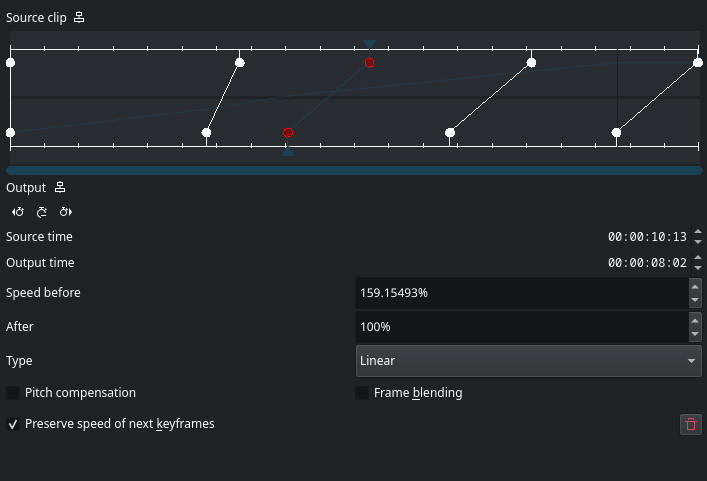
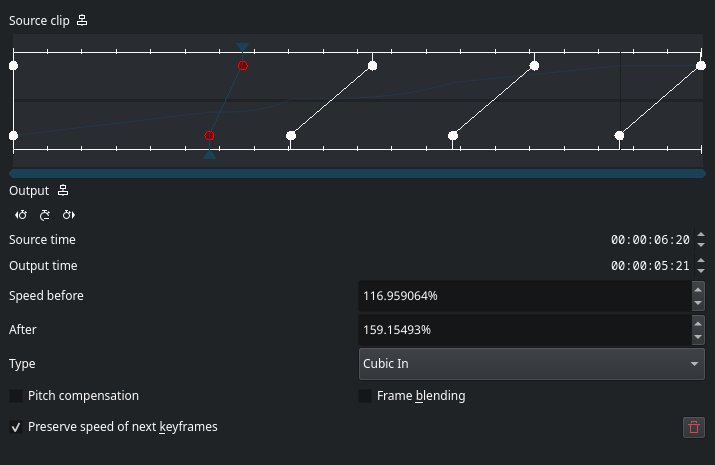
  • Added a Type selector in the remap dialog, starting with a curated list (Linear, Smooth, Cubic In, Cubic Out)

Type

Type selector showing Linear

Type

Type selector showing Cubic In

Keyframe types follow their keyframes through drags, clip resizes, and deletion, and are captured in undo/redo alongside keyframe positions.

The curated list, and why

The full MLT keyframe type list also includes Bounce, Elastic, Exponential, and Circular, all of which overshoot outside the 0..1 range. On a time map, an overshoot means source time briefly runs backward, so the clip plays in reverse for a few frames at the keyframe boundary. That could be a real effect some people want, or a confusing artifact for everyone else. Left it out of the curated list for now and flagged it as an open question in the MR rather than deciding alone.

Manually verified

  • Existing projects with time remapping load with all keyframes linear, playback unchanged
  • Setting a keyframe to Smooth, Cubic In, or Cubic Out changes the curve shape and is audible/visible in playback
  • Undo/redo through type changes restores both type and curve correctly, no desync
  • Types survive keyframe drags, clip resizes, and neighbor deletion
  • Save/reload preserves types; linear-only projects round-trip without gaining type properties

MR opened

Opened MR !928, referencing #2188 and #1454. Pipeline is running. No unit tests added this round since RemapView holds state directly in the widget, not reachable from the existing test harness without splitting the storage out first, noted this directly in the MR rather than skipping silently.

What's next

Waiting on Jean-Baptiste's review, specifically his call on the curated type list question.

Welcome to a new issue of This Week in Plasma!

This week we merged a number of features and UI changes that focus on user-friendliness — in addition to a nice crop of bug-fixes and performance improvements:

Notable new features

Plasma 6.8

If you try to print using a printer that’s unavailable, Plasma now helpfully notifies you of this instead of just doing nothing. (Mike Noe, KDE Bugzilla #362143)

Notification about the printer that just received a print job being unavailable

Notable UI improvements

Plasma 6.8

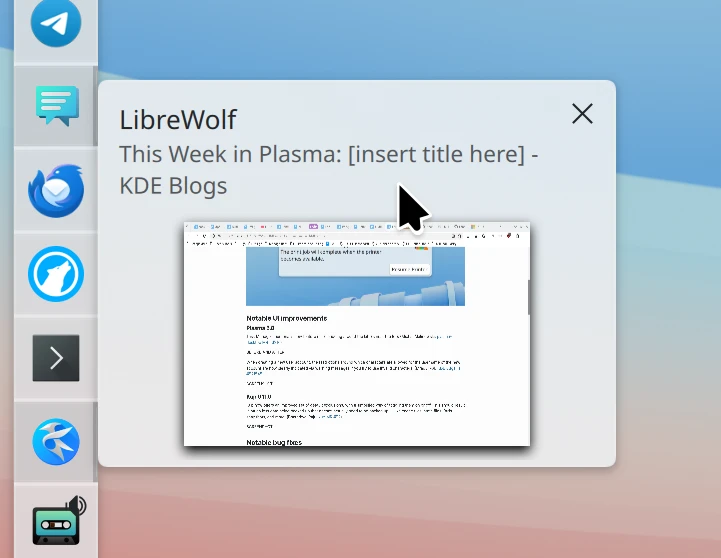
Task Manager thumbnails now feature nicer padding around the labels near the top. (Michal Malinowski, plasma-desktop MR #3916)

Task Manager tooltip with better padding around the text

When creating a new user account, the restrictions around which characters are allowed for the username of the new account are now clearly indicated via warning messages if you try to use invalid ones. (Mradul Pal, KDE Bugzilla #521545)

Warning about character restrictions when typing the new user’s username

Kup 0.11.0

Kup now offers an improved set of default exclusions, with a simplified way of toggling them on or off. This should result in much less data being backed up that doesn’t actually need to be backed up — like cache files, state files, Btrfs snapshots, and more. (Bharadwaj Raju, kup MR #52)

User-friendly list of comprehensibly-phrased exclusions for Kup-based backups
This settings page is still a bit old and crusty. A visual refresh is also planned, JFYI!

Notable bug fixes

Plasma 6.6.7

If the xdg-desktop-portal-kde process crashes while it’s being used to allow an app to control the pointer and keyboard, control now instantly returns to you rather than getting stuck until the system is restarted. (Marcus Renheim, KDE Bugzilla #523515)

Using a panel’s “Floating Applets” feature no longer breaks the ability to drag files onto Task Manager representations of grouped tasks. (Antonio Rojas, KDE Bugzilla #510643)

The Task Manager widget no longer lays out items incorrectly when you rearrange them while the widget is using right-to-left mode. (Christoph Wolk, KDE Bugzilla #504898)

The “Identify Displays” feature no longer shows weird hexadecimal numbers in the labels for some screens. (David Wild and Marco Martin, KDE Bugzilla #523181 and kwin MR #9655)

Plasma 6.7.4

Fixed a UI glitch in the Disk Quota widget. (Nicolas Fella, KDE Bugzilla #523618)

Plasma 6.7.5

Syncing your settings to Plasma Login Manager now includes the ~/.config/plasma-localerc file, which makes the login screen respect your preferred language and time settings. (Nate Graham, KDE Bugzilla #516964)

Fixed or implemented support for the “highlight changed settings” feature for multiple System Settings pages. (Tobias Ozór, kwin MR #9675, KDE Bugzilla #521974, powerdevil MR #660, KDE Bugzilla #521978, and KDE Bugzilla #469914)

System Settings’ Spell Checking page no longer erroneously prompts you to save unsaved changes when you navigate away from it without having made any changes. (Antti Savolainen, KDE Bugzilla #521712)

The “OS Version” sensor in System Monitor widgets now works more reliably to handle KDE Linux and other non-traditional operating systems. (David Redondo, KDE Bugzilla #523727)

Plasma 6.8

Fixed a bug in Plasma’s built-in remote desktop server that could present certain clients with a black screen instead of the expected content. (Shouvik Kar, krdp MR #222)

Switching between virtual desktops no longer makes the Window List Widget show the wrong window. (Marco Martin, KDE Bugzilla #523409)

The Applet::Index() property in Plasma scripting now actually returns the correct index. (Marco Martin, KDE Bugzilla #523675)

Notable in performance & technical

Plasma 6.8

Plasma’s built-in remote desktop server now exhibits less latency and better performance when using less-than-ideal network connections. (Shouvik Kar, krdp MR #190)

Plasma now loads the clipboard pop-up on demand rather than at launch, which saves some memory. (Nicolas Fella, plasma-workspace MR #6899)

How you can help

KDE has become important in the world, and your time and contributions have helped us get there. As we grow, we need your support to keep KDE sustainable.

Would you like to help put together this weekly report? Introduce yourself in the Matrix room and join the team!

Beyond that, you can help KDE by directly getting involved in any other projects. Donating time is actually more impactful than donating money. Each contributor makes a huge difference in KDE — you are not a number or a cog in a machine! You don’t have to be a programmer, either; many other opportunities exist.

You can also help out by making a donation! This helps cover operational costs, salaries, travel expenses for contributors, and in general just keeps KDE bringing Free Software to the world.

To get a new Plasma feature or a bug fix mentioned here

Push a commit to the relevant merge request on invent.kde.org.

Friday, 7 August 2026

Last Call

Last chance to submit your KDE Goals proposal

The call for submissions for the next KDE Goals cycle closes tomorrow, August 8.

As of the time of writing we've received nineteen proposals, covering a variety of topics like enterprise, gaming, personal well-being, documentation, accessibility, semantic desktops, color management, design, user experience, mobile and more.

Current proposals (by order of submission):

Join in

If any of the proposals above spark your interest, then by all means join the effort as a co-champion or contributor. And if you don't feel inspired by any, then there is still time to submit your own and champion a new KDE Goal.

Remember that you do not have to be a developer to participate. Read the selection process carefully before you send your proposal. If you have any doubts, join our Matrix room or create a topic at the KDE forum.

What's Next?

Once the submission period is over, we'll move into the refinement phase, where champions and the community work together to polish their proposals and finalize them so they're elligible for voting.

Timeline:

  • Call for submissions - June 19 to August 8
  • Refinement of proposals - August 9 to August 27
  • Voting period - August 28 to September 11
  • Tallying & preparation - September 12 to September 18
  • Announcement at Akademy - September 19

Alright, this will be the last review of the Summer. I’ll take a break until September as I really need to unplug for a bit. The next edition will be at the end of the first week of September. See you then!

But first… let’s go for my web review for the week 2026-32.


Tags: tech, gdpr, web, europe, law

This campaign is definitely worth a try. Hammering people with cookie banners exhibiting dark patterns isn’t exactly a good way to seek people consent.

https://killthecookiebanner.eu/


Stop Sending Me Your Errors

Tags: tech, email

Yes please! The amount of email system which get it wrong nowaday is really kind of sad.

https://kramkow.ski/article/2026/08/05/stop_sending_me_your_errors.html


Offensive Internet Posture

Tags: tech, internet, security, self-hosting

Indeed, so many things to do to deter bottom feeders. Lots of good funny ideas in there.

https://bruceediger.com/posts/offensive-machine/


Atom is better than RSS, in ways that matter

Tags: tech, atom, rss, blog

Indeed Atom is a better standard than RSS for feeds.

https://chrismorgan.info/atom%3Erss


The DISTINCT in your COUNT

Tags: tech, databases, postgresql, performance, optimisation

Careful how you use DISTINCT or ORDER BY on very large tables. You might want to reevaluate (after checking if there’s a problem of course).

https://boringsql.com/posts/distinct-in-your-count/


C++26: #embed

Tags: tech, c++

Another nice addition to the standard for dealing with embedded assets.

https://www.sandordargo.com/blog/2026/08/05/cpp26-embed


Crubit: C++/Rust Bidirectional Interop Tool

Tags: tech, c++, rust, interoperability, bindings

Interesting tool. Maybe more chances for C++ and Rust hybrids?

https://crubit.rs/


rust-lang/rust is adopting an LLM policy

Tags: tech, ai, machine-learning, copilot, foss, codereview, rust

Interesting policy. I think it strikes a good balance.

https://blog.rust-lang.org/inside-rust/2026/08/05/rust-langrust-is-adopting-an-llm-policy/


A Guide to Watchdog Timers for Embedded Systems

Tags: tech, embedded, reliability

Long and nice guide about watchdogs in an embedded context.

https://interrupt.memfault.com/blog/firmware-watchdog-best-practices


Elevators

Tags: tech, algorithm, simulation, complexity

Nice little post with simulations about the algorithms behind elevators. It’s quickly more complex than it sounds.

https://john.fun/elevators


The Wheels We Keep Reinventing

Tags: tech, architecture, complexity, supply-chain, vendor-lockin

There is truth here that our profession reinvents the wheel way to often. Some problem are solved, they don’t need reinventing. Be careful on your dependencies though, this is where lies the tradeoff.

https://blainsmith.com/articles/reinventing-the-wheel/


The development pipeline is a production system

Tags: tech, developer-experience, production

And indeed that makes it as important as the final product.

https://sundry.jerryorr.com/2026/07/31/development-pipeline-is-a-production-system


Committing to creativity

Tags: creativity, motivation

Interesting take. It’s indeed mostly about committing to something on the long term and doing the grunt work which begets creativity. It’s not just motivation between grit teeth or waiting to be blessed by a muse. Those won’t get you as far in your craft.

https://herman.bearblog.dev/creativity/


Bye for now!