

What is an agent harness?
An agent harness is the runtime layer around an LLM that turns it into a reliable, long-running agent. Instead of only generating text, the harness runs the full execution loop — planning, tool routing and execution, context management for long tasks, security boundaries like sandboxing and human-in-the-loop approvals, and session state that survives reconnects and restarts.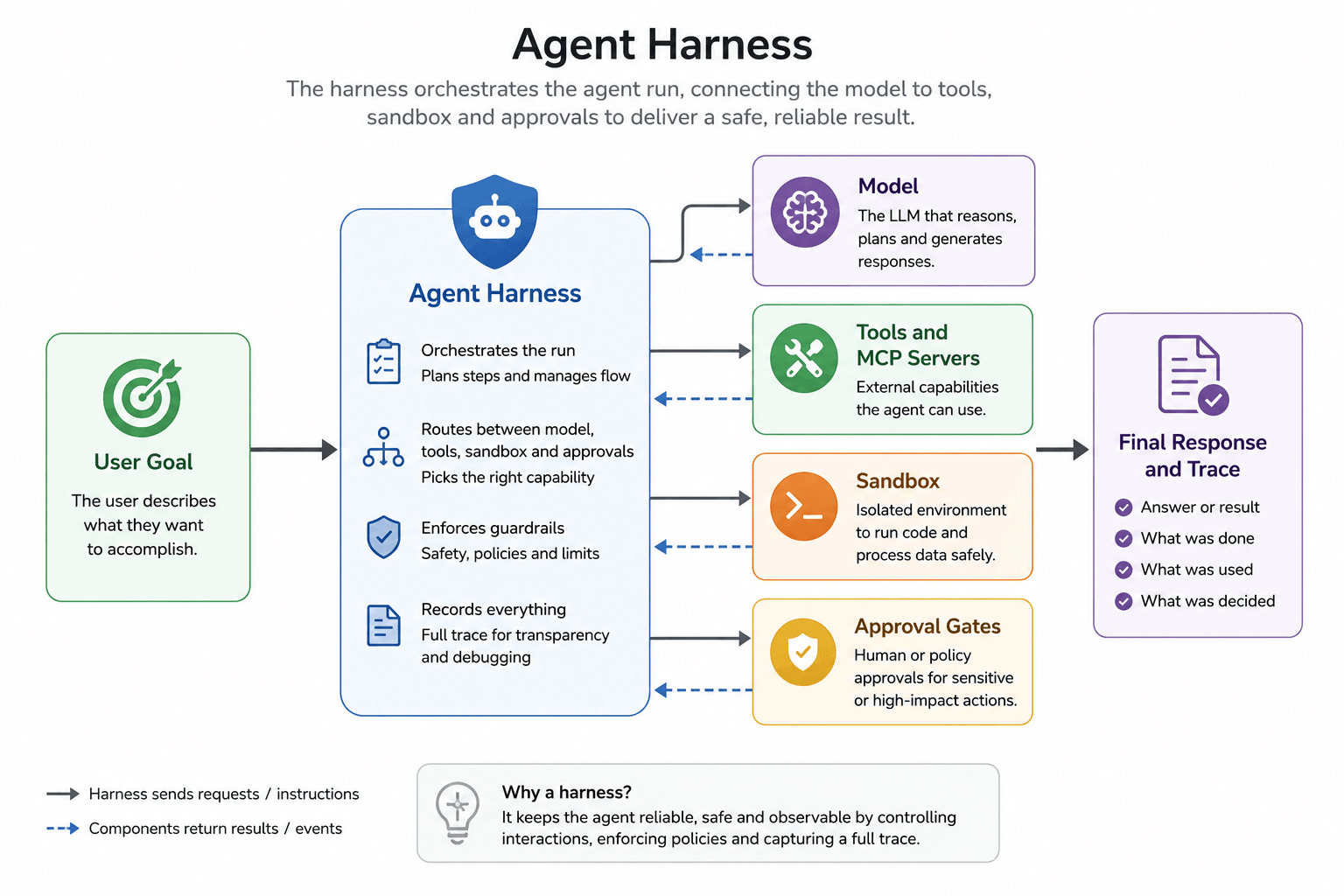
The harness orchestrates the agent run, connecting the model, tools, sandbox, and approvals to deliver a safe, reliable result
What is TrueForge?
TrueForge is an open-source agent harness with three parts: a core server that runs the agent loop, an HTTP API (with a TypeScript SDK) to drive it from code, and a chat UI (with a React UI SDK) to drive it from the browser.truefoundry/trueforge
Loading repository data...
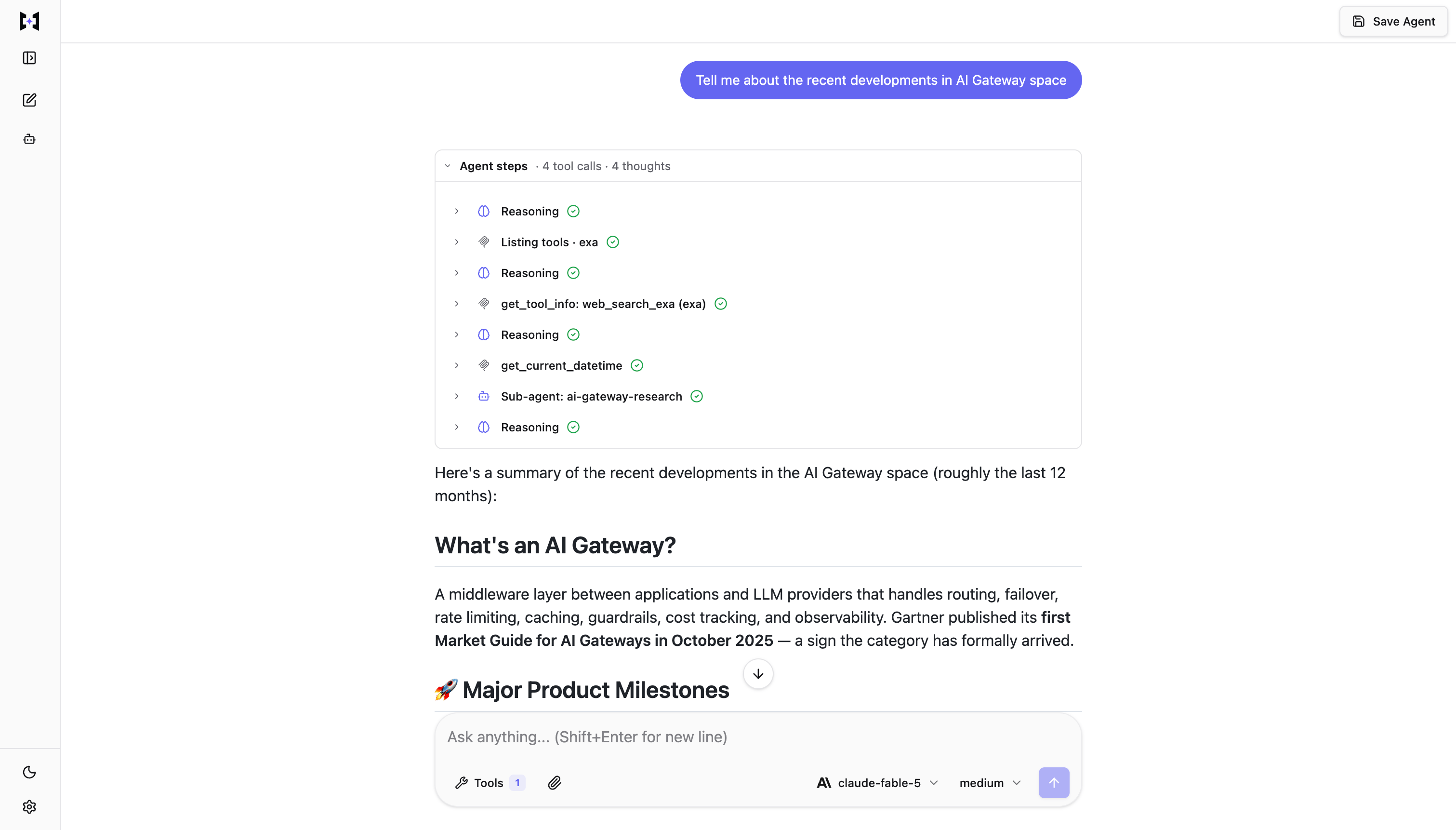
The bundled chat UI — a streaming response with the agent-steps panel expanded to show reasoning, tool calls, and a subagent.
Key Components


Chat UI and SDK connect to the TrueForge server HTTP API and agent loop, which talks to SQLite or Postgres and bring-your-own models, MCP servers, and sandbox
TrueForge server
Runs the agent loop. When a user sends a message, the server:- Plans the turn, calls the model, and executes tools — streaming every step back
- Pauses for human approval on sensitive actions
- Keeps context lean on long tasks with harness capabilities like subagents and compaction
- Persists sessions, so conversations survive reconnects and restarts
Many harnesses run the agent inside a sandbox. TrueForge treats the sandbox as a tool: one is provisioned only
when the agent actually needs to execute code. That’s why one server can run many agents concurrently, and why turns
that don’t need code execution are cheaper and faster.
HTTP API + TypeScript SDK
Everything the server does is exposed as an API, so anything you see in the UI you can automate:- REST + Server-Sent Events, with an OpenAPI spec and interactive docs at
/api/v1/docs - A TypeScript SDK (
@truefoundry/trueforge-core) to create and call agents from your own code
Chat UI + UI SDK
A ready-made interface for the agents you create:- Browse your agents, chat with them, and manage models, MCP servers, skills, and sandbox settings
- Bundled with the server and served on the same port — nothing extra to deploy
- Also published as a customizable UI SDK (
@truefoundry/trueforge-ui): theme it to your organization and launch your own Claude Desktop-like interface, backed by your TrueForge server
Two ways to run it
The agent features are identical in both modes — only the backend around the server changes. The Quickstart has run instructions for each.Start building
Quickstart
Run TrueForge with one command, configure a model provider, and start chatting.
Initial Setup
Configure models, MCP servers, skills, and sandbox — and customize the shipped catalogs.
Create an Agent
Select a model, attach connectors and skills, then save to the Agents Library.
Harness Capabilities
Sandbox-as-tool, subagents, deferred tools, code mode, compaction, and human checkpoints.
Setup Login
Optional OIDC for shared deployments — admin vs user, with a local no-auth default.
SDK
HTTP API and TypeScript SDK to create sessions, stream turns, and automate agents.
Chat UI
Bundled chat experience, or embed
@truefoundry/trueforge-ui in your React app.