

Core concepts
Talking to an agent follows one hierarchy: one Agent → many Sessions → many Turns → many Events → some Deltas. The sections below walk through each layer with one running example: a customer support agent namedsupport-bot.
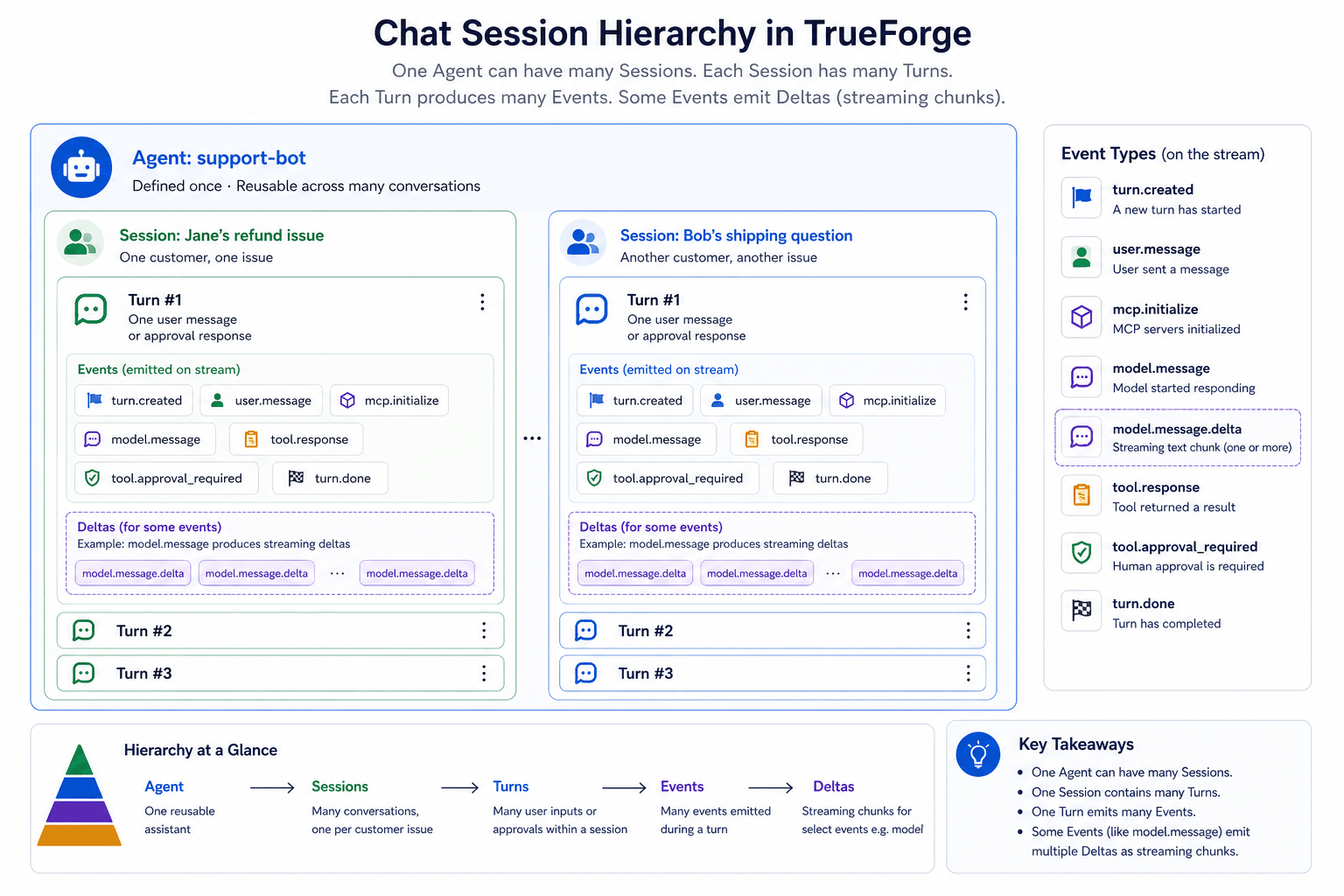
One agent serves many sessions; each session has many turns; each turn emits events; some events stream as deltas
Agent
An agent is a definition, not a running process. You define it once (the model, instructions, tools, and config), and any number of conversations can use it.support-bot is a support assistant that looks up orders and processes refunds through an MCP server. Its AgentSpec looks like this:
support-bot AgentSpec
Session
A session is one issue worked through with the agent. It holds the conversation context: every turn on that issue chains together, and the agent remembers what happened earlier in the same session. Each new issue gets its own session, whether it comes from the same customer or a different one.
Jane’s follow-ups about the refund stay in
sess-7f2a9c1b. Bob’s question runs in a separate session, so the two conversations never share context.
Session for Jane's refund issue
id so Jane can come back tomorrow and pick up where she left off. Only one turn runs in a session at a time.
Turn
A turn is one request in the conversation: a single back-and-forth between your app and the agent. Each time Jane sends a message (or your app sends an approval), you create a new turn. Turns in a session chain automatically (previous_turn_id defaults to "auto"), so the agent sees every earlier turn without you resending history.
A turn can also pause when the agent asks a clarifying question (
tool.response_required)
or needs MCP OAuth (mcp.auth_required). You resume with a new turn, just like
Turn 3 above.Event
While a turn runs, the agent emits events on the SDK stream, one JSON object at a time. Each event tells your app what the agent is doing: calling a tool, getting a result, writing a reply, or finishing. Events during Turn 1 (Jane asks for order status):
Sample payload:
turn.done
id and a thread_id ("main" for the root agent, a generated id for subagents, or null for run-level events), plus a sequence number used for resuming after a disconnect. The stream always opens with turn.created and closes with turn.done. Field-level schemas for every event type are in the turn events reference.
Delta
Most events arrive as a complete payload. Model output is the exception: the LLM streams token by token, so the harness sends a basemodel.message event first, then a series of model.message.delta fragments that you merge into it. All deltas share the base event’s id.
The agent’s full reply in Turn 1 is “Your order ORD-2031 shipped on June 12. Total: $1,240.00.” Your client receives:
Base event (empty shell)
Deltas (merge into msg-a1 as they arrive)
content to the event with the matching id and re-render on every chunk. That’s how the chat UI shows the reply word by word:
GET .../events), each model.message is already merged, so you use it directly.
A thread is a related idea: an execution context inside a turn. The root agent runs on
thread_id: "main", and
subagents get their own thread ids, announced by thread.created / thread.done
events. Events carry thread_id so you can separate a single turn stream when subagents run in parallel.The three turns, end to end
Here is Jane’s whole refund session: your app opens a session, runs turns, and reads the streamed events.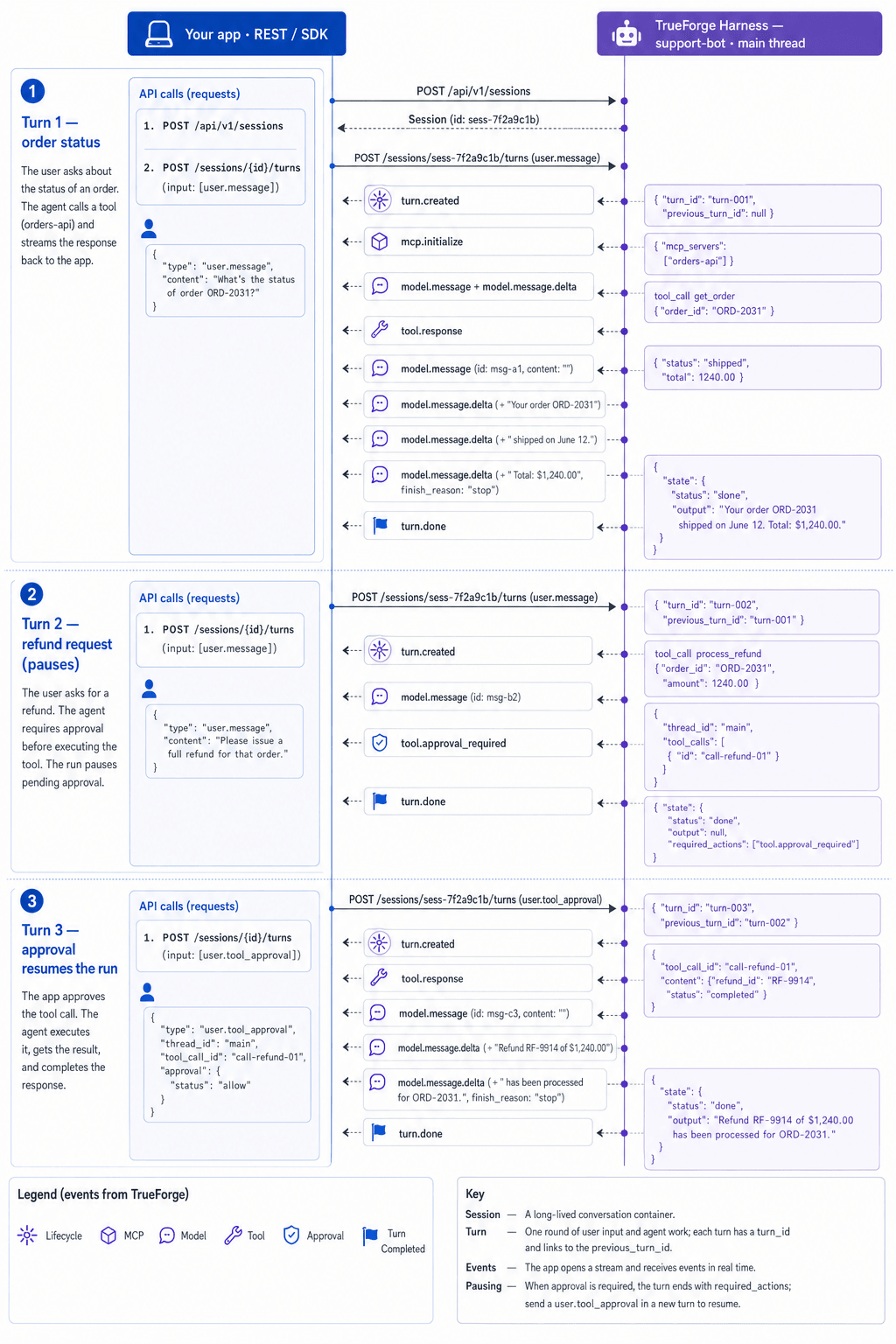
Three chained turns in one session: your app creates the session and turns; TrueForge streams events back
A separate issue (Bob’s shipping question, or Jane’s next problem) runs in its own session, where Turn 1 starts fresh with no refund history.
Next steps
- SDK Quickstart installs the SDK, connects with a token, and streams your first turn.
- Use an agent is the full cookbook: streaming, approvals, questions, threads, and reconnects.
- The API Reference tab has the raw HTTP endpoints and OpenAPI schemas.
