FREE GPU FPS BOOST🚨
AUTO OVERCLOCK YOUR GPU WITH MSI AFTERBURNER:
1. Open MSI Afterburner
2. Increase Power + Temp Limit
3. Click the OC Scanner 🔍
4. Hit SCAN and let it finish
5. Click Apply ✓
6. Save the result to a profile
7. Run a stress test/play a game to test
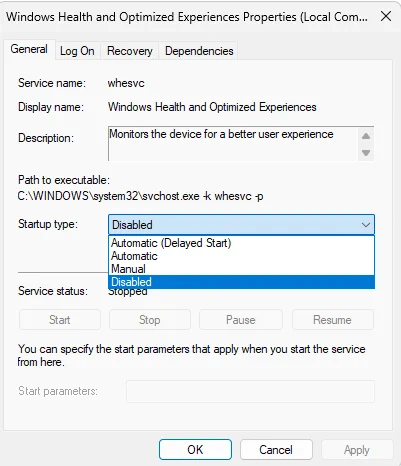
WINDOWS HEALTH SERVICE RUNNING? 🚨
The Windows Health and Optimized Experiences service runs background monitoring and diagnostic tracing to detect performance issues.
Most gaming PCs don’t need it running. Disabling it can reduce unnecessary background activity, free up