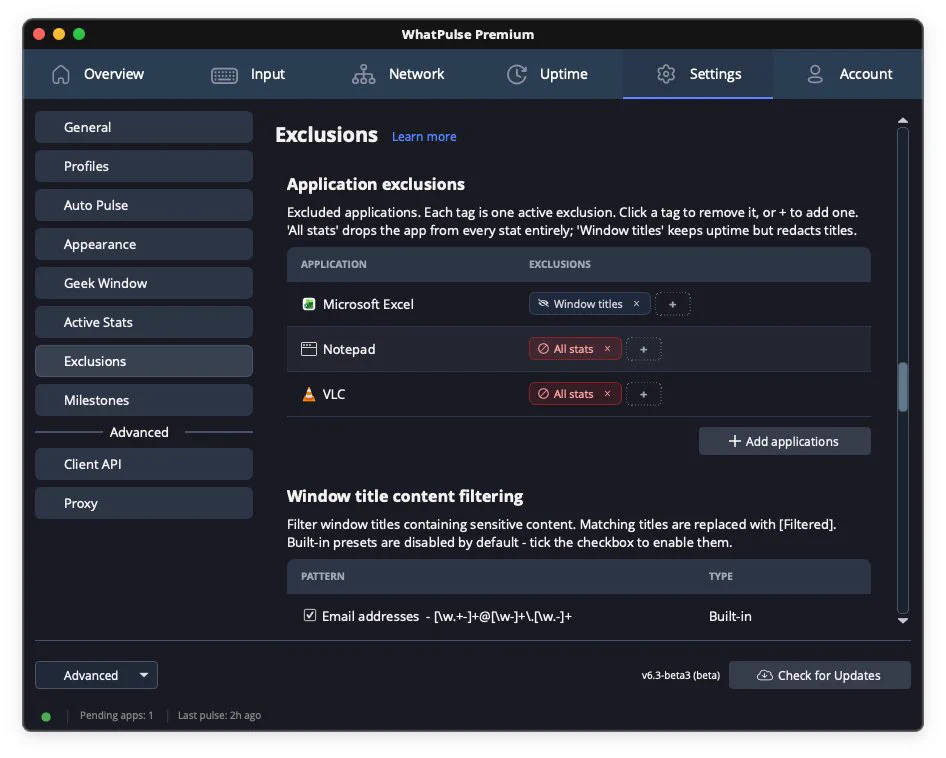
Some things belong in your workflow, not in your stats.
That’s why we added app exclusions: hide window titles, exclude an app entirely, or filter specific title text so sensitive work stays private while the rest still gets measured.
Time alone is a lousy way to measure work.
Sort apps by keys and clicks, then check the window titles. You’ll see where the work happened, not just where the clock went. That’s the view we built in WhatPulse.
One day can hold work, play, and a side project. Your stats shouldn't mash them together.
Switch tracking profiles from the menu bar popup in WhatPulse and keep each context in its own lane.
Default tracking isn't neutral. It's a choice.
Pause what counts. Exclude apps. Pick which keyboard, mouse, network, uptime, and web stats matter in WhatPulse.
Your stats, your data, your control. What would you exclude first?
A 30-second check now can save you from a weird stats surprise later.
Open your account page and make sure backups are on, your lifetime totals look right, and your stats are online. In WhatPulse, you can also refresh things or fix account access if something looks off.