
JavaScript frameworks can help you build interactive web apps, but choosing one based on a popularity chart is a poor shortcut. The right fit depends on whether you are adding a few interactive components or building a complete application, what your team already knows, and how you plan to route, render, test, and deploy the site.
This guide compares React, Vue, Angular, and Svelte by how you build with them and the kinds of projects they suit. They are not interchangeable packages, and no one option is best for every project.
React, Vue, Angular, and Svelte at a glance
| Option | What it is | Consider it when |
|---|---|---|
| React | A library for building user interfaces; a separate framework can provide app structure and server features. | Your team already uses React, or you want to choose an app framework and tooling around the UI library. |
| Vue | A progressive framework that can be added to a page or used to build a full application. | You want to start with familiar HTML, CSS, and JavaScript and adopt more of the ecosystem as the app grows. |
| Angular | A web application platform with integrated conventions and tooling, including routing and form approaches. | A larger app or team benefits from a consistent, structured way to build and maintain features. |
| Svelte | A UI framework whose compiler turns components into browser code; SvelteKit adds application features. | You like authoring components with HTML, CSS, and JavaScript and want to evaluate Svelte's app framework as part of the choice. |
These are starting points, not scores. Your current codebase, hosting constraints, and ability to maintain the chosen stack matter more than a generic ranking.
React: choose the application framework too
React focuses on composing user interfaces from components. It does not prescribe every part of a complete web application, such as routing or data loading. React's current documentation recommends starting a new app with a framework; it documents options such as Next.js and React Router. Building from scratch gives you more control but also leaves more decisions and integrations to maintain.
React can be a sensible choice when your team already has React experience or when a particular React framework fits your deployment needs. Compare the framework's routing, rendering, hosting, and upgrade requirements rather than assuming React alone settles those choices.
- React: Creating a React App
- React on GitHub
- React Native is a related option for native mobile apps, not a requirement for a React website.
Vue: adopt the framework incrementally
Vue is designed to work at different scales: you can add it to an existing page or use it for a single-page or server-rendered application. For projects using a build setup, Vue's documentation describes Single-File Components and both the Options and Composition APIs. Composition API with Single-File Components is the documented production direction for full applications, while the Options API can fit simpler integrations.
This range can be useful for a solo developer or small team that wants to enhance an existing site before committing to a larger app structure. If you need server-side rendering, static generation, or other application-level features, review the rendering and deployment tradeoffs rather than treating them as automatic benefits.
- Vue documentation
- Vue server-side rendering guide
- Vue on GitHub
- For a practical starting point, see our Vue.js tutorials.
Angular: a more integrated application platform
Angular provides an opinionated structure and official tooling for building web applications. Its router is part of the framework's standard application setup, and its forms guide covers both reactive and template-driven approaches. That integrated approach can help a team share conventions across a larger app; it also means there is more of the platform to learn than a UI library alone.
Consider Angular when its built-in patterns match your product and your team is comfortable with its application model. Before committing, prototype a representative route and form, then check how the development workflow and hosting setup fit your project.
Svelte: components compiled for the web
Svelte uses a compiler to turn components written with HTML, CSS, and JavaScript into code for the browser. SvelteKit is its companion application framework, with routing and configurable rendering for full web apps. Evaluate Svelte and SvelteKit together if you need a complete application rather than standalone components.
This can be appealing if Svelte's component model suits your team, but compare the libraries, integrations, deployment adapters, and maintenance expertise your specific app will need. A framework's generated output alone does not determine real-world performance.
A practical way to choose
- Start with the existing product. For a working app, prefer its current framework unless a specific limitation justifies the cost and risk of migration. For a small enhancement to a mostly static site, a full application framework may be unnecessary; a focused library such as jQuery or a progressive Vue integration may be enough.
- List the features you actually need. Write down routing, forms, data loading, authentication, server rendering, static output, and any integrations the product requires. Do not select a stack for features you do not plan to use.
- Check rendering and hosting together. Client-side rendering, server-side rendering, and static generation have different tradeoffs. Some server-rendered deployments need a runtime such as Node.js; static output can have different hosting requirements. Confirm the framework's supported deployment options and likely operating costs before building around them.
- Build a small, representative proof of concept. Implement one route, one important form, and one data-loading path. Check keyboard interaction, validation, loading and error states, test setup, build output, and deployment—not just how quickly the first component appears.
- Choose the stack you can keep current. Team familiarity, upgrade cadence, documentation, and the availability of libraries you truly need are practical constraints, especially for a one-person business or small team.
No framework makes an app accessible, secure, or fast by default. Use semantic HTML, label controls, support keyboard interaction, validate inputs on the server where appropriate, and measure performance with the real pages and data your users will encounter.
If you maintain a Meteor application, our Meteor learning resources remain a targeted starting point; Meteor is not included in this four-option comparison.
Historical infographic
The infographic below is retained from the original article as a 2017 snapshot, not as a current popularity ranking or recommendation. It was created by DashBouquet.
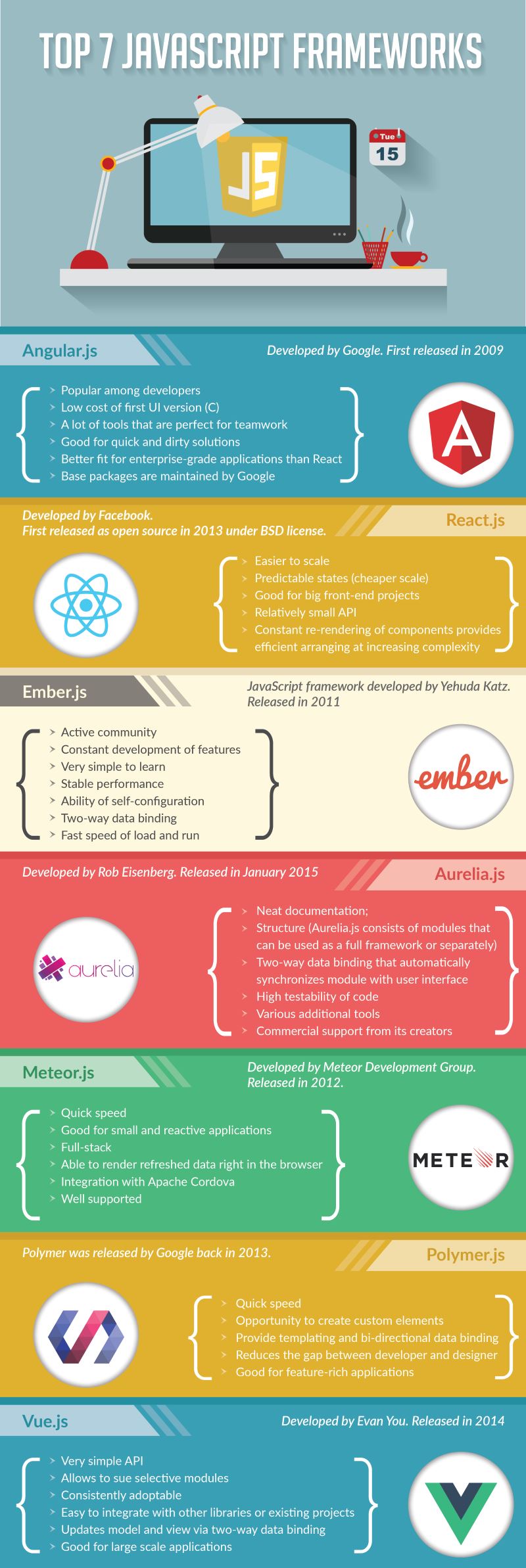


Vue website/github urls are incorrect
Thanks for pointing that out. The links have been corrected.
Typo in vue graphic
Allows to sue selective models
That is an unfortunate typo. It should read: “Allows to use selective models”. Thank you for pointing it out.
Fine infographic BTW.