Availability Group (AG)

SQLServerCentral Article

Steps for Installing AlwaysOn Availability Groups - SQL 2019

  • Article

With SQL Server 2012 Microsoft introduced the AlwaysOn Availability Group feature, and since then many changes and improvements have been made.  This article is an update to another article, and will cover the prerequisites and steps for installing AlwaysOn in your SQL Server 2019 environment. Prerequisites Before implementing your AlwaysOn Availability Group (AG), make sure […]

★ ★ ★ ★ ★ ★ ★ ★ ★ ★

You rated this post out of 5. Change rating

2025-12-24 (first published: )

2,676 reads

External Article

How to Measure Replication Latency in SQL Server AlwaysOn Synchronous Availability Groups

  • Article

Synchronous replicas in SQL Server Availability Groups promise no data loss, but they don’t promise zero delay; under heavy load they can still fall behind. This article shows how to measure and track that hidden replication delay using SQL Server performance counters, so you can see how well your system keeps up during IO‑intensive operations and plan maintenance more safely.

2025-09-17

Image

Contained Availability Groups in SQL Server 2022

  • Article

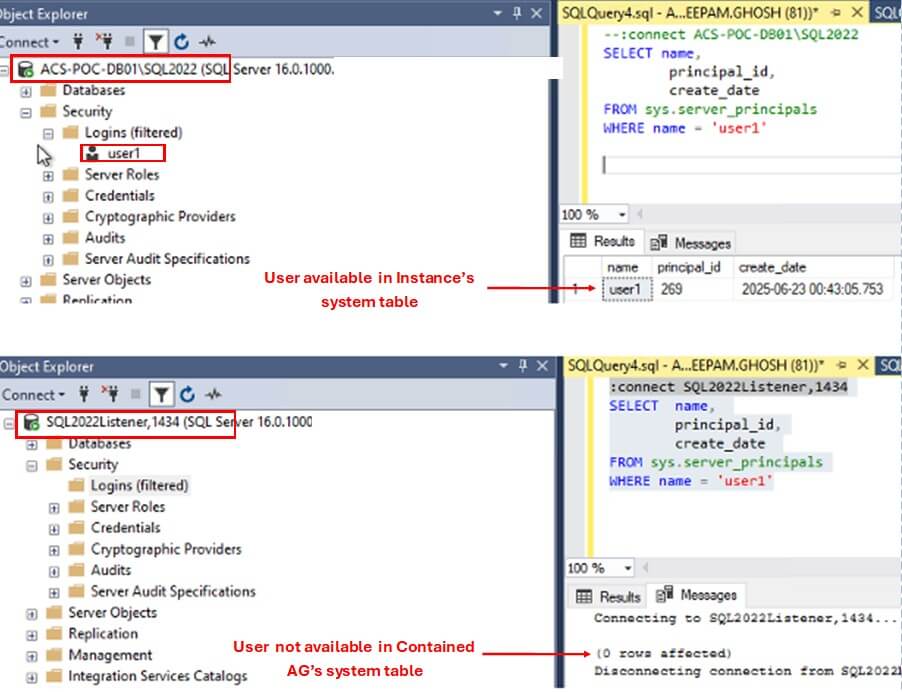
SQL Server 2022 introduced a new feature called Contained Availability Groups. It allows the Database Administrators to effectively manage the Server Level objects, such as Logins, SQL Agent jobs, etc. in an HA environment. In today's article, we will learn about this new feature of SQL Server. The Challenge of Managing Server Objects in Availability […]

★ ★ ★ ★ ★ ★ ★ ★ ★ ★

You rated this post out of 5. Change rating

2025-08-20

11,403 reads

Technical Article

Enable TDE for Databases in a SQL Server AlwaysOn Availability Group

  • Article

A customer has a database that is already set up in a SQL Server Availability Group. Since this database hosts sensitive data, there is a need to encrypt the primary and all secondary replicas of the data. In this article, we will walk through how this can be done.

★ ★ ★ ★ ★ ★ ★ ★ ★ ★

You rated this post out of 5. Change rating

2025-08-13

Blogs

Asking for Help Isn’t a Weakness

By

During COVID, I attended training on software/enterprise architecture given by Mark Richards. One of...

The Proof of the Backup Is in the Pudding

By

For me, the objective is straightforward: have a backup strategy that is reliable, understandable,...

T-SQL Tuesday #204 – Are blogs still relevant?

By

Note: This post is the invitation for T-SQL Tuesday #204 on November 3rd, 2026....

Read the latest Blogs

Forums

The ##MS_DatabaseConnector## User

By Steve Jones - SSC Editor

Comments posted to this topic are about the item The ##MS_DatabaseConnector## User

Planning for Change

By Steve Jones - SSC Editor

Comments posted to this topic are about the item Planning for Change

Importing Excel files into SQL Server, Azure Edition

By Cláudio Tereso

Comments posted to this topic are about the item Importing Excel files into SQL...

Visit the forum

Question of the Day

The ##MS_DatabaseConnector## User

On SQL Server 2025, I run this code as a sysadmin:

CREATE LOGIN Demo WITH PASSWORD = 'Demo1234567'
GO
ALTER SERVER ROLE ##MS_DatabaseConnector## ADD MEMBER Demo
GO
I then login as Demo and run this:
USE sandbox
go
SELECT CURRENT_USER
What is returned?

See possible answers