
This SQL Server String Function is used to format the specified value in the given way or dates and numbers using culture. We can use the FORMAT() function to format dates, times, or numbers as strings according to the local system (user).
Some common numeric formats
- G: Default one. It follows the local language formatting options.
- N: Number with decimal values.
- C: Currency
- P: Percentage
- E: Scientific notations
SQL FORMAT function syntax
The syntax of the FORMAT Function is
Format(Value, Format, Culture)
- Value: Please specify a valid Expression of the supporting SQL Data Type.
- Format: Please specify a valid .NET Framework string.
- Culture: This is an optional argument and user for regional or country-specific changes. If we don’t specify the culture argument, FORMAT() uses the language of the current session (query or system).
NOTE: The FORMAT() function returns NULL for an invalid format (Second argument).
SQL FORMAT Date Example
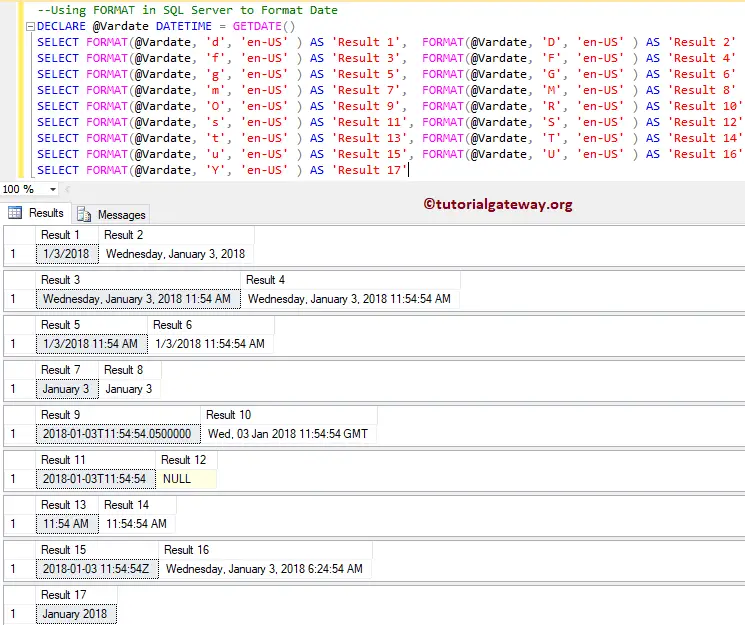
In this String Functions example, we first declared a Datetime variable and assigned SQL GETDATE() to it. Here, we are going to use the function to return the date in different formats. I suggest you refer to the Standard Date Time Format article to understand the string formats we used in this example.
DECLARE @Vardate DATETIME = GETDATE()
SELECT FORMAT(@Vardate, 'd', 'en-US' ) AS 'Result 1',  FORMAT(@Vardate, 'D', 'en-US' ) AS 'Result 2'
SELECT FORMAT(@Vardate, 'f', 'en-US' ) AS 'Result 3',  FORMAT(@Vardate, 'F', 'en-US' ) AS 'Result 4'
SELECT FORMAT(@Vardate, 'g', 'en-US' ) AS 'Result 5',  FORMAT(@Vardate, 'G', 'en-US' ) AS 'Result 6'
SELECT FORMAT(@Vardate, 'm', 'en-US' ) AS 'Result 7',  FORMAT(@Vardate, 'M', 'en-US' ) AS 'Result 8'
SELECT FORMAT(@Vardate, 'O', 'en-US' ) AS 'Result 9',  FORMAT(@Vardate, 'R', 'en-US' ) AS 'Result 10'
SELECT FORMAT(@Vardate, 's', 'en-US' ) AS 'Result 11', FORMAT(@Vardate, 'S', 'en-US' ) AS 'Result 12'
SELECT FORMAT(@Vardate, 't', 'en-US' ) AS 'Result 13', FORMAT(@Vardate, 'T', 'en-US' ) AS 'Result 14'
SELECT FORMAT(@Vardate, 'u', 'en-US' ) AS 'Result 15', FORMAT(@Vardate, 'U', 'en-US' ) AS 'Result 16'
SELECT FORMAT(@Vardate, 'Y', 'en-US' ) AS 'Result 17'
SQL Server FORMAT Date using Culture
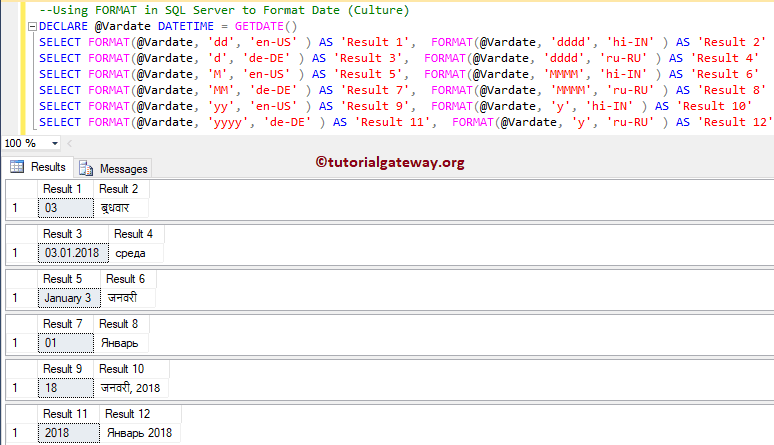
In this example, we are going to use the third argument, culture. By this, you can display the month name or day name in the native language—something like the Day name in Japanese, Chinese, Hindi, Russian, Korean, etc. Please refer to the list of SQL String Functions from our SQL Programming.
DECLARE @Vardate DATETIME = GETDATE()
SELECT FORMAT(@Vardate, 'dd', 'en-US' ) AS 'Result 1',  FORMAT(@Vardate, 'dddd', 'hi-IN' ) AS 'Result 2'
SELECT FORMAT(@Vardate, 'd', 'de-DE' ) AS 'Result 3',  FORMAT(@Vardate, 'dddd', 'ru-RU' ) AS 'Result 4'
SELECT FORMAT(@Vardate, 'M', 'en-US' ) AS 'Result 5',  FORMAT(@Vardate, 'MMMM', 'hi-IN' ) AS 'Result 6'
SELECT FORMAT(@Vardate, 'MM', 'de-DE' ) AS 'Result 7',  FORMAT(@Vardate, 'MMMM', 'ru-RU' ) AS 'Result 8'
SELECT FORMAT(@Vardate, 'yy', 'en-US' ) AS 'Result 9',  FORMAT(@Vardate, 'y', 'hi-IN' ) AS 'Result 10'
SELECT FORMAT(@Vardate, 'yyyy', 'de-DE' ) AS 'Result 11',  FORMAT(@Vardate, 'y', 'ru-RU' ) AS 'Result 12'
Use SQL FORMAT() function with custom string options
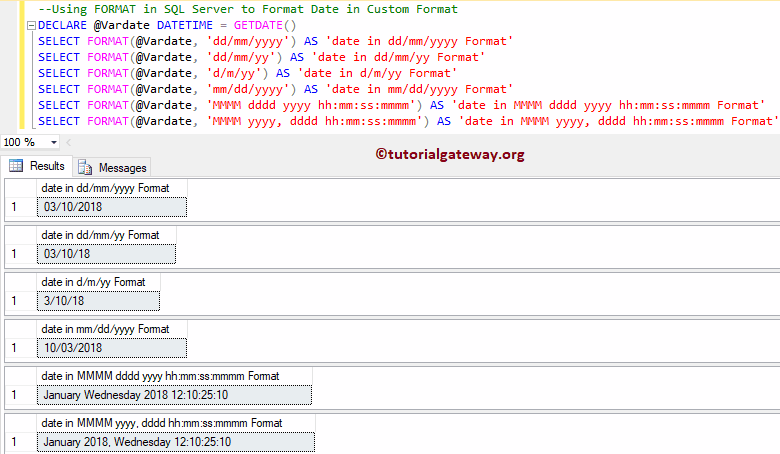
In this section, we are going to define custom date-time formats. By this, you can determine the custom formats to display the date and time.
DECLARE @Vardate DATETIME = GETDATE()
SELECT FORMAT(@Vardate, 'dd/mm/yyyy') AS 'date in dd/mm/yyyy Format'
SELECT FORMAT(@Vardate, 'dd/mm/yy') AS 'date in dd/mm/yy Format'
SELECT FORMAT(@Vardate, 'd/m/yy') AS 'date in d/m/yy Format'
SELECT FORMAT(@Vardate, 'mm/dd/yyyy') AS 'date in mm/dd/yyyy Format'
SELECT FORMAT(@Vardate, 'MMMM dddd yyyy hh:mm:ss:mmmm') AS 'date in MMMM dddd yyyy hh:mm:ss:mmmm Format'
SELECT FORMAT(@Vardate, 'MMMM yyyy, dddd hh:mm:ss:mmmm') AS 'date in MMMM yyyy, dddd hh:mm:ss:mmmm Format'
TIP: I think you should refer to the SQL CAST and SQL CONVERT function articles.
FORMAT Time
In the following statements, we use SYSDATETIME() to get the system date and time. Next, the FORMAT() function formats the time (hours, minutes, seconds, AM/PM).
SELECT FORMAT(SYSDATETIME(), N'hh:mm tt')

SELECT FORMAT(SYSDATETIME(), N'hh-mm-ss tt')

SELECT FORMAT(SYSDATETIME(), N'hh:m t')
11:36 AM

11-36-06 AM

11:36 A
SQL FORMAT Currency using Culture
Formatting currency helps display prices in local currency format. For example, if the same report is shown in the USA, the EU, and India, we format the prices according to their respective country and add the currency symbols.
In this case, we are going to format the Currency values based on the specified culture.
DECLARE @Sales INT = 3325
SELECT FORMAT(@Sales, 'c', 'en-US' ) AS 'USA Currency'
SELECT FORMAT(@Sales, 'c', 'ru-RU' ) AS 'Russian Currency'
SELECT FORMAT(@Sales, 'c', 'hi-IN' ) AS 'Indian Currency'
SELECT FORMAT(@Sales, 'c', 'de-DE' ) AS 'Indian Currency'
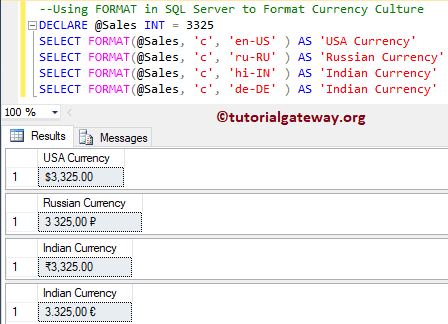
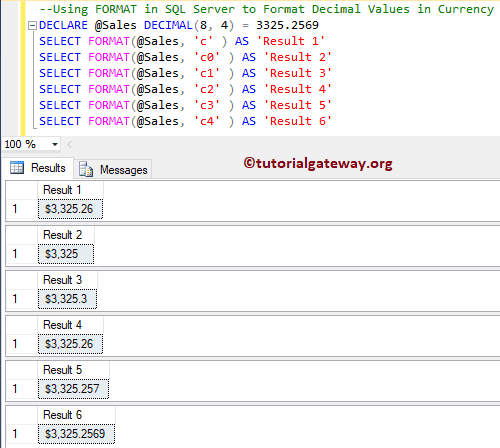
In this example, we use this to format the Currency. Using this approach, you can simply display the country’s Currency symbols before the Money or Value. Refer to the SQL REPLACE function.
DECLARE @Sales DECIMAL(8, 4) = 3325.2569
SELECT FORMAT(@Sales, 'c' ) AS 'Result 1'
SELECT FORMAT(@Sales, 'c0' ) AS 'Result 2'
SELECT FORMAT(@Sales, 'c1' ) AS 'Result 3'
SELECT FORMAT(@Sales, 'c2' ) AS 'Result 4'
SELECT FORMAT(@Sales, 'c3' ) AS 'Result 5'
SELECT FORMAT(@Sales, 'c4' ) AS 'Result 6'
Use FORMAT() function to format Currency Decimals
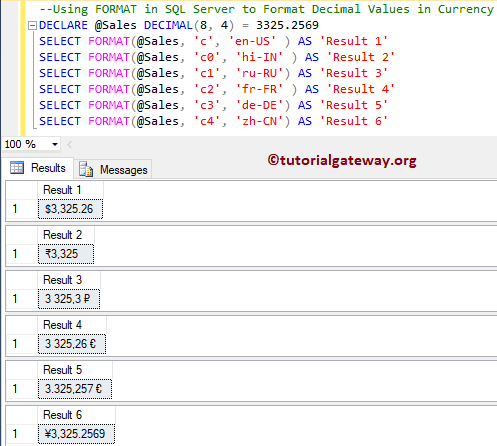
In this example, we are going to format the decimal values in Currency using this.
DECLARE @Sales DECIMAL(8, 4) = 3325.2569
SELECT FORMAT(@Sales, 'c', 'en-US' ) AS 'Result 1'
SELECT FORMAT(@Sales, 'c0', 'hi-IN' ) AS 'Result 2'
SELECT FORMAT(@Sales, 'c1', 'ru-RU') AS 'Result 3'
SELECT FORMAT(@Sales, 'c2', 'fr-FR' ) AS 'Result 4'
SELECT FORMAT(@Sales, 'c3', 'de-DE') AS 'Result 5'
SELECT FORMAT(@Sales, 'c4', 'zh-CN') AS 'Result 6'
SQL FORMAT function to format Numbers (‘N’)
The following query uses the N format specifier, where N formats numeric values. You must use an integer from 0 to N to specify the number of decimal places. For example, N1 formats a numeric value with 1 decimal place.
DECLARE @n DECIMAL(10, 4) = 987654.1234
SELECT FORMAT(@n, 'N0')
SELECT FORMAT(@n, 'N1')
SELECT FORMAT(@n, 'N2')
987,654

987,654.1

987,654.12
TIP: It is very helpful to show the thousand separator or fix the decimals to 2 or 3.
Use FORMAT() function with # symbols
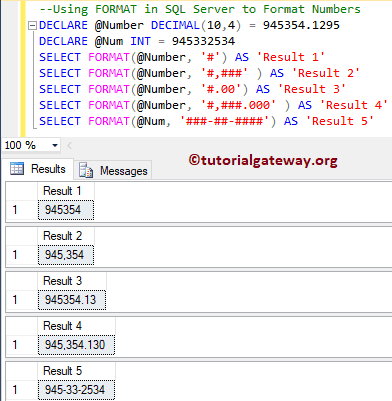
In this example, we are going to format numbers. To format the numbers, you can use the # symbols. Or, you can also use 0 to specify the number of decimal values.
DECLARE @Number DECIMAL(10,4) = 945354.1295
DECLARE @Num INT = 945332534
SELECT FORMAT(@Number, '#') AS 'Result 1'
SELECT FORMAT(@Number, '#,###' ) AS 'Result 2'
SELECT FORMAT(@Number, '#.00') AS 'Result 3'
SELECT FORMAT(@Number, '#,###.000' ) AS 'Result 4'
SELECT FORMAT(@Num, '###-##-####') AS 'Result 5'
FORMAT numbers using Culture
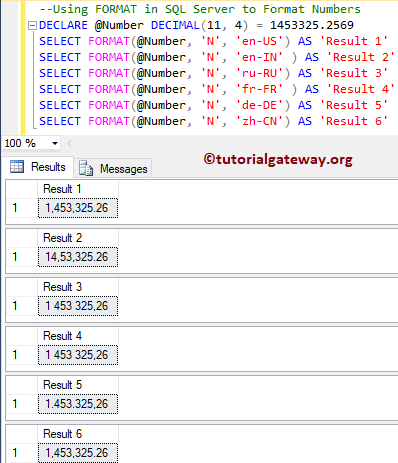
In this example, we will use the function to format Numbers. Culture specifies the number formats. I mean, some countries separate 100s, and others separate 1000s, etc.
DECLARE @Number DECIMAL(11, 4) = 1453325.2569
SELECT FORMAT(@Number, 'N', 'en-US') AS 'Result 1'
SELECT FORMAT(@Number, 'N', 'en-IN' ) AS 'Result 2'
SELECT FORMAT(@Number, 'N', 'ru-RU') AS 'Result 3'
SELECT FORMAT(@Number, 'N', 'fr-FR' ) AS 'Result 4'
SELECT FORMAT(@Number, 'N', 'de-DE') AS 'Result 5'
SELECT FORMAT(@Number, 'N', 'zh-CN') AS 'Result 6'
Use SQL FORMAT function to pad leading zeros
In the query below, FORMAT() has to display a 6-digit number. So, it adds / pads three 0s at the starting position, followed by the actual number (777).
SELECT FORMAT(777, '000000')
000777FORMAT Percentage (‘P’)
Please replace 0.75 with any number. The number should be between 0 and 1, where 0 = 0% and 1 = 100%. For example, 0.5 returns 50%. You can add culture information (en-US), but we don’t need it because % is the same in all languages. In some cultures, (ru-RU) 75.00 becomes 75,00%.
SELECT FORMAT(0.75, 'P')
75.00%Using the FORMAT() function on table columns
In the query below, we find total sales and average sales according to order year. Here, we formatted the currencies and used the dollar and INR symbols.
SELECT YEAR([OrderDate]) AS Year
    ,FORMAT(SUM([SalesAmount]), 'c', 'en_US') TotalSales
    ,FORMAT(AVG([SalesAmount]), 'c', 'hi_IN') SalesAverage
FROM [FactInternetSales]
GROUP BY YEAR(OrderDate)
ORDER BY Year
Year	TotalSales	SalesAverage
2010	$43,421.04	₹3,101.50
2011	$7,075,525.93	₹3,192.93
2012	$5,842,485.20	₹1,719.90
2013	$16,351,550.34	₹309.68
2014	$45,694.72	₹23.20