
The SQL REVERSE is one of the String Functions used to reverse the specified expression or the order of characters in a string.
The syntax of the REVERSE() function is as shown below.
SELECT REVERSE (String_Expression)
FROM [Source]
The REVERSE() function accepts a string_Expression (string) or binary data type as an argument and returns VARCHAR or NVARCHAR.
NOTE: WE must always use an expression that can be implicitly converted to VARCHAR. To explicitly convert, we must use the CAST function.
SQL REVERSE Function Example
The REVERSE function is used to invert the given string. The following query will show multiple ways to use it.
Example 1: Reverse a string
In the query below, we passed a string to the REVERSE() function to change the order of characters in it.
SELECT REVERSE('Welcome')
emocleWWhen we pass an empty string to REVERSE(), it returns an empty string.
SELECT REVERSE(' ')
Example 2: Reverse a string from a variable
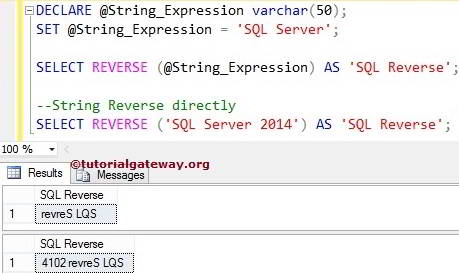
We first declared a string variable within this query and assigned the string data. Next, we used the String method to reverse the string variable @String_Expression. In the next line, we used it directly on the string. Please refer to the list of SQL String Functions from our Learn SQL Server page.
DECLARE @String_Expression varchar(50)
SET @String_Expression = 'SQL Server'

SELECT REVERSE (@String_Expression) AS 'SQLReverse'

--directly
SELECT REVERSE ('SQL Server 2014') AS 'SQLReverse'
Example 3: Reverse an integer
In the query below, we passed an integer as the argument. Here, before applying the SQL Server REVERSE() function, the server implicitly converts the INT data type to VARCHAR and reverses the result.
SELECT REVERSE(12345)
54321Example 4: Reverse a floating-point number
Similar to INT, we can pass a float data type to the REVERSE() function. First, it implicitly converts it to NVARCHAR and reverses it.
SELECT REVERSE(78.95)
59.87Example 5: Use REVERSE() with NULL values
When we pass a NULL value to the REVERSE() function, it returns NULL as output.
SELECT REVERSE(NULL)
NULLUse the SQL REVERSE() function on table columns
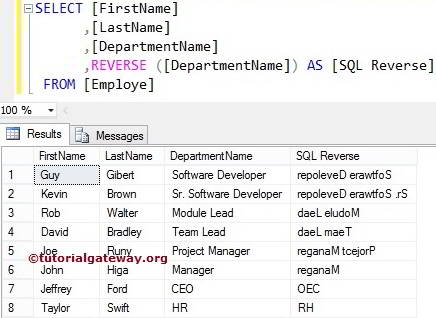
The reverse function also allows you to reverse the expressions inside the columns. We are going to use the below-shown data to explain the string REVERSE Function.
In this example, we are going to reverse all the records in the [Department Name] column present in the Employee table. Please refer to the SQL REPLICATE and SQL REPLACE functions.
SELECT [FirstName]
      ,[LastName]
      ,[DepartmentName]
      ,REVERSE ([DepartmentName]) AS [SQLReverse]
 FROM [Employe]
Use the REVERSE() function to check if a string is a palindrome
If a string is equal to its reverse, then it is a palindrome. Here, we use the SQL CASE statement to print the condition. We can also use SQL IIF.
DECLARE @n VARCHAR(20) = 'madam'
SELECT CASE
	WHEN @n = REVERSE(@n)
	THEN 'Palindrome String'
	ELSE 'Not a Palindrome String'
END Result
Palindrome String