
The SQL Server REPLICATE is a String Function used to repeat the existing string for a given number of times. This replicate function accepts both character string or binary data and returns the same type as the specified expression.
The syntax of the SQL REPLICATE Function is as shown below.
SELECT REPLICATE (String_Expression, int_Expression)
FROM [Source]
- String_Expression: Please specify the valid string. The Replicate function will repeat the string present in this String_Expression. It can be a character string or binary data.
- int_Expression: How many characters do you want to repeat the String_Expression?
SQL Server REPLICATE Example
The REPLICATE Function repeats the original string with a specified number of times.
Example 1: In this example, we repeat Hi 3 times. To do so, use Hi as the REPLICATE() function’s first argument and 3 as the second.
SELECT REPLICATE('Hi ', 3)
Hi Hi HiExample 2: If we pass a number as a string, REPLICATE() will repeat the number the given number of times.
SELECT REPLICATE('999', 2)
999999Example 3: However, if we pass a decimal value as the second argument, the SQL REPLICATE() function trims the decimal portion and considers it as a number. For example, 4.67 becomes 4, and the text is repeated 4 times.
SELECT REPLICATE('IND ', 4.67)
IND IND IND INDExample 4: What if we set the second argument to 0? If the count is less than 0, the REPLICATE() function returns an empty string.
SELECT REPLICATE('IND ', 0)
Example 5: If any one of the arguments or both are NULL, the REPLICATE() function returns NULL.
SELECT REPLICATE(NULL, 2)

SELECT REPLICATE('Hi', NULL)
NULL

NULL
Using the REPLICATE () function on variables
The following query will show multiple ways to use the Replicate function.
DECLARE @String VARCHAR(50)
SET @String = 'Learn SQL Server'

SELECT REPLICATE (@String, 3) AS 'SQLServer Replicate'

SELECT REPLICATE ((@String + ', '), 3) AS 'SQLServer Replicate'

--Replicating String Directly
SELECT REPLICATE ('Learn T-SQL Server ', 4) AS 'Replicate Result'
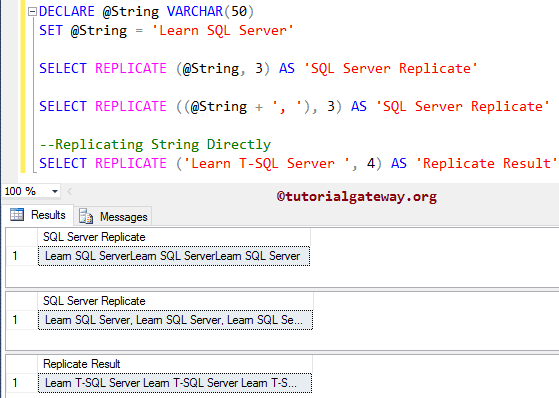
Here, We used the REPLICATE function to repeat the @String data three times. Please refer to the list of SQL String Functions from our SQL Server tutorial.
SELECT REPLICATE (@String, 3) AS 'SQLServer Replicate'
Next, we used the Arithmetic Operator to add the extra space between repeated items in SQL Server.
SELECT REPLICATE ((@String + ', '), 3) AS 'SQLServer Replicate'
In the next line, we used the string data directly inside the function, and the following statement will repeat ‘Learn T-SQL Server’ for 4 times. Please refer to the SQL REPLACE and SQL SUBSTRING functions.
SELECT REPLICATE ('Learn T-SQL Server ', 4) AS 'Replicate Result'
Use SQL REPLICATE Function on Table columns
In this String Function example, we use the Replicate function to assign serial numbers to products. For this, We are going to use the below-shown data.
SELECT [EnglishProductName]
      ,[Color]
      ,LEFT([EnglishProductName], 2) +
	    REPLICATE('0', 3)  +
	    RIGHT([EnglishProductName], 2) AS 'Product Serial'
      ,[StandardCost]
      ,[ListPrice]
      ,[DealerPrice]
      ,[SalesAmount]
      ,[TaxAmt]
FROM [Product Sales]
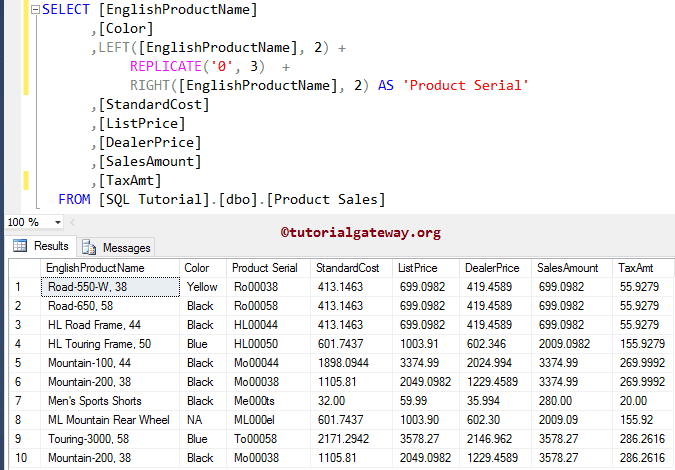
In the statement below, we used the SQL LEFT Function to return the leftmost two characters from the [EnglishProductName] column data.
LEFT([EnglishProductName], 2)
The following statement will repeat 0 for 3 times.
REPLICATE('0', 3)
In the below statement, we used the SQL RIGHT Function to return the rightmost two characters from the [EnglishProductName] column data.
RIGHT([EnglishProductName], 2)
Lastly, we used the SQL Arithmetic Operator to concatenate the result of the above three statements. It means the first two characters of the English Product Name + Three Zeros + the Last two characters of the Product Name.
Using SQL REPLICATE to pad leading zeros to a table column
In the query below, we used the REPLICATE() function to repeat 0 for N number of times. Here, N is calculated by 6 – LEN(Color). This means that if the current row in the Color column is below 6 (4), add two zeros (00) to the starting position. Refer to SQL LEN.
To add the actual product color, we must use the SQL CONCAT function. Otherwise, you get 0, 00, etc.
SELECT [EnglishProductName]
      ,[Color]
      ,CONCAT(REPLICATE('0', 6 - LEN(Color)), Color) AS New_Color
FROM [Product Sales]
EnglishProductName	Color	New_Color
Road-550-W, 38	Yellow	Yellow
Road-650, 58	Black	0Black
HL Road Frame, 44	Black	0Black
HL Touring Frame, 50	Blue	00Blue
Mountain-100, 44	Black	0Black
Mountain-200, 38	Black	0Black
Men's Sports Shorts	Black	0Black
ML Mountain Rear Wheel	NA	0000NA
Touring-3000, 58	Blue	00Blue
Mountain-200, 38	Black	0Black