
The SQL Server RIGHT function returns the rightmost characters from a given expression. The RIGHT function uses its second argument to decide the number of characters it should return, and its syntax.
SELECT RIGHT(Character_Expression, Value)
FROM [Source]
- Character_Expression: It will write the rightmost characters from this expression. We can use any character expression as the RIGHT() function’s first argument, but it has to be implicitly converted to VARCHAR or NVARCHAR.
- Value: Number of characters it has to extract from the Character_Expression.
NOTE: If we pass a negative value as the second argument, the RIGHT() function returns an Error.
The index position in the RIGHT Function will start from 1, Not 0. The following query uses RIGHT() to return the seven rightmost characters (7) from the given string.
SELECT RIGHT('Tutorial Gateway', 7)
GatewaySQL Server RIGHT Function Example
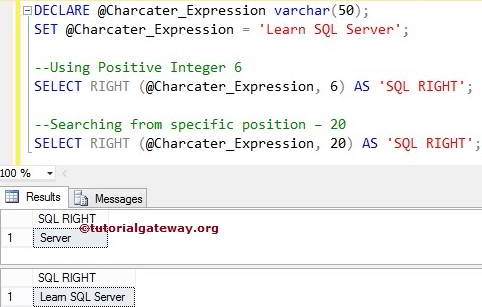
The RIGHT function returns the specified number of rightmost characters from the given string. For example, the following query returns the rightmost 6 and 20 characters from a variable.
First, we declared a Character expression with sample text. Next, we used this one to return the six rightmost characters from the @Character_Expression variable. Please refer to the list of SQL String Functions from our SQL Language basics.
In the following line, We set the second argument = 20, which is greater than the string length. So, the RIGHT Function prints all the letters from the @Character_Expression
DECLARE @Charcater_Expression varchar(50)
SET @Charcater_Expression = 'Learn SQL Server'

--Using Positive Integer 6
SELECT RIGHT(@Charcater_Expression, 6) AS 'SQLRIGHT'

--Searching from specific position – 20
SELECT RIGHT(@Charcater_Expression, 20) AS 'SQLRIGHT'
SQL Server RIGHT on table columns
The RIGHT function also allows you to select the rightmost characters from the column values. In this SQL Server example, we print the rightmost nine words of all the records present inside the Email column
SELECT [FirstName]
      ,[LastName]
      ,[DepartmentName]
      ,[Email]
      ,RIGHT([Email], 9) AS [SQLRIGHT]
 FROM [Employe]
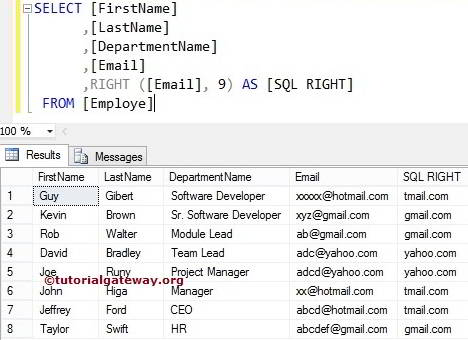
If you observe the above result, it is not getting the domain names perfectly because we are using fixed values. In the following String RIGHT methods example, we show how to use a dynamic value as a second argument to return the domain names accurately.
Use the SQL RIGHT() function to find domain names in Email
We will find the domain names present in the Email column using the SQL right Function.
SELECT [FirstName]
      ,[LastName]
      ,[DepartmentName]
      ,[Email]
      ,RIGHT(
              [Email]
             ,(LEN([Email]) - CHARINDEX ('@', [Email]))
             ) AS [SQLRIGHT]
 FROM [Employe]
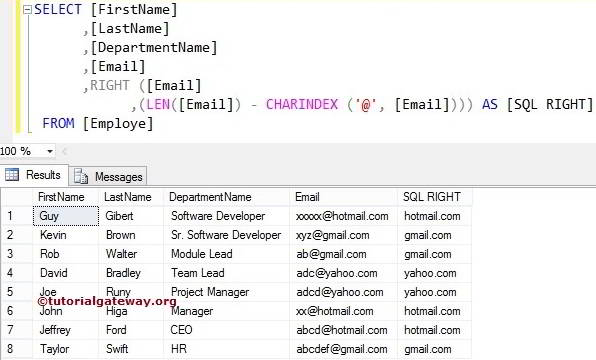
Within the right function, it will find the length of the Email using the LEN method. Explore more about the SQL Server LEN method
LEN([Email])
It returns the index position of the @ symbol. It means the SQL CHARINDEX method checks for the index position of the @ sign in every record. Please refer to the SQL SUBSTRING and SQL LEFT functions.
CHARINDEX ('@', [Email])
We subtracted the index position from the Length of a string.
(LEN([Email]) - CHARINDEX ('@', [Email]))
