
The SQL Server STRING_AGG String Function concatenates the string expressions and places a specified separator in between them. Remember, it will not place a separator at the end of the string.
TIP: The STRING_AGG() function is like an aggregate function because it takes a complete column as the input and concatenates all rows in it. Each row is separated by a given separator and displayed as a single string.
SQL STRING_AGG Syntax
The basic syntax of the STRING_AGG function is as shown below.
SELECT STRING_AGG (String_Expression, Separator)
FROM [Source]
GROUP BY Columns
The list of arguments available in the STRING_AGG is
- String_Expression: Please specify a valid Expression
- Separator: Use VARCHAR or NVARCHAR type. This method will use this separator in-between string concatenation.
- Group By: This is an optional argument. Use this to perform Grouping. Refer to the GROUP BY in SQL Server article.
For this SQL Server demonstration, we are going to use the below-shown data.
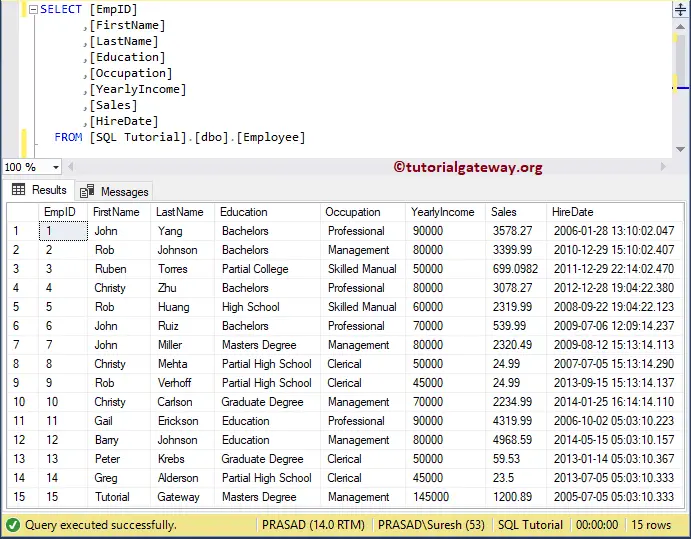
SQL STRING_AGG Function Example
In this String functions example, we will concatenate the Last name column data using the STRING_AGG function.
Here, it takes all rows available in the Employee table’s LastName column and uses a comma and space (‘ , ‘) as the separator to concatenate all rows. Please refer to the list of SQL String Functions from our SQL Server Programming.
SELECT STRING_AGG([LastName], ' , ') AS TextFile
  FROM [Employee]
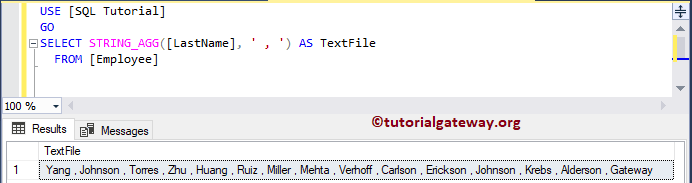
NOTE: When performing the string concatenation, the STRING_AGG() function ignores NULL values in any row.
Using SQL STRING_AGG() with GROUP BY
In this example, we are going to implement the Grouping along with the STRING_AGG function. Here, we group the employees by their Occupation. Next, the STRING_AGG() function concatenates the LastNames in each group as one entry. Please refer to the SQL STRING_ESCAPE and SQL STRING_SPLIT functions.
SELECT STRING_AGG([LastName], ' , ') AS TextFile
  FROM [Employee]
  GROUP BY Occupation
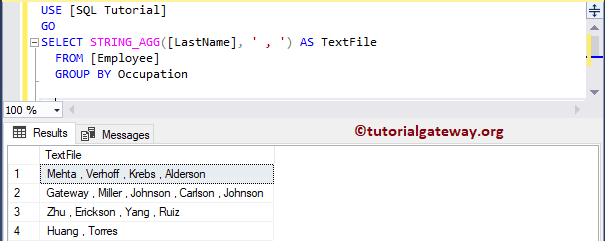
Using the STRING_AGG() function with ORDER BY
It is an extension of the above example. Here, we use the ORDER BY clause within the aggregated group created by the STRING_AGG() function. The query below shows the concatenated last names for each occupation, and those last names are sorted in ascending order. Refer to SQL ORDER BY.
SELECT Occupation, STRING_AGG([LastName], ' , ')
WITHIN GROUP (ORDER BY LastName) AS TextFile
FROM [Employee]
GROUP BY Occupation
Occupation	TextFile
Clerical	Alderson , Krebs , Mehta , Verhoff
Management	Carlson , Johnson , Johnson , Miller
Professional	Erickson , Ruiz , Yang , Zhu
Skilled Manual	Huang , Torres
Using the STRING_AGG() function with aggregations
In the query below, we use the SQL COUNT() function to count the total products in each product color. Here, STRING_AGG() shows the available product sizes in each color. For more, refer to the SQL Aggregate functions.
SELECT Color, COUNT(*) Products, STRING_AGG(Size, ',') AS Sizes
FROM DimProduct
GROUP BY Color
Color	Products	Sizes
Black	133	58,58,58,58,60,60,60,62,62,62,44,44,44,48,48,48,52,52,52,58,58,60,60,62,62,44,44,48,48,52,52,42,42,42,44,48,46,46,46,38,38,38,38,42,44,48,44,44,48,48,52,52,58,58,38,38,42,42,46,46,38,40,44,48,38,40,44,48,62,62,44,44,48,48,52,52,S,M,L,XL,S,M,L,S,S,M,M,L,L,S,M,L,S,M,L,42,44,48,52,40,58,40,42,44,48,52,44,48,52
Blue	28	60,44,50,54,58,62,46,50,54,60,46,50,54,50,54,58,62,46,50,54,60,44,S,M,L
Grey	1	NULL
Multi	18	S,M,L,S,S,S,M,M,M,L,L,L,XL,XL,XL
NA	254	NULL
Red	63	44,48,52,58,58,58,62,62,62,44,44,44,48,48,48,52,52,52,56,56,56,62,44,48,52,56,58,60,44,48,52,58,58,60,60,62,62,44,44,48,48,52,52,44,44,48,48,52,52,58,58,60,60,62,62,44,48,52,58,60
Silver	52	42,42,42,44,48,46,46,46,38,42,44,48,38,38,42,42,46,46,38,38,38,70,38,38,40,42,46,40,42,44,48,52,42,44,48,52,40,40,42,46
Silver/Black	7	NULL
White	4	M,L,M,L
Yellow	46	S,M,L,XL,60,62,46,50,54,40,40,42,42,44,44,48,48,38,38,40,40,42,42,44,44,48,48,38,38,44,50,54,58,40,42,44,48,44,50,54,58,62,46,50,54,60