
The SQL STUFF function inserts one string inside another string. It depends on the length because it deletes a specific number of characters in the original string at the given starting position. Next, it inserts the second (given) string into the original.
SQL STUFF syntax
The syntax of the STUFF function is shown below.
SELECT STUFF (Character_Expression, Starting_Position, Length, New_String)
FROM [Source]
- Character_Expression: String on which you want to insert New_String using this SQL Server Stuff function.
- Starting_Position: From which index position you want, start inserting the New_String characters. It accepts a positive integer value. If we pass a negative number or zero as the second argument, the SQL STUFF() function returns NULL. If it is longer than the length of the original string, it returns NULL.
- Length: How many characters do you want to delete from the Character_Expression? It will start at Starting_Position and delete the specified number of characters from the Character_Expression. If the length is zero, STUFF() inserts the substring from the starting position of the original string. If the length is longer than the original string, it removes the rightmost characters based on the start position and inserts the new string.
- New_String: New string you want to stuff inside the Character_Expression at Starting_Position.
SQL Server STUFF Function Example
The String STUFF function stores the new string inside the old one.
Example 1: Use STUFF() to replace characters in a string
In the following query, we use the STUFF function to replace unwanted special characters with a blank space.
- Within the original string, there are @#$% (a total of 4) special characters.
- The index position of the starting special character (@) is at the 9th position. So, set the second argument (start) to 9.
- As there are 4 special characters that we want to replace, the length of the substring to be replaced is 4.
- As we want to replace them with a space, use it as the fourth argument.
SELECT STUFF('Tutorial@#$%Gateway',9, 4, ' ')
Tutorial GatewayExample 2: Use SQL STUFF() function on variable
It shows you multiple ways to use the STUFF. Below lines of code is used to declare string variables and assign the string data. Please refer to the list of SQL String Functions from our SQL Server Programming.
DECLARE @Character_Expression varchar(50)
SET @Character_Expression = 'Learn Server'
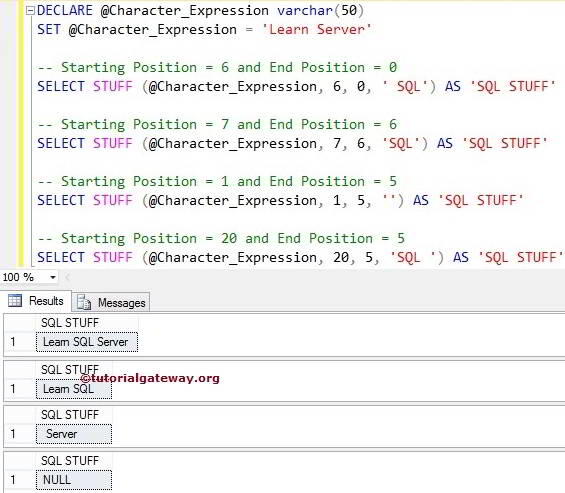
We assigned the start position = 6, and the ending position = 0. So, this String Functions will delete 0 characters from index position 6 and insert text at index position 6
-- Starting Position = 6 and End Position = 0
SELECT STUFF (@Character_Expression, 6, 0, ' SQL') AS 'Res'
We assigned starting position = 7, and end position = 6. So, this stuff function will delete five characters from an index position 7 and insert it at that position.
-- Starting Position = 7 and End Position = 6
SELECT STUFF (@Character_Expression, 7, 6, 'SQL') AS 'Res'
Here, we have given the start position = 1, the end position = 5, and the fourth argument is empty. So, it deletes characters from index 1 to 5 and returns the remaining string.
-- Starting Position = 1 and End Position = 5
SELECT STUFF (@Character_Expression, 1, 5, '') AS 'Res'
In the next line, We set the second argument to 20, which is greater than the string length, so it will return a NULL.
-- Starting Position = 20 and End Position = 5
SELECT STUFF (@Character_Expression, 20, 5, 'SQL ') AS 'Res'
Use STUFF() to replace the end of the string
As previously mentioned, if the length (third argument) is greater than the original string length, the new string replaces all characters from the starting position in the original string with the new string.
Here, 25 is greater than the actual string length (19). The STUFF function starts at the 9th index position and adds ‘s’ to it. It removes all the remaining characters starting from @ to y.
SELECT STUFF('Tutorial@#$%Gateway',9, 25, 's')
TutorialsIf we set the length value to 0, instead of replacing the existing substring, STUFF() will add the new string at the given index position. This query inserts @#$ symbols at the 4th position. It does not delete anything from the original.
SELECT STUFF('New1234York',4, 0, '@#$')
New@#$1234YorkUsing SQL STUFF() function with NULL values
If we pass a NULL value as the fourth argument (new string to insert), the STUFF() function removes the given number of characters from the original string and displays the remaining string.
SELECT STUFF('New1234York',NULL, 4, '@#')
NewYorkHowever, if we pass NULL to any of the first three arguments (character_expression, starting_position, or length), STUFF() returns NULL.
SELECT STUFF('New1234York',4, NULL, '@#')
SELECT STUFF('New1234York', NULL, 4, '@#')
SELECT STUFF(NULL,4, 4, '@#')
NULL
NULL
NULL
Similarly, if the starting_index position is 0 or a negative number, STUFF() returns NULL.
SELECT STUFF('New1234York',0, 4, '@#')

SELECT STUFF('New1234York',-2, 4, '@#')
NULL
NULL
If the length (third argument) is a negative number, STUFF() returns NULL.
SELECT STUFF('New1234York',4, -1, '@#')
NULLUse STUFF to mask Sensitive information
When displaying sensitive information like an account number or credit card number, it is better to mask it. The query below uses STUFF(), LEN(), and REPLICATE() functions to display the last four digits of the credit card number and mask the rest. Refer to the SQL LEN and SQL REPLICATE functions.
DECLARE @cardNumber VARCHAR(16) = '12345678905678'
SELECT STUFF(@cardNumber, 1, LEN(@cardNumber) - 4,
	REPLICATE('*', LEN(@cardNumber) - 3)) AS CreditCard
***********5678Use SQL STUFF function on table columns
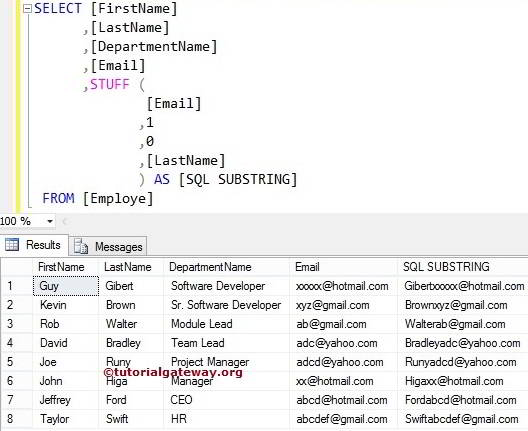
The STUFF function also allows you to add a new string to an old string in the column values. In this example, We insert [LastName] to the Email column at index position 1.
SELECT [FirstName]
      ,[LastName]
      ,[DepartmentName]
      ,[Email]
      ,STUFF (
              [Email]
             ,1
      ,0
      ,[LastName]
             ) AS [SQL SUBSTRING]
 FROM [Employe]
Here, it did not remove any characters from the Emails. It just added the last name to that because We used 0 as the third argument. If you want to remove a few characters, replace 0 with a positive value or see the next example.
Changing Email Ids using SQL STUFF Function
In this example, we are going to change the email IDs present in the Email column using the STUFF Function. The following SQL SELECT query removes the characters before the @ symbol and inserts the [Last Name] column data.
SELECT [FirstName]
      ,[LastName]
      ,[DepartmentName]
      ,[Email]
      ,STUFF (
               [Email]
              ,1
       ,CHARINDEX('@',[Email]) - 1
       ,[LastName]
            ) AS [SQL SUBSTRING]
 FROM [Employe]
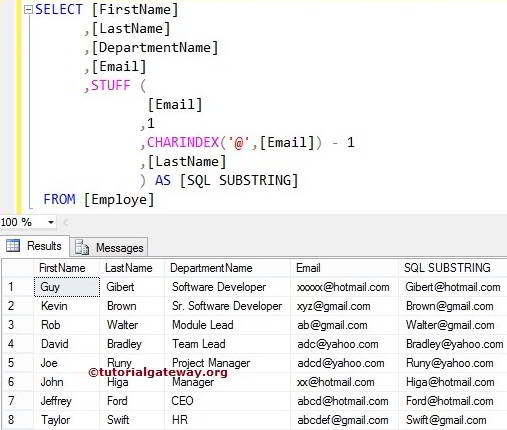
The statement below will return the index position of the @ symbol. It means the SQL Server CHARINDEX Function will check for the index position of the @ symbol in each record. Next, we subtracted one from the index position because we wanted to replace characters before this symbol.
CHARINDEX ('@', [Email]) - 1
The statement below will delete the characters from index position 1 to the @ symbol and then insert [Last Name] data in that place using this. Please refer to SQL DIFFERENCE and SQL NCHAR functions.
STUFF (
       [Email]
      ,1
      ,CHARINDEX('@',[Email]) - 1
      ,[LastName]
     ) AS [SQL SUBSTRING]
