To reduce abuse on our platform by search engine optimizers and spammers, we’ve partly reversed our change from 2021 to allow do-follow links on blogs here.
Going forward, links on all blogs that aren’t using a custom domain will again have no-follow links on their blogs. This will help protect the reputation of all blogs across Write.as, ensuring that our domain doesn’t become associated with spam and low-quality backlink content, in the eyes of search engines.
Again, this only affects blogs using a write.as or writeas.com blog URL. Blogs on a custom domain will still have do-follow links, and are still free to build up their own domain reputation. If you’re a Pro user who isn’t publishing backlink-building commercial content and this negatively affects you, please let us know on our forum!
#updates #writeas #pro
We’ve fixed a bug in RSS feeds where post summaries could start with garbled text, and include leftover bits of HTML. Now feed readers show a clean, plain-text summary of each post, and still include the full post as always. This fix covers blog feeds, plus feeds on Read Write.as, Submit.as, and Snap.as.
This was previously reported in WriteFreely issue #1778.
#updates #RSS #fixes #writeas
We've made some improvements to how your newsletter emails show up for readers! Now they'll have better spacing on mobile, and a set width on desktop so they read much more easily.
If you haven't tried newsletters on Write.as yet, you can learn about them here!
#updates #newsletters #improvements #writeas
We now show alt text in the fediverse! Now alt text from photos in your blog posts gets sent out over ActivityPub, so your images are more accessible to your readers and followers there.
Alt text (meaning alternative text) lets you add a description of any images you include in your posts. This is especially helpful to readers who are blind or have low vision, and use screen readers to consume your posts — instead of an empty space where your image is, the screen reader can read aloud the description you provide, giving them the full context of everything you’re sharing.
In our Plain Text editor, you can use standard Markdown to add alt text in the brackets before your image URL:
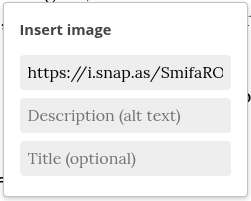
In our Rich Text editor, you can use the top menu option: Insert → Image to find a Description (alt text) field, where you can describe the image:

Alt text on Write.as has been here since day one. But especially with it carrying over to the fediverse now, we’d highly encourage writers to make an effort to include it more often in their posts!
#updates #fediverse #altText #accessibility
Been a while since you logged into Write.as, and can’t remember your username? Now you can easily retrieve it on our Forgot Username page! As long as you have an email address associated with your account, you can enter it there and get a message telling you the username(s) of any and all accounts you have.
#updates #improvements #WriteAs
A small but helpful fix is out for federated blogs! Now, changes to your blog — title, description, icon, etc. — will all go out to the fediverse, so your followers will always see the most up-to-date version, no matter where they are!
#updates #improvements #fediverse #writeas
We fixed a bug that’s haunted our Rich Text editor for a long time, where editing a post that has special HTML or shortcodes would cause the whole thing to break. Now you can create these more custom posts in the Plain Text editor and switch over to Rich Text without worry!
#updates #editor #improvements #writeas
Ever publish a post with the wrong font set on your post? Now you can easily fix that through the web app! Just edit your post, and in the editor, click the circular “i” button. You’ll find a new option to set the correct font there!
#updates #editor #improvements #writeas
Post previews are here! Now you get a peek at how your Markdown will show up before publishing to your blog or anonymously. In the Plain Text editor, simply click the little “Preview” icon next to the Publish button, and you'll be able to see the post in its full glory!

#updates #editor #improvements
We just fixed an issue that affected only Write.as blogs, hosted on a custom domain, with a custom fediverse handle — now readers shouldn't have any issues getting your posts in the fediverse!
#updates #fediverse
