
Summary: In this tutorial, you will learn how to use the SQLite COUNT function to get the number of items in a group.
Introduction to SQLite COUNT() function #
The function COUNT() is an aggregate function that returns the number of items in a group.
For example, you can use the COUNT() function to get the number of tracks from the tracks table, the number of artists from the artists table, and so on.
The following illustrates the basic syntax of the COUNT function:
COUNT([ALL | DISTINCT] expression);Arguments #
The COUNT function behaves according to the arguments that you pass into it and the option ALL or DISTINCT that you specify.
The following describes the meanings of ALL and DISTINCT options:
ALL: when you specify all, theCOUNT()function counts all non-null values, including duplicates. TheCOUNT()function uses theALLoption by default if you skip it.DISTINCT: if you explicitly use theDISTINCToption, theCOUNTfunction counts unique and non-null values.
The expression can be a column or an expression that involves columns to which the function COUNT() is applied.
SQLite provides another syntax of the COUNT() function:
COUNT(*)The COUNT(*) function returns the number of rows in a table, including rows with NULL and duplicates.
SQLite COUNT() function illustration #
First, create a table called t1 that has one column:
CREATE TABLE t1(c INTEGER);Second, insert five rows into the t1 table:
INSERT INTO t1(c)
VALUES(1),(2),(3),(null),(3);Third, query data from the t1 table:
SELECT * FROM t1; c
------
1
2
3
NULL
3
(5 rows)
Fourth, use the COUNT(*) function to return the number of rows in the t1 table:
SELECT COUNT(*) FROM t1;Output:
COUNT(*)
----------
5
(1 row)
The output shows that the result set includes NULL and duplicate rows.
Fifth, use the COUNT(expression) to get the number of non-null values in the column c:
SELECT COUNT(c) FROM t1; COUNT(c)
----------
4
(1 row)
In this example, the COUNT(c) returns the number of non-null values. It counts the duplicate rows as separate rows.
Sixth, use the COUNT(DISTINCT expression) to get the number of unique and non-null values in column c:
SELECT COUNT(DISTINCT c) FROM t1; COUNT(DISTINCT c)
-------------------
3
(1 row)SQLite COUNT(*) examples #
We will take the table tracks in the sample database to demonstrate the functionality of the COUNT(*) function.
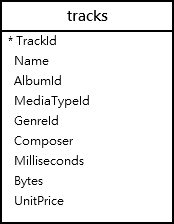
1) SQLite COUNT(*) example #
To get the number of rows from the tracks table, you use the COUNT(*) function as follows:
SELECT count(*)
FROM tracks;count(*)
--------
35032) SQLite COUNT(*) with WHERE clause example #
The following statement uses the COUNT(*) function with a WHERE clause to find the number of tracks whose album id is 10:
SELECT COUNT(*)
FROM tracks
WHERE albumid = 10; COUNT(*)
----------
14
(1 row)3) SQLite COUNT(*) with GROUP BY clause example #
To get all the albums and the number of tracks in each album, you combine the COUNT(*) function with the GROUP BY clause:
SELECT
albumid,
COUNT(*)
FROM
tracks
GROUP BY
albumid; AlbumId | COUNT(*)
---------+----------
1 | 10
2 | 1
3 | 3
4 | 8
5 | 15
6 | 13
7 | 12
8 | 14
9 | 8
10 | 14
...
In this example:
- First, the
GROUP BYclause groups tracks by album id. - Then, the
COUNT(*)function returns the number of tracks for each album or group of tracks.
4) SQLite COUNT(*) with HAVING clause example #
The following uses the COUNT(*) in the HAVING clause to find albums that have more than 25 tracks:
SELECT
albumid,
COUNT(*)
FROM
tracks
GROUP BY
albumid
HAVING COUNT(*) > 25 AlbumId | COUNT(*)
---------+----------
23 | 34
73 | 30
141 | 57
229 | 26
(4 rows)
5) SQLite COUNT(*) with INNER JOIN clause example #
In order to make the output of the above query more useful, you can include the album’s name column. To do this, you add INNER JOIN and ORDER BY clauses to the query like the following query:
SELECT
tracks.albumid,
title,
COUNT(*)
FROM
tracks
INNER JOIN albums ON
albums.albumid = tracks.albumid
GROUP BY
tracks.albumid
HAVING
COUNT(*) > 25
ORDER BY
COUNT(*) DESC; AlbumId | Title | COUNT(*)
---------+----------------+----------
141 | Greatest Hits | 57
23 | Minha Historia | 34
73 | Unplugged | 30
229 | Lost, Season 3 | 26
(4 rows)
SQLite COUNT(DISTINCT expression) examples #
Let’s take a look at the employees table from the sample database.
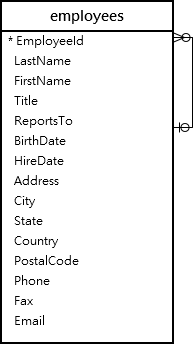
SELECT
employeeid,
lastname,
firstname,
title
FROM
employees; EmployeeId | LastName | FirstName | Title
------------+----------+-----------+---------------------
1 | Adams | Andrew | General Manager
2 | Edwards | Nancy | Sales Manager
3 | Peacock | Jane | Sales Support Agent
4 | Park | Margaret | Sales Support Agent
5 | Johnson | Steve | Sales Support Agent
6 | Mitchell | Michael | IT Manager
7 | King | Robert | IT Staff
8 | Callahan | Laura | IT Staff
(8 rows)
To get the number of position titles, you pass the title column to the COUNT() function as follows:
SELECT COUNT(title)
FROM employees;COUNT(title)
------------
8However, to get the number of unique titles, you need to add the DISTINCT option to the COUNT() function as shown in the following statement:
SELECT COUNT(DISTINCT title)
FROM employees; COUNT(DISTINCT title)
-----------------------
5
(1 row)
In this tutorial, we have shown you how to use SQLite COUNT() function to count the number of items in a group.
Thank you for your feedback!
