

An array is sorted in ascending order when no element is greater than the element right after it, so to check if an array is sorted in Java we compare each pair of neighbors and return false at the first pair that is out of order. The JDK has no isSorted() method, so we write this loop ourselves or call a library such as Apache Commons Lang or Guava.
We check the order before running a binary search, when we validate data that a client or a file claims is sorted, and in tests that verify a sort method or a database ORDER BY. The check costs one pass over the array, whereas sorting costs O(n log n).
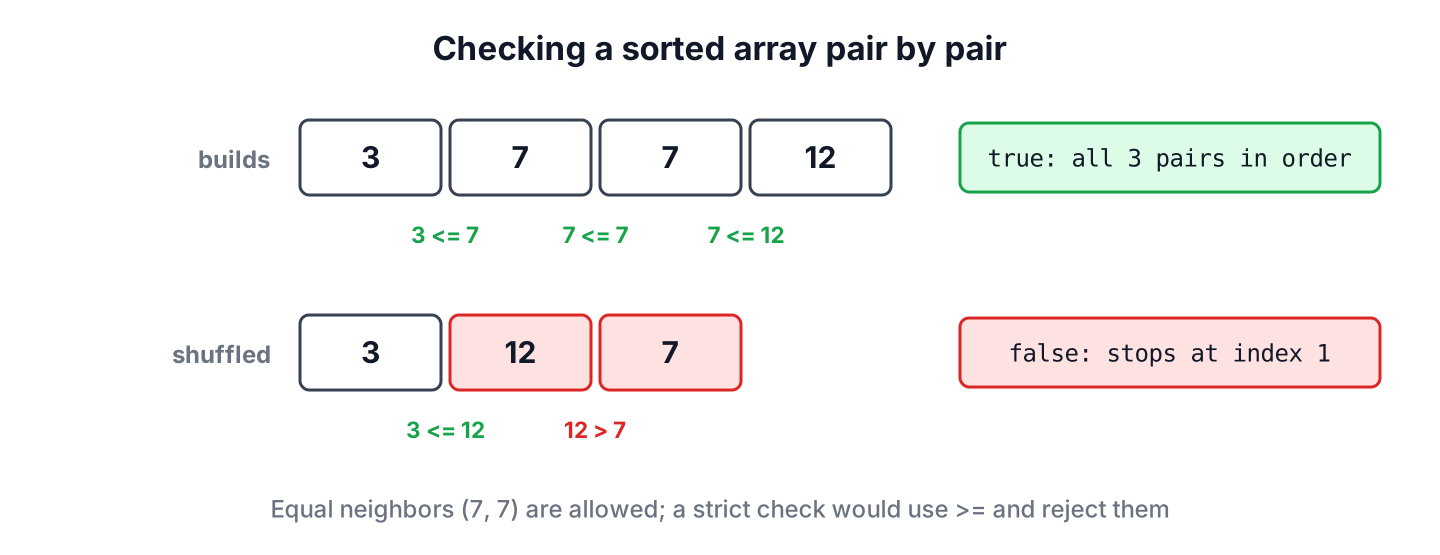
The following example checks two arrays of build numbers with the isSorted() method from section 1.
int[] builds = {3, 7, 7, 12};
boolean ok = isSorted(builds);              // true
int[] shuffled = {3, 12, 7};
boolean notOk = isSorted(shuffled);         // false
Notice that the repeated 7 does not break the order. After the loop and its one-line stream form, we check descending and strict order, objects with a comparator, strings with mixed case, and the library methods.
1. Comparing Each Element with Its Neighbor
The check walks the array once and compares a[i] with a[i + 1]. If one pair has the larger value first, the array is not sorted and we stop there, without reading the rest. If the loop reaches the end, every pair is in order, and so is the whole array, because order between neighbors carries through the chain.
static boolean isSorted(int[] a) {
    if (a == null) {
        return true;
    }
    for (int i = 0; i < a.length - 1; i++) {
        if (a[i] > a[i + 1]) {
            return false;               // first out-of-order pair
        }
    }
    return true;
}
boolean empty = isSorted(new int[0]); // true
boolean one = isSorted(new int[]{42}); // true
boolean tail = isSorted(new int[]{1, 2, 3, 5, 4}); // falseEmpty and one-element arrays count as sorted, because they have no pair to compare. Treating null as sorted matches the behavior of ArrayUtils.isSorted(); a method that must reject null throws an exception there instead. The loop runs in O(n) time and O(1) memory, the same cost as a linear search.
2. A One-Line Check with IntStream.noneMatch()
The same rule fits in one stream expression. We stream the indexes of every pair and ask that none of them is out of order. The noneMatch() method stops at the first match, so it reads no further than the loop does.
int[] builds = {3, 7, 7, 12};
boolean ascending = IntStream.range(0, builds.length - 1).noneMatch(i -> builds[i] > builds[i + 1]);    // true
boolean descending = IntStream.range(0, builds.length - 1).noneMatch(i -> builds[i] < builds[i + 1]);   // false
boolean strictly = IntStream.range(0, builds.length - 1).noneMatch(i -> builds[i] >= builds[i + 1]);    // false
Only the comparison changes between the three variants. Strict order rejects equal neighbors, which is the right check for values that must be unique, such as invoice numbers.
| Order | Out-of-order pair | {3, 7, 7, 12} | {12, 7, 3} |
|---|---|---|---|
| Ascending (non-decreasing) | a[i] > a[i + 1] | true | false |
| Strictly ascending | a[i] >= a[i + 1] | false | false |
| Descending (non-increasing) | a[i] < a[i + 1] | false | true |
3. Objects, Comparable and Comparator
For objects, the comparison operator becomes compareTo() or compare(). A positive result means the left element belongs after the right one, so a positive result for any pair means the array is not sorted. One generic method with a Comparator parameter covers every order.
static <T> boolean isSorted(T[] a, Comparator<? super T> order) {
    if (a == null) {
        return true;
    }
    for (int i = 0; i < a.length - 1; i++) {
        if (order.compare(a[i], a[i + 1]) > 0) {
            return false;
        }
    }
    return true;
}
static <T extends Comparable<? super T>> boolean isSorted(T[] a) {
return isSorted(a, Comparator.naturalOrder());
}Say a mobile app downloads a list of releases and must show the newest first. Before it trusts the server’s order, it checks the dates with the same comparator it would sort with, reversed for newest first.
record Release(String version, LocalDate date) {}Release[] releases = {new Release("2.1", LocalDate.of(2026, 9, 1)), new Release("2.0", LocalDate.of(2026, 6, 15)), new Release("1.9", LocalDate.of(2026, 3, 2))};
boolean newestFirst = isSorted(releases, Comparator.comparing(Release::date).reversed()); // true
boolean oldestFirst = isSorted(releases, Comparator.comparing(Release::date)); // false
Integer[] boxed = {3, 7, 7, 12};
boolean natural = isSorted(boxed); // trueA null element makes compareTo() throw a NullPointerException. When the array may contain null, we wrap the comparator in Comparator.nullsFirst() or nullsLast(), the same wrapper we would pass to a sort with null values.
Integer[] withNull = {null, 3, 7};
boolean nullsFirst = isSorted(withNull, Comparator.nullsFirst(Comparator.naturalOrder()));   // true
boolean crash = isSorted(withNull);                                                          // NullPointerException
4. Strings and Letter Case
The natural order of String compares UTF-16 character codes, so every uppercase letter comes before every lowercase letter, and an alphabetical list with mixed case fails the check. If the list was sorted for people to read, we check it with String.CASE_INSENSITIVE_ORDER.
String[] names = {"apple", "Banana", "cherry"};
boolean byCode = isSorted(names);                                    // false, "B" < "a"
boolean ignoreCase = isSorted(names, String.CASE_INSENSITIVE_ORDER); // true
For text in other languages, such as accented letters, a java.text.Collator for the user’s locale gives the dictionary order, and it works with the same isSorted() method because Collator implements Comparator.
5. Checking Before a Binary Search
The method Arrays.binarySearch() requires a sorted array, and its result is undefined otherwise. On unsorted data, it does not throw an exception; it can return a negative number for a value that is present, which looks like a valid “not found” result.
int[] shuffled = {40, 10, 30, 20};
int lost = Arrays.binarySearch(shuffled, 40);   // -5, although 40 is at index 0
A check before the search prevents that bug. When the data comes from outside, such as a file of timestamps that should be in time order, we check once and sort a copy only if the check fails. The O(n) check is faster than a sort we do not need, and the array sorting methods take over when we do need one.
int[] timestamps = {1700, 1650, 1800};
int[] searchable = isSorted(timestamps) ? timestamps : sortedCopy(timestamps);
int at = Arrays.binarySearch(searchable, 1700);   // 1
static int[] sortedCopy(int[] a) {
int[] copy = a.clone();
Arrays.sort(copy);
return copy;
}6. Library Methods for Arrays and Lists
Apache Commons Lang has ArrayUtils.isSorted() with overloads for every primitive array type, for Comparable arrays, and for an array with a Comparator. Like our method, it returns true for a null array.
int[] builds = {3, 7, 7, 12};
boolean commons = ArrayUtils.isSorted(builds);                                   // true
String[] names = {"apple", "Banana", "cherry"};
boolean commonsCase = ArrayUtils.isSorted(names, String.CASE_INSENSITIVE_ORDER); // true
boolean commonsNull = ArrayUtils.isSorted((int[]) null);                         // true
Guava works on any Iterable, which makes it the shorter choice for lists. The method Comparators.isInOrder() checks non-decreasing order, and isInStrictOrder() rejects equal neighbors. For an array, we pass Arrays.asList(), which wraps the array without copying it.
List<Integer> buildList = List.of(3, 7, 7, 12);
boolean inOrder = Comparators.isInOrder(buildList, Comparator.naturalOrder());           // true
boolean strict = Comparators.isInStrictOrder(buildList, Comparator.naturalOrder());      // false
String[] names = {"apple", "Banana", "cherry"};
boolean guavaArray = Comparators.isInOrder(Arrays.asList(names), String.CASE_INSENSITIVE_ORDER);   // true
Without a library, a list check is the same loop with list.get(i), which is fine for an ArrayList. For a LinkedList, we walk it with an iterator and remember the previous element, because get(i) on a linked list is O(i).
7. Sorted Array Check FAQs
Most follow-up questions are about built-in methods, equal neighbors, sorted copies and recursion.
7.1. Is there a built-in method to check if an array is sorted in Java?
No. The JDK has Arrays.sort() but no isSorted(). We use a loop, a stream with noneMatch(), ArrayUtils.isSorted() from Apache Commons Lang, or Comparators.isInOrder() from Guava.
7.2. Is an array with equal neighbors sorted?
Yes, in non-decreasing order, which is what Arrays.sort() produces. It is not strictly increasing, so a check for unique ascending values uses >= instead of >.
7.3. Should we compare the array with a sorted copy?
No. Arrays.equals(a, sortedCopy(a)) gives the right answer, but it costs O(n log n) time and O(n) memory, whereas the pair check costs O(n) and stops at the first problem. The array equality tutorial explains Arrays.equals() itself.
7.4. How do we check if an array is sorted with recursion?
We compare the last two elements and recurse on the array without its last element, stopping at length 1. The recursive version makes the same comparisons as the loop but uses one stack frame per element, so a long array throws a StackOverflowError.
static boolean isSortedRecursive(int[] a, int n) {
    if (n <= 1) {
        return true;
    }
    return a[n - 2] <= a[n - 1] && isSortedRecursive(a, n - 1);
}
int[] builds = {3, 7, 7, 12};
boolean rec = isSortedRecursive(builds, builds.length); // true8. Conclusion
Checking if an array is sorted means comparing each element with its neighbor and stopping at the first pair in the wrong order. One loop handles primitives, and a generic method with a Comparator handles objects, descending order, null elements and case-insensitive text.
The check is O(n), so it is a cheap guard before Arrays.binarySearch(), which returns wrong results on unsorted data without any exception. When a library is already on the classpath, ArrayUtils.isSorted() and Guava’s Comparators.isInOrder() do the same job in one call.
9. References
- Comparator (Java SE 25 API)
- Arrays.binarySearch() (Java SE 25 API)
- String.CASE_INSENSITIVE_ORDER (Java SE 25 API)
- ArrayUtils (Apache Commons Lang API)
- Comparators (Guava API)
Happy Learning !!

