
An object identity string in Java is the text ClassName@hexHash built from an object’s class name and its identity hash code, without calling the object’s own toString() or hashCode() methods. Since Java 19, the method Objects.toIdentityString() returns it, and it helps us tell two objects apart even when they have the same content.
We use identity strings in debug logs to see whether two variables point to the same instance, to trace one object through a framework, and to log objects whose toString() is too expensive or unsafe to call.
The following example compares the regular toString() of a record with its identity string.
Song song = new Song(1L, "Intro");
String text = song.toString();                              // "Song[id=1, title=Intro]"
String identity = Objects.toIdentityString(song);           // e.g. com.howtodoinjava.Song@1b6d3586
boolean sameBuild = identity.equals(song.getClass().getName() + "@" + Integer.toHexString(System.identityHashCode(song)));  // true
record Song(long id, String title) {}Notice that the identity string ignores the record’s generated toString() and shows the class name with a hash code instead. We start with the default toString() output, followed by the ways to get the identity string on Java 19 and later and on older versions, and end with what the hash part means.
1. The Default Behavior with and without toString() Method
If a class does not override toString(), it inherits Object.toString(), which returns getClass().getName() + “@” + Integer.toHexString(hashCode()). For a class that also keeps the default hashCode(), this text is the object identity string.
Consider the following Track class of a music app, which has two fields and no toString() method.
class Track {
    private final long id;
    private final String title;

    Track(long id, String title) {
        this.id = id;
        this.title = title;
    }
}
Track track = new Track(1L, "Intro");
String printed = track.toString(); // e.g. com.howtodoinjava.Track@6e5e91e4
boolean isIdentity = printed.equals(Objects.toIdentityString(track)); // trueWhen we add a toString() method that prints the fields, printing the object shows the details instead, such as Track{id=1, title=’Intro’}, and the identity part is gone from the output.
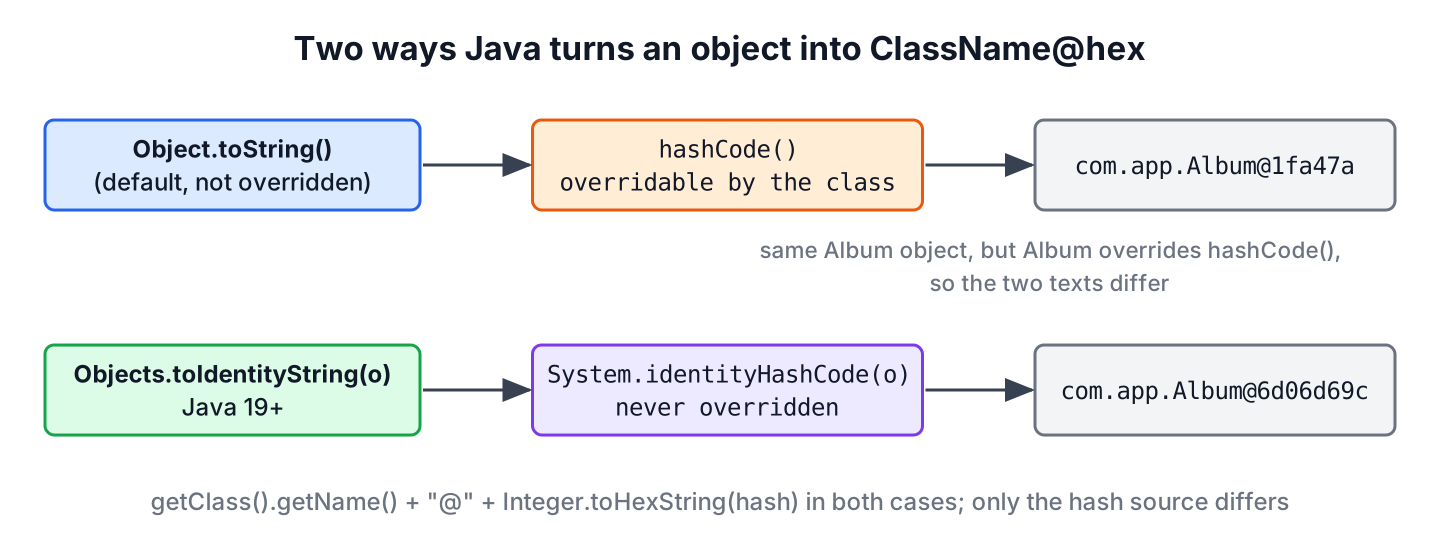
A less known case is a class that overrides hashCode() but not toString(). The default toString() calls the overridden hashCode(), so two different but equal objects print the same text, and the output no longer identifies the instance.
class Album {
    private final String name;

    Album(String name) {
        this.name = name;
    }

    @Override
    public boolean equals(Object o) {
        return o instanceof Album other && name.equals(other.name);
    }

    @Override
    public int hashCode() {
        return name.hashCode();
    }
}
Album one = new Album("Blue");
Album two = new Album("Blue");
boolean sameText = one.toString().equals(two.toString()); // true
boolean sameIdentity = Objects.toIdentityString(one).equals(Objects.toIdentityString(two)); // falseThe default toString() shows the identity hash code only while hashCode() is not overridden, which is why a separate identity string method exists. More about the rules for these two methods is in hashCode() and equals().
2. Accessing the Object Identity String
The way to get the identity string depends on the Java version, but the result is the same text.
2.1. Java 19 and Later
Starting with JDK 19, the method Objects.toIdentityString(Object) returns the identity string. It never calls an overridable method of the object, so it works the same for records, entities, proxies and classes with custom toString() methods.
Song song = new Song(1L, "Intro");
String details = song.toString();                           // "Song[id=1, title=Intro]"
String identity = Objects.toIdentityString(song);           // e.g. com.howtodoinjava.Song@7591083d
The method is not null-safe. Passing null throws a NullPointerException, so a log statement that may get a null reference needs a small check.
static String identityOf(Object object) {
    return object == null ? "null" : Objects.toIdentityString(object);
}
String missing = Objects.toIdentityString(null); // NullPointerException
String safe = identityOf(null); // "null"2.2. Java 18 and Before
For apps running on older versions, we build the identity string from the class name and System.identityHashCode(), which returns the hash code that Object.hashCode() would return, whether or not the class overrides it. The method below returns the same text as Objects.toIdentityString().
static String getIdentityString(Object object) {
    return object.getClass().getName() + "@" + Integer.toHexString(System.identityHashCode(object));
}
Song song = new Song(1L, "Intro");
String legacy = getIdentityString(song); // e.g. com.howtodoinjava.Song@7591083d
boolean same = legacy.equals(Objects.toIdentityString(song)); // trueUnlike Objects.toIdentityString(), System.identityHashCode(null) returns 0 instead of throwing, but getIdentityString(null) still throws a NullPointerException at getClass().
3. What the Hash Part Means
The hex number after the @ sign is the identity hash code, and developers often read more into it than it holds. The Object.hashCode() contract and the HotSpot JVM give us these rules.
- The value stays the same for the whole life of the object, even when the garbage collector moves the object in memory.
- The value is not the memory address. HotSpot generates it when it is first requested and stores it in the object header.
- The value is not unique. It is an int, and HotSpot uses at most 31 bits of it, so two live objects can get the same identity hash code, although it is rare.
- The value differs between runs of the same program, so it means nothing outside the running JVM.
As a result, an identity string identifies an object inside one JVM, during one run, with a small chance of a clash. For an ID that must be unique or survive a restart, we use a database key or a UUID instead.
4. Why do We Need the Object Identity String?
Identity strings help where content-based equality does not answer the question, mostly in debugging and logging. Two objects may have the same state, but if they are separate instances, they have different identities, and the identity string shows that.
Consider a JPA entity Customer whose toString() prints its lazy orders collection. A debug log line in a service that runs outside a transaction calls that toString() and fails with a LazyInitializationException, or it triggers an extra database query. Logging Objects.toIdentityString(customer) calls no method of the entity, so the log line is safe, and it still shows whether two code paths got the same instance.
Other common uses follow the same idea.
- Checking whether a Spring bean is a singleton, because every injection point of a singleton prints the same identity string.
- Finding accidental copies, for example when a cache returns a new object instead of the cached one.
- Tracking an object in a memory leak investigation, together with an IdentityHashMap that counts instances by reference.
- Writing a toString() for a class with a reference cycle, where printing the other object’s identity string instead of its full toString() avoids a StackOverflowError.
5. Object Identity String FAQs
Readers who print identity strings ask mostly about the number after the @ sign and what it promises.
5.1. Is the hash code in the identity string the memory address?
No. HotSpot generates the identity hash code with a random number generator per thread and stores it in the object header the first time it is requested. The garbage collector can move the object while the identity hash code stays the same. The hashCode() contract asks for distinct values for distinct objects only as far as is reasonably practical.
5.2. Is an object identity string unique?
No. The hash part is a single int, so two live objects of the same class can produce the same identity string. Use it to tell objects apart in logs, not as a key.
5.3. What is the difference between toString() and Objects.toIdentityString()?
The toString() method can be overridden and in most classes prints the object’s content, whereas Objects.toIdentityString() always prints the class name and the identity hash code. For a class that overrides neither toString() nor hashCode(), both return the same text.
5.4. Does the identity string change after serialization?
Yes. Deserialization creates a new object, which gets its own identity hash code, so the copy has a different identity string even though its content is equal.
6. Conclusion
An object identity string is the class name, an @ sign and the hex identity hash code. The default toString() returns it only while a class overrides neither toString() nor hashCode(), so Java 19 added Objects.toIdentityString(), which returns it for any object. On older versions, System.identityHashCode() builds the same text.
The method Objects.toIdentityString() throws a NullPointerException for null, and the hash part is neither a memory address nor unique, so identity strings belong in logs and debugging sessions, not in stored data. The Java tutorial covers the Object methods behind this text in more detail.
7. References
- Objects.toIdentityString() Javadoc
- System.identityHashCode() Javadoc
- Object.toString() Javadoc
- JDK-8280184, Add Objects.toIdentityString
Happy Learning !!

