

A Python list comprehension builds a new list from an iterable in one expression, written as [expression for item in iterable if condition]. It replaces the common pattern of creating an empty list, looping and calling append(), and it is shorter and often faster than that loop.
# A new list of even numbers from 0-9
even_numbers = [x for x in range(10) if x % 2 == 0]                # [0, 2, 4, 6, 8]

# if-else inside a list comprehension
labels = ["Even" if x % 2 == 0 else "Odd" for x in range(4)]      # ['Even', 'Odd', 'Even', 'Odd']

# Two lists in one comprehension
combined = [(x, y) for x in [1, 2, 3] for y in [3, 2, 1] if x != y]
# [(1, 3), (1, 2), (2, 3), (2, 1), (3, 2), (3, 1)]
The sections start with the syntax, work through common examples, place if and if-else in the right spot, combine two lists with nested loops and zip(), and look at dict, set and generator comprehensions.
1. Syntax
The basic syntax of a list comprehension has an output expression, a for clause and an optional filter.
[expression for item in iterable if condition]- expression produces each element of the new list, such as x, x * 2 or name.upper().
- item is the loop variable that takes each value of the input.
- iterable is any sequence, collection or iterator, such as a list, range(), a string or a file.
- condition is optional. Items for which it is false are skipped.
- Return value is always a new list. The input is not changed.
The image maps these parts to the even-numbers example.
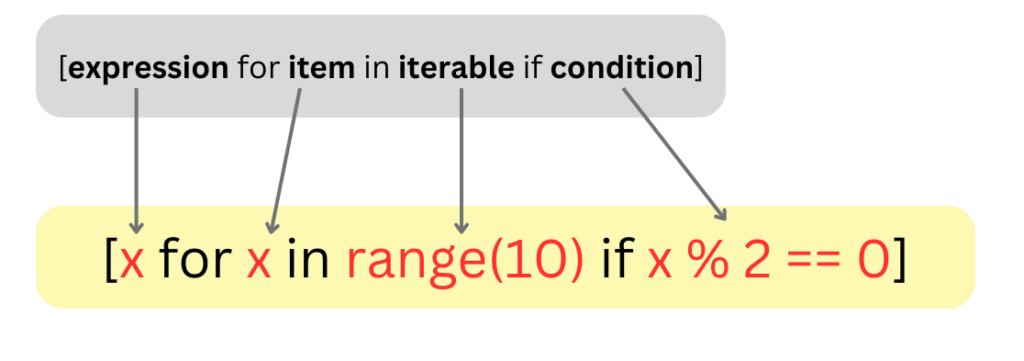
The comprehension and the equivalent for loop produce the same list. The loop needs four lines and a temporary empty list.
even_numbers = []
for x in range(10):
    if x % 2 == 0:
        even_numbers.append(x)
loop_result = even_numbers                                       # [0, 2, 4, 6, 8]
comprehension_result = [x for x in range(10) if x % 2 == 0]       # [0, 2, 4, 6, 8]
2. List Comprehension Examples
Each example transforms, filters or reshapes a list in a single line.
2.1. Squaring Numbers
We create a list of squares for the numbers from 0 to 4.
squares = [x**2 for x in range(5)] # [0, 1, 4, 9, 16]2.2. Lowercase Conversion
We convert all the words in a list to lowercase. Any method call or function can be the output expression.
words = ["List", "COMPREHENSIONS", "Are", "COOL"]
lower_words = [word.lower() for word in words]    # ['list', 'comprehensions', 'are', 'cool']
2.3. Extracting Numbers from a String
A string is iterable, so the comprehension visits each character. We keep the digits and convert each one to an integer.
string = "Hello 12345 World"
numbers = [int(s) for s in string if s.isdigit()]   # [1, 2, 3, 4, 5]
2.4. Flattening a Matrix
To convert a list of lists into a flat list, we write two for clauses. They run in the same order as nested loops, outer loop first.
matrix = [[1, 2], [3, 4], [5, 6]]
flattened = [num for row in matrix for num in row]   # [1, 2, 3, 4, 5, 6]
2.5. Generating Random Numbers
We create ten random numbers and keep the ones that are 0.5 or greater. Calling random.seed() makes the output repeatable, and without it every run gives different numbers.
import random

random.seed(7)
numbers = [round(random.random(), 2) for _ in range(10)]
randoms = [x for x in numbers if x >= 0.5]     # [0.65, 0.54, 0.51]
The name _ marks a loop variable that the expression does not use.
3. List Comprehension using If-else
An if-else in a comprehension chooses between two values for every item, so it changes the output instead of filtering. This is a conditional expression, and it goes before the for clause.
[value_if_true if condition else value_if_false for item in iterable]In this code, we label the numbers from 0 to 9 as ‘Even’ or ‘Odd’. The result has one label for each input number.
labels = ["Even" if x % 2 == 0 else "Odd" for x in range(10)]
print(labels)
['Even', 'Odd', 'Even', 'Odd', 'Even', 'Odd', 'Even', 'Odd', 'Even', 'Odd']A filter if goes after the for clause, while an if-else goes before it. Putting else after the for clause is a syntax error.
prices = [12, 0, 7, 0]
paid = [p for p in prices if p > 0]                 # [12, 7], filter
shown = [p if p > 0 else "free" for p in prices]    # [12, 'free', 7, 'free'], choose
>>> [p for p in prices if p > 0 else "free"]
SyntaxError: invalid syntaxBoth forms can appear together, as in [x * 2 if x > 5 else x for x in data if x is not None].
4. Combining Two Lists with Nested for Clauses
Two for clauses pair every element of the first list with every element of the second list, like a nested loop. The result grows fast, since two lists of 1,000 items produce 1,000,000 pairs.
This example combines the elements from two lists when they are not equal.
list1 = [1, 2, 3]
list2 = [3, 2, 1]
combined = [(x, y) for x in list1 for y in list2 if x != y]
print(combined)
[(1, 3), (1, 2), (2, 3), (2, 1), (3, 2), (3, 1)]4.1. Pairing Two Lists with zip()
To combine items at the same position instead of every pair, we use zip(). Since Python 3.10, strict=True raises an error when the lists have different lengths, instead of dropping the extra items.
names = ["tea", "milk", "sugar"]
prices = [3, 2, 1]
labels = [f"{n}: {p}" for n, p in zip(names, prices)]    # ['tea: 3', 'milk: 2', 'sugar: 1']
totals = [a + b for a, b in zip([1, 2], [10, 20], strict=True)]   # [11, 22]
4.2. Nested Comprehension for a Matrix
A comprehension inside another comprehension builds a list of lists. The inner one creates each row, and the example transposes a 2×3 matrix.
matrix = [[1, 2, 3], [4, 5, 6]]
transposed = [[row[i] for row in matrix] for i in range(3)]   # [[1, 4], [2, 5], [3, 6]]
Deeply nested comprehensions become hard to read, and a regular loop with good variable names is often the clearer choice.
5. Dict, Set and Generator Comprehensions
The same syntax builds other collections. Curly braces with key: value create a dict, curly braces with a single expression create a set, and round brackets create a generator that produces items on demand.
words = ["apple", "kiwi", "apple", "fig"]
lengths = {w: len(w) for w in words}        # {'apple': 5, 'kiwi': 4, 'fig': 3}
unique = {w[0] for w in words}              # {'a', 'k', 'f'}, order may vary
total = sum(len(w) for w in words)          # 17, no list is built
A generator expression is the better choice for large inputs that we only aggregate, because it never holds all the values in memory.
6. Real-World Example: Parsing CSV Lines
Data often arrives as text lines. A comprehension splits each line, skips blank and comment lines, and converts the fields in one pass. The walrus operator := stores an intermediate value so it is computed once.
lines = [
    "tea,3.50,10",
    "# discontinued",
    "milk,1.20,0",
    "",
    "sugar,2.00,4",
]
rows = [line.split(",") for line in lines if line and not line.startswith("#")]
in_stock = [(name, float(price)) for name, price, qty in rows if int(qty) > 0]
# [('tea', 3.5), ('sugar', 2.0)]
values = [v for name, price, qty in rows if (v := float(price) * int(qty)) > 0]
# [35.0, 8.0]
7. List Comprehension FAQs
Speed, variable scope and the alternatives are the open points.
7.1. Is a list comprehension faster than a for loop?
Yes, for building lists. It avoids the repeated lookup and call of append(), and since Python 3.12 comprehensions are inlined into the surrounding code (PEP 709). The gain is modest, so readability should decide in most cases.
7.2. Does the loop variable leak out of a list comprehension?
No. In Python 3, the loop variable belongs to the comprehension, so a variable with the same name outside it keeps its value.
x = "outer"
squares = [x * x for x in range(3)]
after = x                                   # 'outer'
7.3. Should we use map() and filter() instead?
Both give the same results as a comprehension. With an existing function, list(map(str.upper, words)) is short and clear, while a lambda inside map() or filter() reads worse than the comprehension. The Python filter() tutorial compares them in detail.
7.4. When should we not use a list comprehension?
We avoid it when the loop has side effects such as printing or writing files, when it needs several statements or try/except, or when nesting makes it hard to read. A regular for loop is clearer there.
8. Conclusion
A list comprehension creates a new list from an iterable with an optional filter. A filter if goes after the for clause, while an if-else that picks a value goes before it. Two for clauses produce every pair, and zip() pairs items by position. For large data that we only aggregate, a generator expression saves memory.
9. References
Happy Learning !!

