

The BufferedReader class in Java helps read text efficiently from files or user input. It stores data in a buffer, making reading faster and smoother instead of reading one character at a time.
- Faster Reading: Reads large chunks of data at once, reducing the number of read operations.
- Easy to Use: Can read text line by line using the readLine() method.
Class Declaration
public class BufferedReader extends Reader
Sample.txt
Welcome to GeeksforGeeks.
BufferedReader reads text efficiently.
Learning Java is easy.
The BufferedReader class extends the Reader class, which means it is a subclass specialized for character input with buffering capabilities.
import java.io.BufferedReader;
import java.io.FileReader;
import java.io.IOException;

public class GFG {

    public static void main(String[] args)
    {

        try (BufferedReader reader = new BufferedReader(
                 new FileReader("sample.txt"))) {

            String line;

            while ((line = reader.readLine()) != null) {
                System.out.println(line);
            }
        }
        catch (IOException e) {
            System.out.println(
                "An error occurred while reading the file: "
                + e.getMessage());
        }
    }
}
Output:
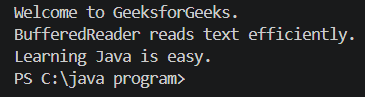
Explanation: The program uses BufferedReader with FileReader to read text line by line from the file sample.txt. The readLine() method continues until it reaches the end of the file (null).
Constructor of BufferedReader Class
1. BufferedReader(Reader in): Creates a buffered character input stream using the specified reader.
BufferedReader br = new BufferedReader(new FileReader("file.txt"));
2. BufferedReader(Reader in, int size): Creates a buffered character input stream with a custom buffer size.
BufferedReader br = new BufferedReader(new FileReader("file.txt"), 8192);
Example: Reading Text from a File
import java.io.*;

public class GFG{

    public static void main(String[] args)
        throws IOException
    {
        BufferedReader reader = new BufferedReader(
            new InputStreamReader(System.in));

        System.out.print("Enter your name: ");
        String name = reader.readLine();

        System.out.println("Hello, " + name + "!");
    }
}
Output:

Common Methods of BufferedReader Class
| Method | Action |
|---|---|
| close() | Closes the stream and releases associated resources. |
| mark(int readAheadLimit) | Marks the current position so that the stream can later be reset to this position. |
| markSupported() | Checks whether the stream supports the mark() operation. BufferedReader supports marking. |
| read() | Reads a single character and returns -1 when the end of the stream is reached. |
| read(char[] cbuf, int off, int len) | Reads characters into a portion of the specified character array. |
| readLine() | Reads a line of text and returns null when the end of the stream is reached. |
| ready() | Returns true if the stream is ready to be read without blocking. |
| reset() | Resets the stream to the most recent mark. |
| skip(long n) | Skips the specified number of characters. |
lines() | Returns a Stream<String> containing the lines read from the BufferedReader. |
