

Set interface is a part of the Java Collection Framework, located in the java.util package. It represents a collection of unique elements, meaning it does not allow duplicate values.
- The set interface does not allow duplicate elements.
- It can contain at most one null value except TreeSet implementation which does not allow null.
- The set interface provides efficient search, insertion, and deletion operations.
import java.util.HashSet;
import java.util.Set;

public class Geeks {

  	public static void main(String args[])
    {
        // Create a Set using HashSet
        Set<String> s = new HashSet<>();

        // Displaying the Set
        System.out.println("Set Elements: " + s);
    }
}
Explanation: In the above example, HashSet will appear as an empty set, as no elements were added. The order of elements in HashSet is not guaranteed, so the elements will be displayed in a random order if any are added.
Declaration
The declaration of Set interface is listed below:
public interface Set<E> extends Collection <E>
Common Implementations of the Set Interface
The image below shows common implementations of the Set interface.
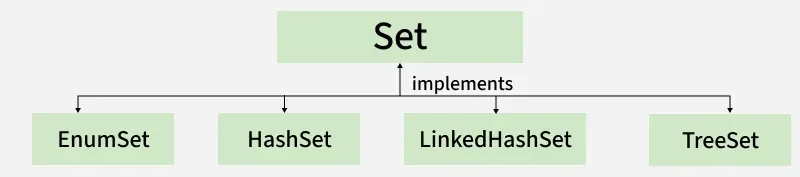
Note: This diagram shows common Set implementations, not the complete inheritance hierarchy. Set extends Collection, and Collection extends Iterable. Therefore, Set is not a standalone interface.
Classes that implement the Set interface:
- HashSet: A set that stores unique elements without any specific order, using a hash table and allows one null element.
- EnumSet : A high-performance set designed specifically for enum types, where all elements must belong to the same enum.
- LinkedHashSet: A set that maintains the order of insertion while storing unique elements.
- TreeSet: A set that stores unique elements in sorted order, either by natural ordering or a specified comparator.
Creating Set Objects
Since Set is an interface, objects cannot be created of the typeset. We always need a class that implements this interface in order to create an object. And also, after the introduction of Generics in Java 1.5, it is possible to restrict the type of object that can be stored in the Set. This type-safe set can be defined as:
// Obj is the type of the object to be stored in Set
Set<Obj> set = new HashSet<Obj> ();
Performing Various Operations on Set
Set interface provides commonly used operations to manage unique elements in a collection. Now let us discuss these operations individually as follows:
1. Adding Elements
To add elements to a Set in Java, use the add() method.
import java.util.*;

// Main class
class Geeks {

    public static void main(String[] args)
    {
        Set<String> s = new HashSet<String>();

        s.add("B");
        s.add("B");
        s.add("C");
        s.add("A");

        System.out.println(s);
    }
}
Output
[A, B, C]
Explanation: The first example demonstrates how to add elements to a Set using the add() method. The HashSet stores "B", "C", and "A". When "B" is added a second time, it is ignored because a Set does not allow duplicate elements.
2. Accessing the Elements
After adding the elements, if we wish to access the elements, we can use inbuilt methods like contains().
import java.util.*;

class Geeks {

    public static void main(String[] args)
    {
        Set<String> h = new HashSet<String>();

        h.add("A");
        h.add("B");
        h.add("C");
        h.add("A");

        System.out.println("Set is " + h);

        String s = "D";

        System.out.println("Contains " + s + " " + h.contains(s));
    }
}
Output
Set is [A, B, C]
Contains D false
Explanation: The second example demonstrates how to check whether a particular element exists in a Set using the contains() method. The set contains "A", "B", and "C", so checking for "D" returns false.
3. Removing Elements
The values can be removed from the Set using the remove() method.
import java.util.*;
class Geeks {

    public static void main(String[] args)
    {
        // Declaring object of Set of type String
        Set<String> h = new HashSet<String>();

        // Elements are added using add() method, Custom input elements
        h.add("A");
        h.add("B");
        h.add("C");
        h.add("B");
        h.add("D");
        h.add("E");

        System.out.println("Initial HashSet " + h);

        // Removing custom element using remove() method
        h.remove("B");
        System.out.println("After removing element " + h);
    }
}
Output
Initial HashSet [A, B, C, D, E]
After removing element [A, C, D, E]
Explanation: The third example demonstrates how to remove an element from a Set using the remove() method. The duplicate "B" is stored only once, and remove("B") removes that element from the set.
4. Iterating elements
There are various ways to iterate through the Set. The most famous one is to use the enhanced for loop.
 import java.util.*;

class Geeks {

    public static void main(String[] args)
    {
        // Creating object of Set and declaring String type
        Set<String> h = new HashSet<String>();

        // Adding elements to Set using add() method, Custom input elements
        h.add("A");
        h.add("B");
        h.add("C");
        h.add("B");
        h.add("D");
        h.add("E");

        // Iterating through the Set via for-each loop
        for (String value : h)

            // Printing all the values inside the object
            System.out.print(value + ", ");

        System.out.println();
    }
}
Output
A, B, C, D, E,
Explanation: The fourth example demonstrates how to traverse all elements of a Set using the enhanced for loop. Each element is accessed one at a time and printed.
Methods of Set Interface
Let us discuss methods present in the Set interface provided below in a tabular format below as follows:
| Method | Description |
|---|---|
| add(element) | Adds the element if it is not already present. Returns true if added; otherwise, false. |
| addAll(collection) | Adds elements from the given collection that are not already present. Returns true if the set changes. |
| clear() | Removes all elements from the set. Returns void. |
| contains(element) | Returns true if the set contains the specified element; otherwise, false. |
| containsAll(collection) | Returns true if the set contains every element of the given collection. |
| hashCode() | Returns the sum of the hash codes of the set’s elements. A null element contributes zero. |
| isEmpty() | Returns true if the set contains no elements; otherwise, false. |
| iterator() | Returns an iterator over the elements of the set. Iteration order depends on the implementation. |
| remove(element) | Removes the specified element if present. Returns true if removed; otherwise, false. |
| removeAll(collection) | Removes from this set all elements also present in the given collection. Returns true if this set changes. |
| retainAll(collection) | Keeps only elements also present in the given collection. Returns true if this set changes. |
| size() | Returns the number of elements in the set. |
| toArray() | Returns an Object[] containing all elements of the set. |
